Marketing leaders face a critical decision: invest in AI infrastructure now, or fall behind competitors who are already executing faster, more data-driven campaigns at lower costs.
The difference between marketing teams thriving with AI and those drowning in ChatGPT tabs comes down to infrastructure. You need a production-ready AI stack—not a collection of disconnected tools your team uses inconsistently.
This guide provides the framework WE•DO uses to build AI infrastructure for growth marketing teams. You'll learn how to select tools, integrate systems, train teams, and measure ROI without wasting months on experimentation.
---
01 / why-marketing-teams-need-ai-infrastructure
Why Marketing Teams Need AI Infrastructure
Most marketing teams approach AI backwards. They start with excitement about ChatGPT, create a few blog posts, then hit a wall when trying to scale. The problem isn't the technology—it's the lack of infrastructure.
The Infrastructure Gap: A Real-World Example
Consider a mid-sized B2B SaaS company with a 12-person marketing team. In January 2024, they gave everyone ChatGPT Plus subscriptions ($240/month total). By March, they had:
- 8 different AI tools being used across the team (ChatGPT, Claude, Jasper, Copy.ai, Midjourney, Canva AI, Perplexity, and Notion AI)
- No shared prompt library—each person reinventing the wheel
- Blog posts ranging from excellent to unusable depending on who wrote them
- One designer creating images in Midjourney, another in Canva AI, creating inconsistent brand aesthetics
- No way to measure which content was AI-assisted vs. manual
- A security incident when a sales rep accidentally copied customer data into ChatGPT for email writing
Total monthly spend: $1,400. Measured ROI: Unknown. Team satisfaction: Declining.
By June, after implementing proper infrastructure (standardized tools, shared knowledge base, documented workflows, integrated systems), the same team was producing 3x more content with consistent quality, clear ROI metrics showing $18,000 in monthly time savings, and 87% team adoption.
What happens without proper infrastructure:
| Problem | Impact | Real Cost |
|---|---|---|
| Team members use 8+ different AI tools with no standardization | Duplicate subscriptions, no expertise depth | $800-2,000/month in redundant tools |
| Content quality varies wildly based on who wrote the prompt | High revision rates, inconsistent brand voice | 40-60% of time savings lost to editing |
| No systematic way to train models on your brand voice | Generic outputs that require heavy customization | AI reduces efficiency instead of improving it |
| Data lives in silos—no integration between systems | Manual copy/paste between tools | 15-20 hours/week of non-value-add work |
| ROI measurement is impossible because nothing is tracked | Can't justify continued investment or expansion | Budget cuts during next planning cycle |
| Security risks from employees copying sensitive data into public AI tools | Potential data breaches, compliance violations | $50K-500K+ per incident plus reputation damage |
What changes with proper infrastructure:
| Solution | Benefit | Measurable Impact |
|---|---|---|
| Standardized tools and workflows across the entire team | Everyone uses the same platforms, builds collective expertise | 90%+ adoption rate, compound learning effects |
| Consistent output quality through documented prompts and brand training | First drafts require 20% editing instead of 80% | Time-to-publish reduced by 60-70% |
| Automated data flow between marketing systems | AI tools connected to CMS, analytics, CRM automatically | Zero manual data transfer, real-time insights |
| Clear attribution from AI activities to revenue outcomes | Every AI-assisted piece tracked through conversion funnel | Prove $10-50 return per $1 invested in AI tools |
| Enterprise-grade security with proper data governance | Controlled access, data retention policies, audit trails | Zero security incidents, compliance maintained |
| Scalable processes that work for 5 campaigns or 500 | Workflows designed for volume from day one | Linear cost scaling, exponential output growth |
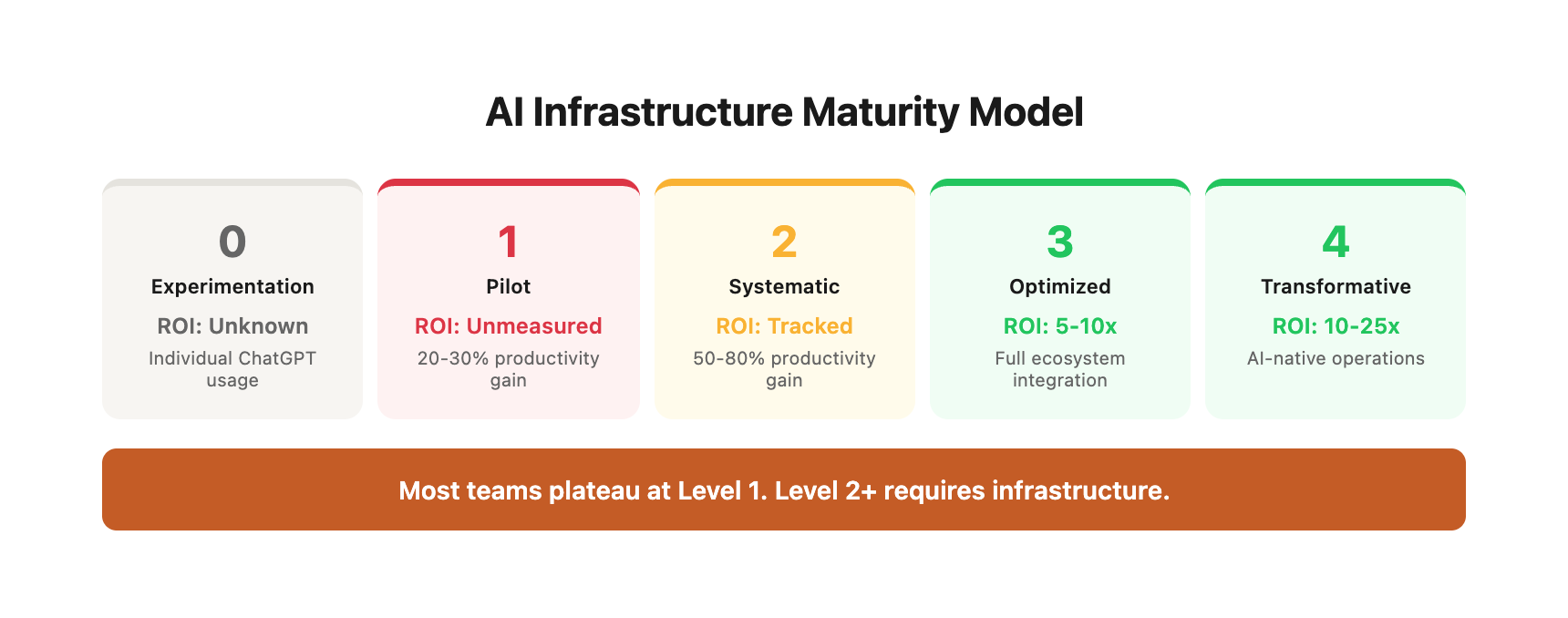
The Infrastructure Maturity Model
Marketing teams typically progress through five stages of AI adoption. Understanding where you are helps you plan the next step:
Level 0: Experimentation (1-3 months)
- Individual team members trying ChatGPT for personal tasks
- No budget allocated, no formal processes
- Output: Sporadic, inconsistent
- ROI: Unmeasurable
- Typical team size: Any
Level 1: Pilot Programs (3-6 months)
- Company subscribes to 1-2 AI tools for team use
- Basic training provided, limited documentation
- Output: 20-30% productivity gain in specific use cases
- ROI: Positive but not systematically tracked
- Typical team size: 3-10 people
Level 2: Systematic Implementation (6-12 months)
- Standardized tool stack with documented workflows
- Prompt libraries, brand training, integration between 2-3 systems
- Output: 50-80% productivity gain, consistent quality
- ROI: Clearly measured, executive dashboard reporting
- Typical team size: 8-25 people
Level 3: Optimized Operations (12-24 months)
- Comprehensive AI stack with full ecosystem integration
- Custom GPTs/projects, advanced automations, continuous optimization
- Output: 100-150% productivity gain, new capabilities unlocked
- ROI: Multi-year track record, strategic advantage over competitors
- Typical team size: 20-50 people
Level 4: AI-First Marketing (24+ months)
- AI embedded in every workflow, team trained in advanced techniques
- Custom fine-tuned models, proprietary AI capabilities
- Output: 200%+ productivity gain, market leadership
- ROI: AI infrastructure becomes product differentiator
- Typical team size: 40-100+ people
Most marketing teams are stuck between Level 0 and Level 1. The difference between Level 1 and Level 3 is infrastructure—not technology, not budget, not team size. It's systematic approach to implementation, integration, training, and measurement.
The companies winning with AI aren't just using better prompts—they've built systems that allow their teams to execute at scale while maintaining quality and measuring results. They've progressed through the maturity model intentionally, with each stage building on the previous one.
---
02 / essential-components-of-a-marketing-ai-stack
Essential Components of a Marketing AI Stack
A production-ready marketing AI stack consists of five core layers. Each layer serves a specific function, and together they create an integrated system that amplifies your team's capabilities.
1. Foundation Layer: Core AI Platforms
Purpose: Primary AI engines for text generation, analysis, and automation.
Comprehensive Platform Comparison:
| Platform | Best For | Strengths | Weaknesses | Pricing | Context Window | Team Features |
|---|---|---|---|---|---|---|
| ChatGPT Teams | General marketing content, brainstorming, fast iteration | Speed, plugin ecosystem, GPT-4 Turbo access | Can be verbose, occasional hallucinations | $25-30/user/month | 128K tokens (~100K words) | Shared workspace, team history, admin controls |
| Claude Teams | Long-form content, technical writing, code generation | Superior reasoning, large context, better at following complex instructions | Slower response times, fewer integrations | $20-30/user/month | 200K tokens (~150K words) | Project knowledge bases, shared prompts |
| Gemini Advanced | Google Workspace integration, multimodal analysis | Native Gmail/Docs/Sheets integration, image understanding | Newer, still evolving capabilities | $20/user/month | Up to 1M tokens (varies by task) | Google Workspace admin management |
| Perplexity Pro | Research, competitive intelligence, fact-checking | Real-time web search, source citations, academic mode | Not ideal for creative writing | $20/user/month | N/A (search-based) | Shared spaces, collections |
Real-World Use Case Mapping:
| Marketing Function | Primary Platform | Secondary Platform | Rationale |
|---|---|---|---|
| Content Marketing | Claude Teams | ChatGPT Teams | Claude's 200K context handles full content briefs + research; ChatGPT for rapid ideation |
| Social Media | ChatGPT Teams | - | Speed matters more than depth; rapid variant generation |
| Email Marketing | ChatGPT Teams | Claude Pro | ChatGPT for subject lines and short copy; Claude for nurture sequences |
| SEO/Research | Perplexity Pro | Claude Teams | Perplexity for keyword research and competitor analysis; Claude for content optimization |
| Paid Ads | ChatGPT Teams | - | High-volume variant testing requires speed |
| Analytics | Claude Teams | - | Complex data interpretation benefits from Claude's reasoning |
| Strategy/Planning | Claude Teams | Perplexity Pro | Long-form strategic thinking + real-time market research |
Cost Analysis by Team Size:
| Team Size | Recommended Stack | Monthly Cost | Annual Cost | Cost per Employee | ROI Break-Even Point |
|---|---|---|---|---|---|
| 3-5 people | ChatGPT Teams (all) + Perplexity Pro (1-2) | $150-200 | $1,800-2,400 | $40-60 | 8-12 hours saved/month |
| 8-15 people | ChatGPT Teams (all) + Claude Teams (content) + Perplexity Pro (research/strategy) | $400-600 | $4,800-7,200 | $40-50 | 15-20 hours saved/month |
| 20-50 people | ChatGPT Teams (all) + Claude Teams (content/technical) + Perplexity Pro (leadership) + Gemini (Google users) | $800-1,500 | $9,600-18,000 | $30-40 | 20-30 hours saved/month |
| 50+ people | Full stack + Enterprise agreements | $2,000-5,000 | $24,000-60,000 | $25-35 | 30-40 hours saved/month |
Selection Decision Tree:
-
Start here: Does your team primarily use Google Workspace?
- Yes → Start with Gemini Advanced for native integration
- No → Continue to question 2
-
What's your primary content type?
- Long-form blog posts, whitepapers, case studies → Claude Teams (200K context)
- Short-form social, ads, emails → ChatGPT Teams (speed)
- Mix of both → ChatGPT Teams + Claude Teams
-
How important is research and fact-checking?
- Critical (B2B, healthcare, finance, legal) → Add Perplexity Pro
- Moderate → Rely on primary platform
- Minimal → Skip research-specific tools
-
Budget constraint level:
- Tight ($20-30/user) → Single platform (ChatGPT Teams)
- Moderate ($40-60/user) → Primary + secondary
- Flexible ($60-80/user) → Full multi-platform approach
Case Study: SaaS Company Platform Selection
A 15-person B2B SaaS marketing team evaluated all four platforms over 60 days:
Initial approach: Gave everyone access to all four platforms ($75/user/month = $1,125 total)
Usage analysis after 60 days:
- ChatGPT: 450 uses (30/person)
- Claude: 180 uses (12/person)
- Gemini: 45 uses (3/person)
- Perplexity: 90 uses (6/person)
Optimized approach:
- All 15 team members: ChatGPT Teams ($450/month)
- 5 content writers: Claude Teams ($125/month)
- 2 strategists: Perplexity Pro ($40/month)
- Total: $615/month (45% cost reduction) with same output quality
Results after 6 months:
- ChatGPT usage increased to 600/month (content velocity)
- Claude usage increased to 250/month (content team mastery)
- Perplexity usage stable at 100/month (focused research use)
- Saved $510/month = $6,120/year with better results from focused expertise
WE•DO recommendation: Start with ChatGPT Teams or Claude Teams as your primary platform. Add Perplexity Pro for research-heavy roles. This covers 90% of marketing use cases at manageable cost. Run a 30-day pilot with 3-5 power users before rolling out company-wide. Measure actual usage weekly—cut tools that aren't being used at least 10x per month per license.
2. Specialization Layer: Domain-Specific Tools
Purpose: AI tools built specifically for marketing functions. Content creation:
- Jasper - Brand voice training, template-based content ($49-125/month)
- Copy.ai - Sales copy, ad variations, social content ($49-249/month)
- Descript - Video editing, podcast production, transcription ($24-50/month)
SEO and research:
- Surfer SEO - Content optimization, SERP analysis ($89-219/month)
- Clearscope - Content briefs, competitive analysis ($170-1,200/month)
- MarketMuse - Content strategy, topic modeling ($149-1,500/month)
Design and visual:
- Canva Pro with AI - Design generation, brand templates ($15-40/user/month)
- Midjourney - Custom imagery, brand visuals ($10-60/month)
- Runway ML - Video generation, editing effects ($15-95/month)
Analytics and insights:
- Narrative BI - Automated reporting, insight generation ($50-500/month)
- Polymer - Data visualization, dashboard creation ($25-250/month)
Selection criteria:
- Prioritize tools that integrate with your existing martech stack
- Calculate cost per use—expensive tools need high utilization to justify ROI
- Evaluate training requirements—complex tools slow adoption
- Test output quality with your actual brand and content types
WE•DO recommendation: Don't buy everything at once. Start with one tool per function (content, SEO, design) based on your biggest bottlenecks. Measure results before expanding.
3. Integration Layer: Connecting Systems
Purpose: Move data between AI tools and your existing marketing systems. Integration approaches: Native integrations (easiest, limited flexibility):
- Zapier - 6,000+ app connections, visual workflow builder ($20-400/month)
- Make (formerly Integromat) - More complex workflows, better error handling ($9-299/month)
- IFTTT - Simple automations, consumer-focused ($3-15/month)
API connections (moderate complexity, high flexibility):
- OpenAI API - Build custom AI features into your tools ($0.01-0.12/1K tokens)
- Anthropic API (Claude) - Alternative to OpenAI with different strengths (usage-based)
- Custom scripts - Python/Node.js scripts connecting systems (development cost)
Enterprise platforms (complex setup, complete control):
- Workato - Enterprise automation with AI capabilities ($10K-100K+/year)
- MuleSoft - Full integration platform, Salesforce ecosystem ($20K+/year)
- Custom infrastructure - Full dev team, maximum flexibility ($150K+/year)
Key integration points:
- CRM → AI tools (enrich lead data, generate outreach)
- AI tools → Content management (publish AI-generated content)
- Analytics platforms → AI tools (automated insights, reporting)
- Project management → AI tools (task generation, status updates)
- Email platforms → AI tools (personalization, optimization)
WE•DO recommendation: Start with Zapier for no-code integrations. Move to API connections once you identify high-volume workflows worth custom development. Enterprise platforms only make sense above $5M marketing budget.
4. Knowledge Layer: Training and Context
Purpose: Give AI tools access to your brand voice, data, and institutional knowledge. Brand knowledge base components:
- Brand voice guidelines - Documented writing style, tone examples
- Product/service information - Features, benefits, positioning, technical specs
- Customer data - Personas, pain points, objections, success stories
- Performance history - What worked, what didn't, why
- Competitor intelligence - Positioning, messaging, tactics
Implementation methods: Custom GPTs (OpenAI platform):
- Upload documents directly to GPT (brand guides, personas)
- Create role-specific GPTs (Social Media Manager, Email Copywriter)
- Share across team for consistent outputs
- Limitations: 20 files, 10 conversations per GPT
Claude Projects (Anthropic platform):
- 200K character knowledge base per project
- Better for long documents and technical content
- Maintains context across conversations
- Limitations: 5 projects on Pro plan, 50 on Teams
Vector databases (advanced):
- Pinecone, Weaviate, or Chroma for large knowledge bases
- Semantic search retrieves relevant context automatically
- Scales to millions of documents
- Requires development resources
Fine-tuning (enterprise):
- Train models specifically on your data
- Highest quality, most expensive option
- OpenAI fine-tuning starts at $8/million tokens training
- Only justified for very high-volume use cases
WE•DO recommendation: Start with Custom GPTs or Claude Projects. Create separate AI assistants for each major function (content, ads, email) loaded with relevant brand documents. This delivers 80% of fine-tuning benefits at 5% of the cost.
5. Governance Layer: Control and Compliance
Purpose: Ensure AI use aligns with legal, ethical, and brand standards. Policy framework:
- Acceptable use policy - What AI can/cannot be used for
- Data handling guidelines - What information can be shared with AI tools
- Review requirements - What needs human approval before publishing
- Attribution standards - When to disclose AI involvement
- Security protocols - Access controls, account management
Technical controls:
- Enterprise plans - Better security, admin controls, usage monitoring
- SSO integration - Centralized access management
- Data retention policies - Control what AI platforms store
- API key management - Secure credential storage and rotation
- Usage monitoring - Track who's using what, identify risks
Compliance considerations:
- GDPR/CCPA - Don't feed customer PII into public AI tools
- Copyright - Verify AI-generated content doesn't infringe
- Industry regulations - Healthcare (HIPAA), finance (SEC), etc.
- Brand safety - Prevent AI outputs that conflict with values
- Quality standards - Maintain consistency across AI-generated content
WE•DO recommendation: Document policies before rolling out AI tools widely. Use Teams/Enterprise plans for centralized management. Implement approval workflows for public-facing AI content until quality is proven consistent. ---
03 / build-vs-buy-the-decision-framework
Build vs Buy: The Decision Framework
Every marketing leader faces this question: build custom AI solutions or buy off-the-shelf tools?
The right answer depends on your specific situation. Use this framework to decide.
When to Buy (90% of situations)
Buy off-the-shelf tools when:
- The use case is common across many companies (content creation, SEO analysis, image generation)
- You need results in weeks, not months
- Your team lacks AI/ML development expertise
- Total addressable use cases are under 100 hours per month
- The problem has well-defined inputs and outputs
Benefits of buying:
- Immediate access to proven, tested solutions
- Regular feature updates and improvements included
- Lower initial cost and faster time-to-value
- Less technical debt and maintenance burden
- Support and training from vendors
Example scenarios:
- Generating social media content (Buy: Jasper, Copy.ai)
- SEO content optimization (Buy: Surfer, Clearscope)
- Design asset creation (Buy: Canva Pro, Midjourney)
- Automated reporting (Buy: Narrative BI, Polymer)
- Email personalization (Buy: Phrasee, Persado)
When to Build (10% of situations)
Build custom solutions when:
- Your workflow is highly specific to your business model
- You have proprietary data that creates competitive advantage
- The problem requires deep integration with existing systems
- You're spending $10K+/month on a tool you could build for less
- Your team has available development resources
- The solution becomes a core product differentiator
Benefits of building:
- Perfect fit for your exact requirements
- Full control over features and timeline
- Own the intellectual property
- No recurring SaaS fees at scale
- Competitive advantage from proprietary capabilities
Example scenarios:
- Custom AI-powered product recommendation engine
- Proprietary content scoring system based on your conversion data
- Automated campaign optimization using your unique KPI framework
- AI assistant trained exclusively on your customer conversation history
- Custom integration connecting 8+ systems in your specific workflow
Hybrid Approach: The Pragmatic Middle
Start with buy, evolve to build:
1. Use off-the-shelf tools to validate the use case and ROI
2. Document gaps and limitations over 3-6 months
3. Build custom solutions only for high-value, validated workflows
4. Keep buying for commodity functions (don't reinvent image generation)
Example progression:
- Month 1-3: Use ChatGPT API for all content generation
- Month 4-6: Identify that product description generation is highest-volume use case
- Month 7-9: Build custom fine-tuned model just for product descriptions
- Ongoing: Continue using ChatGPT API for everything else
Detailed Build vs Buy Analysis Framework
Use this comprehensive framework to make informed decisions about custom development:
Decision Matrix:
| Evaluation Factor | Weight | Buy Score (1-10) | Build Score (1-10) | Weighted Buy | Weighted Build | Winner |
|---|---|---|---|---|---|---|
| Speed to Value | 25% | 9 (1 week) | 3 (3+ months) | 2.25 | 0.75 | Buy |
| Initial Cost | 20% | 7 ($125/user/mo) | 3 ($25K+) | 1.4 | 0.6 | Buy |
| Long-term Cost | 15% | 6 ($1.5K/year) | 8 ($6K/year) | 0.9 | 1.2 | Build |
| Customization | 15% | 5 (Limited) | 10 (Unlimited) | 0.75 | 1.5 | Build |
| Maintenance Burden | 10% | 9 (Vendor managed) | 3 (Your team) | 0.9 | 0.3 | Buy |
| Integration Flexibility | 10% | 6 (Pre-built) | 9 (Custom) | 0.6 | 0.9 | Build |
| Competitive Advantage | 5% | 4 (Same as competitors) | 10 (Proprietary) | 0.2 | 0.5 | Build |
| Total | 100% | - | - | 7.0 | 5.75 | Buy |
Interpretation:
- Score difference <2 points: Marginal decision, consider hybrid approach
- Score difference 2-4 points: Clear preference, proceed with confidence
- Score difference >4 points: Overwhelming case, don't second-guess
Real-World Build vs Buy Case Studies:
Case Study 1: E-Commerce Product Description Generator
Initial situation:
- 5,000+ products requiring unique descriptions
- Manual writing: 30 minutes per product
- Agency cost: $75 per description = $375,000 for full catalog
- Time to complete manually: 2,500 hours (1.25 years at full-time)
Buy option (Jasper):
- Cost: $125/month × 3 users = $375/month
- Setup time: 2 weeks (template creation, brand training)
- Output: 50 descriptions/day with 30% editing required
- Total time: 3 months to complete catalog
- Ongoing cost: $4,500/year
- Quality: 7/10
Build option (Custom fine-tuned model):
- Development cost: $35,000 (includes data preparation, fine-tuning, interface)
- Setup time: 4 months
- Output: 100 descriptions/day with 10% editing required
- Ongoing cost: $800/month (API calls + maintenance) = $9,600/year
- Quality: 9/10
Decision: Started with Jasper (immediate need), switched to custom after 8 months when catalog was complete. Custom model now handles new products and updates.
Outcome: Saved $340,000 vs. agency, custom model pays for itself in 4 years, competitive advantage from better descriptions.
Case Study 2: Social Media Content Calendar
Initial situation:
- Need 60 social posts per month across 4 platforms
- Manual creation: 20 hours/month
- Required: Brand voice consistency, platform optimization, variety
Buy option (Copy.ai):
- Cost: $49/month
- Setup: 1 week
- Result: 80+ posts/month, 40% need heavy editing
- Quality: 6.5/10
- Annual cost: $588
Build option (Custom GPT with proprietary data):
- Development: $8,000
- Setup: 6 weeks
- Result: 100+ posts/month, 15% need editing
- Quality: 8.5/10
- Annual cost: $1,200 (OpenAI API + hosting)
Decision: Stayed with Copy.ai after pilot showed custom build ROI break-even would take 13 years. Volume didn't justify custom development.
Outcome: Copy.ai continues to work well. Invested potential build budget in other higher-value custom projects.
The Build Decision Triggers:
Only build custom solutions when you check 4+ of these boxes:
- Volume exceeds 1,000 uses per month
- Using purchased tool costs >$1,000/month
- Purchased tool limitations significantly impact quality or results
- You have proprietary data that creates competitive advantage
- The workflow is highly specific to your business model
- Break-even period is under 18 months
- You have available development resources
- The capability becomes a product differentiator
- Purchased tools can't integrate with your critical systems
- Compliance or security requires full control
Progressive Build Strategy:
Instead of all-or-nothing, use this progression:
Phase 1: Validate with Purchase (Month 1-3)
- Use off-the-shelf tool to prove use case
- Track volume, quality, and limitations
- Document gaps and customization needs
- Calculate potential ROI of custom solution
Phase 2: Optimize Purchased Tool (Month 4-6)
- Maximize value from purchased solution
- Build integrations and workflows
- Train team to expert level
- Confirm whether custom build still makes sense
Phase 3: Hybrid Approach (Month 7-12)
- Use purchased tool for 80% of use cases
- Build custom solution for highest-value 20%
- Example: Copy.ai for general social, custom model for product launches
- Maintain both tools, each optimized for its strengths
Phase 4: Full Custom (Optional, Month 12+)
- Only if ROI clearly justifies
- Migrate gradually, maintain fallback
- Continue using purchased tools for low-value tasks
Cost-benefit analysis template with 3-year projection:
| Factor | Buy (Jasper) | Build (Custom) | Hybrid (Both) |
|---|---|---|---|
| Year 1 Cost | $4,500 | $35,000 + $9,600 = $44,600 | $4,500 + $15,000 = $19,500 |
| Year 2 Cost | $4,500 | $9,600 | $12,000 |
| Year 3 Cost | $4,500 | $9,600 | $12,000 |
| 3-Year Total | $13,500 | $63,800 | $43,500 |
| Time to Launch | 1 week | 4 months | 1 week (full value in 5 months) |
| Output Quality | 7/10 | 9.5/10 | 8.5/10 |
| Flexibility | Limited | Complete | High |
| Best For | <500 uses/month | >2,000 uses/month | 500-2,000 uses/month |
WE•DO recommendation: Buy first, build later. The only exception is if you have specific data moats (proprietary customer insights, unique performance data) that buying tools can't access. Even then, use purchased tools for 80% of use cases and custom-build only for the 20% that drive competitive advantage.
Run a simple calculation: (Monthly tool cost × 24 months) < (Build cost + 2 years maintenance)? If false, stay with purchased tool. If true, validate with 90-day pilot before committing to custom development. ---
04 / integration-strategies-connecting-your-stack
Integration Strategies: Connecting Your Stack
The value of your AI stack multiplies when tools communicate. A disconnected collection of AI subscriptions frustrates teams and limits ROI. Integration turns those tools into a system.
API Integration Examples
Before diving into workflows, let's look at practical code examples for integrating AI into your marketing stack.
Example 1: OpenAI API for Blog Post Generation
const OpenAI = require('openai');

const openai = new OpenAI({
  apiKey: process.env.OPENAI_API_KEY
});

async function generateBlogPost(topic, keywords) {
  const response = await openai.chat.completions.create({
    model: "gpt-4-turbo-preview",
    messages: [
      {
        role: "system",
        content: "You are an expert marketing content writer. Write SEO-optimized blog posts that engage readers and drive conversions."
      },
      {
        role: "user",
        content: `Write a comprehensive blog post about: ${topic}\n\nTarget keywords: ${keywords.join(', ')}\n\nInclude:\n- Compelling introduction\n- 3-5 main sections with H2 headers\n- Actionable takeaways\n- Strong call-to-action`
      }
    ],
    temperature: 0.7,
    max_tokens: 2000
  });

  return response.choices[0].message.content;
}

// Usage
const post = await generateBlogPost(
  "AI Marketing Automation",
  ["marketing automation", "AI tools", "campaign optimization"]
);
Example 2: Claude API for Content Analysis
const Anthropic = require('@anthropic-ai/sdk');

const anthropic = new Anthropic({
  apiKey: process.env.ANTHROPIC_API_KEY
});

async function analyzeContent(content) {
  const message = await anthropic.messages.create({
    model: "claude-3-5-sonnet-20241022",
    max_tokens: 1024,
    messages: [
      {
        role: "user",
        content: `Analyze this marketing content for:\n1. Brand voice consistency\n2. SEO optimization\n3. Clarity and readability\n4. Call-to-action effectiveness\n\nContent: ${content}\n\nProvide specific recommendations for improvement.`
      }
    ]
  });

  return message.content[0].text;
}

// Usage
const analysis = await analyzeContent(blogPostText);
console.log(analysis);
Example 3: Zapier Webhook Integration
// Trigger Zapier workflow when content is approved
async function publishToWordPress(post) {
  const webhookUrl = process.env.ZAPIER_WEBHOOK_URL;

  await fetch(webhookUrl, {
    method: 'POST',
    headers: {
      'Content-Type': 'application/json'
    },
    body: JSON.stringify({
      title: post.title,
      content: post.content,
      categories: post.categories,
      featured_image: post.imageUrl,
      seo_description: post.metaDescription,
      publish_status: 'draft'
    })
  });
}
Production-Ready Prompt Library
Effective AI integration requires well-crafted prompts. Here are proven templates:
SEO Content Brief Generation
You are an SEO content strategist. Create a comprehensive content brief for:

Topic: [TARGET_TOPIC]
Primary Keyword: [MAIN_KEYWORD]
Secondary Keywords: [KEYWORD_LIST]
Target Audience: [PERSONA_DESCRIPTION]

Include:
1. Recommended article structure (H1, H2, H3 outline)
2. Key points to cover based on top-ranking content
3. Suggested word count and reading level
4. Internal linking opportunities
5. Meta description and title tag suggestions
6. Featured snippet optimization recommendations

Format the output as a structured markdown document ready for the content team.
Email Campaign Optimization
Analyze this email campaign and provide specific improvements:

Subject Line: [SUBJECT]
Preview Text: [PREVIEW]
Body Copy: [EMAIL_BODY]

Email Type: [Promotional/Nurture/Transactional]
Goal: [CTA_DESCRIPTION]
Audience Segment: [SEGMENT_INFO]

Provide:
1. Subject line variations (A/B test ideas)
2. Body copy improvements for clarity and conversion
3. CTA button copy optimization
4. Personalization opportunities
5. Mobile readability assessment
6. Expected performance impact of each suggestion

Rate each suggestion by implementation effort (Easy/Medium/Hard) and expected impact (Low/Medium/High).
Competitive Analysis
I need a competitive content analysis:

Our Brand: [BRAND_NAME]
Our Key Products: [PRODUCT_LIST]
Competitors: [COMPETITOR_LIST]
Content Type: [Blog/Social/Email/Ads]

For each competitor, analyze:
1. Content publishing frequency and consistency
2. Top-performing content themes
3. Unique angles or positioning
4. Content gaps we can exploit
5. SEO strategy insights
6. Audience engagement patterns

Output as a comparison table with actionable recommendations for our content strategy.
Integration Architecture Comparison
| Integration Level | Setup Time | Monthly Cost | Scalability | Best For |
|---|---|---|---|---|
| Manual Copy/Paste | 0 hours | $0 | Low | Testing tools, under 10 tasks/month |
| Zapier/Make | 2-4 hours | $20-400 | Medium | Standard workflows, under 1000 tasks/month |
| Custom API Scripts | 20-40 hours | $50-200 | High | High-volume workflows, complex logic |
| Enterprise Platform | 80+ hours | $1000-5000 | Very High | Full ecosystem integration, over 10K tasks/month |
Critical Integration Workflows
1. Content creation to publication
- AI tool generates content → Content management system → SEO review → Publishing platform
- Example: Jasper writes blog post → WordPress draft → Surfer SEO analysis → Auto-publish with images
2. Research to campaign execution
- Competitive intelligence → Strategy development → Asset creation → Campaign launch
- Example: Perplexity research → GPT strategy brief → Midjourney ads → Meta Ads Manager
3. Performance data to optimization
- Analytics platform → AI analysis → Recommendations → Implementation → Testing
- Example: Google Analytics → Claude analyzes trends → Zapier creates tasks → Team implements → Track results
4. Lead capture to personalization
- Form submission → CRM enrichment → AI personalization → Outreach automation
- Example: Website form → Salesforce → GPT customizes email → Automated send via HubSpot
5. Content approval workflows
- AI generation → Quality review → Brand compliance → Stakeholder approval → Publication
- Example: Copy.ai output → Google Doc → Brand checklist → Manager approval → Scheduled post
Integration Architecture Levels
Level 1: Manual (starting point)
- Copy/paste between tools
- Human bridges every gap
- Time-consuming, error-prone
- Cost: $0 (just time)
- Appropriate for: Testing new tools, low-volume workflows
Level 2: No-code automation (most common)
- Zapier or Make connects tools
- Triggered workflows execute automatically
- Some conditional logic possible
- Cost: $20-400/month
- Appropriate for: Standard workflows, moderate volume (under 1,000 tasks/month)
Level 3: API integration (high volume)
- Custom scripts call AI APIs directly
- Full control over data flow
- Requires developer resources
- Cost: Development time + API usage costs
- Appropriate for: High-volume workflows, complex logic, cost optimization
Level 4: Enterprise platform (full ecosystem)
- Workato, MuleSoft, or custom infrastructure
- All tools connected through central hub
- Advanced error handling, monitoring, governance
- Cost: $10K-100K+ annually
- Appropriate for: Large teams, complex processes, enterprise compliance needs
Sample Integration: Content Production Pipeline
Objective: Publish 20 SEO-optimized blog posts monthly with 80% less manual effort. Tools involved:
- Ahrefs (keyword research)
- Claude (content creation)
- Surfer SEO (optimization)
- WordPress (publication)
- Slack (team notifications)
Workflow steps: Week 1: Planning (automated)
1. Ahrefs API pulls keyword opportunities into Google Sheets
2. Zapier triggers Claude API to create content brief for each keyword
3. Briefs automatically added to Notion content calendar
4. Slack notification sent to content team with week's assignments
Week 2-3: Creation (semi-automated)
5. Writer selects brief from Notion, clicks "Generate Draft" button
6. Custom script sends brief to Claude API with brand voice guidelines
7. Claude generates 1,500-word draft, saved directly to Google Docs
8. Writer reviews, edits, adds expert insights (30 min vs. 3 hours from scratch)
Week 4: Optimization and publishing (automated)
9. Zapier detects "Ready for SEO" status in Notion
10. Google Doc sent to Surfer SEO API for optimization analysis
11. Optimization recommendations added as comments in Google Doc
12. Writer implements recommendations (15 min)
13. "Approve" button in Notion triggers WordPress API
14. Post published with meta tags, images, internal links
15. Slack notification confirms publication with performance tracking link
Results:
- Time per post: 45 minutes (vs. 4 hours manual)
- Monthly time savings: 70 hours
- Cost to implement: $400 (Zapier) + $200 (API calls) = $600/month
- Break-even: Immediate (vs. hiring additional writer at $4K+/month)
Common Integration Pitfalls
1. Overcomplicating early workflows
- Mistake: Building complex multi-step automations before proving value
- Fix: Start with single-step automations, expand after validation
2. Ignoring error handling
- Mistake: Automations break silently, team doesn't know for days
- Fix: Build in notifications for failures, regular health checks
3. Hardcoding without flexibility
- Mistake: Workflow only works for exact scenario as built
- Fix: Use variables, conditional logic, allow manual overrides
4. Not documenting integrations
- Mistake: Creator leaves company, no one knows how system works
- Fix: Document every integration with diagram, purpose, troubleshooting steps
5. Security as afterthought
- Mistake: API keys in plaintext, no access controls
- Fix: Use secure credential storage, implement least-privilege access
WE•DO recommendation: Start with 3 high-value integrations, prove ROI, then expand. Document everything as you go. Review quarterly to identify optimization opportunities and remove workflows that aren't being used. ---
05 / team-training-and-adoption-strategy
Team Training and Adoption Strategy
The most sophisticated AI stack fails if your team doesn't use it. Adoption requires intentional training, change management, and ongoing support.
The Adoption Challenge: By The Numbers
Industry research and our direct experience implementing AI stacks reveals consistent patterns:
| Adoption Metric | Without Structured Training | With Structured Training | Impact Difference |
|---|---|---|---|
| Active users after 30 days | 35-45% | 75-90% | 2.1x higher |
| Daily usage rate | 15-25% | 55-75% | 3x higher |
| Time to proficiency | 8-12 weeks | 3-4 weeks | 65% faster |
| Quality satisfaction | 5.2/10 | 7.8/10 | 50% better |
| ROI achievement | 30-40% of potential | 80-95% of potential | 2.5x higher |
| Voluntary turnover | Increases 8-12% | Decreases 3-5% | 15% swing |
The hidden cost of poor adoption:
A 20-person marketing team with $10K/year AI stack investment:
- Poor adoption (40%): Effectively spending $25K per active user, achieving 30% potential ROI = $3K return = 70% loss
- Strong adoption (85%): Spending $5.9K per active user, achieving 85% potential ROI = $8.5K return = 147% gain
The difference between these scenarios isn't the technology—it's training and change management.
Pre-Launch: Building Foundation
1. Identify power users
- Find 2-3 team members excited about AI
- These become peer trainers and advocates
- Give early access and advanced training
- Empower them to help onboard others
2. Document core workflows
- Create step-by-step guides for each tool
- Include screenshots and video walkthroughs
- Focus on specific use cases, not generic training
- Store in accessible knowledge base (Notion, Confluence)
3. Establish success metrics
- Time saved per task
- Quality improvements (tracked through reviews)
- Volume increase (output per person)
- Cost reduction (vs. alternatives)
- Team satisfaction scores
Launch: Structured Rollout
Week 1: Core concepts
- 60-minute session on AI fundamentals
- Why we're implementing this stack
- Expected benefits and realistic limitations
- Q&A addressing concerns
Week 2: Tool training
- 90-minute hands-on session per major tool
- Live demos with real company examples
- Practice exercises using actual work
- Share prompt templates and best practices
Week 3: Workflow integration
- Show how tools connect to create complete workflows
- Walk through end-to-end content production pipeline
- Demonstrate automation and time savings
- Address questions about process changes
Week 4: Open practice
- Teams use tools for real projects
- Power users available for support
- Daily stand-up to share wins and challenges
- Document common questions for FAQ
Post-Launch: Continuous Improvement
Weekly office hours
- 30-minute drop-in sessions for questions
- Power users demonstrate advanced techniques
- Share team member wins and use cases
- Address frustrations immediately
Monthly showcase
- Team members present creative AI applications
- Share prompts that worked exceptionally well
- Discuss failures and lessons learned
- Update documentation based on discoveries
Quarterly strategy review
- Assess adoption rates by person and function
- Evaluate which tools are delivering ROI
- Identify gaps and new tool opportunities
- Survey team for satisfaction and suggestions
- Sunset underutilized tools
Overcoming Resistance
Common objections and responses: "AI will replace my job"
- Reality: AI amplifies your abilities, doesn't replace expertise
- Companies using AI hire more marketers, not fewer
- Focus shifts from execution to strategy and creativity
- You're more valuable as an AI-powered marketer
"I don't have time to learn new tools"
- Invest 3 hours upfront to save 10 hours weekly
- Start with one tool for your biggest bottleneck
- Power users available to help troubleshoot
- Learning curve is days, not months
"AI content isn't good enough"
- True if used as final output—AI is drafting tool
- Your expertise makes it great through editing
- Show examples of AI-assisted content that performed well
- Set realistic expectations: AI speeds 80%, you perfect 20%
"This seems complicated"
- Start simple: use ChatGPT for one repetitive task
- You don't need to master everything at once
- Documentation and support readily available
- Complexity only comes as you advance
Training Resources Structure
Level 1: Quick start guides (5 min each)
- Single-task tutorials
- "How to generate social media captions with ChatGPT"
- "How to optimize blog post with Surfer SEO"
- Designed for immediate use
Level 2: Workflow documentation (15-30 min)
- End-to-end process guides
- "Complete blog post production pipeline"
- "Paid ad campaign creation and optimization"
- Shows how tools work together
Level 3: Advanced techniques (45-60 min)
- Prompt engineering deep dives
- Custom GPT creation
- API integration tutorials
- For power users and continued learning
WE•DO recommendation: Treat AI adoption like any major software rollout—structured training, clear documentation, ongoing support. Measure adoption weekly for first month, monthly thereafter. If adoption is below 70% after two months, investigate barriers and adjust approach. ---
06 / roi-measurement-framework
ROI Measurement Framework
Marketing leaders need to justify AI investments with clear ROI data. Vague claims about "efficiency gains" don't secure continued budget. Use this framework to measure and communicate AI stack value.
Establishing Baseline Metrics
Before implementing any AI tools, document: Time metrics:
- Hours per blog post (research, writing, editing, SEO)
- Hours per social media campaign (planning, creation, scheduling)
- Hours per email campaign (design, copy, list segmentation, testing)
- Hours per ad campaign (creative development, targeting setup, optimization)
- Hours per report (data gathering, analysis, deck creation, insights)
Quality metrics:
- Content engagement rates (time on page, social shares)
- SEO performance (rankings, organic traffic, conversions)
- Campaign performance (CTR, conversion rate, ROAS)
- Customer satisfaction (NPS, reviews, feedback scores)
- Brand consistency (measured through audits)
Cost metrics:
- Cost per piece of content (including labor)
- Agency/freelancer expenses for outsourced work
- Tool costs for current martech stack
- Opportunity cost of delays and bottlenecks
Volume metrics:
- Content pieces published per month
- Campaigns launched per quarter
- Leads generated and qualified
- Accounts touched through personalization
Tracking AI Impact
Implement measurement infrastructure: Time tracking:
- Tag tasks with "AI-assisted" in project management tools
- Track time before AI (manual) vs. after AI (assisted)
- Calculate percentage time reduction per task type
- Document time-to-completion for comparable projects
Quality indicators:
- Performance metrics for AI-assisted vs. manual content
- A/B test AI-generated variants against human-only
- Track revision rounds required (fewer = higher initial quality)
- Monitor audience feedback and engagement trends
Cost analysis:
- Total AI tool costs (subscriptions + API usage)
- Labor hours saved × average hourly rate
- Reduced outsourcing expenses
- Avoided hiring costs from productivity gains
Output measurement:
- Content volume increase (posts, emails, ads)
- Campaign velocity (time from concept to launch)
- Personalization scale (variants created, accounts reached)
- Testing frequency (experiments run per month)
Calculating ROI: Example Scenarios
Scenario 1: Content marketing team (5 people) Baseline:
- Produces 12 blog posts monthly
- 4 hours per post (research, writing, SEO) = 48 hours total
- Content manager salary: $80K ($40/hour)
- Monthly content cost: $1,920 in labor
With AI stack:
- AI tools cost: $600/month (Claude, Surfer, Canva)
- Time per post: 1.5 hours (AI draft + human editing/expertise) = 18 hours total
- Monthly labor: $720
- Time saved: 30 hours
ROI calculation:
- Monthly savings: $1,920 - $720 - $600 = $600
- Annual savings: $7,200
- ROI: ($7,200 / $7,200 in tool costs) = 100% annual ROI
- Payback period: 1 month
Plus secondary benefits:
- Freed 30 hours enables producing 20 posts instead of 12 (+67% output)
- Or reallocate time to strategy, optimization, promotion
- Organic traffic growth compounds over time
Scenario 2: Paid media team (3 people) Baseline:
- Manage 15 client campaigns
- 6 hours per campaign for creative development and testing
- Media buyer salary: $75K ($38/hour)
- Monthly creative costs: $3,420
With AI stack:
- AI tools: $400/month (Midjourney, Copy.ai, ChatGPT)
- Time per campaign: 2 hours (AI generates variants, human selects best)
- Monthly labor: $1,140
- Time saved: 60 hours
ROI calculation:
- Monthly savings: $3,420 - $1,140 - $400 = $1,880
- Annual savings: $22,560
- ROI: ($22,560 / $4,800 in tool costs) = 470% annual ROI
- Payback period: Immediate
Plus secondary benefits:
- Test 3x more creative variants → improved ROAS
- Faster iteration = better campaign performance
- Can manage more clients without adding headcount
Scenario 3: Enterprise marketing team (25 people) Baseline:
- 100 hours weekly spent on reporting and analysis
- Average salary: $85K ($43/hour)
- Annual reporting cost: $223,600
With AI stack:
- AI platforms: $15K/year (enterprise GPT, custom integrations)
- Time reduction: 60% (automated data gathering, AI insights)
- New annual labor cost: $89,440
- Time saved: 3,120 hours annually
ROI calculation:
- Annual savings: $223,600 - $89,440 - $15,000 = $119,160
- ROI: ($119,160 / $15,000) = 794% annual ROI
- Payback period: 45 days
Plus secondary benefits:
- Real-time insights vs. week-old reports
- More time for strategic decision-making
- Faster response to market changes
- Better attribution and optimization
Creating Executive Dashboards
Track and communicate these metrics monthly: Efficiency gains:
- Total hours saved across all AI use cases
- Labor cost savings (hours × average rate)
- ROI percentage and trend line
- Payback period achieved
Quality improvements:
- Performance comparison (AI-assisted vs. manual)
- Engagement metrics trending
- Conversion rate changes
- Quality scores or review ratings
Scale achievements:
- Output volume increase (content, campaigns, tests)
- Personalization reach expansion
- Speed to market improvements
- Capacity created (avoided hires or outsourcing)
Adoption metrics:
- Team members actively using AI tools
- Usage frequency and breadth
- Power users developing advanced techniques
- Satisfaction scores
Dashboard visualization example:
```
AI Stack ROI Dashboard - Q1 2025
Cost: $14,400/quarter
Time Saved: 520 hours
Labor Savings: $22,880
Net Savings: $8,480
ROI: 59% (quarterly)
Output Increase:
- Content: +85% (23 → 43 posts/month)
- Campaigns: +40% (15 → 21/month)
- A/B Tests: +120% (10 → 22/month)
Quality Indicators:
- Blog engagement: +12% avg. time on page
- Email CTR: +8%
- Ad ROAS: +15%
- Review score: 4.2 → 4.6
Adoption:
- Active users: 18/22 (82%)
- Daily usage: 68%
- Power users: 5 creating custom workflows
- Satisfaction: 8.1/10
```
Advanced ROI Tracking: Beyond Simple Time Savings
Most teams stop at "hours saved" but sophisticated measurement reveals the full value picture:
Comprehensive ROI Framework:
| Value Category | Metrics to Track | Measurement Method | Typical Impact |
|---|---|---|---|
| Direct Time Savings | Hours saved per task type | Time tracking tags, before/after comparison | 40-70% time reduction |
| Quality Improvements | Engagement rates, conversion rates, brand consistency scores | A/B testing, analytics comparison, quality audits | 15-30% performance lift |
| Volume Scaling | Content pieces, campaigns launched, tests run | Output tracking vs. baseline | 2-4x output increase |
| Opportunity Cost Recovery | Strategic initiatives launched, new channels tested | Project tracking, quarterly reviews | $50K-500K in new revenue |
| Cost Avoidance | Headcount not hired, agency work brought in-house | Budget analysis, workforce planning | $75K-300K annual |
| Speed to Market | Days from concept to launch | Project timeline tracking | 50-70% faster launches |
| Competitive Advantage | Market share gains, win rate improvements | Sales data, market analysis | 5-15% market position improvement |
Case Study: E-Commerce Company ROI Breakdown
8-person marketing team, $15K annual AI stack investment across 12 months:
Direct Costs:
- Foundation tools: $7,200/year
- Specialized tools: $4,800/year
- Integration setup: $2,000 one-time
- Training time: $1,000 (40 hours × $25/hour)
- Total Year 1 Investment: $15,000
Quantified Returns:
-
Direct Time Savings: $48,000
- Content production: 60 hours/month saved × $40/hour × 12 months = $28,800
- Campaign setup: 30 hours/month saved × $40/hour × 12 months = $14,400
- Reporting: 10 hours/month saved × $40/hour × 12 months = $4,800
-
Quality Improvements: $32,000
- Blog engagement up 25% → 15% more qualified leads → 8 additional sales × $4,000 ACV = $32,000
- Email CTR up 18% → $12K additional revenue
- Ad ROAS improved 12% → $8K additional revenue
-
Volume Scaling: $85,000
- Doubled content output (12 → 24 posts/month) → 40% more organic traffic → $45K additional revenue
- Launched 2 new product categories (freed capacity) → $40K revenue
-
Cost Avoidance: $75,000
- Avoided hiring junior content marketer ($65K salary + $10K recruiting)
-
Speed to Market: $50,000
- Launched holiday campaign 3 weeks earlier → captured $50K that would have been missed
Total Measurable Return: $290,000 Net ROI: ($290,000 - $15,000) / $15,000 = 1,833% Payback Period: 19 days
This company also achieved unmeasurable benefits:
- Team morale improved (exit survey scores up 15%)
- Marketing seen as strategic partner vs. cost center
- Competitive advantage in speed and sophistication
- Foundation for continued scaling without proportional headcount
Multi-Year ROI Projection:
| Year | Investment | Direct Returns | Total Returns (incl. compound effects) | ROI % | Cumulative ROI |
|---|---|---|---|---|---|
| Year 1 | $15,000 | $290,000 | $290,000 | 1,833% | 1,833% |
| Year 2 | $12,000 (no setup) | $350,000 | $425,000 | 3,442% | 2,548% |
| Year 3 | $12,000 | $380,000 | $520,000 | 4,233% | 3,077% |
ROI compounds because:
- No repeated setup costs
- Team gets more proficient (better outputs, faster execution)
- Optimization reveals new high-value use cases
- Competitive moat widens as others fall further behind
Executive Dashboard Template:
🎯 AI Stack ROI Summary - [Month Year]

💰 FINANCIAL IMPACT
├─ Total Investment (YTD): $X,XXX
├─ Measured Returns (YTD): $XXX,XXX
├─ Net Benefit: $XXX,XXX
└─ ROI: XXX%

⏱️ EFFICIENCY GAINS
├─ Hours Saved This Month: XXX
├─ Hours Saved (YTD): X,XXX
├─ Labor Cost Saved: $XX,XXX
└─ FTE Capacity Created: X.X

📊 QUALITY METRICS
├─ Content Engagement: +XX%
├─ Campaign Performance: +XX%
├─ Lead Quality Score: X.X/10
└─ Brand Consistency: XX%

📈 SCALE ACHIEVEMENTS
├─ Content Output: XXX pieces (+XX%)
├─ Campaign Launches: XX (+XX%)
├─ A/B Tests Run: XXX (+XX%)
└─ New Channels: X

👥 ADOPTION METRICS
├─ Active Users: XX/XX (XX%)
├─ Daily Usage Rate: XX%
├─ Power Users: X
└─ Team Satisfaction: X.X/10

🎓 MATURITY LEVEL
Current: Level X (Systematic Implementation)
Target: Level X (Optimized Operations)
Timeline: X months

🎯 NEXT 30 DAYS
1. [Top priority initiative]
2. [Second priority initiative]
3. [Third priority initiative]
WE•DO recommendation: Measure everything from day one. The first month establishes baseline. By month three, you should have clear ROI data. By month six, you'll identify opportunities to optimize tool mix and expand high-value use cases. Update executive dashboards monthly—visibility maintains buy-in and budget support.
Create a simple shared spreadsheet in the first week tracking: (1) hours spent on AI-assisted tasks, (2) output created, (3) quality scores (manager rating 1-10), and (4) any revenue directly attributable. This takes 5 minutes per person per week and builds an undeniable ROI case within 90 days. ---
07 / implementation-roadmap-90-day-plan
Implementation Roadmap: 90-Day Plan
Most marketing teams fail at AI implementation because they try to do everything at once. This roadmap breaks the process into manageable phases, prioritizes high-impact activities, and builds momentum through quick wins.
Phase 1: Foundation (Days 1-30)
Week 1: Assessment and planning Day 1-3: Audit current state
- Document all existing AI tool usage (even informal ChatGPT use)
- List marketing processes by time investment (what takes longest?)
- Identify biggest bottlenecks and pain points
- Survey team on AI experience and concerns
Day 4-5: Define objectives
- Set specific goals (e.g., "Reduce content production time by 40%")
- Establish success metrics (time, quality, cost, volume)
- Determine budget constraints
- Get leadership alignment on priorities
Week 2: Tool selection Day 8-10: Research and demo
- Shortlist 3 tools per category based on needs
- Run trials with real use cases (not generic demos)
- Have actual users test, not just managers
- Document pros, cons, and costs
Day 11-12: Make decisions
- Select core platform (ChatGPT Teams, Claude Teams, or Gemini)
- Choose 1-2 specialized tools for highest-priority use cases
- Secure budget approval and purchasing
- Set up accounts with proper security (SSO if available)
Week 3: Documentation and prep Day 15-17: Create knowledge base
- Document brand voice guidelines in single source file
- Compile product/service information for AI context
- Create customer persona documents
- Gather top-performing content examples
Day 18-19: Build prompt library
- Develop prompt templates for common tasks
- Test prompts with brand documents loaded
- Create custom GPTs or Claude Projects
- Document what works (and what doesn't)
Week 4: Training preparation Day 22-24: Develop training materials
- Create step-by-step workflow guides
- Record video tutorials for each tool
- Build FAQ based on anticipated questions
- Set up knowledge base in accessible location
Day 25-26: Train power users
- Intensive session with early adopters (3-4 hours)
- Practice with real work scenarios
- Empower them as peer trainers
- Create support channel (Slack, Teams)
Deliverables by end of Phase 1:
- Documented goals and success metrics
- 2-4 AI tools selected and configured
- Brand knowledge base loaded into AI tools
- Prompt library with 10+ templates
- Training materials and support structure
- 3-5 trained power users
Phase 2: Implementation (Days 31-60)
Week 5: Team training Day 29-31: Onboarding sessions
- Mandatory 90-minute training for all team members
- Hands-on practice with tools
- Assign first AI-assisted project to everyone
- Set expectations for adoption timeline
Day 32-33: Support and troubleshooting
- Daily check-ins to address questions
- Power users available for peer support
- Document common issues and solutions
- Iterate on training materials based on feedback
Week 6-7: Pilot projects Day 36-45: Controlled rollout
- Select 3-5 high-value, low-risk projects for AI assistance
- Examples: blog posts, social content, email campaigns, ad variants
- Track time spent vs. baseline
- Measure quality against past performance
- Document process improvements and challenges
Recommended pilot projects:
1. Blog content production (lowest risk, clear time savings)
2. Social media content (high volume, easy to measure engagement)
3. Email campaign creation (controlled audience, A/B testable)
4. Competitive research (internal use, immediate value)
5. Ad creative variants (testable results, performance data)
Week 8: Integration start Day 50-53: Build first automation
- Choose one high-volume, repetitive workflow
- Set up Zapier or Make integration
- Test thoroughly before production use
- Document workflow for team reference
Day 54-56: Refine processes
- Review pilot project results
- Identify what worked and what needs adjustment
- Update prompt library with successful examples
- Expand documentation with real-world learnings
Deliverables by end of Phase 2:
- Entire team trained on core tools
- 5+ completed pilot projects with performance data
- First workflow automation live
- Updated documentation and prompt library
- Clear ROI data from initial use cases
Phase 3: Optimization (Days 61-90)
Week 9-10: Scale successful workflows Day 59-68: Expand adoption
- Roll out proven use cases across all relevant team members
- Standardize processes based on pilot learnings
- Create templates and checklists for consistency
- Build additional automations for validated workflows
Advanced integrations to implement:
- Content creation → CMS → SEO analysis → Publishing
- Research → Brief generation → Content creation
- Performance data → Analysis → Recommendations
Week 11: Measure and report Day 71-75: Compile ROI data
- Calculate time savings across all use cases
- Measure quality indicators (engagement, performance, reviews)
- Assess output volume increase
- Survey team satisfaction and adoption rates
Day 76-77: Create executive presentation
- Summarize implementation progress
- Present clear ROI with dollars and percentages
- Share success stories and examples
- Outline next phase recommendations
Week 12: Plan next phase Day 80-85: Identify expansion opportunities
- Which additional tools would deliver ROI?
- What processes still have bottlenecks?
- Where can automation be expanded?
- What advanced techniques should power users learn?
Day 86-90: Strategic planning
- Set goals for next 90 days
- Budget for additional tools or capabilities
- Plan advanced training sessions
- Establish ongoing governance and review cadence
Deliverables by end of Phase 3:
- AI workflows fully operational across team
- Clear ROI documentation and executive report
- 5+ automated processes running
- Adoption above 70% of team members
- Roadmap for continued expansion
Critical Success Factors
What makes or breaks implementation: 1. Executive sponsorship
- Leadership must actively champion AI adoption
- Budget must be committed for full 90 days minimum
- Quick wins should be celebrated publicly
- Resistance should be addressed by leadership
2. Power user network
- Early adopters become force multipliers
- Peer training is more effective than top-down
- Create incentives for helping teammates
- Recognize and reward advanced usage
3. Documentation discipline
- Everything must be documented from day one
- Successful prompts saved to shared library
- Workflows visualized with diagrams
- Troubleshooting guides continuously updated
4. Realistic expectations
- AI amplifies capabilities, doesn't replace expertise
- Learning curve is real but short
- Not every experiment will succeed
- Focus on progress, not perfection
5. Measurement rigor
- Track everything from baseline forward
- Weekly reviews in first month
- Pivot quickly if something isn't working
- ROI data drives continued investment
Common pitfalls to avoid:
- Trying to boil the ocean - Start small, prove value, then expand
- Insufficient training - One session isn't enough, plan ongoing learning
- No change management - People need support through workflow changes
- Measuring wrong metrics - Focus on business outcomes, not activity
- Abandoning too quickly - Give initiatives 30 days minimum before pivoting
WE•DO recommendation: Follow this 90-day roadmap strictly. Don't skip phases or compress timelines. The structured approach builds competence and confidence systematically. By day 90, you'll have proven ROI, team buy-in, and momentum to continue expanding AI capabilities. ---
08 / common-implementation-pitfalls
Common Implementation Pitfalls
Learn from others' mistakes. These are the most frequent ways marketing teams fail at AI implementation—and how to avoid each one.
Pitfall 1: Tool Hoarding Without Strategy
What it looks like:
- Subscriptions to 12 AI tools, team uses 3
- "We need to try every new AI tool" mentality
- No clear use case before purchasing
- Tools selected based on hype, not actual needs
Why it happens:
- Fear of missing out on AI advances
- Lack of clear prioritization framework
- Decision makers not close enough to actual work
- Vendors oversell capabilities
The damage:
- Wasted budget on unused subscriptions
- Team overwhelmed by too many tools
- No depth of expertise in any single platform
- Inconsistent outputs across different tools
How to avoid it:
- Define use case before evaluating tools
- Run 30-day pilot before annual commitment
- Limit to 3-5 core tools maximum initially
- Review utilization quarterly, sunset unused tools
- Make power users part of purchase decisions
Recovery strategy if already in trouble:
- Audit current tool usage (login frequency, outputs created)
- Cancel tools with <50% team adoption or <10 uses/month
- Consolidate onto fewer platforms
- Redirect budget to training on remaining tools
Pitfall 2: Prompting Without Context
What it looks like:
- Generic prompts: "Write a blog post about [topic]"
- No brand voice guidelines loaded into AI tools
- Output quality varies wildly between team members
- Constant heavy editing required, negating time savings
Why it happens:
- Team doesn't understand prompt engineering importance
- No documented brand voice or style guides
- Skipping the "knowledge layer" setup phase
- Treating AI like Google search instead of intelligent assistant
The damage:
- AI-generated content requires 80% rewrite (should be 20%)
- Inconsistent brand voice across content
- Team loses faith in AI capabilities
- Projects take longer with AI than without
How to avoid it:
- Create comprehensive brand knowledge base
- Load context into Custom GPTs or Claude Projects
- Develop prompt templates with variables, not one-offs
- Include examples of desired output in prompts
- Train team on prompt engineering fundamentals
Example transformation: Bad prompt:
```
Write a blog post about email marketing best practices
```
Good prompt:
```
Write a 1,200-word blog post for [Company] about email marketing best practices for B2B SaaS companies.
Context:
- Our voice is [load brand guide document]
- Target audience: Marketing managers at 50-500 person B2B SaaS companies
- Goal: Generate leads for our email marketing consulting service
- Primary keyword: "B2B email marketing strategy"
Structure:
1. Hook addressing pain point: low email engagement rates
2. 5-7 specific tactics with examples
3. Case study or data point for each tactic
4. CTA: Download our email marketing audit template
Tone: Confident but not arrogant, data-driven, actionable
Include specific metrics and examples, not generic advice.
```
Pitfall 3: No Integration Between Tools
What it looks like:
- Team copies data between 5 different tools manually
- AI generates content → human copies to CMS → SEO tool requires re-input
- Data exists in silos, no system talks to another
- "Automation" means one tool does one thing
Why it happens:
- Underestimating importance of integration layer
- Assuming teams will just "make it work"
- Budget allocated to tool subscriptions, not integration setup
- No one with technical skills to build connections
The damage:
- Time savings evaporate in manual data transfer
- Human error in copying between systems
- Team frustration with clunky processes
- Limited scale because everything requires manual steps
How to avoid it:
- Plan integration architecture before purchasing tools
- Allocate budget for Zapier/Make or development time
- Start with 2-3 high-value automations early
- Document data flow between all systems
- Test integrations thoroughly before rolling out
Priority integrations to implement:
1. AI content tool → Content management system
2. Analytics platform → AI analysis tool
3. CRM → AI personalization tool
4. Project management → AI task generation
5. Design tool → Brand asset storage
Pitfall 4: Treating AI as "Set It and Forget It"
What it looks like:
- Tools set up once, never reviewed or optimized
- Same prompts used for months without refinement
- No ongoing training or skill development
- Automation breaks, no one notices for weeks
Why it happens:
- Team moves on to next priority after initial implementation
- Assumption that AI improves automatically
- No assigned owner for AI stack management
- Success metrics tracked initially, then forgotten
The damage:
- Performance degrades over time
- Team develops workarounds instead of fixing issues
- Newer, better capabilities go unused
- ROI stagnates or declines
How to avoid it:
- Assign an AI stack owner (even if part-time role)
- Schedule monthly optimization reviews
- Track and trend performance metrics continuously
- Stay current on new features and capabilities
- Create feedback loop for prompt improvement
Maintenance schedule: Weekly:
- Review automation error logs
- Address team questions and issues
- Share notable successes in team channel
Monthly:
- Analyze usage and adoption metrics
- Update prompt library with best performers
- Identify optimization opportunities
- Host power user showcase
Quarterly:
- Full ROI analysis and reporting
- Strategic review of tool mix
- Evaluate new tools for potential addition
- Advanced training session for interested users
Pitfall 5: Neglecting Change Management
What it looks like:
- Tools rolled out with minimal training
- Team resists using AI, sticks to old methods
- Adoption plateaus at 30-40% of team
- Frustrated leadership sees poor ROI
Why it happens:
- Underestimating human side of technology change
- Assuming "good tools sell themselves"
- No support structure for questions and problems
- Resistance dismissed instead of addressed
The damage:
- Failed implementation despite good tools
- Wasted investment in unused capabilities
- Team morale suffers from poorly managed change
- Leadership loses faith in AI initiatives
How to avoid it:
- Treat AI rollout like major software implementation
- Communicate benefits clearly and repeatedly
- Provide structured training and ongoing support
- Address resistance with empathy and evidence
- Celebrate early wins publicly
Change management checklist:
- [ ] Leadership communicates vision and commitment
- [ ] Team understands "why" before "how"
- [ ] Adequate training time allocated (not squeezed in)
- [ ] Support resources available (power users, documentation)
- [ ] Safe space to ask questions and report problems
- [ ] Recognition for adoption and creative usage
- [ ] Feedback incorporated into process improvements
Pitfall 6: Focusing on Complexity Over Value
What it looks like:
- Building elaborate custom solutions for low-value tasks
- Obsessing over "perfect" prompts for minor content
- Implementing advanced features before mastering basics
- Valuing technical sophistication over business results
Why it happens:
- Power users get excited about capabilities
- "Engineer's mindset" optimizing for elegance
- Losing sight of actual business objectives
- No clear prioritization framework
The damage:
- High-value opportunities ignored
- Time spent on impressive but low-impact projects
- ROI diluted across too many initiatives
- Team confused about priorities
How to avoid it:
- Always start with business value, not technical possibility
- Use 80/20 rule: simple solution for 80% of cases
- Measure time invested vs. value created
- Prioritize based on frequency × impact
- Reserve advanced techniques for proven high-value use cases
Value prioritization matrix:
| Frequency | Impact | Priority | Example |
|-----------|--------|----------|---------|
| High | High | Do First | Blog content production, email campaigns |
| High | Low | Automate | Social media posts, image resizing |
| Low | High | Do Manually | Strategic presentations, major campaigns |
| Low | Low | Don't Do | Custom integrations for one-off tasks |
WE•DO recommendation: Review this pitfall list monthly for first six months. Most teams fall into 2-3 of these traps. Catching problems early prevents compounding damage. If you identify a pitfall you're already experiencing, address it immediately before continuing to expand AI capabilities. ---
09 / future-proofing-your-ai-stack
Future-Proofing Your AI Stack
AI capabilities evolve rapidly. The marketing AI stack you build today needs flexibility to incorporate advances tomorrow without complete rebuilds.
Building for Adaptability
Architecture principles: 1. Favor composability over monolithic solutions
- Choose tools that connect via APIs
- Avoid all-in-one platforms that lock you in
- Build modular workflows that can be reconfigured
- Maintain the ability to swap components
2. Standardize on open formats
- Store data in formats any tool can read (JSON, CSV, Markdown)
- Avoid proprietary file types when possible
- Use common protocols (REST APIs, webhooks)
- Document data schemas for portability
3. Abstract away specific tools
- Document workflows by function, not tool name
- "Content generation" not "ChatGPT workflow"
- Make it easy to switch providers if better option emerges
- Focus on outcomes, not specific implementation
4. Invest in transferable skills
- Prompt engineering principles apply across all models
- Understanding AI capabilities vs. learning tool-specific features
- Train team on concepts, not just button-clicking
- Build critical thinking about AI strengths and limitations
Monitoring the AI Landscape
Stay informed without drowning in noise: Essential sources (15 min/day):
- One AI newsletter summarizing marketing use cases
- Follow 3-5 AI experts relevant to your industry on Twitter/LinkedIn
- Set Google Alert for "[your industry] + AI marketing"
- Monthly review of top AI marketing blogs
Quarterly deep dives (2 hours/quarter):
- Test 2-3 new tools that address current pain points
- Attend one webinar on AI marketing trends
- Review case studies from similar companies
- Analyze competitor AI capabilities
Annual strategic review (half-day):
- Assess entire AI stack against current market
- Evaluate whether build vs. buy decisions should change
- Consider emerging capabilities (video, voice, predictive)
- Plan next year's AI roadmap and budget
Questions to ask about new tools:
1. Does this solve a problem we actually have?
2. Is it better than our current solution (or no solution)?
3. What's the switching cost if we're wrong?
4. How does this integrate with existing stack?
5. What's the learning curve and adoption risk?
Key Technology Trends to Watch
1. AI agents (autonomous task completion)
- Current: You prompt AI, it responds once
- Future: AI agents complete multi-step tasks autonomously
- Example: "Analyze competitor content and create campaign strategy"
- Readiness: Early stages, prepare for 2026-2027
2. Multimodal AI (text + image + video + audio)
- Current: Separate tools for each medium
- Future: Single AI that works across all content types
- Example: Generate video ad with script, visuals, voiceover from brief
- Readiness: Advancing quickly, start testing now
3. Real-time personalization at scale
- Current: Segment-based personalization (manual setup)
- Future: Individual-level personalization for every interaction
- Example: Every website visitor sees content tailored to their context
- Readiness: Technology ready, integration complexity barrier
4. Predictive campaign optimization
- Current: Analyze past performance, make recommendations
- Future: AI predicts campaign performance before launch
- Example: Test 100 variants in simulation, launch only top performers
- Readiness: Early adopters testing, mainstream 2-3 years
5. Voice and conversational interfaces
- Current: Type prompts, get text responses
- Future: Speak naturally to AI, get immediate multimedia responses
- Example: Brainstorm campaign ideas via conversation, AI builds deck
- Readiness: Technology improving rapidly, UX still evolving
How to prepare:
- Ensure your data is well-organized and accessible
- Build API integrations that can plug into new platforms
- Train team to think in terms of outcomes, not current limitations
- Allocate 10% of AI budget to experimentation
When to Rebuild vs. Iterate
Iterate your current stack when:
- Core tools still meet 80%+ of needs
- Team is proficient and adoption is high
- Integration architecture supports new additions
- ROI continues to meet or exceed targets
- Problems are minor optimizations, not fundamental gaps
Consider rebuilding when:
- Technology has leaped ahead (e.g., GPT-3 → GPT-4 level jump)
- Current tools can't integrate with critical new systems
- You've outgrown SMB tools, need enterprise capabilities
- Total cost of workarounds exceeds rebuild cost
- Strategic direction changes significantly (new market, model)
Rebuild decision framework:
| Factor | Weight | Current Stack | New Stack | Score |
|--------|--------|---------------|-----------|-------|
| Capabilities | 30% | 7/10 | 9/10 | +0.6 |
| Cost | 25% | 6/10 | 7/10 | +0.25 |
| Integration | 20% | 5/10 | 8/10 | +0.6 |
| Learning curve | 15% | 9/10 | 4/10 | -0.75 |
| Risk | 10% | 9/10 | 5/10 | -0.4 |
| Total | | | | +0.3 |
Score >+1.0 = Rebuild now
Score 0 to +1.0 = Plan rebuild in 6-12 months
Score <0 = Iterate current stack
Migration strategy if rebuilding:
1. Run old and new stacks in parallel for 30 days
2. Migrate one function at a time, starting with lowest risk
3. Measure performance continuously during transition
4. Keep rollback plan ready for each migration
5. Complete transition within 90 days maximum
WE•DO recommendation: Plan to evolve your AI stack continuously rather than periodic complete overhauls. Expect to swap 1-2 tools annually as capabilities improve. Every 2-3 years, evaluate whether your core architecture still makes sense or needs fundamental rethinking. The marketing teams succeeding with AI treat their stack as living infrastructure, not a one-time project. ---
10 / conclusion-from-prompt-to-production
Conclusion: From Prompt to Production
Building a marketing AI stack isn't about buying the newest tools or chasing every AI announcement. It's about creating systematic infrastructure that amplifies your team's capabilities while maintaining quality, measuring results, and scaling efficiently.
The marketing teams winning with AI share these characteristics: Clear strategy over tool hoarding
- They solve specific problems, not experiment aimlessly
- Three well-integrated tools beat twelve disconnected subscriptions
- Every tool purchase justified with expected ROI
Infrastructure over one-off use
- Documented prompts and workflows, not ad-hoc ChatGPT tabs
- Integrated systems that move data automatically
- Knowledge bases that train AI on brand voice and data
Team enablement over hero users
- Structured training ensures 70%+ adoption
- Power users amplify capabilities across organization
- Support structure makes it safe to ask questions
Measurement over assumptions
- Time, quality, cost, and volume tracked from day one
- ROI calculated and communicated monthly
- Data drives decisions about what to expand or sunset
Iteration over perfection
- Start with high-value use cases and prove results
- Expand systematically based on what works
- Continuous optimization beats "set it and forget it"
Your Next Steps
If you're just starting:
1. Follow the 90-day implementation roadmap (Phase 1: Foundation)
2. Select one core AI platform and 1-2 specialized tools maximum
3. Document brand voice and create knowledge base
4. Train 3 power users before rolling out to full team
5. Measure everything from baseline forward
If you're already using AI but seeing limited results:
1. Audit current tool utilization honestly
2. Cancel underused subscriptions, consolidate onto fewer tools
3. Build integration between your most-used tools
4. Invest in team training—adoption is your bottleneck
5. Establish clear ROI metrics and review monthly
If you're scaling AI successfully:
1. Document your workflows for consistency
2. Build advanced automations for high-volume processes
3. Train team on advanced techniques like custom GPTs
4. Explore build opportunities for competitive advantage
5. Share results to secure budget for continued expansion
The Competitive Reality
Your competitors are implementing AI infrastructure right now. The question isn't whether to build a marketing AI stack—it's whether you'll lead or follow.
Companies deploying AI effectively are:
- Producing 2-3x more content with the same team size
- Launching campaigns 60% faster from concept to execution
- Testing 5x more variants to optimize performance
- Personalizing at scale previously impossible manually
- Reallocating human creativity to strategy instead of execution
This isn't hype. It's measurable advantage compounding month after month.
The gap between AI-powered marketing teams and traditional approaches will widen over the next 24 months. Not because the technology gets harder—it's getting easier and cheaper—but because infrastructure takes time to build, integrate, and optimize.
Start now. Start small. Measure everything. Scale what works.
Your marketing AI stack is infrastructure for growth. Build it strategically, implement it systematically, and evolve it continuously.
The teams who do this work today will dominate their markets tomorrow. ---
11 / ready-to-build-your-marketing-ai-stack
Ready to Build Your Marketing AI Stack?
WE•DO helps growth-focused companies implement AI infrastructure that delivers measurable ROI. We're not consultants who hand you a strategy deck—we're a bolt-on marketing team that builds, integrates, and optimizes your AI stack alongside you.
What we provide:
- AI stack assessment and tool selection guidance
- Custom implementation roadmap for your specific needs
- Integration architecture and automation setup
- Team training and change management support
- Ongoing optimization and ROI measurement
Our approach:
- Start with quick wins that prove value in 30 days
- Build systematically using proven frameworks
- Measure ROI ruthlessly and pivot based on data
- Transfer knowledge so your team owns the infrastructure
We've built AI stacks for B2B SaaS, e-commerce, hospitality, and professional services companies. We know what works, what fails, and how to navigate the implementation challenges that derail most teams.
Ready to build your production-grade AI marketing infrastructure? See our AI Operations services for our full approach.
Let's talk about your AI infrastructure. Share your biggest marketing bottleneck and we'll show you how AI can solve it—with specific tools, expected ROI, and clear implementation timeline. Schedule a 30-minute AI stack consultation or email us at hello@wedoworldwide.com --- About WE•DO: We're a bolt-on marketing team that fuses knowledge, hustle, and grit to help you grow. Our cross-industry approach brings fresh strategies beyond cookie-cutter playbooks. We're your digital marketing partner from your first sale to growth at scale.
Ready to Transform Your Growth Strategy?
Let's discuss how AI-powered marketing can accelerate your results.