Most businesses do not fail at AI because they chose the wrong tool. They fail because the organization was not ready to use it.
According to Harvard Business Review, roughly 80% of AI projects never reach full deployment. The technology works. The foundation does not.
AI enablement is the strategic process of preparing your business to adopt AI effectively. It covers data, infrastructure, skills, and governance. It is what separates a successful AI rollout from an expensive experiment that goes nowhere.
This guide breaks down a practical AI enablement framework built for small and mid-size businesses. No enterprise jargon. No 18-month timelines. Just the five components that actually matter, real examples, and a roadmap you can start this month.
What Is AI Enablement?
AI enablement is the strategic process of equipping an organization with the technology infrastructure, data management, workforce skills, governance frameworks, and cultural readiness to adopt AI effectively and at scale. Unlike AI implementation, which focuses on deploying a specific tool, AI enablement builds the foundation that makes every AI project more likely to succeed.
Think of it this way: AI implementation is installing a new CRM with AI features. AI enablement is making sure your customer data is clean, your team knows how to use it, and you have policies for how AI-generated insights get reviewed before acting on them.
The distinction matters because most businesses skip enablement entirely. They buy a tool, hand it to their team, and wonder why adoption stalls after three weeks. The tool was never the problem. The readiness was.
Here is how the three related terms break down:
AI Enablement: Building the organizational foundation (data, skills, governance, infrastructure) so AI can work across multiple use cases over time.
AI Implementation: Deploying a specific AI tool or solution for a defined purpose. It has a start date, an end date, and a deliverable.
AI Adoption: The degree to which your team actually uses AI in their daily work. Adoption is the outcome that enablement and implementation are supposed to produce.
Search interest in AI enablement has grown 49% year-over-year as of early 2026. Businesses are moving past the "buy a tool and hope" phase into building real AI capabilities.
Why AI Enablement Matters for Small and Mid-Size Businesses
Enterprise companies spend $200,000 to $500,000 or more on AI enablement consulting engagements that span 12 to 18 months. They have dedicated AI teams, data engineers, and C-suite sponsors.
Most SMBs do not have any of that. And that is actually an advantage.
Small and mid-size businesses can move faster. You do not need a 14-person steering committee to approve a pilot. You do not need six months of vendor evaluation. You need a clear framework, a focused starting point, and the willingness to test and learn.
The risk of skipping enablement is real, though. A 2025 KPMG study found that only about half of employees in advanced economies say their company has the proper support systems for AI, including clear strategies, adequate training, and strong governance. Without those foundations, AI tools become expensive shelfware.
For a 15-person company, the cost of getting enablement wrong looks like this: $300 to $500 per month in unused AI subscriptions, 5 to 10 hours per week of team time wasted on poorly prompted AI outputs, and growing skepticism that makes the next AI initiative even harder to launch.
The cost of getting it right is far lower than you might expect. A focused AI enablement engagement for an SMB typically runs $5,000 to $15,000 and delivers measurable results within 90 days. Compare that to the enterprise price tag and you start to see why smaller companies are well-positioned to move quickly.
The 5-Component AI Enablement Framework
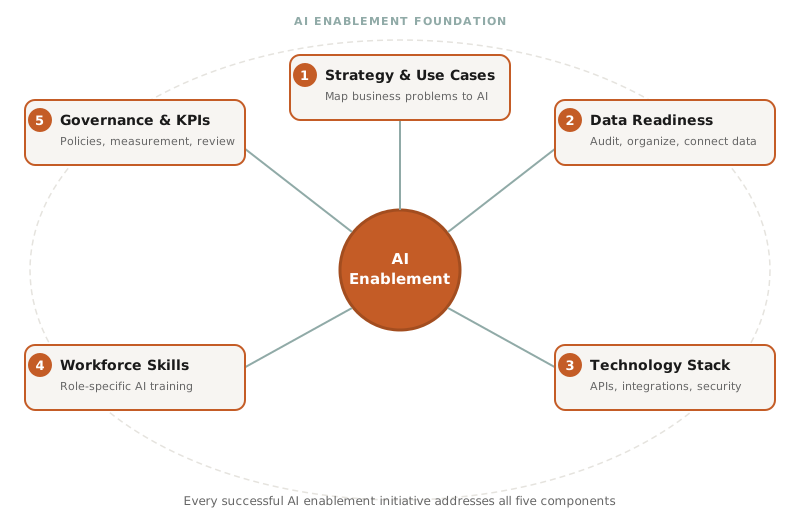
This is the framework we use with clients at WE-DO. It covers five components, and every successful AI enablement initiative addresses all five, even if the depth varies.
1. Strategy and Use Case Mapping
Start with your business problems, not with technology. The first step is identifying two to three use cases where AI can save meaningful time or improve a measurable outcome.
Good starting use cases share three traits: they are high-impact (they affect revenue or significant time costs), low-complexity (they do not require custom AI models), and repeatable (they happen frequently enough that automation pays off).
For example, a marketing agency might start with AI-assisted content drafts. A home services company might start with AI-powered scheduling optimization. A professional services firm might start with automated research summaries.
Map each use case to a specific metric: hours saved per week, error rate reduced, or revenue influenced. If you cannot tie a use case to a number, it is not ready for a pilot.
2. Data Readiness
AI runs on data. If your data is scattered across spreadsheets, disconnected tools, and employee inboxes, AI cannot do much with it.
Data readiness does not mean perfection. It means organization. Can you export your customer list as a clean CSV? Is your CRM updated consistently? Are your project files in a shared system rather than local hard drives?
Start with a simple audit: list your five most-used business tools, check whether they connect to each other via API or integration, and note where data gets entered manually or duplicated. That audit takes about two hours and tells you exactly where the gaps are.
3. Technology Infrastructure
Your AI tools need to connect to your existing stack. If your CRM, email platform, project management tool, and analytics cannot talk to each other, AI will only see fragments of your business.
For most SMBs, the infrastructure checklist is straightforward: cloud-based tools with API access, a centralized document management system, and basic security controls like two-factor authentication and role-based permissions.
You do not need to rip out your current systems. You need to make sure they can share data. Modern integration platforms like Zapier, Make, or native API connections handle this without custom development.
4. Workforce Skills and Training
The biggest barrier to AI adoption is not technology. It is people. Your team needs to understand how to work alongside AI, not just which buttons to click.
Role-specific training matters more than general AI literacy. Your marketing team needs to learn prompt engineering for content and campaign optimization. Your operations team needs to understand how AI scheduling or forecasting tools interpret their data. Your leadership team needs to know how to evaluate AI outputs and when to override them.
Training should cover three areas: how to write effective prompts, how to evaluate AI output quality, and when AI should not be used. That last one is critical. AI is not a replacement for judgment. It is a tool that amplifies whatever judgment you bring to it.
Budget 2 to 4 hours of initial training per team member, then 30 minutes per week of guided practice for the first month. Skills compound quickly once people start seeing results in their own work.
5. Governance and Measurement
Governance sounds heavy, but for an SMB it can be a single page. You need clear answers to three questions: What is AI allowed to do without human review? What requires a human check before going out? What is off-limits entirely?
For example, a marketing team might allow AI to draft internal meeting summaries without review but require human editing on any client-facing content. A legal team might prohibit AI from generating contract language entirely.
Set KPIs for each AI use case from day one. Measure time saved per task, error rate before and after, and team satisfaction. Review these monthly for the first quarter. Adjust your governance policies as you learn what works.
AI Enablement Examples by Industry
The pattern is always the same: prepare the data, connect the tools, train the people, and measure the results. Here is what that looks like in practice.
Professional Services: A 12-person law firm spent two weeks cleaning and tagging 10 years of case documents, then trained attorneys on AI-powered legal research tools. They set confidentiality policies for AI use with client data. Within 60 days, research tasks that took 4 hours dropped to 2.5 hours, a 40% improvement.
E-Commerce: A direct-to-consumer brand with $3M in annual revenue connected their product catalog data to their email and ad platforms, trained their 3-person marketing team on AI content tools, and established brand voice guidelines for AI-generated copy. They went from publishing 4 blog posts per month to 12 without adding headcount.
Healthcare: A multi-provider practice standardized their patient intake forms into a single digital format, connected their EHR to their scheduling system, and trained front desk staff on AI-assisted triage routing. No-show rates dropped 25% in the first quarter.
Construction: A general contractor digitized their job estimation process, connected their project management platform to their accounting software, and trained project managers on AI-powered scheduling optimization. Project timeline overruns decreased by 15%.
In every case, the enablement work (data cleanup, tool connections, team training, governance) took 4 to 8 weeks. The AI tools themselves were deployed in days. The enablement is where the real work happens.
How to Get Started with AI Enablement
You do not need to enable your entire organization at once. Start with one workflow and prove the value before expanding.
Week 1 to 2: Audit and Assess
List every tool your team uses daily. Check which ones connect to each other. Rate your data quality on a scale of 1 to 5 in each system. Ask your team: "Where do you spend the most time on repetitive tasks?" The answers point you to your first pilot.
Quick self-assessment: Can you export your customer data as a clean CSV in under 10 minutes? Can you name the three tasks that consume the most staff hours each week? Does your team have a shared file system, or is work scattered across personal drives? Have you documented how decisions get made (even informally)? Can you describe the last time you measured a process improvement?
If you answered yes to three or more, you are closer to AI-ready than you think. Fewer than three, and your first month should focus on data organization and process documentation before touching any AI tools.
Week 3 to 4: Pick a Pilot
Choose one use case. Define what success looks like with a specific number: "Reduce content drafting time from 6 hours to 2 hours per post" or "Cut invoice processing from 45 minutes to 15 minutes." Select the AI tool, set up the integration, and prepare a brief training plan for the 2 to 3 people involved.
Month 2: Implement with Guardrails
Roll out the pilot with training sessions, a one-page governance doc, and weekly check-ins. The check-ins matter. They catch problems early and give your team a space to share what is working.
Month 3: Measure and Expand
Compare your results against the baseline you set in week 3. Document what worked, what did not, and what you would do differently. Use those learnings to select your second and third use cases.
The most common mistakes at this stage: trying to enable five departments simultaneously instead of proving value in one, buying enterprise-grade AI platforms when lighter tools do the job, and skipping governance because "we are too small for that." You are not.
When AI Enablement Is Not the Right Move
AI enablement is not a universal solution. If your business does not have a repeatable process that consumes significant time, AI will not save you much. If your team is already stretched thin and cannot dedicate 2 to 4 hours per person for initial training, forcing AI adoption will create more friction than value. And if your data lives entirely in paper files or disconnected spreadsheets with no standardization, you need a data organization project before an AI enablement project.
Be honest about where you are. Spending 4 weeks on data cleanup before starting AI enablement is not a failure. It is the smartest investment you can make.
AI Enablement vs. AI Implementation: What Is the Difference?
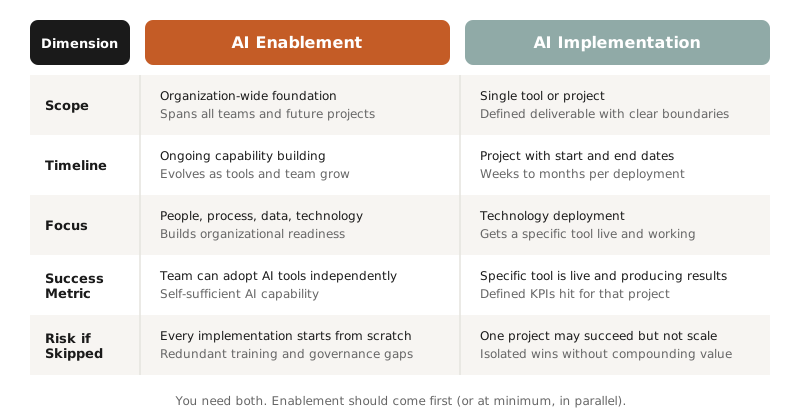
AI enablement and AI implementation are related but distinct. Enablement is the foundation. Implementation is what you build on top of it.
Enablement covers the organization-wide groundwork: data quality, team skills, governance policies, and technology infrastructure. It is ongoing and applies across every AI tool you adopt. Implementation covers a single project: deploying a specific tool for a defined purpose with a clear start and end date.
You need both. But if you implement without enabling first, you end up rebuilding the foundation for every new tool. That means redundant training, inconsistent data practices, and governance gaps that grow with each new AI project.
The most efficient path is to run enablement and your first implementation in parallel. The enablement framework gives structure to the implementation, and the implementation gives your team a concrete project to learn from.
For a deeper look at how to plan your first deployment, read our guide on AI implementation strategy.
What You Should Do Next
AI enablement is the difference between AI that compounds value over time and AI that collects dust after the first month.
You do not need a massive budget, a dedicated AI department, or 18 months of planning. You need a framework, one focused pilot, and the discipline to measure what you build.
Start with the self-assessment above. If you score three or higher, you are ready to pick a pilot use case and move. If you score lower, spend your first two weeks on data organization and process documentation. Either way, you are making progress.
If you want help building the foundation, our team specializes in AI integration and automation services for growth-focused businesses. We can run a focused AI readiness assessment and have you piloting your first use case within 30 days.
Read our guide on AI sales enablement to see how this framework applies specifically to revenue teams.
FAQ
What does AI enablement mean?
AI enablement is the process of preparing an organization to adopt and scale AI by building the right data infrastructure, technology connections, workforce skills, and governance frameworks. It goes beyond deploying a single AI tool by creating the foundation that makes every future AI project more likely to succeed. For small businesses, it typically involves a data audit, tool integration, team training, and a simple governance policy.
How much does AI enablement cost for a small business?
Enterprise AI enablement consulting typically runs $200,000 to $500,000 or more, with timelines of 12 to 18 months. For small and mid-size businesses, a focused engagement costs $5,000 to $15,000 and delivers measurable results within 90 days. The exact cost depends on your current data quality, the number of tools that need integration, and how much training your team requires. Many SMBs start with a single workflow pilot that costs under $5,000.
How long does AI enablement take?
For a focused SMB engagement, expect 4 to 8 weeks for the enablement foundation (data audit, tool connections, training, governance) and 2 to 4 weeks for the first AI implementation on top of it. The first pilot typically shows measurable results within 90 days. Ongoing enablement, such as expanding to new use cases and refining governance, continues indefinitely but requires progressively less effort as your team builds proficiency.