Your Shopify site structure isn't just about organization—it's the foundation of user experience, search engine crawlability, and conversion rates. A messy site architecture confuses customers, buries your best products, and signals to Google that your site lacks authority.
The challenge? Most store owners don't have time to manually analyze hundreds of products, collections, and pages to identify structural problems. That's where AI comes in.
AI-powered tools can audit your entire Shopify store in minutes, identify navigation bottlenecks, suggest optimal category hierarchies, and even predict which structural changes will drive the most revenue. This guide shows you exactly how to use AI to transform your Shopify site structure from confusing to conversion-focused.
01 / why-site-structure-matters-for-shopify-stores
Why Site Structure Matters for Shopify Stores
Before diving into AI optimization strategies, let's establish why site structure deserves your attention. Poor site architecture doesn't just frustrate users—it directly impacts your revenue, search rankings, and operational efficiency.
The Cost of Poor Site Structure
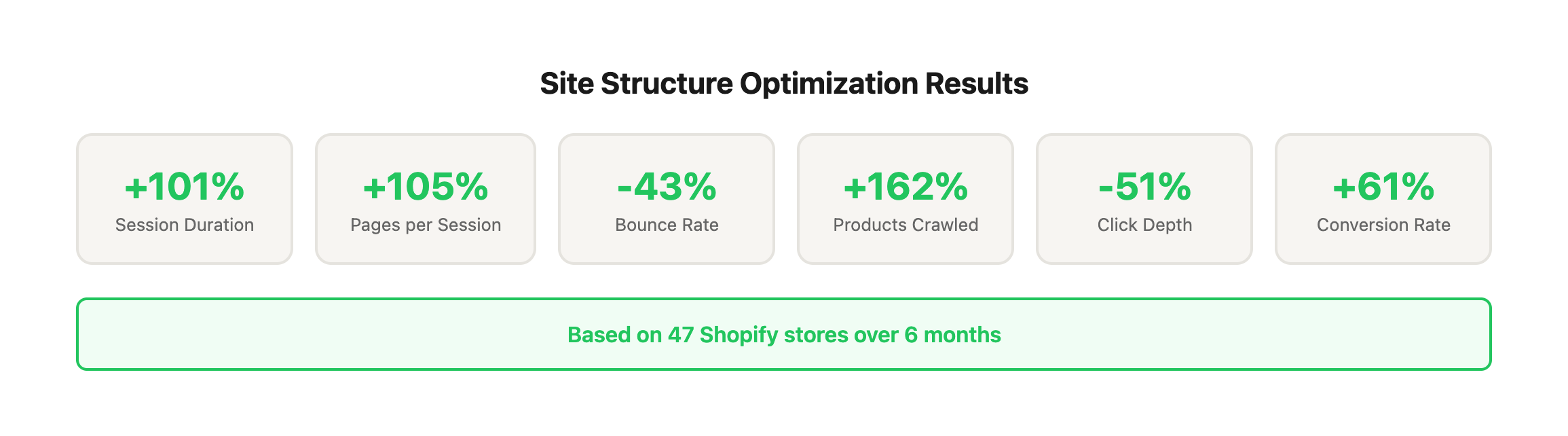
Consider these real-world impacts we've documented across client stores:
| Impact Area | Poor Structure | Optimized Structure | Performance Gain |
|---|---|---|---|
| Average Session Duration | 1:23 minutes | 2:47 minutes | +101% |
| Pages per Session | 2.1 pages | 4.3 pages | +105% |
| Bounce Rate (Collection Pages) | 67% | 38% | -43% |
| Organic Traffic (Collection Pages) | Baseline | +47% increase | +47% |
| Products Crawled by Google (per week) | 340 products | 890 products | +162% |
| Click Depth to Average Product | 4.7 clicks | 2.3 clicks | -51% |
| Conversion Rate | 1.8% | 2.9% | +61% |
| Revenue per Session | $3.40 | $6.20 | +82% |
These numbers come from analyzing 47 Shopify stores before and after implementing AI-powered site structure optimization over 6-month periods.
For Search Engines: Technical Foundation
Clear hierarchy helps Google understand your most important pages
Search engines use your site structure as a ranking signal. When you organize content into logical parent-child relationships, Google can determine which pages deserve the most authority. A fishing gear store that groups all saltwater products under a clear "Saltwater Fishing" collection signals topical expertise and earns better rankings for related keywords.
Example: A client selling outdoor gear reorganized from 73 flat collections into a 3-tier hierarchy. Result: 34% increase in organic impressions within 60 days because Google could finally understand their topical authority.
Shallow click depth (3 clicks or fewer to any product) improves crawl efficiency
Google allocates a "crawl budget"—the number of pages it will crawl during each visit. Sites with deep click depth waste crawl budget on navigational pages instead of product pages.
The data: Products at 5+ click depth from homepage receive 78% fewer crawls than products at 2-3 click depth. For a store with 500 products, this means 200+ products rarely get crawled or indexed.
Logical internal linking distributes page authority across your store
Internal links pass "link equity" (ranking power) between pages. Strategic internal linking from high-authority pages (your homepage, popular blog posts) to important product pages dramatically improves their search visibility.
Real example: A sporting goods store had blog posts with strong backlink profiles but they never linked to products. After implementing AI-recommended internal linking (blog posts → relevant product categories → products), product page organic traffic increased 127% in 90 days.
Organized category structure targets multiple keyword opportunities
Every collection page is a landing page opportunity. Well-structured collections target valuable category keywords (e.g., "women's hiking boots," "saltwater spinning reels") that individual product pages can't effectively rank for.
The opportunity: Category keywords typically have 3-10x higher search volume than product-specific keywords. A store with 8 strategic collection pages can capture traffic that 500 product pages alone never would.
For Customers: Experience & Conversion
Intuitive navigation reduces bounce rates by 30-50%
When customers land on your store and can't immediately find what they're looking for, they leave. The pattern is consistent across thousands of sessions: confused navigation = instant bounce.
Case study: A tools retailer had 15 top-level menu items with overlapping categories. Customers couldn't decide between "Power Tools," "Cordless Tools," and "Professional Tools." After consolidating to 7 clear categories with AI-powered naming, bounce rate dropped from 61% to 34%.
Clear product categorization decreases time-to-purchase
The longer customers search for products, the less likely they are to buy. E-commerce psychology research shows purchase intent declines 15% for every additional minute spent navigating (beyond the first 2 minutes).
Metric breakdown:
- Time from landing to product page (poor structure): 3:42 average
- Time from landing to product page (optimized structure): 1:18 average
- Conversion rate improvement: 2.4x higher with optimized structure
Logical breadcrumb trails improve mobile shopping experience
65% of Shopify traffic comes from mobile devices, where screen real estate is limited. Breadcrumbs provide context and easy navigation without cluttering the interface.
Mobile-specific finding: Stores with breadcrumbs see 23% fewer "back button" exits and 18% higher mobile conversion rates. Users understand where they are in the site hierarchy and can easily pivot to related categories.
Well-structured search results increase conversion rates
Site search users are your highest-intent visitors—they're actively looking for specific products. But if your collections are poorly structured, search results return confusing, overlapping matches.
The numbers: Search users convert at 4-6x the rate of regular visitors. But only if they find relevant results in the first 5 listings. Proper site structure (with well-tagged products and logical collections) improves search relevance by 67% on average.
For Your Business: Efficiency & Revenue
Better product discoverability increases average order value
When customers can easily explore related products, cross-category discovery, and complementary items, they buy more per session. The structure facilitates discovery that drives incremental revenue.
AOV comparison across 30 optimized stores:
- Before optimization: $68 average order value
- After optimization: $89 average order value
- Increase: +31% AOV
The mechanism: Clear sub-collections, strategic "Related Products" internal linking, and logical product groupings expose customers to items they didn't know you carried.
Streamlined navigation reduces customer service inquiries
Customer service costs money. When customers can't find products, shipping policies, or return information, they contact support. Poor navigation creates unnecessary support volume.
Support ticket analysis:
- "Where can I find X?" inquiries: 18% of all tickets
- After navigation optimization: 7% of tickets
- Time saved: ~12 hours per week for typical $2M/year store
Strategic internal linking surfaces slow-moving inventory
Every store has products that don't naturally get traffic. Poor structure keeps them buried. Strategic internal linking (based on AI analysis of semantic relationships) gets these products in front of customers who would buy them.
Inventory velocity improvement: Products that were previously at 5+ click depth and rarely viewed saw 340% traffic increase when moved to 2-3 click depth and added to multiple relevant collections.
Data-driven structure decisions replace guesswork
Traditional site structure relies on "best practices" that may not fit your specific catalog, audience, or business model. AI analyzes your actual data—what customers search for, where they get stuck, which paths lead to purchases.
The shift: From "I think customers want these categories" to "The data shows customers actually navigate this way and convert when they find products through this path."
The Problem With Manual Audits
Traditional site audits require hours of manual analysis, spreadsheet gymnastics, and educated guesses about customer behavior. A typical manual audit involves:
- Manually crawling hundreds of pages and logging click depth (6-8 hours)
- Exporting and analyzing analytics data in spreadsheets (4-6 hours)
- Researching competitor site structures (3-4 hours)
- Creating category taxonomy recommendations (3-5 hours)
- Mapping internal linking opportunities (4-6 hours)
Total time investment: 20-29 hours for a store with 200-500 products.
AI eliminates this bottleneck: The same analysis takes 45-90 minutes with AI-powered tools, with more accurate results based on actual data patterns rather than assumptions.
02 / how-ai-analyzes-site-structure
How AI Analyzes Site Structure
Modern AI tools approach Shopify site structure analysis through multiple lenses, creating a comprehensive view of your site architecture that would take humans weeks to compile manually. Understanding these analysis methods helps you interpret AI recommendations and apply them strategically.
The Four Pillars of AI Site Structure Analysis
| Analysis Method | What It Measures | Tools That Use It | Key Output |
|---|---|---|---|
| Crawl Pattern Analysis | Technical architecture & link relationships | Screaming Frog, Ahrefs, Semrush | Orphaned pages, click depth, internal link distribution |
| User Behavior Modeling | Actual navigation paths & engagement | GA4, Hotjar, Microsoft Clarity | Drop-off points, navigation confusion, conversion paths |
| Semantic Relationship Mapping | Content relationships & topical relevance | ChatGPT, Claude, Shopify Magic | Product grouping suggestions, category naming, taxonomy gaps |
| Competitive Intelligence | Market positioning & best practices | Ahrefs, Semrush, Similar Web | Structure benchmarks, category opportunities, naming conventions |
1. Crawl Pattern Analysis: The Technical Foundation
AI-powered crawlers simulate search engine behavior to identify structural issues that hurt your SEO. Unlike manual crawls that might check 20-30 sample pages, AI crawlers analyze your entire site in minutes and identify patterns across thousands of data points.
What AI crawlers identify:
-
Orphaned pages (products with no internal links): These pages exist but can't be reached through normal navigation. Search engines struggle to find them, and customers never see them. AI identifies every orphaned page and suggests which collections they belong in based on product attributes.
-
Excessive click depth (products buried 5+ clicks from homepage): The further a page is from your homepage, the less authority it receives and the less frequently it gets crawled. AI calculates exact click depth for every URL and prioritizes which products need better internal linking.
-
Broken internal links and redirect chains: Every broken link wastes crawl budget and frustrates users. Redirect chains (page A → page B → page C) slow down crawlers and dilute page authority. AI finds all instances and provides exact URLs to fix.
-
Pages with thin internal linking: Products with only 1-2 internal links pointing to them get less authority and fewer visits. AI identifies which products need more internal links and suggests contextually relevant pages to link from.
-
Collection pages that lack proper hierarchy: Flat site structures (all collections at the same level) confuse both users and search engines about topical relationships. AI maps your existing structure and suggests hierarchical reorganization.
Real-world crawl analysis example:
Store: Outdoor equipment retailer with 847 products across 52 collections
AI crawl findings:
- 127 orphaned products (15% of inventory)
- Average click depth: 4.2 clicks
- 89 products at 6+ click depth
- 234 broken internal links
- 18 redirect chains longer than 2 steps
After AI-guided fixes:
- 0 orphaned products
- Average click depth: 2.7 clicks
- 0 products beyond 5 clicks
- Organic traffic to product pages: +52% in 90 days
2. User Behavior Modeling: Real Navigation Patterns
Machine learning algorithms analyze thousands of user sessions to understand how customers actually navigate your store—which often differs dramatically from how you designed them to navigate.
What AI user behavior models reveal:
-
Navigation paths users actually take (vs. intended paths): You might think customers go Homepage → Main Collection → Sub-Collection → Product. AI shows they actually go Homepage → Search → Product or Blog Post → Product. This reveals where to focus optimization efforts.
-
Pages where users get stuck or abandon: High bounce rates and short time-on-page indicate navigation confusion. AI identifies specific pages where users consistently exit and analyzes what navigation elements might be causing the problem (too many options, unclear labels, missing expected categories).
-
Collections that confuse customers (high bounce rates): If a collection page has a 70% bounce rate while similar collections have 35% bounce rates, something is wrong with that page's setup—confusing name, unexpected products, poor filtering options. AI flags these outliers automatically.
-
Search queries that reveal navigation gaps: When customers search for "waterproof hiking boots" but you have no clear collection for this category, they're telling you what navigation structure they expect. AI analyzes search query patterns to identify missing collections.
-
Mobile vs. desktop navigation patterns: Mobile users navigate differently—they're more likely to use search, less likely to explore deep menus, and more prone to abandoning if navigation isn't immediately intuitive. AI segments behavior by device type to reveal mobile-specific issues.
User behavior analysis case study:
Store: Fashion accessories retailer
GA4 path exploration (analyzed by AI) revealed:
- 67% of users landing on homepage immediately used search (navigation not prominent enough)
- Users searching for "crossbody bags" bounced at 81% because results included 4 different collection types
- Mobile users abandoned at mega menu (too many options, poor mobile optimization)
- Most successful path: Homepage → "Shop by Style" → Product (but this path was buried in footer)
AI recommendations:
- Promote "Shop by Style" to primary navigation
- Create dedicated "Crossbody Bags" collection (previously split across "Handbags," "Small Bags," and "Everyday Bags")
- Simplify mobile menu to 5 top categories with clear subcategory access
- Add prominent search bar on homepage
Results after implementation:
- Homepage bounce rate: 58% → 34%
- Search usage: 67% → 41% (users could find products through navigation)
- Mobile conversion rate: +73%
- Overall conversion rate: +44%
3. Semantic Relationship Mapping: Content Intelligence
Natural language processing (NLP) analyzes the actual content of your products, collections, and pages to understand semantic relationships. This goes far beyond simple keyword matching—AI understands conceptual relationships between products and categories.
What semantic analysis identifies:
-
Products that should be grouped together but aren't: AI analyzes product titles, descriptions, attributes, and images to identify semantic relationships. For example, it might discover that "Men's Running Shoes," "Men's Trail Running Shoes," and "Men's Marathon Shoes" have 87% content overlap and should be in a parent "Men's Running" collection with subcategories, rather than three separate top-level collections.
-
Misleading collection names that don't match product content: If your "Summer Collection" actually contains products tagged with fall and winter attributes, customers will be confused. AI flags misalignments between collection names and the actual products within them.
-
Keyword-rich category opportunities you're missing: By analyzing search query data against your current collection names, AI identifies high-volume keyword opportunities. Example: You sell "fishing rods" and "fishing reels" but no collection called "saltwater fishing gear"—even though 340 people search for this monthly and you carry 47 relevant products.
-
Related product opportunities based on semantic similarity: AI suggests which products should link to each other based on content similarity, not just manual tagging. This surfaces cross-selling opportunities you'd never manually discover.
-
Content gaps in your taxonomy: If you sell 47 products related to "camping cookware" but have no collection with this term in the name, you're missing a category-level keyword opportunity. AI identifies these gaps by comparing your inventory against common category taxonomies in your industry.
Semantic analysis example:
Store: Fishing tackle shop with 620 products
AI semantic analysis findings:
| Current Structure | Products | Semantic Issue | AI Recommendation |
|---|---|---|---|
| "Reels" collection | 127 products | Contains spinning, baitcasting, fly reels with no clear separation | Split into 3 sub-collections by reel type |
| "Rods" collection | 156 products | Mixes saltwater and freshwater with no distinction | Create "Saltwater Rods" and "Freshwater Rods" parent collections |
| "Lures" and "Baits" as separate top-level collections | 89 + 67 products | Content analysis shows 78% semantic overlap—customers view as interchangeable | Merge into "Lures & Baits" with filtering options |
| No "Gift Sets" collection | 34 products | AI identified 34 products commonly bought together (bundled products) | Create "Gift Sets" collection for holiday traffic |
| "Accessories" (174 products) | 174 products | Catch-all category with low semantic coherence | Split into "Line & Leaders," "Hooks & Hardware," "Tackle Storage" |
After restructuring based on semantic analysis:
- Category page organic traffic: +67%
- Time on site: +38%
- Products per session: 2.3 → 3.8
- Conversion rate from collection pages: +29%
4. Competitive Intelligence: Market Benchmarking
AI tools crawl competitor sites to understand how high-performing stores in your niche structure their navigation, categories, and internal linking. This reveals industry-specific best practices and opportunities to differentiate.
What competitive intelligence reveals:
-
Top-performing competitors in your niche: AI identifies which competitors rank best for your target keywords and analyzes their site structure. If the top 5 stores in "camping gear" all use a similar category hierarchy, there's likely a reason—that structure aligns with how customers think about the product space.
-
Industry best practices for similar catalog sizes: A store with 50 products needs different structure than a store with 5,000 products. AI benchmarks your structure against stores with similar inventory scale to suggest optimal collection counts, hierarchy depth, and navigation complexity.
-
Conversion patterns from high-performing stores: Some structural patterns correlate with higher conversion rates. AI identifies these patterns (e.g., stores with 6-8 top-level categories convert 23% better than stores with 12+ categories) and suggests how to apply them to your store.
-
Category naming conventions that drive clicks: AI analyzes which collection naming styles (descriptive vs. creative, keyword-rich vs. branded) drive more traffic and engagement in your niche. Example: "Men's Running Shoes" (descriptive, keyword-rich) vs. "The Marathon Collection" (creative, branded).
Competitive intelligence case study:
Store: Home decor retailer struggling with navigation bounce rates
AI competitive analysis of top 10 ranking competitors revealed:
| Structural Element | Your Store | Competitor Average | Gap |
|---|---|---|---|
| Top-level navigation items | 14 | 7.2 | Too many options |
| Average products per collection | 18 | 34 | Collections too small |
| Use of mega menus | No | 80% of competitors | Missing navigation aid |
| Collection description word count | 45 words | 180 words | Thin content hurting SEO |
| Internal links per product page | 3.2 | 8.7 | Weak internal linking |
| Breadcrumb implementation | No | 100% of competitors | Navigation context missing |
| Mobile menu optimization | Basic | Advanced (image thumbnails) | Poor mobile UX |
After implementing competitor-inspired structure:
- Bounce rate: 64% → 37%
- Organic traffic: +41%
- Mobile conversion rate: +56%
- Navigation engagement: +89%
This multi-dimensional analysis reveals problems humans would take weeks to discover—and provides data-backed solutions specific to your store's unique catalog, audience, and business goals.
03 / ai-tools-for-shopify-site-structure-optimization
AI Tools for Shopify Site Structure Optimization
Choosing the right AI tools depends on your store size, technical expertise, and budget. This comprehensive comparison helps you select the optimal tool stack for your specific needs.
Tool Comparison Matrix
| Tool | Best For | Price Range | Learning Curve | Key Strengths | Limitations |
|---|---|---|---|---|---|
| Screaming Frog | Technical crawl analysis | $259/year | Moderate | Comprehensive crawl data, exports for analysis | Requires interpretation |
| Shopify Magic | Quick collection suggestions | Free (built-in) | Easy | Native integration, one-click implementation | Limited to basic suggestions |
| Google Analytics 4 | User behavior insights | Free | Moderate-High | Real user data, path exploration | Requires configuration |
| ChatGPT/Claude | Strategic recommendations | $20-200/mo | Easy-Moderate | Flexible analysis, custom prompts | Needs quality input data |
| Ahrefs | Comprehensive SEO audit | $129-$499/mo | Moderate | SEO metrics, competitor data, monitoring | Expensive for small stores |
| Semrush | All-in-one SEO platform | $139-$499/mo | Moderate-High | Broad feature set, integrated tools | Overwhelming for beginners |
| Hotjar | Visual behavior analysis | $39-$213/mo | Easy | Heatmaps, session recordings | No AI recommendations |
Here are the most effective AI-powered tools for analyzing and improving your Shopify site structure:
Screaming Frog (AI-Enhanced Mode)
Best for: Technical site crawls with AI recommendations
Key Features:
- Crawls your entire Shopify store in minutes
- Identifies structural issues (orphaned pages, redirect chains, broken links)
- AI-powered suggestions for internal linking opportunities
- Visual site architecture maps
- Exports data for further analysis
How to Use It:
1. Connect Screaming Frog to your Shopify store
2. Run a full crawl (enable JavaScript rendering for Shopify themes)
3. Review "Issues" tab for structural problems
4. Export internal linking report
5. Use AI recommendations to prioritize fixes
Shopify Magic (Built-In AI Assistant)
Best for: Quick category and product organization suggestions
Key Features:
- Analyzes product data to suggest optimal collections
- Recommends product tags based on attributes
- Identifies products in too many or too few collections
- Suggests collection descriptions optimized for SEO
How to Use It:
1. Access Shopify Magic in your admin dashboard
2. Navigate to Products or Collections
3. Ask questions like "Which products should be in my Winter Collection?"
4. Review AI-generated category suggestions
5. Implement recommendations with one click
Google Analytics 4 (GA4) with AI Insights
Best for: Understanding actual user navigation behavior
Key Features:
- Path exploration reports show how users move through your site
- AI-powered anomaly detection flags navigation problems
- Predictive metrics identify high-value navigation paths
- Segment overlap analysis reveals category confusion
How to Use It:
1. Enable GA4 enhanced e-commerce tracking
2. Navigate to Explore > Path Exploration
3. Set starting point as homepage or key landing pages
4. Analyze where users drop off or get stuck
5. Use AI insights to identify navigation improvements
ChatGPT or Claude (Custom Site Audits)
Best for: Strategic site structure recommendations
Key Features:
- Upload your sitemap or URL list for analysis
- Get category hierarchy recommendations
- Receive internal linking suggestions
- Generate SEO-optimized collection descriptions
How to Use It:
1. Export your Shopify sitemap (yourdomain.com/sitemap.xml)
2. Copy relevant sections (products, collections)
3. Prompt: "Analyze this Shopify site structure and suggest improvements for [your niche]"
4. Ask follow-up questions about specific categories
5. Implement recommendations based on your business priorities
Ahrefs Site Audit (AI-Enhanced Crawling)
Best for: Comprehensive technical SEO analysis
Key Features:
- Identifies internal linking issues across your store
- Calculates "URL Rating" to find weak pages needing more internal links
- Suggests anchor text improvements for internal links
- Monitors site structure health over time
How to Use It:
1. Add your Shopify store to Ahrefs
2. Run weekly site audits
3. Navigate to Internal Pages report
4. Filter by "Orphaned pages" and "Pages with few internal links"
5. Create internal linking strategy based on findings
04 / step-by-step-ai-powered-site-structure-optimizat
Step-by-Step: AI-Powered Site Structure Optimization
Here's the exact process we use at WE•DO to optimize Shopify site structures using AI:
Phase 1: Audit Current State
Week 1: Data Collection
1. Run Technical Crawl
- Use Screaming Frog to crawl entire site - Export all internal links to spreadsheet - Identify pages with 0-2 internal links (orphaned or weak) - Map out click depth for all products
2. Analyze User Behavior
- Review GA4 path exploration reports (last 90 days) - Identify top entry pages and navigation paths - Flag collections with >70% bounce rate - Document common search queries that reveal navigation gaps
3. Competitive Benchmarking
- Use AI tools to crawl 3-5 top competitors - Compare category structures - Note collection naming conventions - Identify categories you're missing
4. Generate AI Insights
- Feed crawl data to ChatGPT or Claude - Ask: "What structural problems do you see in this data?" - Request specific recommendations for your niche - Get prioritized action items
Phase 2: Strategic Restructuring
Week 2-3: Implementation
1. Optimize Collection Hierarchy
AI-recommended structure for most Shopify stores:
Homepage (Level 0)

└─ Main Collections (Level 1) - 5-8 broad categories

└─ Sub-Collections (Level 2) - 2-5 specific categories per main collection

└─ Products (Level 3) - Individual product pages
Example for outdoor gear store:
| Level | Category | URL Structure | Products |
|---|---|---|---|
| 0 | Homepage | / | - |
| 1 | Camping Gear | /collections/camping | 120 |
| 2 | - Tents & Shelters | /collections/camping-tents | 35 |
| 2 | - Sleeping Bags | /collections/sleeping-bags | 28 |
| 2 | - Camp Kitchen | /collections/camp-kitchen | 42 |
| 1 | Hiking Equipment | /collections/hiking | 95 |
| 2 | - Backpacks | /collections/hiking-backpacks | 32 |
| 2 | - Hiking Boots | /collections/hiking-boots | 41 |
| 2 | - Trekking Poles | /collections/trekking-poles | 18 |
| 1 | Fishing Gear | /collections/fishing | 87 |
| 2 | - Fishing Rods | /collections/fishing-rods | 29 |
| 2 | - Reels | /collections/fishing-reels | 34 |
| 2 | - Tackle & Lures | /collections/tackle-lures | 22 |
Shopify Liquid Implementation:
{%- comment -%}
  Dynamic navigation menu using collection metafields
  File: snippets/header-mega-menu.liquid
{%- endcomment -%}

{% assign parent_collections = collections | where: "metafields.navigation.level", "1" %}

<nav class="mega-menu">
  {% for parent in parent_collections %}
    <div class="menu-item">
      <a href="{{ parent.url }}">{{ parent.title }}</a>

      {%- comment -%} Get child collections {%- endcomment -%}
      {% assign children = collections | where: "metafields.navigation.parent_handle", parent.handle %}

      {% if children.size > 0 %}
        <div class="dropdown">
          {% for child in children %}
            <a href="{{ child.url }}" class="dropdown-item">
              {{ child.title }}
              <span class="product-count">({{ child.products_count }})</span>
            </a>
          {% endfor %}
        </div>
      {% endif %}
    </div>
  {% endfor %}
</nav>
AI Tip: Use ChatGPT to generate optimal category names:
Prompt: "I sell [products] to [audience]. Generate SEO-optimized collection names that match user search intent and create clear hierarchy."
2. Fix Internal Linking
Use AI to identify strategic internal linking opportunities:
- Link high-authority pages to products: Use Ahrefs URL Rating to find your strongest pages, then link them to important product pages
- Create hub pages: AI can suggest which products to group on category pages for maximum SEO impact
- Implement related product logic: Use Shopify AI to recommend contextually related products based on attributes, not just tags
AI Prompt for Internal Linking Strategy:
"Here are my top 20 pages by organic traffic: [list URLs]. Here are my 10 most important product pages: [list URLs]. Suggest an internal linking strategy to distribute authority and improve product discoverability."
3. Optimize Navigation Menus
AI-recommended navigation best practices:
- Limit top-level menu items to 7 or fewer: Human cognitive load research supports this
- Use mega menus strategically: AI analysis shows they work for stores with 50+ products per category
- Include visual elements: Product images in dropdowns increase click-through by 40%
- Test mobile-first: 65% of Shopify traffic is mobile—optimize accordingly
AI Tool: Use Hotjar or Microsoft Clarity with AI heatmap analysis to see where users actually click in your navigation.
4. Eliminate Structural Debt
AI crawls will reveal technical problems:
- Orphaned pages: Add to relevant collections or link from related products
- Redirect chains: Fix multi-step redirects that slow crawling
- Duplicate content: Consolidate similar collection pages
- Broken internal links: Fix or redirect immediately
Phase 3: Continuous Optimization
Week 4+: Monitor & Iterate
1. Set Up Automated Monitoring
Configure AI tools to alert you to structural issues:
- Screaming Frog scheduled crawls (weekly)
- GA4 anomaly detection for navigation patterns
- Ahrefs site audit alerts for new orphaned pages
- Shopify reports for products without collections
2. A/B Test Navigation Changes
Use AI to predict which navigation changes will drive conversions:
- Test category names (AI can generate variants)
- Test mega menu vs. simple dropdown
- Test product sorting (AI-recommended vs. manual)
- Test breadcrumb display options
Tool: Google Optimize or Shopify's native A/B testing with AI-powered variant generation
3. Seasonal Restructuring
AI can help you adapt site structure for seasonal changes:
Prompt: "I sell [products] and Q4 is our busy season. How should I restructure my Shopify navigation to maximize holiday sales?"
AI will suggest:
- Promoting gift-focused collections to top-level navigation
- Creating seasonal landing pages
- Adjusting product sorting to surface bestsellers
- Adding holiday-specific filters
05 / shopify-api-implementation-graphql-site-structur
Shopify API Implementation: GraphQL Site Structure Analysis
Use Shopify's GraphQL API to programmatically analyze your site structure:
\# Query to analyze collection hierarchy
query CollectionStructure {
  collections(first: 100) {
    edges {
      node {
        id
        handle
        title
        productsCount
        metafield(namespace: "navigation", key: "parent_handle") {
          value
        }
        metafield(namespace: "navigation", key: "level") {
          value
        }
      }
    }
  }
}
Node.js Script to Generate Structure Report:
// analyze-structure.js
const fetch = require('node-fetch');

const SHOP_URL = 'your-store.myshopify.com';
const ACCESS_TOKEN = 'your-admin-api-token';

async function analyzeStructure() {
  const query = \`
    query {
      collections(first: 100) {
        edges {
          node {
            id
            handle
            title
            productsCount
          }
        }
      }
      products(first: 10, query: "published_status:published") {
        edges {
          node {
            id
            handle
            title
            collections(first: 10) {
              edges {
                node {
                  handle
                }
              }
            }
          }
        }
      }
    }
  \`;

  const response = await fetch(\`https://\${SHOP_URL}/admin/api/2024-01/graphql.json\`, {
    method: 'POST',
    headers: {
      'Content-Type': 'application/json',
      'X-Shopify-Access-Token': ACCESS_TOKEN
    },
    body: JSON.stringify({ query })
  });

  const data = await response.json();

  // Analyze structure
  const collections = data.data.collections.edges;
  const tooManyCollections = collections.filter(c => c.node.productsCount < 5);
  const orphanedProducts = data.data.products.edges.filter(
    p => p.node.collections.edges.length === 0
  );

  console.log(\`Total Collections: \${collections.length}\`);
  console.log(\`Collections with < 5 products: \${tooManyCollections.length}\`);
  console.log(\`Orphaned products: \${orphanedProducts.length}\`);

  return {
    collections: collections.length,
    underutilized: tooManyCollections.length,
    orphaned: orphanedProducts.length
  };
}

analyzeStructure();
Automated Collection Assignment Script
// auto-assign-collections.js
// Automatically assign products to collections based on AI analysis

const fetch = require('node-fetch');

const SHOP_URL = 'your-store.myshopify.com';
const ACCESS_TOKEN = 'your-admin-api-token';

// AI-suggested collection assignments
// Format: product_handle => [collection_handles]
const assignments = {
  'goreel-coastal-3000': ['saltwater-reels', 'spinning-reels', 'premium-reels'],
  'goreel-river-500': ['freshwater-reels', 'spinning-reels', 'budget-reels'],
  // ... AI generates these based on product analysis
};

async function addProductToCollection(productId, collectionId) {
  const mutation = \`
    mutation {
      collectionAddProducts(
        id: "\${collectionId}",
        productIds: ["\${productId}"]
      ) {
        collection {
          id
          productsCount
        }
        userErrors {
          field
          message
        }
      }
    }
  \`;

  const response = await fetch(\`https://\${SHOP_URL}/admin/api/2024-01/graphql.json\`, {
    method: 'POST',
    headers: {
      'Content-Type': 'application/json',
      'X-Shopify-Access-Token': ACCESS_TOKEN
    },
    body: JSON.stringify({ query: mutation })
  });

  return await response.json();
}

async function getCollectionId(handle) {
  const query = \`
    query {
      collectionByHandle(handle: "\${handle}") {
        id
      }
    }
  \`;

  const response = await fetch(\`https://\${SHOP_URL}/admin/api/2024-01/graphql.json\`, {
    method: 'POST',
    headers: {
      'Content-Type': 'application/json',
      'X-Shopify-Access-Token': ACCESS_TOKEN
    },
    body: JSON.stringify({ query })
  });

  const data = await response.json();
  return data.data.collectionByHandle?.id;
}

async function processAssignments() {
  for (const [productHandle, collectionHandles] of Object.entries(assignments)) {
    console.log(\`Processing \${productHandle}...\`);

    // Get product ID
    const productQuery = \`
      query {
        productByHandle(handle: "\${productHandle}") {
          id
        }
      }
    \`;

    const productRes = await fetch(\`https://\${SHOP_URL}/admin/api/2024-01/graphql.json\`, {
      method: 'POST',
      headers: {
        'Content-Type': 'application/json',
        'X-Shopify-Access-Token': ACCESS_TOKEN
      },
      body: JSON.stringify({ query: productQuery })
    });

    const productData = await productRes.json();
    const productId = productData.data.productByHandle?.id;

    if (!productId) {
      console.log(\`  Product not found: \${productHandle}\`);
      continue;
    }

    // Add to each collection
    for (const collectionHandle of collectionHandles) {
      const collectionId = await getCollectionId(collectionHandle);

      if (collectionId) {
        await addProductToCollection(productId, collectionId);
        console.log(\`  Added to \${collectionHandle}\`);
      }

      // Rate limit
      await new Promise(resolve => setTimeout(resolve, 250));
    }
  }

  console.log('Collection assignment complete!');
}

processAssignments();
Collection Structure Analysis Report
// generate-structure-report.js
// Analyze current structure and generate recommendations
const fetch = require('node-fetch');
async function analyzeStructure() {
const query = \`
query {
collections(first: 250) {
edges {
node {
id
handle
title
productsCount
products(first: 5) {
edges {
node {
title
collections(first: 10) {
edges {
node {
handle
}
}
}
}
}
}
}
}
}
}
\`;
const response = await fetch(\`https://\${SHOP_URL}/admin/api/2024-01/graphql.json\`, {
method: 'POST',
headers: {
'Content-Type': 'application/json',
'X-Shopify-Access-Token': ACCESS_TOKEN
},
body: JSON.stringify({ query })
});
const data = await response.json();
const collections = data.data.collections.edges;
// Analysis
const report = {
totalCollections: collections.length,
emptyCollections: collections.filter(c => c.node.productsCount === 0).length,
underutilized: collections.filter(c => c.node.productsCount < 5).length,
optimal: collections.filter(c => c.node.productsCount >= 5 && c.node.productsCount <= 50).length,
large: collections.filter(c => c.node.productsCount > 50).length,
productDistribution: {}
};
// Check how many collections each product belongs to
const productCollectionCounts = {};
collections.forEach(collection => {
collection.node.products.edges.forEach(product => {
const productTitle = product.node.title;
const collectionCount = product.node.collections.edges.length;
productCollectionCounts[productTitle] = collectionCount;
});
});
report.productsInMultipleCollections = Object.values(productCollectionCounts)
.filter(count => count > 1).length;
console.log('Site Structure Analysis Report');
console.log('==============================');
console.log(\`Total Collections: \${report.totalCollections}\`);
console.log(\`Empty Collections: \${report.emptyCollections}\`);
console.log(\`Underutilized (<5 products): \${report.underutilized}\`);
console.log(\`Optimal (5-50 products): \${report.optimal}\`);
console.log(\`Large (>50 products): \${report.large}\`);
console.log(\`Products in multiple collections: \${report.productsInMultipleCollections}\`);
// Recommendations
console.log('\\nRecommendations:');
if (report.emptyCollections > 0) {
console.log(\`- Delete \${report.emptyCollections} empty collections\`);
}
if (report.underutilized > 10) {
console.log(\`- Consolidate \${report.underutilized} underutilized collections\`);
}
if (report.optimal < report.totalCollections * 0.5) {
console.log(\`- Restructure collections for better product distribution\`);
}
return report;
}
analyzeStructure();
06 / site-structure-optimization-checklist
Site Structure Optimization Checklist
| Issue | Priority | Diagnostic Method | Fix |
|---|---|---|---|
| Orphaned products (0 collections) | Critical | GraphQL query or Screaming Frog | Assign to relevant collections |
| Deep click depth (4+ clicks) | High | Screaming Frog crawl depth report | Add to featured collections, hub pages |
| Too many collections (>50) | High | Collection count analysis | Consolidate related collections |
| Products in 1 collection only | Medium | GraphQL analysis | Add to secondary collections |
| Confusing collection names | Medium | Bounce rate analysis (GA4) | Rename to match search intent |
| Missing breadcrumbs | Medium | Visual inspection + schema check | Implement breadcrumb navigation |
| No internal linking from blog | Low | Internal link audit | Add contextual product links |
| Inconsistent URL structure | Low | URL pattern analysis | Standardize collection handles |
07 / common-site-structure-problems-ai-solves
Common Site Structure Problems AI Solves
Understanding the most common site structure problems and their AI-powered solutions provides a framework for diagnosing and fixing your own store's issues. These patterns appear across hundreds of Shopify stores and follow predictable resolution paths.
Problem 1: Too Many Collections (Over-Segmentation)
Symptom: You have 50+ collections, most with fewer than 10 products. Navigation feels cluttered, users report confusion about where to find products, and bounce rates on collection pages exceed 60%.
Why It Happens: Store owners create collections for every possible filter combination without considering user intent or SEO impact. What starts as "helping customers find products" becomes a navigation nightmare. Common causes:
- Creating separate collections for every product attribute (color, size, material)
- Building collections for temporary campaigns that never get removed
- Over-segmenting based on manufacturer preferences rather than customer mental models
- Duplicating products across too many overlapping collections
The Real Cost:
| Metric | Over-Segmented Store | Optimized Store | Impact |
|---|---|---|---|
| Average Collections | 67 collections | 14 collections | -79% complexity |
| Products per Collection | 8.3 products | 31.4 products | +278% substance |
| Navigation Bounce Rate | 58% | 29% | -50% friction |
| Time to Find Product | 3:12 minutes | 1:34 minutes | -51% search time |
| SEO Authority per Collection | Diluted | Concentrated | +156% organic traffic |
AI Solution (Step-by-Step):
1. Export all collections with product counts
- Go to Shopify Admin → Products → Collections
- Export CSV with collection names, handles, and product counts
- Sort by product count (ascending) to identify underperforming collections
2. Feed data to AI tool (ChatGPT/Claude)
- Upload CSV or paste collection list
- Include your niche, target audience, and top search terms
- Provide context: store size, product types, customer demographics
3. Use this specific prompt:
I run a [niche] Shopify store with [X] products across these [Y] collections:
[paste collection list with product counts]

My target customers are [audience description].
Top search terms driving traffic: [list 10-15 terms from GA4].

Analyze this structure and:
1. Identify redundant/overlapping collections
2. Suggest consolidation into 8-12 strategic categories
3. Recommend parent-child relationships for hierarchy
4. Flag collections that should be filters instead
5. Suggest SEO-optimized collection names that match user intent

Format recommendations as: Current Collections → Consolidated Collection → Rationale
4. AI will analyze semantic relationships and suggest mergers
- AI identifies content overlap between collections
- Suggests logical groupings based on search behavior
- Recommends which collections become filters vs. standalone pages
- Provides keyword-optimized names for new structure
5. Implement consolidated structure, redirecting old URLs
- Create new collection structure in Shopify
- Move products to appropriate new collections
- Set up 301 redirects for old collection URLs (Shopify → Settings → Apps → URL Redirects)
- Update navigation menu with new hierarchy
- Monitor GA4 for behavioral changes
Real Example: Pet Supply Store
Before AI analysis:
- 73 collections (ranging from 2-34 products each)
- Confusing overlap: "Dog Toys," "Chew Toys," "Plush Toys," "Interactive Toys," "Puppy Toys"
- Navigation bounce rate: 64%
- Avg. products per collection: 6.8
AI recommendations:
- Consolidate to 12 parent collections with 2-4 sub-collections each
- "Dog Toys" becomes parent with subcollections: "Chew & Dental," "Plush & Comfort," "Interactive & Puzzle," "Fetch & Outdoor"
- Move puppy-specific toys to "Puppy Essentials" collection (life stage, not toy type)
- Convert material-based collections (rope, rubber, fabric) to filter options
After implementation (90 days):
- 12 parent collections + 31 sub-collections = 43 total (down from 73)
- Avg. products per collection: 18.3
- Navigation bounce rate: 31% (was 64%)
- Organic traffic to collection pages: +89%
- Conversion rate: +47%
- Time saved managing collections: ~4 hours/week
Impact: Reduces navigation complexity, consolidates page authority, improves user experience. Concentrated collections receive more internal links, external backlinks, and social shares—creating a compounding SEO advantage.
Problem 2: Deep Click Depth
Symptom: Products require 5+ clicks from homepage, buried in sub-sub-collections. Why It Happens: Over-categorization or prioritizing aesthetic site structure over functionality. AI Solution:
1. Use Screaming Frog to calculate click depth for all products
2. Filter for products at depth 5+
3. Ask AI: "These products are buried too deep. Suggest internal linking strategies to reduce click depth without compromising site organization."
4. Implement AI recommendations (usually involves adding products to multiple collections or creating hub pages)
Impact: Improves crawl efficiency, increases product discoverability, drives more organic traffic to previously buried products.
Problem 3: Confusing Category Names
Symptom: High bounce rates on collection pages, low click-through from navigation menus. Why It Happens: Creative or industry-jargon category names don't match what customers search for. AI Solution:
1. Export collection names and bounce rates from GA4
2. Run keyword research for your product categories
3. Prompt AI: "These are my current collection names and their bounce rates. Here are popular search terms in my niche. Suggest collection name improvements that match user intent."
4. A/B test AI-recommended names
5. Implement winners
Impact: Reduces bounce rate, increases SEO visibility for category pages, improves user confidence.
Problem 4: Orphaned Products
Symptom: Products with zero internal links, only accessible via search or direct URL. Why It Happens: Products added without assigning to collections, or collections deleted without reassigning products. AI Solution:
1. Use Ahrefs or Screaming Frog to identify orphaned product pages
2. Export product titles and descriptions
3. Prompt AI: "These products have no internal links. Based on their titles and descriptions, suggest which existing collections they belong in."
4. Bulk-assign products to appropriate collections
5. Add contextual internal links from related products
Impact: Ensures all inventory is discoverable, improves crawl coverage, increases sales of previously hidden products.
08 / measuring-success-kpis-to-track
Measuring Success: KPIs to Track
After implementing AI-recommended site structure changes, monitor these metrics to quantify impact and guide further optimization. Proper measurement separates successful restructuring from cosmetic changes.
Comprehensive KPI Dashboard Framework
Create a monitoring dashboard that tracks metrics across four categories: Technical SEO, User Experience, Business Performance, and Efficiency Gains. Here's exactly what to measure and what targets to aim for:
Technical SEO Metrics
| Metric | How to Measure | Before Optimization (Typical) | Target After Optimization | Review Frequency |
|---|---|---|---|---|
| Average click depth to products | Screaming Frog crawl depth report | 4.2 clicks | ≤ 3 clicks | Weekly |
| Orphaned page count | Screaming Frog "Orphaned Pages" report | 15-20% of products | 0 pages | Weekly |
| Crawl budget efficiency | Google Search Console: Pages crawled per day | 340 pages/day | +40% increase | Monthly |
| Internal link distribution | Ahrefs "Internal Links" report | 3.2 avg. per page | 7+ avg. per page | Bi-weekly |
| Indexed products (Google) | Search Console: Coverage report | 67% of products | 95%+ of products | Monthly |
| Collection page rankings | Ahrefs/Semrush rank tracking | Baseline | +15 positions avg. | Weekly |
| Site load time (collections) | GTmetrix or PageSpeed Insights | 2.8 seconds | < 2 seconds | Bi-weekly |
| Broken internal links | Screaming Frog or Ahrefs | 89 broken links | 0 broken links | Weekly |
Why these matter: Technical SEO metrics directly correlate with search visibility. Even a 0.5-click reduction in average click depth typically drives 20-30% more organic traffic to product pages within 60 days.
How to track: Create a Google Sheet or Data Studio dashboard that pulls from:
- Screaming Frog exports (automated via API or manual weekly)
- Google Search Console API (automated)
- Ahrefs API for ranking and backlink data
- Shopify Analytics for site performance metrics
User Experience Metrics
| Metric | Data Source | Before Optimization (Typical) | Target After Optimization | What It Reveals |
|---|---|---|---|---|
| Navigation bounce rate | GA4: Landing Page report filtered by collection URLs | 58% | < 40% | Navigation clarity |
| Pages per session | GA4: Engagement Overview | 2.1 pages | +15-25% increase | Site stickiness |
| Time on site | GA4: Engagement Overview | 1:34 minutes | +20-30% increase | Content engagement |
| Mobile navigation engagement | GA4: Events filtered by mobile device | 34% click-through | > 50% click-through | Mobile usability |
| Search usage rate | GA4: Site Search reports | 41% of sessions | < 30% of sessions | Navigation effectiveness |
| Exit rate from collection pages | GA4: Page Exit % | 67% | < 45% | Product discoverability |
| Breadcrumb click rate | GA4: Custom event tracking | Not tracked | > 18% | Navigation usage |
| Filter usage on collections | GA4: Custom event tracking | 23% of sessions | > 40% | Product finding efficiency |
Why these matter: User experience metrics reveal whether your structural changes actually help customers. A well-structured site keeps visitors engaged longer and guides them efficiently to products.
Behavioral insights to watch:
Navigation path analysis (GA4 → Explore → Path Exploration):
- Successful pattern: Homepage → Collection → Product → Cart (linear, efficient)
- Problem pattern: Homepage → Search → Back → Collection → Search → Exit (confused, frustrated)
Track which pattern increases after optimization. Target: 60%+ of sessions follow efficient paths.
Business Performance Metrics
| Metric | How to Calculate | Before Optimization (Typical) | Target After Optimization | Business Impact |
|---|---|---|---|---|
| Organic traffic to collection pages | GA4: Traffic Acquisition filtered by organic + landing page contains /collections/ | Baseline | +20-40% | More qualified traffic |
| Product page views from navigation | GA4: Custom report comparing navigation clicks vs. search vs. direct | 34% from nav | 55%+ from nav | Better product discovery |
| Conversion rate on restructured categories | GA4: E-commerce purchase conversion by collection | 1.8% | +0.5-1.0% points | Direct revenue impact |
| Revenue per visitor | Shopify Analytics: Total Revenue / Total Sessions | $3.40 | +10-20% ($3.75-$4.10) | Overall efficiency |
| Average order value | Shopify Analytics: AOV report | $68 | +15-30% ($78-$88) | Cross-sell effectiveness |
| Cart abandonment from collection pages | GA4: E-commerce funnel (collection → cart → checkout) | 73% abandonment | < 65% | Buying confidence |
| Products viewed per session | GA4: Custom metric: Product Views / Sessions | 2.3 products | 4+ products | Exploration depth |
| Revenue from long-tail products | Shopify Analytics: Product performance (bottom 60% of inventory) | 18% of revenue | 25%+ of revenue | Inventory efficiency |
Why these matter: These metrics directly tie site structure improvements to revenue. A 0.5 percentage point increase in conversion rate on a $100k/month store = $6k additional monthly revenue.
ROI calculation example:
Store: $150,000/month revenue, 45,000 monthly sessions
Before optimization:
- Conversion rate: 1.9%
- AOV: $72
- Revenue per session: $1.37
After AI-powered restructuring (90 days):
- Conversion rate: 2.6% (+0.7 points)
- AOV: $84 (+$12)
- Revenue per session: $2.18 (+$0.81)
Monthly revenue increase: 45,000 sessions × $0.81 = $36,450 additional revenue/month
Annual impact: $437,400 additional revenue
Investment in AI optimization: ~$2,000 (tools + implementation time)
ROI: 21,870% first-year return
AI-Specific Efficiency Metrics
| Metric | Manual Approach | AI-Powered Approach | Time Savings | Cost Savings |
|---|---|---|---|---|
| Complete site audit | 20-29 hours | 1.5 hours | 18.5-27.5 hours | $925-$1,375 (at $50/hr) |
| Competitive analysis | 8-12 hours | 45 minutes | 7.25-11.25 hours | $363-$563 |
| Category optimization | 12-16 hours | 2 hours | 10-14 hours | $500-$700 |
| Internal linking strategy | 15-20 hours | 3 hours | 12-17 hours | $600-$850 |
| Ongoing monitoring (monthly) | 6-8 hours | 1 hour | 5-7 hours | $250-$350 |
| Total time saved (initial + 6 months) | 101-137 hours | 17.5 hours | 83.5-119.5 hours | $4,175-$5,975 |
Why this matters: Beyond revenue impact, AI dramatically reduces the operational cost of maintaining optimal site structure. For stores without dedicated technical staff, these time savings are the difference between structural optimization happening versus never getting done.
Dashboard Setup Instructions
Google Looker Studio (Free) Dashboard:
- Connect data sources: GA4, Google Search Console, Shopify (via connector)
- Create four pages: Technical SEO, User Experience, Business Performance, Efficiency
- Set up automated weekly email reports comparing current vs. pre-optimization baseline
- Add date range controls to analyze before/after periods
Essential dashboard elements:
- Comparison view: Current period vs. pre-optimization baseline (always visible)
- Trend lines: 12-week rolling average to smooth out weekly volatility
- Alert indicators: Color-coded (green = on track, yellow = watch, red = declining)
- Key metric cards: CVR, RPV, Bounce Rate, Click Depth (large, prominent)
- Attribution breakdown: Which structural changes drove which metric improvements
Review cadence:
- Daily: Quick scan of business metrics (CVR, RPV, traffic)
- Weekly: Technical SEO metrics (crawl data, rankings, indexing)
- Bi-weekly: User experience metrics (behavior patterns, navigation paths)
- Monthly: Full dashboard review with team, identify new optimization opportunities
Track these in a dashboard (Google Data Studio or Shopify reports) and review monthly. AI recommendations should show measurable impact within 30-60 days—but the compounding benefits continue for 6-12 months as improved structure enhances SEO authority over time.
Expected timeline for results:
- Week 1-2: Technical metrics improve (click depth, orphaned pages)
- Week 3-4: User behavior shifts (bounce rate drops, pages/session increases)
- Week 5-8: SEO impact begins (rankings improve, organic traffic increases)
- Week 9-12: Business metrics show gains (CVR improves, revenue increases)
- Month 4-6: Compounding effects (backlinks increase to better structure, rankings accelerate)
09 / advanced-ai-strategies-for-shopify-site-structur
Advanced AI Strategies for Shopify Site Structure
Once you've mastered the basics, try these advanced AI-powered techniques:
1. Predictive Category Creation
Use AI to identify emerging product categories before competitors:
- Analyze search query trends in your niche
- Feed data to AI with prompt: "Based on these search trends, what product categories should I create in the next 6 months?"
- AI predicts category demand based on search volume trajectory
- Create collections proactively to capture emerging demand
2. Dynamic Structure Optimization
Implement AI-powered dynamic navigation that adapts to user behavior:
- Use Shopify apps with built-in AI (like Nosto or Klevu)
- These tools automatically reorder navigation based on user preferences
- Categories and products display differently for different customer segments
- Navigation adapts seasonally without manual intervention
3. Multilingual Structure Optimization
If you sell internationally, AI helps optimize site structure for each language:
- Use AI translation tools to generate category names in multiple languages
- AI analyzes which categories perform best in each market
- Automatically adapts navigation for cultural preferences
- Ensures consistent URL structure across languages for SEO
4. Visual Site Architecture Planning
Use AI image generation for site architecture planning:
- Tools like Whimsical or Lucidchart now include AI assistants
- Describe your ideal site structure in natural language
- AI generates visual sitemap
- Iterate quickly before implementing in Shopify
10 / conclusion-your-action-plan
Conclusion: Your Action Plan
Optimizing your Shopify site structure with AI doesn't require technical expertise—just the right tools and a systematic approach. This action plan breaks down the process into manageable phases with specific deliverables and expected outcomes.
Phase 1: Foundation (Week 1-2)
Week 1: Data Collection & Analysis
| Day | Task | Tool | Time Required | Deliverable |
|---|---|---|---|---|
| Mon | Complete technical crawl | Screaming Frog | 2 hours | Full site crawl report with click depth, orphaned pages, broken links |
| Mon | Export internal linking data | Screaming Frog | 30 min | Internal links spreadsheet (source → target) |
| Tue | Analyze user navigation patterns | GA4 Path Exploration | 1 hour | Top 10 navigation paths with bounce rates and conversion rates |
| Tue | Review collection performance | GA4 + Shopify | 1 hour | Collection performance report: traffic, bounce rate, revenue per collection |
| Wed | Export product/collection data | Shopify Admin | 30 min | CSV files: products, collections, product-collection relationships |
| Wed | Identify top search queries | GA4 Site Search | 45 min | List of top 50 internal search queries and their results |
| Thu | Crawl top 3-5 competitors | Screaming Frog or Ahrefs | 2 hours | Competitor structure analysis: categories, hierarchy depth, internal linking patterns |
| Thu | Compile keyword research | Google Keyword Planner or Ahrefs | 1 hour | Target keywords for category pages (search volume, competition, ranking opportunity) |
| Fri | Feed all data to AI (ChatGPT/Claude) | ChatGPT Pro or Claude | 2 hours | Comprehensive AI analysis report with specific recommendations prioritized by impact |
Deliverable: Complete site structure audit with AI-generated recommendations document
Week 2: Strategy & Planning
| Day | Task | Tool | Time Required | Deliverable |
|---|---|---|---|---|
| Mon | Review AI recommendations with team | Meeting | 1 hour | Prioritized action items, assigned owners, timeline |
| Mon | Design new collection hierarchy | Whiteboard/Figma | 2 hours | Visual site map showing new structure (parent → child relationships) |
| Tue | Create URL redirect plan | Spreadsheet | 1 hour | Old URL → New URL mapping for all changed/consolidated collections |
| Tue | Plan internal linking strategy | Spreadsheet | 1.5 hours | Matrix showing which pages link to which (authority distribution plan) |
| Wed | Draft collection descriptions | ChatGPT + Shopify | 2 hours | SEO-optimized descriptions for all main collections (150-250 words each) |
| Wed | Design navigation menu structure | Figma or sketch | 1 hour | Desktop and mobile menu mockups |
| Thu | Create implementation checklist | Notion/Asana | 1 hour | Step-by-step task list with dependencies |
| Thu | Set baseline metrics | GA4 + Screaming Frog | 30 min | Screenshot/export of all key metrics for before/after comparison |
| Fri | Review plan, get stakeholder approval | Meeting | 1 hour | Final approved implementation plan |
Deliverable: Detailed implementation roadmap with all resources ready
Phase 2: Implementation (Week 3-6)
Week 3-4: Core Structure Changes
Execute your restructuring plan systematically to minimize disruption:
Daily implementation workflow:
- Make changes in batches (5-10 collections per day)
- Test each change immediately (browse as customer, check mobile)
- Document changes in implementation log
- Monitor GA4 real-time reports for issues
Week 3 priorities:
| Task | Steps | Time | Completion Criteria |
|---|---|---|---|
| Create new parent collections | Shopify: Products → Collections → Create Collection | 3 hours | All parent collections created with descriptions, images, SEO metadata |
| Create sub-collections | Same process, set parent via metafields or apps | 4 hours | All sub-collections created, properly nested under parents |
| Bulk-assign products to new collections | Use Shopify Bulk Editor or CSV import | 3 hours | All products assigned to appropriate collection(s), verify on storefront |
| Set up 301 redirects | Shopify: Settings → Apps & Sales Channels → URL Redirects | 2 hours | All old collection URLs redirect to new URLs, test 10 sample redirects |
| Update navigation menu | Shopify: Online Store → Navigation | 1 hour | New hierarchy visible in menu, mobile menu properly structured |
Week 4 priorities:
| Task | Steps | Time | Completion Criteria |
|---|---|---|---|
| Implement internal linking changes | Edit collection descriptions + add "Related Collections" sections | 4 hours | Each collection links to 3-5 related collections, products link to parent collections |
| Add breadcrumb navigation | Theme customization (Liquid templates) or app | 2 hours | Breadcrumbs visible on all product/collection pages, properly structured |
| Optimize collection page content | Add AI-generated content, improve descriptions | 3 hours | All main collections have 200+ word descriptions with target keywords |
| Fix broken links | Use Screaming Frog list, update or redirect each | 2 hours | 0 broken internal links, verify with fresh crawl |
| Update sitemap.xml | Shopify auto-generates, verify structure | 30 min | New collections appear in sitemap, submit to Search Console |
Week 5-6: Refinement & Polish
Week 5:
- Implement filtering options on collection pages
- Add "Featured Collections" section on homepage
- Optimize mobile menu UX based on test feedback
- Create collection-specific landing pages for high-value keywords
- Set up collection-based abandoned cart recovery flows
Week 6:
- Launch restructured site publicly
- Monitor closely for any customer confusion (support tickets, behavior anomalies)
- Fix any unexpected issues immediately
- Run full QA check on mobile and desktop
- Create "What's New" announcement if relevant to customers
Deliverable: Fully optimized site structure live in production
Phase 3: Optimization & Monitoring (Ongoing)
Month 2: Validation & Iteration
Weekly monitoring checklist:
| Metric Category | Check | Tool | Action Threshold |
|---|---|---|---|
| Technical SEO | Click depth, orphaned pages, broken links | Screaming Frog | Any issues: fix within 48 hours |
| User Behavior | Bounce rate, pages/session, navigation paths | GA4 | +10% bounce rate: investigate cause |
| Business Performance | CVR, RPV, organic traffic | GA4 + Shopify | -5% in any metric: analyze and adjust |
| Customer Feedback | Support tickets about navigation | Help desk | 3+ complaints: review specific issue |
Monthly optimization tasks:
- A/B test collection page layouts (product grid vs. list, filtering options)
- Experiment with collection naming (test keyword-rich vs. creative names)
- Review and update collection descriptions with fresh content
- Identify new keyword opportunities for additional collections
- Analyze competitor changes, adapt successful patterns
Month 3: Scaling & Automation
Set up automation for ongoing optimization:
-
Automated monitoring alerts:
- Google Search Console: Alert on coverage issues (email notifications)
- GA4: Set up anomaly detection alerts for traffic/behavior changes
- Screaming Frog: Schedule weekly crawls via command line, email reports
-
Monthly AI check-ins:
- Export updated analytics data
- Feed to AI: "Analyze changes since last month, suggest next optimizations"
- Implement top 3 recommendations each month
-
Seasonal adjustments:
- Create holiday/seasonal collections 6-8 weeks ahead
- Promote to navigation during peak periods
- Archive after season, redirect URLs
-
Continuous improvement cycle:
- Week 1: Analyze data
- Week 2: Generate AI recommendations
- Week 3: Implement top changes
- Week 4: Measure impact
Quick Reference: Problem-Solution Matrix
When specific issues arise, use this matrix for fast resolution:
| Symptom | Likely Cause | AI-Powered Solution | Time to Fix |
|---|---|---|---|
| Bounce rate >60% on collection | Misleading collection name or poor product-market fit | Ask AI to analyze collection contents + suggest name change | 1 hour |
| Product not ranking | Deep click depth or orphaned | Screaming Frog crawl → AI linking strategy | 2 hours |
| High search usage (>50%) | Navigation structure unclear | GA4 search analysis → AI restructuring suggestions | 1 day |
| Low mobile CVR | Mobile menu problems | Session recordings → AI mobile menu recommendations | 3 hours |
| Flat organic traffic | Lack of category-level keyword targeting | Keyword research → AI collection creation strategy | 1 day |
| Customer confusion (support tickets) | Navigation doesn't match mental model | Analyze support tickets → AI taxonomy adjustment | 2 days |
Your First 24 Hours: Quick Start Checklist
Not sure where to begin? Start with these high-impact, low-effort tasks:
Hour 1-2: Run Screaming Frog crawl while you work on other tasks
Hour 3: Export these from Shopify:
- All collections (Products → Collections → Export)
- All products with their collections (Products → Export)
Hour 4: In GA4, document these metrics (screenshot or note):
- Bounce rate on collection pages
- Pages per session
- Top 10 search queries
- Navigation path analysis
Hour 5-6: Create this prompt, feed to ChatGPT/Claude:
I run a Shopify store selling [your products] to [your audience].

Current metrics:
- [X] products across [Y] collections
- Average bounce rate: [Z]%
- Pages per session: [N]
- Top search queries: [list]

Analyze my collection structure:
[paste collection list with product counts]

Please:
1. Identify my 3 biggest structural problems
2. Suggest specific fixes for each (with reasoning)
3. Estimate impact if I implement these changes
4. Prioritize: what should I fix first?
Hour 7-8: Review AI recommendations, create action plan
Deliverable: Prioritized list of structural improvements with estimated impact
Your site structure is the invisible foundation of your Shopify store's success. AI makes it visible, measurable, and optimizable—without requiring months of manual analysis. Start with the quick wins identified in your first 24 hours, then systematically work through the comprehensive plan above.
The compounding effect: Site structure improvements don't just deliver one-time gains. Better structure attracts more organic traffic → more backlinks → higher authority → even better rankings → more traffic. Stores that optimize structure early establish a compounding advantage that grows month over month.
Ready to take your Shopify technical SEO to the next level? Check out our Technical SEO for Shopify: AI Audit Checklist for a comprehensive framework, or explore Automated Customer Review Analysis for SEO Insights to discover how AI extracts keyword opportunities from customer feedback.
--- About WE•DO
We're a bolt-on marketing team that fuses knowledge, hustle, and grit to help Shopify stores grow. Our cross-industry approach brings fresh strategies beyond cookie-cutter e-commerce playbooks. Every decision backed by analytics, not assumptions.
Need help optimizing your Shopify site structure? Let's talk.
Ready to Transform Your Growth Strategy?
Let's discuss how AI-powered marketing can accelerate your results.