Your development team quotes 2-3 weeks to build an A/B test variant. By the time the test launches, the season has changed, the competitor has moved, and the opportunity has passed.
This is the conversion rate optimization paradox: the companies that need testing most can test least. Limited development resources mean limited experiments. Limited experiments mean limited learning. Limited learning means limited growth.
We broke the paradox by removing development from the testing equation.
Our team runs 40+ CRO experiments per year per client—not because we have more developers, but because we eliminated the development bottleneck entirely. Experiments that used to take 2-3 weeks now take 60 minutes.
Here's exactly how.
01 / the-traditional-cro-bottleneck
The Traditional CRO Bottleneck
Let's trace the traditional A/B test workflow:
| Phase | Timeline | Dependencies |
|---|---|---|
| Hypothesis formation | 1-2 days | Analytics review, stakeholder input |
| Design mockup | 3-5 days | Designer availability |
| Development | 5-10 days | Developer sprint capacity |
| QA testing | 2-3 days | QA team, staging environment |
| Deploy to A/B platform | 1-2 days | Technical integration |
| Total | 2-4 weeks |
Two to four weeks for a single variant. Four to eight weeks to reach statistical significance. Two to three months total before you know if the hypothesis was right.
At that pace, you run 4-6 experiments per year. That's not optimization—it's educated guessing with very slow feedback loops.
02 / the-60-minute-experiment
The 60-Minute Experiment
Our approach eliminates design and development from the workflow:
| Phase | Timeline | How |
|---|---|---|
| Hypothesis formation | 30 min | AI-assisted hypothesis generation |
| Page capture | 3 min | Single-file HTML capture |
| Brand extraction | 5 min | AI extracts CSS variables |
| Variant creation | 15 min | Modify captured HTML |
| Deploy | 5 min | Paste into page builder |
| Total | 60 minutes |
Same rigor. Same quality. 20x faster.
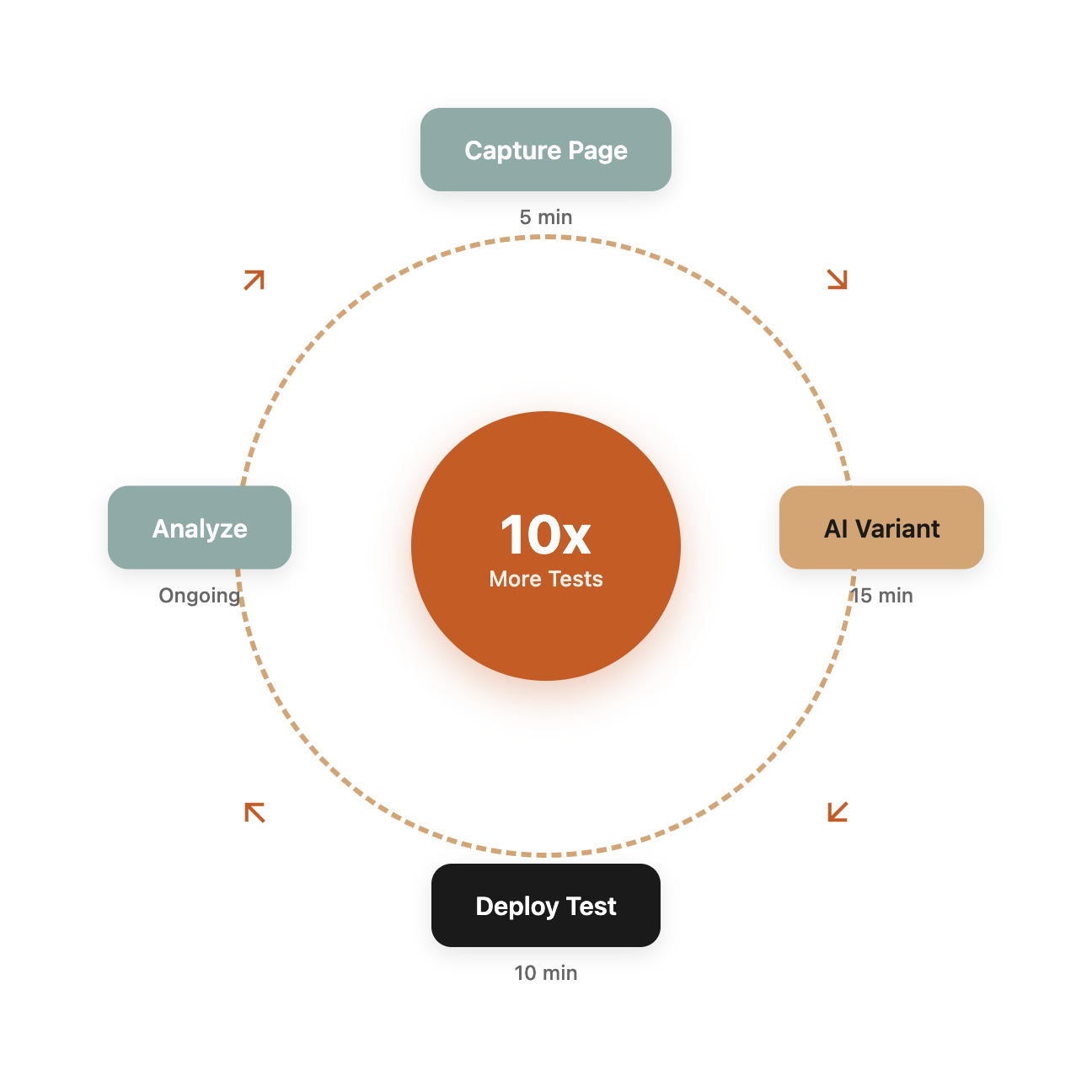
Step 1: AI-Assisted Hypothesis Generation
Good experiments start with good hypotheses. Bad hypotheses waste test cycles.
AI helps generate hypotheses by analyzing:
Behavioral data: Where do users drop off? What pages have high bounce rates? Where does engagement decline?
Best practices: What conversion principles apply to this page type? What's worked in similar contexts?
Psychological triggers: What objections might users have? What trust signals are missing? What friction points exist?
Sample AI-generated hypotheses:
"The checkout page shows shipping costs only after users enter address information, creating negative surprise. Hypothesis: Displaying estimated shipping earlier will reduce cart abandonment by 5-10% because users can budget accordingly before committing personal information."
"The pricing page has no social proof visible above the fold. Hypothesis: Adding customer logos and/or testimonial snippet above the fold will increase contact form submissions by 10-15% because B2B buyers need peer validation before engaging sales."
"The product page has generic 'Add to Cart' button copy. Hypothesis: Changing to benefit-focused copy ('Get Yours Today' or 'Start Improving') will increase add-to-cart rate by 3-5% because action-oriented copy creates urgency."
AI generates 5-10 hypotheses in minutes. Humans select the highest-impact options to test.
Step 2: Single-File HTML Capture
The magic starts with capturing the live page as a self-contained file.
Using SingleFile browser extension or CLI:
npx single-file https://example.com/pricing pricing-original.html
This creates a single HTML file containing:
- All HTML structure
- All CSS (inline, not linked)
- All JavaScript
- All images (as base64)
- All fonts (embedded)
The file opens locally and looks identical to the live page. No dependencies, no broken assets, no missing styles.
This captured file becomes your baseline. Modifications create variants.
Step 3: AI-Assisted Brand Extraction
Before modifying, extract the brand patterns. This ensures variants match the existing design language.
Feed the captured HTML to AI with this prompt:
"Analyze this HTML file and extract all brand styling as CSS custom properties (variables). Include: color palette, typography (fonts, sizes, weights), spacing patterns, border styles, shadow styles, button styles, and any component patterns. Output as a :root CSS block I can use for consistent styling."
Output example:
:root {
  --color-primary: #2563eb;
  --color-primary-hover: #1d4ed8;
  --color-secondary: #64748b;
  --color-text: #1e293b;
  --color-text-muted: #64748b;
  --color-background: #ffffff;
  --color-border: #e2e8f0;

  --font-heading: 'Inter', sans-serif;
  --font-body: 'Inter', sans-serif;
  --font-size-h1: 2.5rem;
  --font-size-body: 1rem;

  --spacing-sm: 0.5rem;
  --spacing-md: 1rem;
  --spacing-lg: 2rem;

  --radius-sm: 0.375rem;
  --radius-md: 0.5rem;
  --radius-full: 9999px;

  --shadow-sm: 0 1px 2px rgba(0,0,0,0.05);
  --shadow-md: 0 4px 6px rgba(0,0,0,0.1);
}
Now you can create variants that perfectly match the brand without guessing colors or referencing style guides.
Step 4: Variant Creation
With captured HTML and extracted variables, create the variant.
For copy changes: Direct text replacement in HTML For layout changes: Modify HTML structure For visual changes: Add CSS using extracted variables For element addition: Create new HTML using existing patterns
Example: Adding trust badges to pricing page
<!-- Add after pricing table -->
<div class="trust-badges" style="
  display: flex;
  justify-content: center;
  gap: var(--spacing-lg);
  padding: var(--spacing-lg);
  margin-top: var(--spacing-lg);
">
  <div class="badge">
    <img src="[security-badge-base64]" alt="256-bit SSL Encryption">
    <span style="color: var(--color-text-muted); font-size: 0.875rem;">Secure checkout</span>
  </div>
  <div class="badge">
    <img src="[guarantee-badge-base64]" alt="30-day guarantee">
    <span style="color: var(--color-text-muted); font-size: 0.875rem;">30-day money back</span>
  </div>
  <div class="badge">
    <img src="[support-badge-base64]" alt="24/7 support">
    <span style="color: var(--color-text-muted); font-size: 0.875rem;">24/7 support</span>
  </div>
</div>
The variant uses extracted CSS variables, ensuring perfect brand consistency.
Step 5: Deployment via Page Builder
No development deployment needed. Most sites use page builders (WordPress + Elementor/Beaver Builder, Webflow, Shopify sections, etc.) that accept custom HTML.
WordPress with Beaver Builder:
- Add row to page
- Add HTML module
- Paste variant HTML (including modified CSS in style tags)
- Publish
Webflow:
- Add Embed element
- Paste variant HTML
- Publish
Shopify:
- Add Custom Liquid section
- Paste variant HTML
- Save
From variant creation to live: 2-5 minutes.
Step 6: A/B Test Configuration
With both control and variant live (on different URLs or via A/B platform), configure the test:
Google Optimize (or similar):
- Define control and variant URLs
- Set traffic split (typically 50/50)
- Define conversion goals
- Set minimum sample size for statistical significance
- Launch test
Manual split (simpler):
- Create two landing page URLs
- Split traffic via ads or email
- Track conversions separately
- Compare after sufficient sample
03 / defensive-css-why-variants-dont-break
Defensive CSS: Why Variants Don't Break
The biggest risk with HTML injection: existing site styles override your variant styles, breaking the design.
Solution: Defensive CSS patterns.
Scope your styles:
.cro-variant-001 {
  all: initial; /* Nuclear reset */
  display: block;
  /* Rebuild only what you need */
}

.cro-variant-001 * {
  box-sizing: border-box;
}
Use high specificity:
body .page-content .cro-variant-001 .cta-button {
  background: var(--color-primary) !important;
  /* Specificity beats theme styles */
}
Avoid class name conflicts:
Use unique prefixes: .cro-v001- instead of generic .button or .card.
These patterns ensure your variant renders correctly regardless of theme CSS conflicts.
04 / the-experimentation-compound-effect
The Experimentation Compound Effect
Running 40 experiments per year instead of 4 changes everything.
Learning velocity:
- 4 experiments/year: You learn what doesn't work
- 40 experiments/year: You learn what works, what doesn't, and why
Compound gains:
- Average winning test: 5-15% improvement
- 4 wins per year at 10% each: 46% cumulative improvement
- But only 1-2 of 4 tests typically win
- 40 tests with 10 wins at 10% each: 159% cumulative improvement
Risk reduction:
- 4 tests means each test is high stakes
- 40 tests means each test is low stakes
- Low stakes enables bolder hypotheses
- Bolder hypotheses yield bigger wins
The math is clear: more experiments = more learning = better outcomes. This experimentation velocity is a key component of our AI-amplified marketing approach, built on AI tools for business automation that make rapid testing economically viable.
05 / what-to-test
What to Test
With 60-minute experiment cycles, you can test things that weren't worth the traditional investment.
High-impact candidates:
| Element | Why It Works |
|---|---|
| Headlines | First thing visitors see; huge impact on engagement |
| CTA copy | Small change, measurable conversion impact |
| Trust signals | Reduces friction for skeptical visitors |
| Form fields | Each field removed increases completion |
| Pricing presentation | Same price, different perception |
| Social proof placement | Validates decision at key moments |
| Urgency/scarcity | Creates action motivation |
| Risk reversal | Reduces perceived risk of action |
Previously "too small to test":
| Element | Now Worth Testing |
|---|---|
| Button color | Takes 10 minutes to test |
| Image swap | A/B different hero images quickly |
| Testimonial rotation | Which customer resonates most? |
| Benefit order | What matters most to visitors? |
| Navigation labels | Does wording affect click-through? |
When experiments are cheap, you can test more aggressively.
06 / tracking-and-analysis
Tracking and Analysis
Fast experiments require fast analysis.
Essential tracking:
- Conversion events (form submits, purchases, signups)
- Micro-conversions (scroll depth, time on page, clicks)
- Revenue per visitor (for e-commerce)
We track all of this through our AI-powered analytics system for comprehensive analysis.
Statistical rigor:
- Define minimum sample size before test (typically 1,000+ visitors per variant)
- Set significance threshold (typically 95%)
- Don't peek and stop early
- Run for full business cycle (at least 1-2 weeks)
AI-assisted analysis: Feed test results to AI for interpretation:
"Variant B increased form submissions by 12% (95% confidence interval: 7-17%). The improvement appears driven by mobile visitors specifically—mobile conversion increased 23% while desktop remained flat. This suggests the trust badges added in the variant address mobile-specific objections, possibly related to security concerns on smaller screens. Recommendation: Implement variant B; consider additional mobile-specific optimizations for next test."
07 / building-your-rapid-cro-capability
Building Your Rapid CRO Capability
You can implement this system today.
Tools needed:
- SingleFile extension or CLI (free)
- AI assistant (Claude, GPT-4) for hypothesis generation and brand extraction
- Page builder with HTML capability (most have this)
- A/B testing platform (VWO, Optimizely for advanced)
- Analytics for conversion tracking
Skills needed:
- Basic HTML/CSS (modify existing, not create from scratch)
- Hypothesis formation (follow templates)
- Statistical interpretation (basic significance understanding)
Process:
- Capture page
- Extract brand
- Generate hypotheses
- Create variant
- Deploy
- Test
- Analyze
- Implement winners
- Repeat
08 / start-your-first-rapid-experiment
Start Your First Rapid Experiment
Here's your action plan:
Today:
- Install SingleFile browser extension
- Capture your highest-traffic page
- Feed HTML to AI, request brand variable extraction (see our guide on automated style guide extraction)
This week:
- Generate 5 hypotheses using AI
- Select highest-impact hypothesis
- Create variant from captured HTML
- Deploy via page builder
This month:
- Run test to statistical significance
- Analyze results with AI assistance
- Implement winner or learn from loser
- Start next experiment
09 / let-us-run-your-experiments
Let Us Run Your Experiments
Want rapid CRO without building the capability? Our CRO & Analytics team runs experiments for you.
What you get:
- Hypothesis generation based on your data and goals
- Variant creation using our capture and modification system
- Deployment and test configuration
- Statistical analysis and recommendations
- Winner implementation
Investment: Starting at $2,000 per experiment, or $6,000/month for 4 experiments.
Contact us:
- Email: hello@wedoworldwide.com
- Website: wedoworldwide.com
Send us your highest-traffic page URL. We'll send back 3 hypothesis ideas within 24 hours. For the broader picture of how CRO fits into a complete AI marketing strategy, explore our guide on using AI for marketing.
About the Author: Mike McKearin is the founder of WE•DO Growth Agency. His team runs 500+ CRO experiments per year across 100+ clients using the rapid experimentation system described in this article. Average client conversion improvement: 23% annually.