New client onboards. You need to create landing pages, reports, email templates, and social graphics that match their brand.
The brand guidelines PDF is 47 pages of philosophy and 2 pages of actual specifications. The hex codes are there, but the web-specific applications aren't. Which blue for buttons? What's the hover state? How much padding? What's the font stack for fallbacks?
You spend 3 hours in browser DevTools reverse-engineering their live site. Or you guess and get revision requests.
AI-powered style guide extraction does this in 15 minutes. Point it at a website, get a complete web style guide with CSS variables, typography scales, and component patterns.
Here's how.
01 / the-style-guide-problem
The Style Guide Problem
Most brand guidelines fail web practitioners:
What brand guides provide:
- Logo files and clear space rules
- Color palette (often just primary colors)
- Typography (font names, maybe sizes)
- Voice and tone guidance
- Print specifications
What web developers need:
- Full color system (primary, secondary, backgrounds, borders, text variations)
- Typography scale (sizes, weights, line heights for all heading levels)
- Spacing system (consistent padding and margins)
- Interactive states (hover, focus, active for all elements)
- Component specifications (buttons, cards, forms, tables)
- CSS custom properties for consistent implementation
The gap between brand guide and web implementation is where inconsistency lives.
02 / the-15-minute-style-guide
The 15-Minute Style Guide
Our approach extracts web specifications directly from the client's live site.
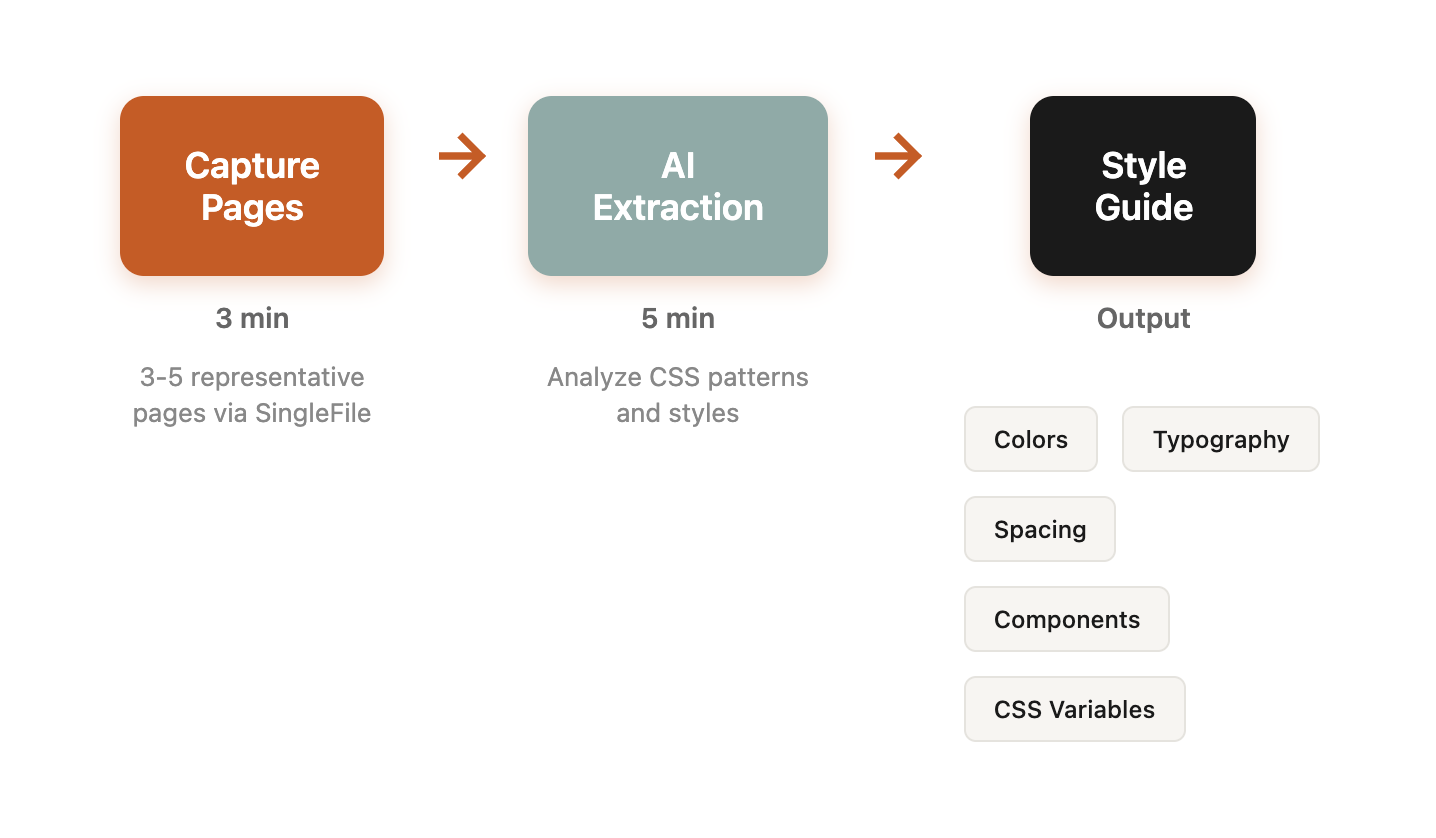
Step 1: Capture Representative Pages (3 minutes)
Using SingleFile, capture 3-5 pages that showcase the design system:
- Homepage (brand colors, hero treatment, navigation)
- Product/service page (content typography, CTAs, feature displays)
- Blog/content page (body typography, heading hierarchy)
- Contact or form page (form styling, input treatments)
These captured files contain all the CSS—both inline and embedded from stylesheets.
Step 2: AI Extraction (5 minutes)
Feed captured HTML files to AI with this prompt:
Analyze these HTML files and extract a comprehensive web style guide.

For each element, provide the actual values used on the site:

1. COLOR SYSTEM
- Primary brand colors (with hover/active states if visible)
- Secondary/accent colors
- Background colors (main, alternate sections, cards)
- Text colors (headings, body, muted, links)
- Border colors
- Status colors (success, warning, error if present)
Format as CSS custom properties with descriptive names

2. TYPOGRAPHY SYSTEM
- Font families (with fallback stacks)
- Heading sizes (h1-h6) with line heights and weights
- Body text size and line height
- Small/caption text
- Button/label text
Format as CSS custom properties

3. SPACING SYSTEM
- Section padding patterns
- Component margins
- Internal component padding
- Grid gaps if visible
Format as CSS custom properties (--spacing-xs through --spacing-3xl)

4. COMPONENT STYLES
- Button styles (padding, border-radius, shadows)
- Card styles (padding, border, shadow, radius)
- Input/form styles
- Table styles if present
Format as complete CSS rules using the custom properties

5. NOTES
- Any patterns that appear multiple times
- Inconsistencies observed (different blues, varying padding)
- Recommended standardization
Step 3: Human Refinement (5 minutes)
AI output needs human review:
- Verify extracted colors against brand guide (AI might pick up off-brand elements)
- Standardize any inconsistencies (pick one padding value, not three similar ones)
- Add missing elements based on anticipated needs
- Organize into logical groups
Step 4: Documentation Output (2 minutes)
Final output becomes a working style guide document:
/* ===== [CLIENT] Web Style Guide ===== */
/* Extracted from live site: [date] */

:root {
  /* === COLORS === */
  /* Primary */
  --color-primary: #2563eb;
  --color-primary-hover: #1d4ed8;
  --color-primary-light: #dbeafe;

  /* Secondary */
  --color-secondary: #64748b;
  --color-secondary-hover: #475569;

  /* Backgrounds */
  --color-bg-primary: #ffffff;
  --color-bg-secondary: #f8fafc;
  --color-bg-accent: #f1f5f9;

  /* Text */
  --color-text-primary: #1e293b;
  --color-text-secondary: #64748b;
  --color-text-muted: #94a3b8;
  --color-text-inverse: #ffffff;

  /* Borders */
  --color-border: #e2e8f0;
  --color-border-strong: #cbd5e1;

  /* Status */
  --color-success: #22c55e;
  --color-warning: #f59e0b;
  --color-error: #ef4444;

  /* === TYPOGRAPHY === */
  --font-family-heading: 'Inter', -apple-system, BlinkMacSystemFont, sans-serif;
  --font-family-body: 'Inter', -apple-system, BlinkMacSystemFont, sans-serif;
  --font-family-mono: 'Fira Code', monospace;

  --font-size-xs: 0.75rem;    /* 12px */
  --font-size-sm: 0.875rem;   /* 14px */
  --font-size-base: 1rem;     /* 16px */
  --font-size-lg: 1.125rem;   /* 18px */
  --font-size-xl: 1.25rem;    /* 20px */
  --font-size-2xl: 1.5rem;    /* 24px */
  --font-size-3xl: 1.875rem;  /* 30px */
  --font-size-4xl: 2.25rem;   /* 36px */
  --font-size-5xl: 3rem;      /* 48px */

  --line-height-tight: 1.25;
  --line-height-normal: 1.5;
  --line-height-relaxed: 1.75;

  --font-weight-normal: 400;
  --font-weight-medium: 500;
  --font-weight-semibold: 600;
  --font-weight-bold: 700;

  /* === SPACING === */
  --spacing-xs: 0.25rem;   /* 4px */
  --spacing-sm: 0.5rem;    /* 8px */
  --spacing-md: 1rem;      /* 16px */
  --spacing-lg: 1.5rem;    /* 24px */
  --spacing-xl: 2rem;      /* 32px */
  --spacing-2xl: 3rem;     /* 48px */
  --spacing-3xl: 4rem;     /* 64px */

  /* === BORDERS === */
  --radius-sm: 0.25rem;    /* 4px */
  --radius-md: 0.375rem;   /* 6px */
  --radius-lg: 0.5rem;     /* 8px */
  --radius-xl: 0.75rem;    /* 12px */
  --radius-full: 9999px;

  /* === SHADOWS === */
  --shadow-sm: 0 1px 2px 0 rgb(0 0 0 / 0.05);
  --shadow-md: 0 4px 6px -1px rgb(0 0 0 / 0.1);
  --shadow-lg: 0 10px 15px -3px rgb(0 0 0 / 0.1);
}

/* === COMPONENT STYLES === */

/* Buttons */
.btn {
  font-family: var(--font-family-body);
  font-size: var(--font-size-sm);
  font-weight: var(--font-weight-medium);
  padding: var(--spacing-sm) var(--spacing-lg);
  border-radius: var(--radius-md);
  transition: all 0.15s ease;
}

.btn-primary {
  background-color: var(--color-primary);
  color: var(--color-text-inverse);
}

.btn-primary:hover {
  background-color: var(--color-primary-hover);
}

/* Cards */
.card {
  background: var(--color-bg-primary);
  border: 1px solid var(--color-border);
  border-radius: var(--radius-lg);
  padding: var(--spacing-lg);
  box-shadow: var(--shadow-sm);
}
This becomes the source of truth for all deliverables.
03 / why-this-beats-manual-extraction
Why This Beats Manual Extraction
Speed: 15 minutes vs 3+ hours
Completeness: AI catches patterns humans miss. That slightly different gray used in one section? AI notes it.
Consistency: Extracted variables ensure every deliverable matches exactly. No "close enough" color picking.
Documentation: The output is immediately usable CSS, not notes that need translation.
Team alignment: Anyone on the team can use the style guide. No tribal knowledge required. This is part of our broader AI-amplified marketing approach.
04 / use-cases-beyond-initial-extraction
Use Cases Beyond Initial Extraction
Once you have the style guide, applications multiply:
Landing Page Creation
Building landing pages for a client? Start with their extracted variables:
<style>
  /* Import client's extracted style guide */
  :root { /* ... client variables ... */ }
</style>

<section style="background: var(--color-bg-secondary); padding: var(--spacing-3xl);">
  <h2 style="color: var(--color-text-primary); font-size: var(--font-size-3xl);">
    Headline Here
  </h2>
  <button class="btn btn-primary">
    Call to Action
  </button>
</section>
Perfect brand match, every time. This enables rapid CRO experiments that look like they were built by the client's team.
Report and Dashboard Styling
Client reports should match client branding:
.report-header {
  background: var(--color-primary);
  color: var(--color-text-inverse);
}

.report-metric {
  font-family: var(--font-family-heading);
  font-size: var(--font-size-2xl);
  color: var(--color-text-primary);
}

.report-chart-bar {
  background: var(--color-primary);
}
Reports feel like an extension of the client's brand, not a generic template. This is essential for our AI-powered client reporting at scale.
Email Templates
Email styling from the same variables:
<table style="font-family: 'Inter', Arial, sans-serif;">
  <tr>
    <td style="background: #2563eb; color: #ffffff; padding: 24px;">
      <!-- Header using client primary color -->
    </td>
  </tr>
  <tr>
    <td style="color: #1e293b; font-size: 16px; line-height: 1.5;">
      <!-- Body using client text colors -->
    </td>
  </tr>
</table>
Email requires inline styles, but the values come from the extracted guide.
CRO Experiment Variants
Testing landing page variants? Extracted styles ensure variants match the site:
.cro-variant-trust-badges {
  background: var(--color-bg-secondary);
  border: 1px solid var(--color-border);
  border-radius: var(--radius-lg);
  /* Matches site perfectly */
}
No "that doesn't look like our site" revision requests. This brand extraction technique powers our CRO & Analytics services—every test variant matches your brand perfectly.
05 / handling-edge-cases
Handling Edge Cases
Multiple Brand Variations
Some companies have sub-brands or campaign-specific styling:
- Extract each variation separately
- Name variables with variation prefix:
--corporate-primary,--campaign-primary - Document when to use each
Inconsistent Source Sites
Some sites have inconsistent styling (different designers over time):
- Note inconsistencies in the extraction
- Recommend standardization
- Pick the most common pattern as the baseline
Missing Elements
Source site doesn't have a component you need?
- Derive from existing patterns
- "Button has 8px radius, so cards should likely be 12px for visual hierarchy"
- Document as "derived" vs "extracted"
06 / building-this-into-your-workflow
Building This Into Your Workflow
For Agencies
New client onboarding checklist:
- Receive brand guidelines
- Extract web style guide from live site
- Compare extraction to guidelines (note gaps)
- Create master stylesheet with variables
- Use for all client deliverables
For In-House Teams
Maintain style guide as source of truth:
- Extract current state from production
- Document any deviations from intent
- Update extraction when site updates
- Use variables in all internal tools/templates
For Freelancers
Client project kickoff:
- Extract style guide before starting work
- Share with client for validation
- Use for all deliverables
- Include in project handoff
07 / start-today
Start Today
If you're spending hours matching client branding, here's your path:
Today:
- Install SingleFile browser extension
- Capture a client's homepage
- Run AI extraction prompt
- Review output quality
This week:
- Extract style guides for active clients
- Update your templates to use CSS variables
- Test on next deliverable
This month:
- Build extraction into new client onboarding
- Create template library using variable patterns
- Standardize team workflow around style guides
08 / let-us-handle-your-style-guides
Let Us Handle Your Style Guides
Want professional style guide extraction? We offer it as a service.
What you get:
- Comprehensive web style guide extraction
- CSS custom properties ready for implementation
- Component patterns documentation
- Recommendations for consistency improvements
Investment: $250 per style guide extraction.
Contact us:
- Email: hello@wedoworldwide.com
- Website: wedoworldwide.com
Send us a client URL. We'll send back sample extracted variables within 24 hours.
About the Author: Mike McKearin is the founder of WE•DO Growth Agency. His team extracts style guides for 100+ client websites, ensuring every deliverable matches the brand without hours of manual reverse-engineering.