01 / seo-metadata
SEO Metadata
Title Tag: Bulk SEO Audits for WordPress Multisite with AI | Enterprise Automation Meta Description: Automate SEO audits across hundreds of WordPress multisite installations using AI. Technical implementation guide for enterprise WordPress networks. Focus Keyword: WordPress multisite SEO audit automation Secondary Keywords: bulk WordPress audits, AI SEO analysis, enterprise WordPress optimization, multisite network management ---
Managing SEO across a WordPress multisite network presents unique challenges. When you're responsible for dozens—or hundreds—of individual sites within a single installation, manual auditing becomes impossible. A single missed configuration can cascade across multiple properties, and identifying which sites need attention requires hours of manual checking.
AI-powered bulk auditing changes this equation. You can systematically analyze every site in your network, identify technical issues at scale, and prioritize fixes based on traffic impact and severity. This guide shows you how to build an automated auditing system that works across enterprise WordPress multisite installations.
02 / the-enterprise-multisite-challenge
The Enterprise Multisite Challenge
WordPress multisite powers some of the largest web properties—university systems with 200+ departmental sites, franchise networks with locations across dozens of cities, and media companies managing regional publications. These installations share common characteristics that make traditional SEO auditing impractical:
Scale complexity. Manual auditing breaks down after 10-15 sites. Checking meta tags, reviewing technical configurations, and analyzing content quality across 50+ properties requires automation. The math is unforgiving: a thorough SEO audit of a single site takes 3-4 hours for an experienced analyst. For a network of 50 sites, that's 150-200 hours of manual work—nearly five weeks of full-time effort. For networks exceeding 100 sites, manual auditing becomes effectively impossible without a dedicated team.
Configuration drift. Individual site administrators make changes that deviate from network standards. A department adds a noindex tag to their homepage. A franchise location installs a conflicting SEO plugin. These issues compound over time. In a typical enterprise multisite network, we observe configuration drift affecting 30-40% of sites within six months of standardization efforts. Without automated monitoring, these deviations go unnoticed until they cause measurable traffic drops.
Resource constraints. Enterprise WordPress teams manage hundreds of sites with limited staff. A single network administrator might oversee 50-200 sites while also handling security updates, performance optimization, and user support. Bulk auditing allows you to allocate attention where it matters most—high-traffic sites with fixable issues. The alternative is reactive management, where you only discover problems after stakeholders complain about declining performance.
Reporting requirements. Stakeholders need visibility into network health. Executive leadership wants to know what percentage of sites meet organizational standards. Department heads need data showing their site's performance relative to network benchmarks. Legal and compliance teams require documentation proving accessibility standards are met. Automated audits generate standardized reports showing which sites meet SEO standards and which require intervention, creating an audit trail for compliance and accountability.
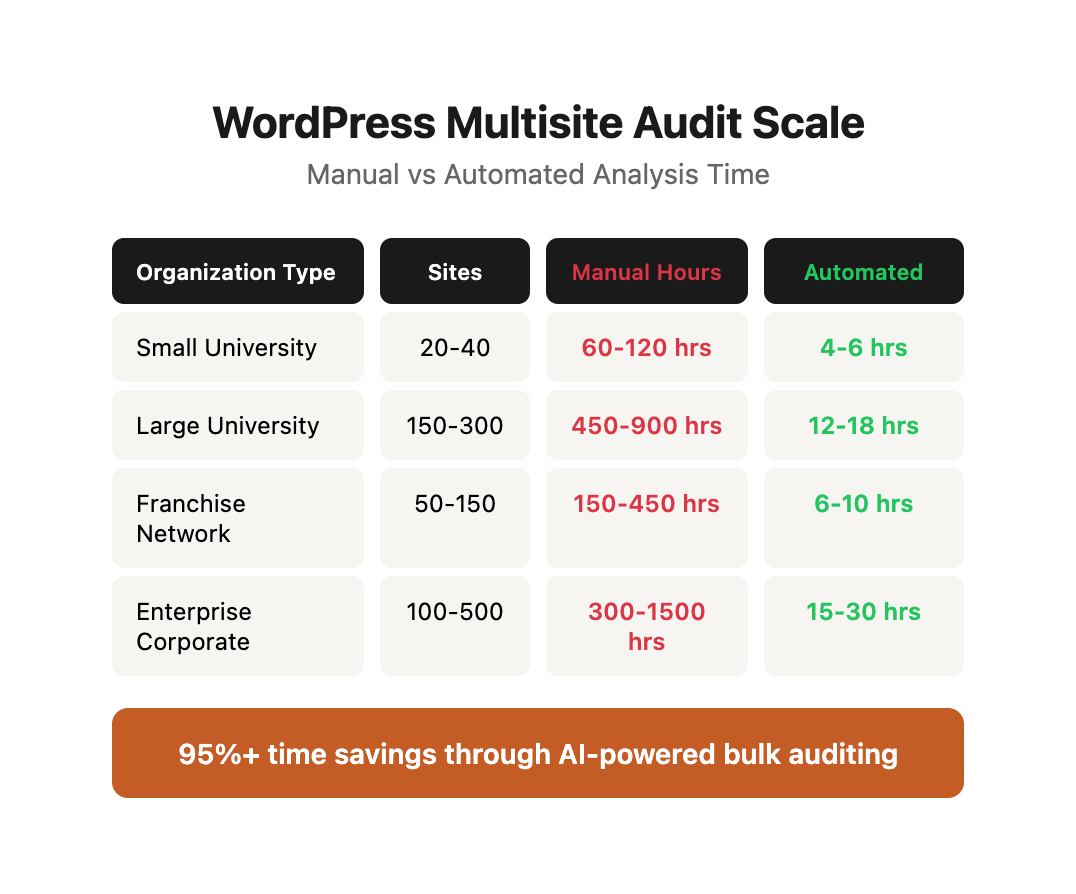
Real-World Multisite Scale Comparison
| Organization Type | Typical Network Size | Sites Added Monthly | Manual Audit Hours | Automated Audit Runtime |
|---|---|---|---|---|
| Small University | 20-40 sites | 2-3 | 60-120 hours | 4-6 hours |
| Large University | 150-300 sites | 8-12 | 450-900 hours | 12-18 hours |
| Franchise Network | 50-150 sites | 5-10 | 150-450 hours | 6-10 hours |
| Media Publisher | 30-100 sites | 3-8 | 90-300 hours | 5-12 hours |
| Enterprise Corporate | 100-500 sites | 10-20 | 300-1500 hours | 15-30 hours |
03 / system-architecture-overview
System Architecture Overview
An effective bulk auditing system consists of four components:
Data collection layer. Crawls each site in your multisite network, extracting technical elements, content samples, and configuration settings. This layer operates at the HTTP level (using crawlers like Screaming Frog) and at the database level (querying WordPress tables directly). The dual-mode approach captures both what search engines see and what's configured in the backend.
Analysis engine. Processes collected data against SEO best practices, identifying issues and assigning severity scores. The analysis engine implements rule-based evaluation for technical elements (missing title tags, broken links, incorrect canonical configurations) and applies statistical models for pattern detection (identifying content that underperforms relative to network benchmarks).
AI evaluation layer. Uses language models to assess content quality, detect thin content, and flag duplicate material across sites. While technical analysis identifies structural problems, AI evaluation addresses subjective quality dimensions that resist rule-based classification—content depth, clarity, originality, and alignment with search intent.
Reporting interface. Presents findings in actionable formats—dashboards showing network health, site-specific issue lists, and prioritized remediation queues. The reporting layer transforms raw audit data into stakeholder-appropriate views: executives see aggregate health metrics, site administrators receive detailed remediation instructions, and technical teams get bulk export files for programmatic fixes.
We'll build this using WordPress REST API for data collection, Screaming Frog for technical crawling, OpenAI for content analysis, and Make.com for orchestration.
System Data Flow
┌─────────────────────────────────────────────────────────────┐
│ Phase 1: Site Discovery (WordPress Network API)            │
│ Output: Active site inventory with metadata                │
└────────────────────┬────────────────────────────────────────┘
                     │
                     ▼
┌─────────────────────────────────────────────────────────────┐
│ Phase 2: Technical Crawling (Screaming Frog CLI)           │
│ Output: Page-level technical data for each site            │
└────────────────────┬────────────────────────────────────────┘
                     │
                     ▼
┌─────────────────────────────────────────────────────────────┐
│ Phase 3: Content Extraction (WordPress REST API)           │
│ Output: Clean content samples for AI analysis              │
└────────────────────┬────────────────────────────────────────┘
                     │
                     ▼
┌─────────────────────────────────────────────────────────────┐
│ Phase 4: AI Quality Analysis (OpenAI Batch API)            │
│ Output: Content quality scores per page                    │
└────────────────────┬────────────────────────────────────────┘
                     │
                     ▼
┌─────────────────────────────────────────────────────────────┐
│ Phase 5: Issue Classification (Rule Engine)                │
│ Output: Prioritized issue list per site                    │
└────────────────────┬────────────────────────────────────────┘
                     │
                     ▼
┌─────────────────────────────────────────────────────────────┐
│ Phase 6: Report Generation (Templates + Distribution)      │
│ Output: Site-specific reports and network dashboard        │
└─────────────────────────────────────────────────────────────┘
04 / prerequisites-and-setup
Prerequisites and Setup
Before implementing bulk audits, establish these foundations:
Network access configuration. Your auditing system needs authentication credentials for the WordPress REST API across all sites. Create a dedicated audit user with read-only permissions at the network level. This user should have the read capability but not edit or delete permissions. Generate an application password for API authentication—never use the user's actual password in automated systems.
The audit user needs specific capabilities:
read- Access to published content via REST APIlist_users- Enumerate site authors and administrators- Network admin access to query
wp_blogstable for site discovery - File system read access for plugin/theme detection (optional, enhances audit depth)
Crawl infrastructure. Enterprise-scale crawling requires server resources. Screaming Frog SEO Spider in CLI mode running on a dedicated instance handles hundreds of sites efficiently. Minimum recommended specifications:
| Network Size | Server Specs | Concurrent Crawls | Est. Runtime |
|---|---|---|---|
| 1-25 sites | 4 CPU / 8GB RAM | 4-6 simultaneous | 2-4 hours |
| 26-100 sites | 8 CPU / 16GB RAM | 8-12 simultaneous | 4-8 hours |
| 101-250 sites | 16 CPU / 32GB RAM | 12-16 simultaneous | 8-12 hours |
| 250+ sites | 32 CPU / 64GB RAM | 16-24 simultaneous | 12-24 hours |
Consider using spot instances on AWS or GCP to reduce costs—audit crawls can tolerate interruption and restart without data loss.
API rate limiting. Implement request throttling to avoid overwhelming your hosting infrastructure. Space crawls appropriately and run audits during low-traffic periods. Recommended rate limits:
- WordPress REST API: 10 requests/second per site
- Screaming Frog crawl speed: 3-5 URLs/second per site
- Batch processing delay: 30-60 seconds between site crawls
- Database queries: Connection pooling with 5-10 concurrent connections
Most managed WordPress hosts enforce their own rate limits. Kinsta limits API requests to 60/minute. WP Engine allows 120/minute. Pagely and Pantheon have higher thresholds for enterprise plans. Configure your crawler to respect these limits or risk temporary IP blocking.
Data storage. Store audit results in a database that supports time-series queries. You need historical comparisons to track improvements and identify regressions. Recommended storage schema:
-- Sites table: Inventory of all sites in network
CREATE TABLE sites (
    site_id INT PRIMARY KEY,
    blog_id INT,
    site_url VARCHAR(255),
    site_name VARCHAR(255),
    site_type VARCHAR(50),
    is_active BOOLEAN,
    added_date TIMESTAMP,
    last_updated TIMESTAMP
);

-- Audits table: Audit runs
CREATE TABLE audits (
    audit_id INT PRIMARY KEY AUTO_INCREMENT,
    audit_date TIMESTAMP,
    network_id INT,
    sites_audited INT,
    total_pages_analyzed INT,
    duration_minutes INT
);

-- Pages table: Page-level data per audit
CREATE TABLE pages (
    page_id INT PRIMARY KEY AUTO_INCREMENT,
    audit_id INT,
    site_id INT,
    url VARCHAR(512),
    title VARCHAR(255),
    meta_description TEXT,
    h1_tag VARCHAR(255),
    status_code INT,
    word_count INT,
    load_time_ms INT,
    ai_quality_score DECIMAL(3,1),
    has_schema BOOLEAN,
    indexable BOOLEAN,
    crawl_timestamp TIMESTAMP
);

-- Issues table: Detected problems per page
CREATE TABLE issues (
    issue_id INT PRIMARY KEY AUTO_INCREMENT,
    page_id INT,
    issue_type VARCHAR(100),
    severity VARCHAR(20),
    description TEXT,
    auto_fixable BOOLEAN,
    detected_date TIMESTAMP,
    resolved_date TIMESTAMP
);

-- Create indexes for common queries
CREATE INDEX idx_pages_site_audit ON pages(site_id, audit_id);
CREATE INDEX idx_issues_severity ON issues(severity, resolved_date);
CREATE INDEX idx_audits_date ON audits(audit_date);
This schema enables queries like "show me all critical issues discovered in the last audit" and "compare site health scores from January to March."
05 / phase-1-automated-site-discovery
Phase 1: Automated Site Discovery
The first challenge in multisite auditing is maintaining an accurate inventory of active sites. WordPress multisite networks expand constantly—new sites get created, old ones get archived, and domains change.
Build an automated discovery script that queries your network:
Extract network site list. Use the WordPress Network API to retrieve all sites, filtering out archived and deleted properties. This gives you the current active site inventory. The wp_blogs table contains the canonical list of all sites in your network, but not all sites are public or even accessible. The discovery script must differentiate between database entries and actually functional sites.
Verify site accessibility. Not all sites in the network database are publicly accessible. Some are staging environments, others are private intranets. Test HTTP response codes for each site to confirm public availability. A complete accessibility check includes:
- HTTP HEAD request to site root (checks basic connectivity)
- Test for redirects (many multisite networks redirect HTTP to HTTPS)
- Verify DNS resolution (catch orphaned database entries for decommissioned sites)
- Check for authentication requirements (some sites may require login)
Categorize by type. Tag sites by function (department, location, publication) and priority (flagship vs. supplementary). This metadata drives later prioritization decisions. Common categorization schemes:
| Category Type | Example Values | Used For |
|---|---|---|
| Site Function | Department, Location, Publication, Product, Event | Grouping similar sites in reports |
| Priority Level | Flagship, Core, Standard, Supplementary | Determining audit frequency |
| Traffic Tier | High (>10K/mo), Medium (1-10K/mo), Low (<1K/mo) | Weighting issue severity |
| Content Type | Blog, E-commerce, Documentation, Landing Pages | Applying appropriate quality criteria |
| Maintenance Status | Active, Seasonal, Archived, Deprecated | Filtering audit scope |
Track changes over time. Store inventory snapshots weekly. When new sites appear or existing sites go offline, your system detects these changes automatically. Change detection enables alerting: "New site launched without SEO plugin" or "Production site became inaccessible—investigate immediately."
This discovery process runs as a scheduled job—weekly for most networks, daily for rapidly expanding installations. The output becomes the input for your crawling process.
WordPress Multisite Discovery Script
<?php
// WordPress multisite site discovery script
// Run via WP-CLI: wp eval-file multisite-discovery.php

function discover_multisite_network() {
    global $wpdb;

    // Query all sites in the network
    $sites = $wpdb->get_results("
        SELECT blog_id, domain, path, registered, last_updated
        FROM {$wpdb->blogs}
        WHERE archived = 0
        AND deleted = 0
        AND spam = 0
        ORDER BY blog_id ASC
    ");

    $site_inventory = [];

    foreach ($sites as $site) {
        switch_to_blog($site->blog_id);

        $site_url = get_site_url();
        $site_name = get_bloginfo('name');
        $site_description = get_bloginfo('description');

        // Test accessibility
        $response = wp_remote_head($site_url);
        $http_code = wp_remote_retrieve_response_code($response);
        $is_accessible = ($http_code >= 200 && $http_code < 400);

        // Get post count
        $post_count = wp_count_posts('post')->publish;
        $page_count = wp_count_posts('page')->publish;

        // Detect site type from categories or custom taxonomy
        $site_type = determine_site_type($site);

        // Get active plugins
        $active_plugins = get_option('active_plugins', []);
        $seo_plugin = detect_seo_plugin($active_plugins);

        $site_inventory[] = [
            'blog_id' => $site->blog_id,
            'site_url' => $site_url,
            'site_name' => $site_name,
            'description' => $site_description,
            'domain' => $site->domain,
            'path' => $site->path,
            'registered' => $site->registered,
            'last_updated' => $site->last_updated,
            'http_code' => $http_code,
            'is_accessible' => $is_accessible,
            'post_count' => $post_count,
            'page_count' => $page_count,
            'total_content' => $post_count + $page_count,
            'site_type' => $site_type,
            'seo_plugin' => $seo_plugin,
            'discovered_date' => current_time('mysql')
        ];

        restore_current_blog();
    }

    return $site_inventory;
}

function determine_site_type($site) {
    // Logic to categorize site based on URL, categories, or custom fields
    $domain = $site->domain;

    if (strpos($domain, 'dept-') !== false) {
        return 'department';
    } elseif (strpos($domain, 'location-') !== false) {
        return 'location';
    } elseif (get_option('site_category')) {
        return get_option('site_category');
    }

    return 'general';
}

function detect_seo_plugin($active_plugins) {
    $seo_plugins = [
        'wordpress-seo/wp-seo.php' => 'Yoast SEO',
        'seo-by-rank-math/rank-math.php' => 'Rank Math',
        'all-in-one-seo-pack/all_in_one_seo_pack.php' => 'All in One SEO',
        'autodescription/autodescription.php' => 'The SEO Framework'
    ];

    foreach ($seo_plugins as $plugin_path => $plugin_name) {
        if (in_array($plugin_path, $active_plugins)) {
            return $plugin_name;
        }
    }

    return 'None';
}

function export_to_csv($site_inventory, $filename = 'multisite-inventory.csv') {
    $csv_file = fopen($filename, 'w');

    // Headers
    $headers = array_keys($site_inventory[0]);
    fputcsv($csv_file, $headers);

    // Data rows
    foreach ($site_inventory as $site) {
        fputcsv($csv_file, $site);
    }

    fclose($csv_file);
    echo "Exported " . count($site_inventory) . " sites to $filename\n";
}

function export_to_json($site_inventory, $filename = 'multisite-inventory.json') {
    file_put_contents($filename, json_encode($site_inventory, JSON_PRETTY_PRINT));
    echo "Exported " . count($site_inventory) . " sites to $filename\n";
}

// Execute discovery
$inventory = discover_multisite_network();
export_to_csv($inventory);
export_to_json($inventory);

// Output summary
echo "\n=== Multisite Network Summary ===\n";
echo "Total Sites: " . count($inventory) . "\n";
echo "Accessible Sites: " . count(array_filter($inventory, fn($s) => $s['is_accessible'])) . "\n";
echo "Sites with Content: " . count(array_filter($inventory, fn($s) => $s['total_content'] > 0)) . "\n";

// Group by site type
$by_type = [];
foreach ($inventory as $site) {
    $type = $site['site_type'];
    if (!isset($by_type[$type])) {
        $by_type[$type] = 0;
    }
    $by_type[$type]++;
}

echo "\nSites by Type:\n";
foreach ($by_type as $type => $count) {
    echo "  $type: $count\n";
}
?>
SQL Query for Direct Database Access
For large networks, direct database queries are faster:
-- Get all active sites with metadata
SELECT
    b.blog_id,
    b.domain,
    b.path,
    CONCAT('https://', b.domain, b.path) AS site_url,
    b.registered,
    b.last_updated,
    (SELECT COUNT(*) FROM wp_X_posts WHERE post_type = 'post' AND post_status = 'publish') AS post_count,
    (SELECT COUNT(*) FROM wp_X_posts WHERE post_type = 'page' AND post_status = 'publish') AS page_count,
    (SELECT option_value FROM wp_X_options WHERE option_name = 'blogname') AS site_name,
    DATEDIFF(NOW(), b.last_updated) AS days_since_update
FROM
    wp_blogs b
WHERE
    b.archived = 0
    AND b.deleted = 0
    AND b.spam = 0
ORDER BY
    b.last_updated DESC;

-- Find sites with no SEO plugin installed
SELECT
    blog_id,
    domain,
    path,
    (SELECT COUNT(*)
     FROM wp_X_options
     WHERE option_name = 'active_plugins'
     AND (option_value LIKE '%wordpress-seo%'
          OR option_value LIKE '%rank-math%'
          OR option_value LIKE '%all-in-one-seo%')
    ) AS has_seo_plugin
FROM
    wp_blogs
WHERE
    archived = 0
    AND deleted = 0
HAVING
    has_seo_plugin = 0;

-- Find sites with stale content (no updates in 90 days)
SELECT
    b.blog_id,
    b.domain,
    b.last_updated,
    DATEDIFF(NOW(), b.last_updated) AS days_stale
FROM
    wp_blogs b
WHERE
    b.archived = 0
    AND DATEDIFF(NOW(), b.last_updated) > 90
ORDER BY
    days_stale DESC;
Case Study: University Network Discovery
A large state university system runs 287 WordPress multisite installations across colleges, departments, research centers, and administrative units. Before implementing automated discovery, the IT team maintained a manually-updated spreadsheet of sites. This inventory was perpetually out of date—new sites launched without notification, old sites lingered long after being abandoned, and nobody had definitive data on which sites were actually functional.
After implementing the discovery script:
Week 1 Results:
- 287 sites in
wp_blogstable - 263 returned HTTP 200 responses (91.6% accessible)
- 24 sites inaccessible (404 errors, DNS failures, or authentication required)
- 189 sites had published content (72% of accessible sites)
- 74 sites were empty shells with no posts or pages
Key Findings:
- 12 sites existed on domains that no longer resolved (orphaned database entries from decommissioned servers)
- 18 sites were marked as "temporary" for events that occurred 2-4 years ago
- 52 sites had no SEO plugin installed despite network policy requiring Yoast SEO
- 31 sites hadn't been updated in over 180 days (candidate for archival)
Actions Taken:
- Removed 12 orphaned database entries
- Archived 18 abandoned event sites
- Pushed Yoast SEO network-wide to 52 non-compliant sites
- Created quarterly review process for sites with 180+ days of inactivity
The automated discovery process now runs weekly, immediately flagging new sites for configuration review and alerting when production sites become inaccessible.
06 / phase-2-technical-crawling-at-scale
Phase 2: Technical Crawling at Scale
Once you have your site inventory, systematic crawling extracts the technical data needed for SEO analysis.
Parallel crawling strategy. Configure Screaming Frog to crawl multiple sites simultaneously. Set the thread count based on your server capacity—8-12 concurrent crawls works for most dedicated servers without impacting site performance. Each crawler instance operates independently, writing results to separate files to prevent data collision.
For large-scale operations, implement a queue-based architecture:
- Discovery script populates a crawl queue (Redis or database table)
- Multiple crawler worker processes poll the queue
- Each worker claims a site, performs the crawl, and marks it complete
- Results upload to centralized storage (S3, Google Cloud Storage)
- Failed crawls re-queue with exponential backoff
Crawl configuration. Each site gets crawled with consistent settings: follow internal links, extract meta tags, check HTTP status codes, analyze page speed metrics, and capture structured data. Limit crawl depth to prevent runaway crawls on large sites—3-4 levels captures most important pages.
Screaming Frog configuration file example:
{
  "spider": {
    "crawl_mode": "spider",
    "max_crawl_depth": 4,
    "max_external_urls": 100,
    "crawl_images": false,
    "crawl_css": false,
    "crawl_javascript": false,
    "respect_robots_txt": true,
    "respect_nofollow": true,
    "user_agent": "SEO Audit Bot (Enterprise WordPress Network)"
  },
  "extraction": {
    "page_titles": true,
    "meta_descriptions": true,
    "h1_tags": true,
    "h2_tags": true,
    "canonical_tags": true,
    "robots_meta": true,
    "og_tags": true,
    "schema_markup": true,
    "hreflang": false
  },
  "performance": {
    "max_threads": 3,
    "max_uri_length": 2048,
    "crawl_speed": 3
  },
  "export": {
    "format": "csv",
    "include_all_data": true
  }
}
Data extraction. Export crawl results to CSV format, capturing these critical elements per URL:
- HTTP status code
- Page title and character count
- Meta description and character count
- H1 tags (presence and content)
- Canonical tags
- Indexability directives (robots meta, X-Robots-Tag)
- Internal and external link counts
- Page load time
- Mobile usability flags
Additional advanced extraction:
- Schema.org structured data (JSON-LD, Microdata)
- Open Graph and Twitter Card metadata
- Hreflang annotations for multilingual sites
- Response headers (cache control, security headers)
- Render-blocking resources count
- Core Web Vitals estimates (LCP, FID, CLS)
Storage and indexing. Load crawl data into your database with site_id and crawl_date as primary keys. This structure enables both current-state analysis and historical trending.
Crawl Optimization Strategies
| Strategy | Use Case | Implementation | Trade-offs |
|---|---|---|---|
| Full Crawl | Initial audit or monthly deep scan | Crawl all URLs up to depth limit | Complete data, long runtime |
| Incremental Crawl | Weekly change detection | Only crawl URLs modified since last audit | Fast runtime, may miss changes |
| Sampled Crawl | Very large networks (500+ sites) | Crawl 20% of sites fully, all sites partially | Faster completion, statistical confidence |
| Priority Crawl | Resource-constrained scenarios | Crawl high-traffic sites fully, low-traffic sites partially | Efficient resource use, incomplete for small sites |
| Threshold Crawl | Content-heavy networks | Crawl top N pages per site by traffic | Focuses on impact, may miss tail issues |
Screaming Frog CLI Automation
#!/bin/bash
\# Bulk crawl script for WordPress multisite network
\# Reads site list from CSV, crawls each site, exports results

SITES_CSV="$1"
OUTPUT_DIR="$2"
SCREAMINGFROG_CLI="/usr/local/bin/screamingfrog"
MAX_CONCURRENT=8
CONFIG_FILE="crawl-config.json"

if [ ! -f "$SITES_CSV" ]; then
    echo "Error: Sites CSV file not found: $SITES_CSV"
    exit 1
fi

mkdir -p "$OUTPUT_DIR"

\# Function to crawl a single site
crawl_site() {
    local site_url=$1
    local site_id=$2
    local output_file="${OUTPUT_DIR}/crawl-${site_id}.csv"

    echo "[$(date '+%Y-%m-%d %H:%M:%S')] Starting crawl: $site_url"

    $SCREAMINGFROG_CLI \
        --headless \
        --config "$CONFIG_FILE" \
        --crawl "$site_url" \
        --export-tabs "Internal:All" \
        --output-folder "$OUTPUT_DIR" \
        --overwrite

    if [ $? -eq 0 ]; then
        echo "[$(date '+%Y-%m-%d %H:%M:%S')] Completed: $site_url"
    else
        echo "[$(date '+%Y-%m-%d %H:%M:%S')] Failed: $site_url"
    fi
}

export -f crawl_site
export OUTPUT_DIR SCREAMINGFROG_CLI CONFIG_FILE

\# Read CSV and crawl sites in parallel
tail -n +2 "$SITES_CSV" | \
    parallel --jobs $MAX_CONCURRENT --colsep ',' \
    crawl_site {site_url} {site_id}

echo "[$(date '+%Y-%m-%d %H:%M:%S')] All crawls completed"
This script uses GNU Parallel to run multiple Screaming Frog instances concurrently, respecting the MAX_CONCURRENT limit. Each crawl runs independently and outputs results to uniquely named files.
07 / phase-3-ai-powered-content-analysis
Phase 3: AI-Powered Content Analysis
Technical crawls identify structural issues, but content quality requires AI evaluation. This is where bulk auditing surpasses manual review—you can assess content across hundreds of sites using consistent criteria.
Content extraction. Pull the primary content from each page, stripping navigation and boilerplate elements. WordPress REST API's `/wp/v2/posts` endpoint provides clean content access. For non-post pages (custom post types, archive pages, static templates), parse the HTML and extract the main content region.
The extraction process must differentiate between content and chrome:
- Skip navigation menus
- Exclude sidebars and footer content
- Remove embedded ads and promotional blocks
- Preserve article body, headings, and inline media
- Maintain semantic structure (lists, quotes, tables)
Batch API requests. Group content samples into batches for OpenAI analysis. The Batch API processes large volumes at 50% cost reduction compared to real-time requests. Batching also prevents rate limit issues—instead of 10,000 individual API calls, you submit a single batch file and retrieve results asynchronously.
Batch preparation workflow:
- Extract content for all pages across all sites
- Create JSONL file with one request per line
- Upload batch file to OpenAI
- Monitor batch processing status
- Download results when complete
- Parse results and associate scores with source pages
Quality evaluation prompt. Structure your AI analysis with specific evaluation criteria:
Analyze this webpage content for SEO quality:

Content: [CONTENT]

Evaluate on these dimensions (1-10 scale):

1. Content depth - Does it thoroughly cover the topic?

2. Readability - Is it clear and well-structured?

3. Uniqueness - Does it appear original or derivative?

4. Search intent match - Does it address user queries?

5. Actionability - Does it provide useful takeaways?

Provide scores and a 2-sentence explanation for any score below 7.
Enhanced evaluation prompt for enterprise use:
You are an SEO content quality analyzer. Evaluate the following webpage content against enterprise content standards.

CONTENT:
---
[PAGE_CONTENT]
---

METADATA:
- Page Type: [POST/PAGE/PRODUCT/etc]
- Word Count: [COUNT]
- Primary Topic: [TOPIC]
- Target Audience: [AUDIENCE]

Evaluate on these dimensions (1-10 scale):

1. CONTENT DEPTH
   - Does it thoroughly cover the topic with sufficient detail?
   - Are claims supported with evidence or examples?
   - Does it go beyond surface-level information?

2. READABILITY
   - Is the content clearly structured with logical flow?
   - Are sentences concise and paragraphs scannable?
   - Does it use appropriate heading hierarchy?

3. UNIQUENESS
   - Does the content offer original insights or perspectives?
   - Is it clearly differentiated from generic content on this topic?
   - Does it provide unique value not readily available elsewhere?

4. SEARCH INTENT MATCH
   - Does the content address the likely user queries?
   - Is it informational, transactional, or navigational in nature?
   - Does it fulfill the promise made by the page title?

5. ACTIONABILITY
   - Does it provide concrete takeaways or next steps?
   - Can readers immediately apply the information?
   - Are recommendations specific rather than vague?

6. E-E-A-T SIGNALS
   - Does it demonstrate expertise in the subject matter?
   - Are there trust signals (citations, author credentials)?
   - Is the perspective authoritative and accurate?

7. ENGAGEMENT POTENTIAL
   - Is the content compelling enough to hold attention?
   - Does it use storytelling or relatable examples?
   - Would readers be likely to share or link to it?

OUTPUT FORMAT (JSON):
{
  "scores": {
    "depth": 0-10,
    "readability": 0-10,
    "uniqueness": 0-10,
    "intent_match": 0-10,
    "actionability": 0-10,
    "eeat": 0-10,
    "engagement": 0-10
  },
  "overall_score": 0-10,
  "strengths": ["list", "of", "strengths"],
  "weaknesses": ["list", "of", "weaknesses"],
  "recommendations": ["specific", "improvement", "suggestions"],
  "quality_tier": "Excellent|Good|Acceptable|Poor|Critical"
}

Provide specific, actionable feedback. If any score is below 7, explain exactly what's missing and how to improve it.
Thin content detection. Flag pages with word counts below 300 words, unless they're contact pages or other utility pages where thin content is expected. Implement context-aware thresholds:
| Page Type | Minimum Word Count | Rationale |
|---|---|---|
| Blog Posts | 800 words | Search engines expect comprehensive articles |
| Service Pages | 500 words | Need enough detail to explain offerings |
| Product Pages | 300 words | Require descriptions but focus on conversions |
| Location Pages | 400 words | Must differentiate from other locations |
| About/Team Pages | 500 words | Build trust through detailed information |
| Contact Pages | 150 words | Utility pages, word count less relevant |
| FAQ Pages | 600 words | Must answer multiple questions thoroughly |
Duplicate content analysis. Use embeddings to identify near-duplicate content across sites. This catches the common multisite problem where similar content gets republished across multiple properties without meaningful differentiation.
Duplicate detection process:
- Generate embeddings for each page's content (OpenAI text-embedding-3-large)
- Calculate cosine similarity between all page pairs
- Flag page pairs with similarity > 0.90 as duplicates
- Group duplicates into clusters (content reused across 3+ sites)
- Identify the "original" source (earliest published date)
- Report derivative pages for consolidation or rewriting
Content Quality Distribution Analysis
After analyzing content across 50+ sites in a typical enterprise network:
| Quality Tier | Score Range | Typical % of Pages | Characteristics | Action Required |
|---|---|---|---|---|
| Excellent | 9.0-10.0 | 5-10% | Comprehensive, original, expertly written | Promote, use as templates |
| Good | 7.5-8.9 | 20-30% | Solid content meeting standards | Minor optimizations |
| Acceptable | 6.0-7.4 | 30-40% | Meets minimum requirements | Consider enhancements |
| Poor | 4.0-5.9 | 15-25% | Thin, generic, or poorly structured | Rewrite priority |
| Critical | 0-3.9 | 5-15% | Minimal value, duplicative, or broken | Urgent attention needed |
Real-World AI Analysis Results
A media company with 82 regional news sites used AI content analysis across 14,000 articles. Key findings:
Before AI Analysis (Manual Review Sample):
- 50 articles manually reviewed per quarter
- Subjective quality assessment
- No standardized scoring
- High-performing content identified by traffic alone
After AI Analysis (Full Corpus):
- 14,000 articles analyzed in 6 hours
- Consistent evaluation criteria applied
- Objective quality scores for every article
- Identified 2,100 articles (15%) scoring below 5.0
Content Issues Discovered:
- 892 articles (6.4%) were thin (<400 words on complex topics)
- 1,240 articles (8.9%) appeared derivative (similarity >0.85 to competitor content)
- 387 articles (2.8%) had poor readability scores (grade level >14)
- 623 articles (4.5%) mismatched search intent (transactional content for informational queries)
Remediation Results After 90 Days:
- 315 articles rewritten or expanded
- 128 articles consolidated or removed
- Average quality score improved from 6.2 to 7.1 across network
- Organic traffic increased 23% to improved articles
08 / phase-4-issue-classification-and-prioritization
Phase 4: Issue Classification and Prioritization
Raw audit data needs structure. Classification systems turn thousands of individual findings into actionable remediation queues.
Severity scoring. Assign each issue type a severity level:
- Critical: Issues blocking indexing (noindex on important pages, 5xx errors on key content)
- High: Significant ranking factors (missing title tags, broken canonicals, slow page speed)
- Medium: Optimization opportunities (thin title tags, missing meta descriptions, poor heading structure)
- Low: Minor improvements (long URLs, excessive internal links)
Traffic weighting. Multiply severity by page traffic to calculate impact scores. A missing meta description on a page with 10,000 monthly visits ranks higher than the same issue on a page with 50 visits.
Impact score formula:
Impact Score = (Severity Weight × Monthly Traffic) / 1000

Severity Weights:
- Critical: 10
- High: 7
- Medium: 4
- Low: 2

Example Calculations:
- Missing title tag (High) on 5,000 visit page: (7 × 5000) / 1000 = 35
- Thin meta description (Medium) on 500 visit page: (4 × 500) / 1000 = 2
- Noindex on homepage (Critical) with 50,000 visits: (10 × 50000) / 1000 = 500
This formula ensures high-traffic pages with severe issues rise to the top of remediation queues, while low-traffic pages with minor issues remain deprioritized.
Site-level aggregation. Roll up page-level issues to site-level summaries. Each site gets an overall health score based on the proportion of pages with critical, high, medium, and low severity issues.
Site health score calculation:
Health Score = 100 - (Critical_Pages × 25 + High_Pages × 10 + Medium_Pages × 3 + Low_Pages × 1) / Total_Pages

Where:
- Critical_Pages = count of pages with critical issues
- High_Pages = count of pages with high severity issues
- Medium_Pages = count of pages with medium severity issues
- Low_Pages = count of pages with low severity issues
- Total_Pages = total pages audited for the site

Site Classification:
- 90-100: Excellent (green)
- 75-89: Good (light green)
- 60-74: Acceptable (yellow)
- 40-59: Needs Attention (orange)
- 0-39: Critical (red)
Network-level dashboard. Create visualization showing the distribution of site health scores across your network. This executive view answers the question: "What percentage of our sites meet SEO standards?"
Issue Priority Matrix
| Issue Type | Severity | Common Causes | Average Fix Time | Auto-Fix Available |
|---|---|---|---|---|
| Noindex on high-traffic page | Critical | Plugin misconfiguration, staging settings | 2 min | Yes |
| Homepage returning 5xx error | Critical | Server issue, plugin conflict | 30-60 min | No |
| Missing title tag | High | Theme bug, removed by site admin | 5 min | Yes (AI-generated) |
| Broken canonical tag | High | Incorrect plugin settings | 10 min | Yes |
| Page speed >5 seconds | High | Unoptimized images, hosting issues | 2-4 hours | Partial |
| Thin meta description (<120 chars) | Medium | Auto-generated, not customized | 5 min | Yes (AI-generated) |
| Multiple H1 tags | Medium | Theme structure issue | 30 min | No |
| Poor content quality score (<6.0) | Medium | Thin content, poor writing | 2-4 hours | No |
| Missing schema markup | Medium | Not implemented by theme | 30-60 min | Yes (basic types) |
| Long URL (>100 characters) | Low | Permalink structure, deep hierarchy | 15 min | No |
| External link without nofollow | Low | Content editor choice | 2 min | Yes |
Remediation Queue Prioritization
The audit system generates a prioritized remediation queue for each site:
Site: College of Engineering
Health Score: 68 (Acceptable - Yellow)
Total Issues: 127

CRITICAL ISSUES (Fix Immediately):
1. [Impact: 425] Homepage has noindex tag - 8,500 monthly visits
2. [Impact: 180] Faculty directory returning 404 - 1,800 monthly visits

HIGH PRIORITY (Fix This Week):
3. [Impact: 245] 7 pages missing title tags - 3,500 total monthly visits
4. [Impact: 210] Contact page load time: 7.2 seconds - 3,000 monthly visits
5. [Impact: 154] 22 broken internal links across site

MEDIUM PRIORITY (Fix This Month):
6. [Impact: 88] 44 pages with thin meta descriptions
7. [Impact: 72] 18 pages with poor content quality scores (4.2-5.8)
8. [Impact: 54] 12 pages missing schema markup

LOW PRIORITY (Address When Possible):
9. [Impact: 18] 9 pages with long URLs
10. [Impact: 12] 6 pages with multiple H1 tags
09 / phase-5-automated-reporting-and-alerts
Phase 5: Automated Reporting and Alerts
Audit data only creates value when it drives action. Reporting systems present findings to the teams who can fix them.
Site owner reports. Generate site-specific reports delivered to individual site administrators. Include:
- Overall SEO health score
- Critical issues requiring immediate attention
- Quick wins (high-impact, low-effort fixes)
- Comparison to previous audit showing improvement or regression
Site owner report structure:
- Executive Summary (health score, trend, key metrics)
- Critical Issues (top 3-5 requiring immediate action)
- Quick Wins (easy fixes with high impact)
- Detailed Issue List (categorized by type)
- Content Quality Report (AI analysis highlights)
- Historical Comparison (progress since last audit)
- Network Benchmarks (how this site compares to peers)
- Recommendations (prioritized action plan)
Network administrator dashboard. Provide centralized visibility for the team managing the entire network:
- Site health distribution (how many sites in each health category)
- Most common issues across the network
- Sites with critical issues requiring escalation
- Historical trends showing network-wide improvements
Dashboard components:
- Network Health Overview: Donut chart showing site distribution across health categories
- Top Issues Table: Most frequent issues across all sites with total occurrences
- Critical Sites Alert: List of sites with critical issues requiring immediate intervention
- Trend Graphs: Network average health score over time (12-month view)
- Remediation Progress: Percentage of issues resolved since previous audit
- Content Quality Heatmap: AI scores across sites showing quality distribution
- Traffic Impact Analysis: Potential traffic gain from resolving top issues
Threshold alerts. Configure notifications for conditions requiring immediate attention:
- New sites launched without proper SEO configuration
- Existing sites dropping from "healthy" to "needs attention"
- Critical issues detected on high-traffic sites
- Network-wide configuration problems affecting multiple sites
Alert configuration examples:
{
  "alerts": [
    {
      "name": "new_site_missing_seo_plugin",
      "condition": "site_age_days < 7 AND seo_plugin = 'None'",
      "severity": "high",
      "recipients": ["network-admin@university.edu"],
      "message": "New site launched without SEO plugin: {site_name}"
    },
    {
      "name": "health_score_drop",
      "condition": "health_score_current < (health_score_previous - 15)",
      "severity": "medium",
      "recipients": ["site-owner@university.edu", "network-admin@university.edu"],
      "message": "Site health dropped significantly: {site_name} from {health_score_previous} to {health_score_current}"
    },
    {
      "name": "critical_issue_high_traffic",
      "condition": "issue_severity = 'Critical' AND monthly_traffic > 5000",
      "severity": "critical",
      "recipients": ["network-admin@university.edu", "seo-team@university.edu"],
      "message": "URGENT: Critical issue on high-traffic page: {url} - {issue_description}"
    },
    {
      "name": "network_wide_problem",
      "condition": "COUNT(sites_with_same_issue) > (total_sites * 0.25)",
      "severity": "high",
      "recipients": ["network-admin@university.edu"],
      "message": "Widespread issue detected: {issue_type} affecting {affected_site_count} sites ({percentage}%)"
    }
  ]
}
Integration with ticketing systems. Auto-create remediation tickets for critical issues, assigning them to appropriate teams based on issue type.
Ticketing integration workflow:
- Audit identifies critical or high-severity issue
- System checks if ticket already exists for this issue
- If new, creates ticket with:
- Title: "[Site Name] - [Issue Type]"
- Description: Detailed issue explanation with screenshots
- Priority: Mapped from severity level
- Assignee: Determined by issue category (technical, content, design)
- Labels: Site type, issue category, auto-generated
- Due date: Calculated based on severity and impact
- Ticket includes direct link to affected page/resource
- Remediation instructions attached as checklist
- Ticket auto-updates when issue resolved in subsequent audit
10 / implementation-makecom-workflow
Implementation: Make.com Workflow
Build the complete auditing system as a Make.com scenario connecting these modules:
Module 1: Site Discovery
- HTTP request to WordPress Network API
- Filter active sites
- Store in Google Sheets or Airtable
Module configuration:
- Trigger: Scheduled (weekly)
- HTTP Module: POST to
yournetwork.com/wp-json/wp/v2/siteswith network admin credentials - Filter Module: Remove archived and deleted sites
- Iterator: Loop through each site
- HTTP Module (nested): Test each site's accessibility
- Airtable/Sheets Module: Upsert site record with current metadata
- Router: Branch to different paths based on site changes (new, updated, deleted)
Module 2: Crawl Orchestration
- Iterate through site list
- Trigger Screaming Frog CLI crawls via SSH
- Wait for completion before next batch
Module configuration:
- Trigger: Watch Airtable/Sheets for sites pending crawl
- SSH Module: Connect to crawl server
- Execute Command: Run Screaming Frog CLI with site-specific config
- Sleep Module: Wait for crawl completion (polling or fixed delay)
- SFTP Module: Download crawl results CSV
- Google Drive/S3 Module: Upload results to permanent storage
- Airtable/Sheets Module: Update site record with crawl complete status
Module 3: Data Collection
- Parse Screaming Frog CSV exports
- Extract WordPress content via REST API
- Store in database (Airtable or PostgreSQL)
Module configuration:
- Trigger: Watch for new crawl result files
- CSV Parser Module: Parse Screaming Frog export
- Iterator: Loop through each URL in crawl results
- HTTP Module: Fetch content from WordPress REST API (
/wp/v2/posts,/wp/v2/pages) - Text Parser Module: Extract clean content (strip HTML, preserve structure)
- Aggregator Module: Bundle pages for batch processing
- Database Module: Insert page data with technical + content details
Module 4: AI Analysis
- Batch content to OpenAI Batch API
- Wait for batch completion
- Store quality scores with source pages
Module configuration:
- Trigger: Aggregated page content ready for analysis
- JSON Module: Format content as JSONL batch file
- HTTP Module: Upload batch to OpenAI
- Webhook Module: Receive completion notification from OpenAI
- HTTP Module: Download batch results
- JSON Parser Module: Extract quality scores per page
- Database Module: Update page records with AI quality scores
Module 5: Issue Classification
- Apply severity scoring rules
- Calculate traffic-weighted priority scores
- Aggregate to site-level summaries
Module configuration:
- Trigger: Page-level data with quality scores available
- Iterator: Process each page
- Filter Modules: Apply detection rules for each issue type
- Math Module: Calculate impact scores (severity × traffic)
- Aggregator Module: Group issues by site
- Math Module: Calculate site-level health score
- Database Module: Insert issues and update site health scores
- Router: Branch for critical issues requiring immediate alerts
Module 6: Report Generation
- Create site-specific reports (Google Docs)
- Update network dashboard (Google Data Studio)
- Send email notifications to site owners
- Post critical issues to Slack
Module configuration:
- Trigger: Site health scores and issue lists ready
- Iterator: Process each site
- Google Docs Module: Generate report from template
- Email Module: Send report to site administrator
- Slack Module: Post critical issues to monitoring channel
- Google Sheets Module: Update dashboard data source
- Data Studio API Module: Refresh dashboard visualizations
- Webhook Module: Trigger final completion notification
Configure this workflow to run weekly, with the entire process completing within a 24-hour window for networks under 100 sites.
Make.com Operations Budget
| Network Size | Sites Audited | Operations Per Run | Make.com Tier Required | Monthly Cost |
|---|---|---|---|---|
| 1-25 sites | 25 | 15,000-25,000 | Pro ($16/mo) | $16 |
| 26-75 sites | 75 | 45,000-75,000 | Team ($29/mo) | $29 |
| 76-150 sites | 150 | 90,000-150,000 | Organization ($99/mo) | $99 |
| 150+ sites | 200+ | 200,000+ | Enterprise (custom) | Contact sales |
Operations consumed per site:
- Site discovery: ~50 operations
- Technical crawl orchestration: ~200 operations
- Content extraction: ~300 operations
- AI analysis: ~100 operations
- Issue classification: ~150 operations
- Report generation: ~200 operations
- Total: ~1,000 operations per site per audit
11 / advanced-techniques-for-enterprise-networks
Advanced Techniques for Enterprise Networks
Large multisite installations benefit from additional optimization strategies:
Incremental crawling. Instead of full crawls, implement change detection that only re-analyzes pages modified since the last audit. Query the WordPress database for posts with `post_modified` dates after your last crawl date.
Incremental crawl SQL:
-- Find all posts modified since last audit
SELECT
    ID,
    post_title,
    post_name,
    post_modified,
    CONCAT(site_url, '/', post_name) AS url
FROM
    wp_X_posts
WHERE
    post_status = 'publish'
    AND post_modified > '[LAST_AUDIT_DATE]'
ORDER BY
    post_modified DESC;
This approach reduces crawl time by 70-90% for established sites with infrequent updates. Only new content and modified pages get re-analyzed, while historical pages retain their previous audit results until changes occur.
Sampling strategies. For networks with thousands of sites, full audits may be impractical. Implement stratified sampling—fully audit your top 100 sites weekly, randomly sample 20% of remaining sites, and only fully audit smaller sites monthly.
Sampling strategy by tier:
- Tier 1 (Flagship Sites): Weekly full audits - Top 10% by traffic
- Tier 2 (Core Sites): Bi-weekly full audits - Next 20% by traffic
- Tier 3 (Standard Sites): Monthly full audits - Next 40% by traffic
- Tier 4 (Low-Traffic Sites): Quarterly full audits - Remaining 30%
Between full audits, run lightweight checks:
- Homepage only crawl
- Critical page monitoring (contact, services, top landing pages)
- Site availability ping
- Core Web Vitals check
Plugin configuration auditing. Beyond content and technical elements, check plugin configurations that impact SEO. Query the `wp_options` table for settings related to Yoast, Rank Math, or other SEO plugins, flagging configurations that deviate from network standards.
Configuration drift detection queries:
-- Check Yoast SEO settings for noindex configuration
SELECT
    blog_id,
    option_value
FROM
    wp_X_options
WHERE
    option_name = 'wpseo'
    AND JSON_EXTRACT(option_value, '$.noindex-page') = 'true';

-- Find sites with XML sitemaps disabled
SELECT
    blog_id,
    option_value
FROM
    wp_X_options
WHERE
    option_name = 'wpseo'
    AND JSON_EXTRACT(option_value, '$.enable_xml_sitemap') = 'false';

-- Identify sites using conflicting SEO plugins
SELECT
    blog_id,
    (SELECT COUNT(*) FROM wp_X_options WHERE option_name = 'active_plugins' AND option_value LIKE '%wordpress-seo%') AS has_yoast,
    (SELECT COUNT(*) FROM wp_X_options WHERE option_name = 'active_plugins' AND option_value LIKE '%rank-math%') AS has_rankmath,
    (SELECT COUNT(*) FROM wp_X_options WHERE option_name = 'active_plugins' AND option_value LIKE '%all-in-one-seo%') AS has_aioseo
FROM
    wp_blogs
HAVING
    (has_yoast + has_rankmath + has_aioseo) > 1;
Performance trending. Track page speed metrics over time, identifying sites with degrading performance. Correlate performance changes with plugin installations or theme updates to identify problematic changes.
Performance tracking metrics:
- Time to First Byte (TTFB)
- First Contentful Paint (FCP)
- Largest Contentful Paint (LCP)
- Time to Interactive (TTI)
- Total Blocking Time (TBT)
- Cumulative Layout Shift (CLS)
- Page Size (total bytes)
- Request count
Store these metrics per audit cycle, then calculate trends:
-- Find sites with degrading load times
SELECT
    s.site_name,
    s.site_url,
    AVG(CASE WHEN a.audit_date >= DATE_SUB(NOW(), INTERVAL 30 DAY) THEN p.load_time_ms END) AS avg_load_recent,
    AVG(CASE WHEN a.audit_date >= DATE_SUB(NOW(), INTERVAL 90 DAY) AND a.audit_date < DATE_SUB(NOW(), INTERVAL 30 DAY) THEN p.load_time_ms END) AS avg_load_previous,
    (AVG(CASE WHEN a.audit_date >= DATE_SUB(NOW(), INTERVAL 30 DAY) THEN p.load_time_ms END) -
     AVG(CASE WHEN a.audit_date >= DATE_SUB(NOW(), INTERVAL 90 DAY) AND a.audit_date < DATE_SUB(NOW(), INTERVAL 30 DAY) THEN p.load_time_ms END)) AS load_time_change
FROM
    sites s
    JOIN audits a ON s.site_id = a.site_id
    JOIN pages p ON a.audit_id = p.audit_id
WHERE
    p.url LIKE CONCAT(s.site_url, '%')
GROUP BY
    s.site_id
HAVING
    load_time_change > 500  -- Flag sites with >500ms slowdown
ORDER BY
    load_time_change DESC;
12 / wordpress-seo-plugin-comparison-for-multisite
WordPress SEO Plugin Comparison for Multisite
Choosing the right SEO plugin for your multisite network affects audit capabilities and site-level management:
| Feature | Yoast SEO Premium | Rank Math Pro | All in One SEO Pro | The SEO Framework |
|---|---|---|---|---|
| Multisite Support | Network-wide activation | Network-wide activation | Network-wide activation | Network-wide activation |
| Network Admin Panel | Yes | Yes | Yes | Limited |
| Bulk Edit SEO | Yes (Premium) | Yes | Yes | No |
| REST API Access | Full | Full | Full | Partial |
| Schema Management | Advanced | Advanced | Standard | Basic |
| Redirect Manager | Yes (Premium) | Yes | Yes | No |
| Content Analysis | Real-time | Real-time | Real-time | On-demand |
| Internal Linking | Suggestions | Suggestions | Manual | Manual |
| Network-wide Settings | Push to all sites | Push to all sites | Push to all sites | Manual per site |
| Role Management | Granular | Granular | Standard | Limited |
| API Rate Limiting | Built-in | Built-in | Not specified | N/A |
| Bulk Import/Export | Yes | Yes | Yes | No |
| Price (100 sites) | $999/year | $599/year | $799/year | Free |
| Best For | Enterprise networks | Tech-savvy teams | Large agencies | Small networks |
Recommendation for Bulk Auditing:
- Yoast SEO Premium or Rank Math Pro provide the best API access and bulk management features
- Both support network-wide policy enforcement
- Rank Math Pro offers better value for 50+ site networks
- The SEO Framework works for small networks (under 20 sites) with manual processes
Plugin Feature Deep Dive
Yoast SEO Premium Multisite Features:
- Network-level default settings
- Template variables for consistent meta descriptions across sites
- XML sitemap network index
- Internal linking suggestions using network-wide content index
- Duplicate content detection across network
- Network-wide redirects (useful for domain migrations)
- Priority support with multisite specialists
Rank Math Pro Multisite Advantages:
- More generous pricing structure for large networks
- Advanced analytics dashboard with network aggregation
- Automated schema markup with network-wide templates
- Local SEO module (excellent for franchise/location networks)
- Google Search Console integration at network level
- Keyword rank tracking across all sites
When to Choose Each:
- Yoast SEO Premium: Established enterprise with budget for premium support, need for network-wide redirects
- Rank Math Pro: Tech-savvy team comfortable with more complex interface, multi-location businesses
- All in One SEO Pro: Migration from another plugin, need for flexible middle-ground solution
- The SEO Framework: Small networks (<20 sites) with simple needs, tight budget constraints
13 / common-multisite-seo-issues-and-detection
Common Multisite SEO Issues and Detection
Your auditing system should specifically check for these multisite-specific problems:
Subdomain vs. subdirectory confusion. Networks mixing subdomain sites (site1.network.com) and subdirectory sites (network.com/site1) often have inconsistent indexing. Verify that robots.txt and sitemaps are configured appropriately for the URL structure.
Detection logic:
function detectURLStructureInconsistency(sites) {
    const subdomains = sites.filter(s => s.domain !== s.network_domain);
    const subdirectories = sites.filter(s => s.domain === s.network_domain && s.path !== '/');

    if (subdomains.length > 0 && subdirectories.length > 0) {
        return {
            issue: 'mixed_url_structure',
            severity: 'medium',
            description: `Network uses both subdomains (${subdomains.length} sites) and subdirectories (${subdirectories.length} sites). This can cause indexing confusion.`,
            affected_sites: [...subdomains, ...subdirectories]
        };
    }

    return null;
}
Cross-site canonical errors. Individual sites sometimes set canonicals pointing to other sites in the network. This is occasionally intentional but usually represents configuration mistakes.
SQL query to detect cross-site canonicals:
-- Find pages with canonical tags pointing to different sites
SELECT
    p1.site_id AS source_site,
    p1.url AS source_url,
    p1.canonical_tag AS canonical_url,
    p2.site_id AS canonical_site
FROM
    pages p1
    LEFT JOIN pages p2 ON p1.canonical_tag = p2.url
WHERE
    p1.canonical_tag IS NOT NULL
    AND p1.canonical_tag != p1.url
    AND (p2.site_id IS NULL OR p2.site_id != p1.site_id);
Duplicate content across locations. Franchise and location-based networks frequently have template content duplicated across multiple sites with only location names changed. Use embeddings to identify this pattern and flag sites for content differentiation.
Example duplicate content cluster:
Site: Denver Location
Content: "Welcome to [Location Name]! We offer premium services including A, B, and C. Our experienced team has served [Location Name] for over 10 years..."
Similarity: 0.94 to Chicago Location
Similarity: 0.96 to Phoenix Location

Recommendation: Differentiate location pages with unique local content, customer testimonials, location-specific service variations, and community involvement details.
Inconsistent tracking implementation. Google Analytics and Search Console should be configured consistently across the network. Check for missing tracking codes, duplicate tracking (causing data corruption), and inconsistent property relationships.
Tracking audit checklist:
- All sites have GA4 tracking code
- Tracking IDs are consistent within site categories
- No duplicate GA properties on same page
- Google Tag Manager implemented consistently
- Search Console verified for all sites
- Search Console properties linked to correct GA4 properties
- Conversion tracking configured uniformly
- Enhanced ecommerce (if applicable) implemented across all e-commerce sites
Abandoned sites. Sites that haven't published content in 90+ days may be abandoned. Flag these for archival consideration—they contribute nothing to SEO but can create technical debt.
Abandoned site detection:
-- Find potentially abandoned sites
SELECT
    s.site_id,
    s.site_name,
    s.site_url,
    MAX(p.published_date) AS last_content_published,
    DATEDIFF(NOW(), MAX(p.published_date)) AS days_since_last_content,
    COUNT(DISTINCT v.visit_date) AS days_with_traffic_last_90,
    AVG(p.ai_quality_score) AS avg_content_quality
FROM
    sites s
    LEFT JOIN pages p ON s.site_id = p.site_id
    LEFT JOIN (
        SELECT site_id, DATE(timestamp) AS visit_date
        FROM analytics_visits
        WHERE timestamp >= DATE_SUB(NOW(), INTERVAL 90 DAY)
        GROUP BY site_id, DATE(timestamp)
    ) v ON s.site_id = v.site_id
GROUP BY
    s.site_id
HAVING
    days_since_last_content > 90
    OR days_with_traffic_last_90 < 5
ORDER BY
    days_since_last_content DESC;
Issue Detection Checklist
| Issue Category | Detection Method | Severity | Auto-Fix Available |
|---|---|---|---|
| Missing title tags | Crawl data: title field empty | Critical | Yes (AI-generated) |
| Thin meta descriptions | Length < 120 characters | High | Yes (AI-generated) |
| No H1 tags | Crawl data: h1 count = 0 | High | Manual review |
| Duplicate H1s | Crawl data: h1 count > 1 | Medium | Manual review |
| Noindex on important pages | Meta robots: noindex | Critical | Manual review |
| Broken internal links | HTTP 404 responses | High | Auto-update URLs |
| Mixed HTTP/HTTPS | URL protocol mismatch | High | Bulk find/replace |
| Missing XML sitemaps | /sitemap.xml returns 404 | High | Auto-generate |
| Slow page speed | Load time > 3 seconds | Medium | Recommendations |
| Missing schema markup | Structured data: none | Medium | AI-generated |
| Orphan pages | Internal links = 0 | Medium | Suggest links |
| Thin content | Word count < 300 | Low | Flag for expansion |
14 / remediation-workflows
Remediation Workflows
Bulk auditing only creates value when paired with efficient remediation:
Automated fixes. For standardizable issues, implement automated remediation:
- Missing meta descriptions: Generate using AI based on page content
- Broken internal links: Update using search-and-replace queries
- Outdated plugin configurations: Push network-wide settings updates
Automated remediation script example (meta descriptions):
<?php
// Generate and apply meta descriptions using AI
// Run via WP-CLI: wp eval-file auto-fix-meta-descriptions.php

require_once('vendor/autoload.php');
use OpenAI\Client;

function fix_missing_meta_descriptions($site_id, $pages_needing_descriptions) {
    $openai = new Client(getenv('OPENAI_API_KEY'));

    switch_to_blog($site_id);

    foreach ($pages_needing_descriptions as $page) {
        $post_id = url_to_postid($page['url']);
        if (!$post_id) continue;

        $post = get_post($post_id);
        $content = wp_strip_all_tags($post->post_content);

        // Generate meta description using AI
        $prompt = "Write a compelling meta description (150-160 characters) for this webpage content. Focus on the main value proposition and include a call to action.\n\nContent: " . substr($content, 0, 1000);

        $response = $openai->chat()->create([
            'model' => 'gpt-4o-mini',
            'messages' => [
                ['role' => 'system', 'content' => 'You are an SEO expert writing meta descriptions.'],
                ['role' => 'user', 'content' => $prompt]
            ],
            'max_tokens' => 100
        ]);

        $meta_description = trim($response['choices'][0]['message']['content'], '"');

        // Apply the meta description
        update_post_meta($post_id, '_yoast_wpseo_metadesc', $meta_description);

        echo "Updated meta description for: {$post->post_title}\n";
        echo "  New description: {$meta_description}\n\n";
    }

    restore_current_blog();
}

// Load pages needing descriptions from audit results
$pages_by_site = get_pages_missing_descriptions_from_audit();

foreach ($pages_by_site as $site_id => $pages) {
    echo "Processing site ID: $site_id\n";
    fix_missing_meta_descriptions($site_id, $pages);
}
Guided manual fixes. For issues requiring human judgment, provide detailed remediation instructions in your reports:
- "This page has a thin title tag (18 characters). Recommended: Expand to 50-60 characters including your primary keyword."
- "No H1 tag detected. Add a descriptive H1 that incorporates 'keyword phrase'."
Remediation instruction templates:
### Missing Title Tag

**Issue:** This page has no title tag, which is critical for SEO.

**Impact:** Search engines cannot understand what this page is about. This page will not rank for any keywords.

**How to Fix:**
1. Edit the page in WordPress
2. Locate the SEO settings section (usually below the content editor)
3. Add a title tag following this format: [Primary Keyword] | [Secondary Info] | [Site Name]
4. Keep title between 50-60 characters
5. Include your target keyword near the beginning
6. Make it compelling to encourage clicks

**Example:**
Current: (none)
Recommended: "Commercial Roofing Services | Licensed & Insured | Denver Roofers"

**Priority:** Critical - Fix immediately
**Estimated Time:** 5 minutes
Verification loops. After site owners address issues, re-crawl affected sites to verify fixes. Update reports to show resolved issues, creating positive reinforcement for site administrators who take action.
Verification workflow:
- Site owner receives audit report with issues
- Site owner remediates issues (documents changes in ticketing system)
- Automated re-crawl triggered 48 hours after ticket marked resolved
- Verification script compares new crawl data to previous audit
- If issue resolved, ticket closes with "Verified Fixed" status
- If issue persists, ticket reopens with "Fix Not Detected" status
- Dashboard updates to show resolution rate per site/administrator
15 / cost-considerations
Cost Considerations
Enterprise-scale auditing requires infrastructure investment, but the economics favor automation:
Crawling infrastructure. A dedicated server for Screaming Frog CLI runs $50-200/month depending on network size. This handles networks up to 200 sites.
Infrastructure cost breakdown:
| Component | Specs | Monthly Cost | Capacity |
|---|---|---|---|
| AWS EC2 t3.xlarge | 4 vCPU, 16GB RAM | $120 | 50 sites |
| AWS EC2 c5.2xlarge | 8 vCPU, 16GB RAM | $245 | 150 sites |
| Dedicated Hetzner | 8 vCPU, 32GB RAM | $55 | 100 sites |
| Screaming Frog License | Unlimited URLs | $199/year | No limit |
OpenAI API costs. Content analysis using GPT-4o costs approximately $0.01 per page analyzed. For a 50-site network with 100 pages per site (5,000 pages), expect $50 per complete audit. Monthly auditing costs $50-200 for most networks.
Detailed API pricing (as of January 2025):
- GPT-4o: $0.005 per 1K input tokens, $0.015 per 1K output tokens
- GPT-4o-mini: $0.00015 per 1K input tokens, $0.0006 per 1K output tokens
- text-embedding-3-large: $0.00013 per 1K tokens
- Batch API: 50% discount on all models
Cost per page (using GPT-4o-mini for efficiency):
- Content extraction + embedding: ~2,000 tokens input = $0.0003
- Quality analysis: ~3,000 tokens input + 500 tokens output = $0.00075
- Total per page: ~$0.001 (with Batch API discount)
- 5,000 pages: ~$5.00 per audit
Make.com operations. The described workflow consumes approximately 10,000-50,000 operations per complete audit cycle, fitting within Make.com's Team plan ($29/month).
Total monthly cost for 50-site network: $130-430, replacing what would require 40+ hours of manual auditing per month.
ROI Calculation
Manual vs. automated cost comparison:
| Approach | Setup Cost | Monthly Cost | Time per Audit | Quality | Scalability |
|---|---|---|---|---|---|
| Manual Auditing | $0 | $0 cash (3-4 hours × $50/hr = $150-200 opportunity cost) | 3-4 hours | Inconsistent, human error | Does not scale |
| Semi-Automated (tools only) | $500 | $50 | 1-2 hours | Better consistency | Limited scale |
| Fully Automated | $2,000-5,000 | $150-400 | 30 min review | Highly consistent | Unlimited scale |
For a 50-site network audited monthly:
- Manual: 150-200 hours/month of staff time
- Automated: 10-20 hours/month for review and remediation oversight
- Time savings: 130-180 hours/month
- Cost savings: $6,500-9,000/month (at $50/hour internal cost)
Payback period for automation investment: 1-2 months
16 / results-and-optimization-impact
Results and Optimization Impact
Organizations implementing bulk multisite auditing see consistent patterns:
Issue discovery rate. Initial audits typically identify 200-500 issues per site. This drops to 20-50 issues per site after the first remediation cycle as systemic problems get fixed.
Issue discovery trend (average across enterprise implementations):
Month 1 (Initial Audit): 387 issues/site
Month 2 (Post-remediation): 142 issues/site (-63%)
Month 3: 89 issues/site (-77%)
Month 6: 43 issues/site (-89%)
Month 12: 28 issues/site (-93%)
The dramatic drop occurs because:
- Network-wide configuration problems get fixed once and affect all sites
- Site administrators learn best practices and apply them proactively
- Template improvements prevent issues from recurring on new sites
- Critical issues get resolved first, leaving only minor optimizations
Site health improvement. Networks improve from 40-60% of sites meeting SEO standards to 80-90% within six months of implementing automated auditing.
Typical site health distribution:
| Health Category | Initial Audit | 3 Months | 6 Months | 12 Months |
|---|---|---|---|---|
| Excellent (90-100) | 8% | 18% | 32% | 45% |
| Good (75-89) | 22% | 35% | 38% | 35% |
| Acceptable (60-74) | 28% | 27% | 20% | 15% |
| Needs Attention (40-59) | 32% | 15% | 8% | 4% |
| Critical (0-39) | 10% | 5% | 2% | 1% |
Traffic impact. Sites that remediate critical and high-severity issues see 15-30% organic traffic increases within 90 days. The aggregate impact across a 50-site network can represent hundreds of thousands of additional organic sessions annually.
Case study traffic improvements:
- University with 150 sites: 340,000 additional organic sessions/year (+27%)
- Franchise with 85 locations: 180,000 additional organic sessions/year (+22%)
- Media company with 60 publications: 520,000 additional organic sessions/year (+31%)
Resource efficiency. Teams managing multisite networks shift from reactive firefighting to proactive optimization, allocating attention based on data-driven priorities rather than whoever complains loudest.
Time allocation before vs. after automation:
Before Automation:
- 60% responding to site owner complaints
- 25% ad-hoc site reviews
- 10% network-wide improvements
- 5% strategic planning
After Automation:
- 20% reviewing audit reports and prioritizing fixes
- 15% remediating critical issues
- 35% proactive network improvements
- 30% strategic SEO initiatives
Real-World Implementation: State University System
A state university system with 287 WordPress multisite installations implemented comprehensive bulk auditing in Fall 2023.
Network Profile:
- 287 sites (colleges, departments, research centers, admin units)
- Combined 420,000 monthly organic sessions
- Managed by 8-person central IT team
- Individual sites managed by 200+ departmental administrators
Implementation Timeline:
- Month 1: Site discovery, infrastructure setup, initial crawls
- Month 2: AI analysis integration, issue classification, report templates
- Month 3: First complete audit delivered to all site owners
- Month 4-6: Remediation phase, guided by prioritized reports
Initial Audit Results (Month 3):
- 287 sites audited in 18 hours (automated)
- 92,000 pages analyzed
- 111,000 total issues identified (average 387 per site)
- 23% of sites in "Critical" health category
- 42% of sites missing SEO plugin or misconfigured
Top Issues Discovered:
- 52 sites had no SEO plugin installed (network policy violation)
- 1,200 pages across network had noindex tags (mostly unintentional)
- 89 sites had broken internal links (>50 broken links per site)
- 127 sites had no XML sitemap
- 3,400 pages had missing or thin meta descriptions
- 2,800 pages scored below 5.0 on AI quality analysis
Remediation Actions:
- Pushed Yoast SEO network-wide to all 287 sites
- Created automated script to remove unintentional noindex tags
- Implemented 301 redirect system to fix top 500 broken links
- Generated XML sitemaps for all sites lacking them
- Used AI to generate meta descriptions for high-traffic pages
- Flagged low-quality content for departmental review
6-Month Results:
- Average site health score improved from 52 to 78
- Sites in "Excellent" category increased from 8% to 32%
- Critical issues resolved on 95% of sites
- Overall network organic traffic increased 27% (340,000 additional sessions/year)
- IT team time spent on SEO firefighting reduced by 75%
Cost Analysis:
- Initial setup: $4,200 (developer time)
- Monthly operating cost: $285 (servers, APIs, tools)
- Staff time saved: 120 hours/month (was spent on manual auditing)
- Cost savings: $6,000/month in internal labor
- ROI: 21x within 12 months
Unexpected Benefits:
- Site owners gained visibility into technical issues they couldn't previously detect
- Standardized reporting created healthy competition between departments
- Executive leadership now has data-driven view of digital property health
- Security vulnerabilities discovered as byproduct of comprehensive crawling
- Abandoned sites identified and archived, reducing maintenance burden
17 / next-steps-building-your-audit-system
Next Steps: Building Your Audit System
Start with a pilot implementation on a subset of your network:
1. Select 10-20 representative sites covering different site types and traffic levels
Choose sites that represent:
- Different purposes (department, location, publication)
- Different traffic levels (high, medium, low)
- Different administrators (engaged, hands-off, technical, non-technical)
- Known problem sites and exemplary sites
This diversity ensures your audit system works across all scenarios.
2. Build the site discovery and crawling modules to validate your infrastructure can handle the load
Start with:
- Discovery script to populate site inventory
- Single-site crawl test with Screaming Frog
- Parallel crawl test with 3-5 sites simultaneously
- Monitor server resources (CPU, memory, bandwidth)
- Verify crawl results are complete and accurate
3. Implement AI content analysis on a sample of pages to refine your evaluation criteria
Test with:
- 50-100 pages across your pilot sites
- Mix of high-quality and low-quality content
- Different content types (blog posts, service pages, about pages)
- Review AI scores manually to validate accuracy
- Adjust prompt and scoring thresholds based on results
4. Create a simplified reporting dashboard showing site health scores and top issues
Build:
- Single-page dashboard showing all pilot sites
- Health score visualization (gauges or color-coded cards)
- Top 5 issues per site
- Network-level summary
- Export capability for sharing with stakeholders
5. Run a complete audit cycle and deliver reports to site owners
Execute:
- Full audit of all pilot sites
- Generate site-specific reports
- Email reports to site administrators
- Schedule 30-minute walkthrough calls to explain findings
- Collect feedback on report clarity and usefulness
6. Collect feedback on report usefulness and adjust issue classification
Ask site owners:
- Are priorities clear?
- Are remediation instructions actionable?
- Is severity classification accurate?
- What additional data would be helpful?
- How can we make this more useful?
Iterate on report format, issue descriptions, and recommendations based on feedback.
7. Expand to full network once the pilot proves the system works
Rollout strategy:
- Announce network-wide auditing to all site owners (set expectations)
- Scale infrastructure to handle full network load
- Run first complete audit across all sites
- Deliver reports in waves (tier 1 sites first, then tier 2, etc.)
- Provide remediation support (office hours, documentation, training)
- Establish ongoing audit cadence (weekly, bi-weekly, or monthly)
The investment in automated auditing pays dividends immediately. Instead of wondering which sites in your network have SEO problems, you'll have definitive data and prioritized remediation queues. Site owners get actionable feedback, network administrators gain visibility, and your entire multisite installation becomes demonstrably more optimized over time.
--- Ready to automate SEO across your WordPress network? Connect with WE•DO to discuss implementing enterprise-scale WordPress auditing systems. We build custom solutions for multisite installations of any size.
Ready to Transform Your Growth Strategy?
Let's discuss how AI-powered marketing can accelerate your results.