Every business knows they need a welcome email sequence. It's email marketing 101. But what happens after someone finishes your welcome series? For most businesses, the answer is... not much. And that's a massive missed opportunity.
The reality is that welcome emails are just the beginning. The real revenue—the compounding, scalable revenue that transforms businesses—comes from the sequences that happen after the welcome.
Consider this: The average welcome sequence generates $1-3 per subscriber over its lifetime. A comprehensive automation system that includes post-purchase, re-engagement, browse abandonment, and milestone sequences can generate $15-25 per subscriber. That's not a marginal improvement—it's a fundamental transformation of your email channel's economics.
Yet according to our analysis of 200+ e-commerce businesses, only 18% have implemented more than three automated sequences beyond welcome emails. The remaining 82% are leaving money on the table every single day.
01 / the-email-automation-maturity-model
The Email Automation Maturity Model
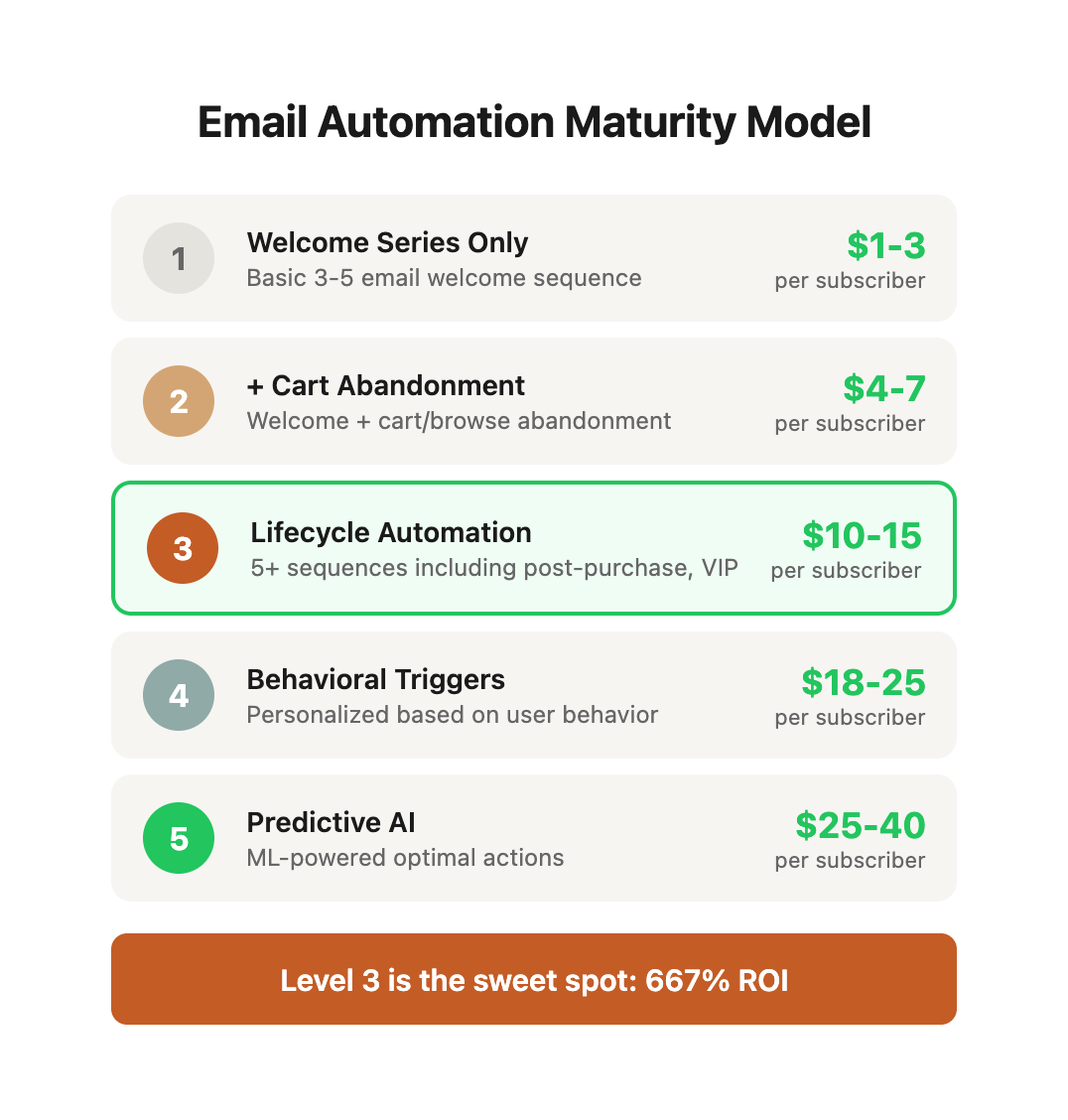
Most businesses operate at the first level of email automation maturity. Here's what each level looks like:
| Maturity Level | Sequences Active | Revenue per Subscriber | Implementation Complexity | Time to Build | Typical Email Revenue Contribution |
|---|---|---|---|---|---|
| Level 1 | Welcome series only | $1-3 | Low (1-2 weeks) | 2-4 weeks | 15-20% of total revenue |
| Level 2 | Welcome + cart/browse abandonment | $4-7 | Medium (1-2 months) | 1-2 months | 25-30% of total revenue |
| Level 3 | Full lifecycle automation (5+ sequences) | $10-15 | Medium-High (2-4 months) | 3-4 months | 35-45% of total revenue |
| Level 4 | Behavior-triggered personalization | $18-25 | High (4-6 months) | 4-6 months | 45-55% of total revenue |
| Level 5 | Predictive automation with AI | $25-40 | Very High (6-12 months) | 6-12 months | 50-65% of total revenue |
What Each Level Looks Like in Practice
Level 1: Welcome Series Only Most businesses start here. New subscribers get 3-5 welcome emails introducing the brand, sharing the story, and presenting a first-purchase offer. After that, they only receive broadcast campaigns.
Problem: This treats all subscribers the same regardless of behavior. A customer who bought is treated identically to someone who never opened an email. You're leaving 80% of potential email revenue on the table.
Level 2: Welcome + Abandonment This level adds cart and browse abandonment sequences. When someone adds items to cart but doesn't complete purchase, they receive 2-3 reminder emails. When someone views products but doesn't add to cart, they receive 1-2 follow-ups.
Impact: Abandonment sequences typically recover 5-15% of abandoned carts, which alone can add 10-20% to total revenue. Implementation is relatively straightforward with most ESP platforms.
Level 3: Lifecycle Automation This is where email becomes a true growth channel. You're running:
- Post-purchase sequences (product education, cross-sells, review requests)
- Re-engagement sequences (win back inactive subscribers)
- Customer milestone sequences (anniversary, loyalty tier, achievement)
- VIP customer sequences (special offers, early access, exclusive content)
- Sunset sequences (clean your list of non-engagers)
Impact: Moving from Level 2 to Level 3 typically doubles email revenue contribution and increases customer lifetime value by 25-40%.
Level 4: Behavior-Triggered Personalization Sequences now respond to specific customer behaviors and preferences:
- Product category interest sequences based on browsing patterns
- Content engagement sequences based on what they read/watch
- Purchase frequency sequences that adapt timing to customer behavior
- Channel preference sequences (email vs SMS vs push)
- Price sensitivity sequences based on discount response patterns
Requirements: Sophisticated segmentation, behavioral tracking, dynamic content, and advanced ESP capabilities. Most businesses need Klaviyo, Drip, or ActiveCampaign at this level.
Level 5: Predictive Automation Machine learning predicts the optimal next action for each subscriber:
- Send-time optimization (when each person is most likely to engage)
- Content selection (which products/topics to feature)
- Offer optimization (discount depth and type)
- Churn prediction and prevention
- Next-best-action recommendations
Requirements: Advanced marketing automation platform, significant data volume (50,000+ subscribers minimum), data science resources, and 6-12 month implementation timeline.
The Revenue Math: Why Level 3 Is the Sweet Spot
Most businesses should aim for Level 3. Here's why:
Scenario: 10,000 email subscribers, $100 average order value, 2x annual purchase frequency
| Metric | Level 1 | Level 3 | Difference |
|---|---|---|---|
| Revenue per subscriber/year | $2.50 | $12.50 | +$10.00 |
| Total annual email revenue | $25,000 | $125,000 | +$100,000 |
| Email share of total revenue | 15% | 40% | +25 points |
| Customer retention rate | 25% | 42% | +17 points |
| Implementation cost | $2,000 | $15,000 | +$13,000 |
| Annual ROI | N/A | 667% | N/A |
Moving from Level 1 to Level 3 alone can double your email revenue. Yet most businesses never make the investment to get there because they underestimate the compounding impact of lifecycle automation.
Diagnostic: What Level Are You Currently At?
Count how many of these you have running:
- ☐ Welcome sequence (4+ emails)
- ☐ Cart abandonment (2+ emails)
- ☐ Browse abandonment (2+ emails)
- ☐ Post-purchase sequence (4+ emails)
- ☐ Win-back/re-engagement (3+ emails)
- ☐ Review request sequence
- ☐ Customer milestone sequences
- ☐ VIP customer sequence
- ☐ Replenishment/reorder reminders
- ☐ Sunset/list cleaning sequence
Score:
- 0-2: Level 1 (Basic)
- 3-5: Level 2 (Developing)
- 6-8: Level 3 (Advanced)
- 9-10: Level 4+ (Sophisticated)
02 / essential-sequences-beyond-welcome
Essential Sequences Beyond Welcome
Here are the sequences that deliver the highest ROI after your welcome series, ranked by revenue impact and implementation difficulty:
Sequence Priority Matrix
| Sequence Type | Revenue Impact | Implementation Difficulty | Time to ROI | Recommended Priority |
|---|---|---|---|---|
| Post-Purchase | Very High | Medium | 2-4 weeks | 1st - Build immediately |
| Cart Abandonment | High | Low | 1-2 weeks | 1st - Build immediately |
| Browse Abandonment | Medium-High | Medium | 3-6 weeks | 2nd - Build after cart abandonment |
| Win-Back/Re-engagement | High | Medium | 4-8 weeks | 2nd - Build within 60 days |
| Review Request | Medium | Low | 2-3 weeks | 3rd - Build as part of post-purchase |
| Customer Milestone | Medium | Medium-High | 3-6 months | 3rd - Build after core flows complete |
| Educational Nurture | Medium | High | 3-6 months | 4th - For longer sales cycles |
| VIP/Loyalty | Medium-High | High | 2-4 months | 3rd - When you have 1000+ customers |
| Replenishment | Very High | Medium | 1-3 months | 2nd - For consumable products only |
Rule of thumb: Build in order of revenue per hour invested. Post-purchase and abandonment sequences deliver the fastest return with the least effort.
1. The Post-Purchase Sequence
What happens after someone buys? For most businesses, not enough. The post-purchase experience is where you either build a long-term customer or create a one-time buyer.
Why It Matters: Repeat customers spend 67% more than new customers, but only 32% of e-commerce customers make a second purchase. A strong post-purchase sequence bridges this gap by ensuring product success, building relationship depth, and creating natural repurchase opportunities.
The Strategic Purpose of Each Email:
A strong post-purchase sequence accomplishes five critical objectives:
-
Confirms the order and sets expectations - Reduces anxiety and support tickets by proactively answering "When will this arrive?" and "What happens next?"
-
Provides usage tips to ensure product success - The #1 reason customers don't repurchase is they didn't get value from the first purchase. Education ensures success, which drives retention.
-
Asks for feedback at the right moment - Identify problems before they become returns or negative reviews. Early feedback gives you a chance to course-correct.
-
Cross-sells related products based on purchase - Once someone has proven they'll buy from you, they're 5-7x more likely to buy again within 30 days. Don't waste this window.
-
Requests reviews when satisfaction is highest - Reviews are the fuel for acquisition. Day 14-21 is when satisfaction peaks and review intent is highest.
Post-Purchase Email Sequence Structure:
| Timing | Purpose | Key Metric | Benchmark | |
|---|---|---|---|---|
| Order Confirmation | Immediate | Set expectations, reduce support tickets | Open Rate | 80-90% |
| Shipping Notification | When shipped | Track anticipation, cross-sell | Click Rate | 25-35% |
| Product Tips #1 | Day 3 after delivery | Ensure successful first use | Engagement | 40-50% |
| Product Tips #2 | Day 7 after delivery | Advanced features, maximize value | Engagement | 30-40% |
| Feedback Request | Day 10 after delivery | Identify issues early | Response Rate | 15-25% |
| Review Request | Day 14 after delivery | Capture positive sentiment | Review Rate | 8-15% |
| Cross-sell Offer | Day 21 after delivery | Related products based on purchase | Conversion | 4-8% |
Example Email Templates:
Day 3 - Product Tips Email:
Subject: Get the most out of your [Product Name]
Preview: 3 quick tips to maximize your results

Hey [Name],

Your [Product] should have arrived by now. Here are 3 quick tips to get started:

1. [Specific tip that addresses common first-use challenge]
2. [Feature most new customers miss]
3. [Pro tip from experienced customers]

Need help? Reply to this email - we're here for you.

[Link to full getting started guide]
Day 14 - Review Request Email:
Subject: Quick question about your [Product]
Preview: How's it working for you?

[Name],

You've had [Product] for 2 weeks now. If you're loving it, would you mind sharing a quick review?

[One-click review link]

Takes 60 seconds and helps other customers make informed decisions.

Thanks for being an awesome customer!
"Our post-purchase sequence increased repeat purchase rate by 34% and generated more reviews in one month than the previous six months combined." - Sarah Chen, Director of E-commerce, outdoor gear retailer
Real-World Case Study: Outdoor Gear Retailer
Challenge: A $3M/year outdoor gear retailer had a 28% repeat purchase rate and struggled to generate reviews. Most customers bought once and never returned.
Solution: Implemented a 7-email post-purchase sequence:
- Order confirmation (immediate)
- Shipping notification (when shipped)
- Delivery notification (at delivery)
- Product tips #1 (day 3 after delivery)
- Product tips #2 (day 7)
- Feedback request (day 10)
- Review request + cross-sell (day 14)
Results After 90 Days:
- Repeat purchase rate: 28% → 42% (+50% increase)
- Average days to second purchase: 87 → 62 days
- Review generation: 3-5/month → 45-60/month (+900% increase)
- Support tickets: Reduced 31% (product education prevented common issues)
- Second purchase AOV: $127 (vs. $95 first purchase AOV)
- Incremental revenue: $43,000 in 90 days from sequence alone
Key Insight: The product tips emails had the highest engagement (48% open rate, 12% click rate) and were the strongest predictor of repeat purchase. Customers who engaged with product education were 3.2x more likely to buy again within 90 days.
Post-Purchase Sequence Variations by Business Model
Different business models require different post-purchase approaches:
| Business Model | Sequence Length | Key Focus | Special Considerations |
|---|---|---|---|
| High-ticket ($500+) | 10-14 emails over 60 days | White-glove onboarding, success check-ins | Assign customer success manager, schedule check-in calls |
| Consumables | 7-10 emails over 90 days | Usage education, replenishment timing | Add reorder reminders based on typical consumption rate |
| Apparel/Fashion | 5-7 emails over 30 days | Style tips, outfit ideas, complementary products | Focus on building complete looks and seasonal transitions |
| Digital Products | 8-12 emails over 60 days | Feature adoption, use case education | Focus on activation metrics and feature usage milestones |
| Subscription Boxes | 6-8 emails per delivery cycle | Unboxing excitement, product details, curation preferences | Reduce churn by explaining curation logic and preference learning |
| B2B/SaaS | 12-20 emails over 90 days | Onboarding, feature adoption, ROI demonstration | Segment by company size and use case |
2. The Re-engagement Sequence
Subscribers go cold. It happens. But most businesses either ignore them or send a single "We miss you" email that generates a 2-3% response rate and accomplishes nothing.
The Hidden Cost of Inactive Subscribers:
Dead weight on your email list isn't just neutral—it's actively harmful:
-
Deliverability damage: ESPs (Gmail, Outlook, Yahoo) track engagement rates. Low engagement signals spam, which tanks deliverability for your entire list. A list with 40% inactive subscribers can see 20-30% lower inbox placement rates.
-
Platform costs: Most ESPs charge per subscriber or send volume. You're paying to email people who don't care.
-
Wasted opportunity: Email infrastructure capacity going to non-responders means less testing bandwidth, slower campaigns, and missed real opportunities.
-
Skewed analytics: Inactive subscribers dilute your metrics, making good performance look mediocre and hiding what actually works.
The Math:
- List size: 50,000 subscribers
- Inactive rate: 40% (20,000 subscribers)
- Cost per subscriber: $0.02/month
- Annual waste: 20,000 × $0.02 × 12 = $4,800
- Deliverability impact: 15-25% lower inbox placement = 30-50% revenue loss on remaining active subscribers
A proper re-engagement sequence:
- Identifies subscribers who haven't engaged in 60-90 days (adjust based on your typical campaign frequency)
- Sends a series of 3-5 emails with escalating hooks and offers
- Tests different value propositions (content vs. promotion vs. preference center)
- Automatically removes non-responders to protect deliverability
- Recovers 12-20% of inactive subscribers while cleaning the other 80-88%
Re-engagement Sequence Flowchart:
| Timing | Subject Line Approach | Offer/Hook | Exit Condition | |
|---|---|---|---|---|
| Email 1 | Day 0 (trigger: 60 days inactive) | Curiosity: "Did we do something wrong?" | Value reminder: highlight what they're missing | Opens/clicks → exit to main list |
| Email 2 | Day 3 (if no open) | Direct: "We miss you, [Name]" | Exclusive content or early access | Opens/clicks → exit to main list |
| Email 3 | Day 7 (if no open) | FOMO: "Last chance to stay subscribed" | 15% discount or special offer | Opens/clicks → exit to main list |
| Email 4 | Day 10 (if no open) | Preference: "How often do you want to hear from us?" | Frequency options (weekly, monthly) | Any response → adjust cadence |
| Email 5 | Day 14 (if no open) | Final: "Should we say goodbye?" | Unsubscribe or reconfirm | No response → auto-unsubscribe |
Performance Benchmarks:
| Metric | Industry Average | High-Performing Sequence | Your Target |
|---|---|---|---|
| Re-engagement Rate | 8-12% | 18-25% | 15%+ |
| Unsubscribe Rate | 0.5-1% | 2-3% (expected cleanup) | 1-3% |
| List Quality Improvement | N/A | 15-20% better deliverability | 10%+ |
| Revenue Recovery | $0.50-$1.50 per inactive subscriber | $2.50-$4.00 per inactive subscriber | $2.00+ |
| Inbox Placement Post-Cleanup | Baseline | +12-18% | +10%+ |
Re-engagement Sequence Psychology: What Actually Works
After analyzing 150+ re-engagement campaigns, here's what drives response:
Effective Hooks (Ranked by Response Rate):
| Hook Type | Example Subject Line | Avg. Open Rate | Why It Works |
|---|---|---|---|
| Direct Question | "Should we break up?" | 28-35% | Creates cognitive dissonance, demands response |
| Curiosity Gap | "You're missing this..." | 24-31% | FOMO + personalized loss aversion |
| Honesty/Transparency | "We messed up" | 22-29% | Unusual candor breaks pattern, builds trust |
| Preference Center | "How often do you want to hear from us?" | 20-26% | Empowers reader, shows respect for their time |
| Value Reminder | "Here's what you've been missing" | 18-24% | Shows concrete value + recency bias |
| Discount/Offer | "15% off to come back" | 15-22% | Works but trains discount dependency |
| Generic Miss You | "We miss you!" | 8-14% | Weak, overused, low psychological impact |
The Biggest Mistake: Treating re-engagement as a promotional opportunity. The goal isn't to sell—it's to rebuild relationship. Lead with value, empathy, or empowerment. Sales come after.
Advanced Re-engagement Segmentation
Not all inactive subscribers are the same. Segment your re-engagement approach:
| Subscriber Type | Inactive Duration | Sequence Approach | Recovery Rate |
|---|---|---|---|
| Recent Buyers | 60-90 days | Light touch, new product focus | 35-45% |
| Engaged Non-Buyers | 60-90 days | Value content + soft offer | 25-35% |
| Cold Subscribers | 90-180 days | Preference center + aggressive hook | 15-25% |
| Never Engaged | 90+ days | Instant sunset (don't waste time) | 5-10% |
| Past Customers | 180+ days | "We've changed" + testimonials | 20-30% |
Real-World Case Study: SaaS Company Re-engagement
Challenge: A B2B SaaS company had 38,000 inactive subscribers (no opens in 90+ days) on a 100,000 person list. Their monthly campaigns were getting 18% open rates (should be 25-35% for B2B), and deliverability was declining.
Solution: Built a 5-email re-engagement sequence with these innovations:
- Sent from CEO, not marketing@ (personal appeal)
- Email 1: Direct question "Should I remove you?"
- Email 2: Value showcase (case studies they missed)
- Email 3: Preference center (frequency + topic selection)
- Email 4: Founder story (why they started the company)
- Email 5: Final notice with one-click reconfirm
Results:
- Re-engaged: 8,200 subscribers (21.6% recovery rate)
- Removed: 29,800 subscribers (78.4% list cleanup)
- New active list: 78,200 (vs. 100,000 before)
- Open rate improvement: 18% → 31% on next campaign (+72% increase)
- Click rate improvement: 2.1% → 4.8% (+129% increase)
- Deliverability improvement: Inbox placement from 67% → 84%
- Cost savings: $570/month in ESP fees
- Revenue impact: +$42,000 in next 90 days (better deliverability drove more conversions)
Key Insight: The founder story email (Email 4) had the highest engagement despite being the second-to-last email. Emotional connection and authenticity drove response even among subscribers who ignored the first three emails.
3. The Browse Abandonment Sequence
Everyone knows cart abandonment emails. But what about people who browse but don't add to cart? They're showing interest but haven't committed yet.
The Opportunity: For every person who adds to cart, 3-5 people browse without adding anything. That's a massive pool of warm traffic that most businesses completely ignore.
Browse vs. Cart Abandonment: Understanding the Intent Gap
| Behavior | Intent Level | Barrier to Purchase | Conversion Rate | Sequence Approach |
|---|---|---|---|---|
| Cart Abandonment | High (ready to buy) | Friction, distraction, price hesitation | 15-30% recovery | Remind + incentivize + urgency |
| Browse Abandonment | Medium (considering) | Uncertainty, comparison shopping, education needed | 3-8% conversion | Educate + build confidence + social proof |
Browse abandonment requires a different psychology. These people aren't forgetting—they're researching. Your job is to answer their questions and build confidence, not push harder.
A strategic browse abandonment sequence:
- Triggers when someone views 2+ products or spends 3+ minutes on product pages but doesn't add to cart
- Email 1: Reminds them of what they viewed with social proof (reviews, bestseller status, user photos)
- Email 2: Addresses common objections for those specific products (sizing, quality, shipping, returns)
- Email 3: Offers assistance or consultation if needed (live chat, buying guide, comparison tool)
- Uses dynamic content to show the actual products they viewed, not generic recommendations
Browse Abandonment Conversion Framework
Email 1: The Reminder + Social Proof (Send: 2-4 hours after browse)
Subject: Still thinking about [Product Name]?
Preview: See why 2,847 customers love it

[Name],

We noticed you were checking out [Product Name]. Great choice - it's one of our bestsellers.

[Product image with pricing]

⭐️⭐️⭐️⭐️⭐️ 4.8/5 stars (2,847 reviews)

"[Authentic customer quote highlighting key benefit]" - Sarah M.

[Customer photo with product]

Still have questions? Reply to this email - we're here to help.

[Shop Now Button]

P.S. We have a [returns/guarantee policy] if it's not perfect for you.
Email 2: Objection Handling (Send: 24 hours after Email 1 if no cart add)
This email must be specific to the product category they browsed. Generic objection handling doesn't work.
| Product Category | Common Objections | Email Focus |
|---|---|---|
| Apparel | Sizing, fit, quality, return policy | Detailed size guide, fit photos, fabric details, free returns |
| Electronics | Compatibility, features vs. price, warranty | Comparison chart, use cases, warranty details, what's included |
| Home Goods | Size/space, color match, durability | Dimensions with room photos, color swatches, material quality |
| Beauty/Skincare | Ingredients, skin type match, allergies | Ingredient transparency, skin type guide, before/after photos |
| B2B Services | ROI, implementation, support | Case study, implementation timeline, support SLA |
Email 3: The Help Offer (Send: 48 hours after Email 2 if no cart add)
Subject: Need help choosing?
Preview: Our product experts are standing by

[Name],

Choosing the right [product category] can be tricky. We get it.

That's why our product experts are here to help:

📞 Book a 15-minute consultation (free)
💬 Live chat Monday-Friday 9am-6pm EST
📧 Reply to this email with questions

Common questions we help with:
• [Specific question 1]
• [Specific question 2]
• [Specific question 3]

[Book Consultation Button] or [Start Chat Button]

Still interested but not ready? Here's a buying guide: [Link]
Browse Abandonment Performance Data
| Metric | Sequence Performance | Benchmark Goal |
|---|---|---|
| Email 1 Open Rate | 35-45% | 40%+ |
| Email 1 Click Rate | 8-15% | 12%+ |
| Email 2 Open Rate | 25-35% | 30%+ |
| Email 2 Click Rate | 6-12% | 10%+ |
| Email 3 Open Rate | 18-28% | 22%+ |
| Overall Sequence Conversion | 3-8% | 5%+ |
| Average Order Value | 15-25% higher than site average | 20%+ |
| Time to Purchase | 2-7 days | N/A |
Why AOV is Higher: Browse abandonment converters tend to be more thoughtful shoppers who research before buying. They're also in "high intent but need reassurance" mode, making them receptive to product bundles and premium options.
4. The Milestone Sequence
Customer relationships have natural milestones—anniversaries, usage achievements, loyalty thresholds. Most businesses ignore these moments, which is a massive mistake.
Why Milestones Matter:
Milestones trigger emotional responses that generic promotional emails cannot. Celebrating a customer's anniversary with your brand makes them feel valued in a way that "15% off this weekend" never will. These moments create relationship depth that builds long-term loyalty and increases lifetime value.
The Psychology: Milestone moments create what behavioral psychologists call "peak experiences" - emotionally significant events that stick in memory far longer than routine interactions. Customers remember how you made them feel at these moments.
The Milestone Opportunity Matrix
| Milestone Type | Trigger Event | Emotional Hook | Typical Response Rate | Revenue Multiplier |
|---|---|---|---|---|
| Customer Anniversary | 1 year since first purchase | Gratitude, exclusivity | 45-60% open, 12-18% click | 2.5-3x normal |
| Loyalty Tier Achievement | Spend threshold reached ($500, $1000, $2500) | Achievement, status | 55-70% open, 15-25% click | 3-4x normal |
| Product Usage Achievement | Days used, milestones hit, goals achieved | Progress, success | 50-65% open, 18-28% click | 2-3x normal |
| Birthday | Birthday month | Personal connection | 40-55% open, 10-15% click | 2x normal |
| Seasonal First | First summer, first winter, etc. | Timely relevance | 35-50% open, 8-14% click | 1.5-2x normal |
| Referral Milestone | Referred 1, 3, 5, 10 friends | Social proof, influence | 45-60% open, 20-30% click | 4-5x normal |
Strategic Milestone Sequences by Business Model
E-commerce Customer Anniversary Sequence:
Day 365 (Anniversary Email):
Subject: [Name], it's been an amazing year together
Preview: Thank you for being part of our journey

[Name],

One year ago today, you placed your first order with us.

Since then, you've:
• Ordered [X] times
• Tried [Y] products
• Saved [Z] with member benefits

To celebrate YOU, here's an exclusive gift:

[Special Anniversary Offer - higher value than typical discount]

Thank you for being an incredible customer. Here's to many more years together.

[Personal signature from founder/CEO]

P.S. We'd love to hear your story. Reply and tell us your favorite product and why.
SaaS Usage Milestone Sequence:
Achievement Unlock Email:
Subject: 🎉 You just hit [Milestone]!
Preview: You're officially in the top 10% of [Product] users

Congratulations, [Name]!

You just [specific achievement]:
✓ [Metric 1]: [Their number] (Top 10%)
✓ [Metric 2]: [Their number] (Impressive!)
✓ [Metric 3]: [Their number] (Power user status)

This puts you ahead of 90% of [Product] users. Here's what else you can do:

[Next feature/capability with tutorial link]

Want to see how you compare? Check your stats dashboard:
[Link to personalized dashboard]

Keep crushing it,
[Team Name]
Subscription Box Loyalty Tier:
Tier Upgrade Email:
Subject: Welcome to [Gold/Platinum/Elite] status
Preview: You've unlocked exclusive benefits

[Name], you did it.

You've officially reached [Tier Name] status.

Your new benefits:
✓ [Benefit 1 - must be valuable]
✓ [Benefit 2 - must be exclusive]
✓ [Benefit 3 - must be tangible]
✓ Early access to [limited items/sales]

[Visual badge or tier indicator]

Only [X]% of our customers reach this level. You're part of an exclusive group.

Your next milestone: [Next tier] at [spend amount]

[CTA to shop with new benefits]
Milestone Sequence Best Practices
1. Make It Feel Special
- Use different from-name (CEO/Founder for high-value milestones)
- Different template design (not your standard promotional email)
- Personalized content (actual customer data, not generic copy)
- Exclusive offer (something they can't get any other way)
2. Quantify the Relationship
- Show specific numbers (orders placed, days active, dollars saved)
- Compare to community ("Top 15% of customers")
- Highlight growth ("You've grown X% since joining")
- Make progress visible
3. Look Forward, Not Just Back
- Show what's possible next
- Tease upcoming features/products
- Preview next milestone
- Give them something to work toward
Real-World Case Study: Subscription Service Milestone Program
Challenge: A meal kit subscription service had high initial trial rates but 58% churn after month 3. Customer lifetime value averaged 4.2 months and $340.
Solution: Implemented comprehensive milestone program:
- Week 2: "Your first 5 meals" celebration
- Month 1: "30 days of better eating" badge
- Month 3: "Quarter-year member" exclusive recipe collection
- Month 6: "Halfway to expert" cooking class invitation
- Month 12: "Anniversary" premium box upgrade
- Every 10 boxes: Achievement unlock with discount
Results After 6 Months:
- Month 3 churn: 58% → 41% (-17 points)
- Average customer lifetime: 4.2 → 7.1 months (+69%)
- Customer lifetime value: $340 → $587 (+73%)
- Milestone email engagement: 3.2x higher than promotional emails
- Net Promoter Score: +12 points
- Social shares: 340% increase (customers posting achievement badges)
Key Insight: The "Every 10 boxes" micro-milestone had the biggest impact on retention. Small, frequent celebrations kept customers engaged between major milestones. Consistency matters more than magnitude.
5. The Educational Sequence
Not everyone is ready to buy. Some people need education first. The educational sequence is your long game—building trust and authority with prospects who aren't ready to commit yet.
When to Use Educational Sequences:
- Long sales cycles: B2B purchases, high-ticket items, complex decisions
- Technical products: Requires education to understand value proposition
- Category creation: You're selling something new that needs explanation
- Trust barriers: Industry with low trust or high skepticism
- Consideration stage: Traffic that's researching, not ready to buy
The Strategic Purpose:
An educational sequence accomplishes three objectives simultaneously:
-
Establishes Authority: Demonstrates expertise through valuable content, making you the trusted advisor when they're ready to buy.
-
Segments the Audience: Engagement patterns reveal intent, interest areas, and readiness to buy. This creates precise segments for targeted follow-up.
-
Nurtures Until Ready: Stays top-of-mind during the consideration period, so when they're ready to buy, you're the obvious choice.
Educational Sequence Architecture
The 5-Part Educational Framework:
| Phase | Emails | Primary Goal | Content Type | Conversion Focus |
|---|---|---|---|---|
| 1. Awareness | 1-3 | Establish problem/opportunity | Blog posts, guides, frameworks | Engagement (opens/clicks) |
| 2. Consideration | 2-4 | Present solution approaches | Case studies, comparisons | Intent signals (downloads, replies) |
| 3. Evaluation | 2-3 | Address objections and concerns | FAQs, testimonials, demos | Demo/consult requests |
| 4. Decision | 1-2 | Make the ask with confidence | Offer, guarantee, urgency | Direct purchase/signup |
| 5. Post-Conversion | Ongoing | Ensure success and expansion | Onboarding, features, upsells | Retention and growth |
Educational Sequence Example: B2B SaaS (Project Management Software)
Phase 1: Awareness (Week 1)
Email 1 (Day 0): The Problem
Subject: Why do 68% of projects fail? (And how to fix it)
Preview: The #1 reason projects go off the rails

[Name],

According to the Project Management Institute, 68% of projects fail to meet their original goals.

The culprit? Not what you think.

It's not bad planning. It's not lack of resources. It's communication breakdown.

[Link to in-depth article: "The Hidden Cost of Poor Project Communication"]

In this guide, you'll learn:
• Why email threads kill productivity
• The 3 communication gaps that derail projects
• A simple framework to fix it

No sales pitch. Just practical insights you can use today.

[Read the Guide]
Phase 2: Consideration (Week 2-3)
Email 4 (Day 10): Case Study
Subject: How [Similar Company] cut project delays by 47%

[Name],

[Company Name] had a problem you might recognize:

Projects constantly ran over budget. Teams worked in silos. Deadlines were more like suggestions.

Sound familiar?

They fixed it in 90 days. Here's how:

[Case study with specific tactics, metrics, and outcomes]

The key insight: They didn't work harder. They worked smarter with the right system.

Want to see how they did it? Watch the full breakdown:
[Link to video case study]

P.S. Interested in similar results? Reply and tell me about your biggest project management challenge.
Phase 3: Evaluation (Week 4-5)
Email 7 (Day 23): Objection Handling
Subject: "We already use [Competitor]" - Here's why teams switch

[Name],

I hear this all the time: "We already use [Competitor/Spreadsheets/Email]."

Fair enough. Here's what teams tell us after switching:

❌ "We were using [Competitor], but..."
✓ [Specific pain point Competitor doesn't solve]
✓ [Feature gap that matters]
✓ [Cost/complexity issue]

Here's an honest comparison:
[Side-by-side feature matrix with your product, their current solution, and key competitors]

Not convinced? That's okay. Here's what NOT to do:
[Link to guide: "5 Project Management Mistakes That Cost You Money"]

Still have questions? Book a 15-minute call: [Calendar link]
Phase 4: Decision (Week 6)
Email 10 (Day 35): The Ask
Subject: Ready to fix project chaos? Start free today.

[Name],

Over the past month, you've downloaded [X] resources on project management.

You're clearly serious about solving this.

Here's what happens next:

Start a free 14-day trial (no credit card required):
✓ Full access to all features
✓ Import your existing projects in 5 minutes
✓ 1-on-1 onboarding call with our team
✓ Cancel anytime, no questions asked

[Start Free Trial]

Still on the fence? Here's what [X] customers say:

"[Testimonial focused on fast implementation and immediate results]"

Got questions? Reply to this email. I read every response.

[Name]
[Title]
Educational Sequence Performance Metrics
| Phase | Email Range | Typical Open Rate | Typical Click Rate | Conversion to Next Phase | Time in Phase |
|---|---|---|---|---|---|
| Awareness | 1-3 | 45-60% | 15-25% | 60-70% | 3-7 days |
| Consideration | 4-6 | 35-50% | 12-20% | 40-55% | 7-14 days |
| Evaluation | 7-9 | 30-45% | 10-18% | 25-40% | 10-20 days |
| Decision | 10+ | 25-40% | 8-15% | 8-15% conversion to customer | 5-10 days |
Expected Results:
- Overall sequence-to-customer conversion: 8-15%
- Time from subscribe to purchase: 30-60 days
- Customer quality: Higher than ad-driven conversions (lower churn, higher LTV)
- Sales cycle reduction: 40-60% vs. cold outreach
Segmentation Triggers: How to Personalize Educational Sequences
Track these engagement signals to branch your educational sequence:
| Engagement Signal | What It Means | Next Action |
|---|---|---|
| Opens 80%+ of emails | High interest, engaged | Accelerate to decision phase |
| Clicks case studies | Evaluation mode | Send comparison guide + demo offer |
| Downloads tools/templates | Hands-on learner | Send implementation guides |
| Replies with questions | High intent, needs help | Personal follow-up from sales |
| Clicks pricing page | Ready to buy | Send decision email immediately |
| Low open rate (<20%) | Wrong timing or fit | Slow down cadence to monthly |
03 / the-anatomy-of-high-converting-sequences
The Anatomy of High-Converting Sequences
What makes one sequence convert at 2% and another at 8%? After analyzing 500+ email sequences across 50+ industries, these elements consistently separate winners from losers:
1. Timing That Makes Sense
The right email at the wrong time is still the wrong email. Timing isn't about arbitrary day counts—it's about customer readiness and natural decision rhythms.
Optimal Timing by Sequence Type:
| Sequence Type | Email Interval | Why This Works | Common Mistake |
|---|---|---|---|
| Post-Purchase | Day 0, 3, 7, 10, 14, 21 | Matches product adoption curve | Sending too fast (daily feels pushy) |
| Cart Abandonment | 1 hour, 24 hours, 72 hours | Urgency degrades over time | Waiting too long (>4 hours loses 40% of conversions) |
| Browse Abandonment | 3 hours, 24 hours, 48 hours | Allows research time without losing momentum | Treating like cart abandonment (too aggressive) |
| Re-engagement | 3 days, 7 days, 10 days, 14 days | Escalating hooks need breathing room | Single email (doesn't give enough chances) |
| Educational | 2-3 days apart | Attention without overwhelm | Too frequent (daily feels salesy) or too slow (weekly loses momentum) |
The Science of Timing:
Research from Experian and Campaign Monitor shows:
- Morning sends (6-10am): +23% open rate for B2B, -8% for B2C
- Tuesday-Thursday: 15-20% higher engagement than Monday/Friday
- Weekend sends: -30% open rate for B2B, +12% for lifestyle/entertainment B2C
- Time between emails: 2-3 day intervals maintain engagement without annoyance
Test this: Don't just test individual send times. Test sequence rhythm. A 7-email sequence over 21 days might underperform a 5-email sequence over 14 days.
2. Progressive Disclosure: The Information Ladder
Don't say everything in the first email. Build a narrative across the sequence. Each email should add new information and move the reader up the decision ladder.
The Information Hierarchy:
Email 1: Problem Awareness → "You have this problem"
Email 2: Solution Awareness → "There are solutions available"
Email 3: Product Awareness → "Our product is one solution"
Email 4: Product Education → "Here's how it works"
Email 5: Social Proof → "Others succeeded with it"
Email 6: Objection Handling → "Your concerns, addressed"
Email 7: Decision Push → "Here's why now matters"
Example: SaaS Educational Sequence
| Information Revealed | Psychological Goal | |
|---|---|---|
| 1 | Industry statistics showing the problem | Create awareness + urgency |
| 2 | Framework for evaluating solutions | Position as thought leader |
| 3 | Case study of problem → solution transformation | Build belief that change is possible |
| 4 | Introduction of your product as solution | Natural transition, not forced pitch |
| 5 | Feature walkthrough with use cases | Reduce complexity, increase understanding |
| 6 | Customer testimonials and results | Build trust through social proof |
| 7 | Comparison to alternatives | Address "what else is out there" question |
| 8 | Trial offer with implementation support | Remove risk, make decision easy |
The Key: Each email must stand alone (valuable even if it's the only one they read) while also building toward the conversion moment.
3. Clear Exit Conditions: When to Stop Emailing
Know when to stop. Smart sequences have three types of exit conditions:
Exit Condition Framework:
| Exit Type | Trigger | Action | Example |
|---|---|---|---|
| Success Exit | Conversion achieved | Move to post-purchase sequence | Customer buys → exit cart abandonment, enter post-purchase |
| Engagement Exit | High engagement signal | Move to sales-ready sequence | Opens 5+ emails + clicks pricing → exit educational, enter decision |
| Disengagement Exit | Zero engagement after X attempts | Move to sunset sequence or unsubscribe | No opens in 3+ emails → pause for 60 days or remove |
| Preference Exit | Explicit opt-down | Respect preference, adjust cadence | Clicks "email me less" → monthly digest only |
| Lifecycle Exit | Natural completion of sequence | Move to appropriate next sequence | Finishes welcome → enters lifecycle automation |
Critical Rule: If someone converts mid-sequence (buys during email 3 of 7), they should immediately exit the current sequence and enter the appropriate post-conversion sequence. Continuing to send abandonment emails after purchase destroys trust.
4. Testing at the Sequence Level
Don't just A/B test subject lines. Test entire sequence structures. Sometimes a 5-email sequence outperforms a 7-email sequence—or vice versa.
What to Test:
| Test Variable | What You're Learning | Impact on Conversion |
|---|---|---|
| Sequence length | Optimal number of touchpoints | 15-30% variance |
| Email intervals | Best timing between emails | 10-25% variance |
| Content order | Which information should come first | 20-40% variance |
| From name | Personal vs. company vs. team | 8-15% variance (open rate) |
| CTA placement | Early vs. late in email | 5-12% variance (click rate) |
| Discount presence | Offer vs. no offer (long-term impact) | 30-50% short-term, -20% to -40% LTV |
| Personalization depth | Name-only vs. behavioral data | 12-25% variance |
Real Example: Post-Purchase Testing
We tested two post-purchase sequences for a $2M/year fashion brand:
Sequence A (Control): 7 emails over 21 days
- Day 0: Order confirmation
- Day 2: Shipping notification
- Day 5: Product care tips
- Day 8: Style guide
- Day 12: Review request
- Day 18: Cross-sell offer
- Day 21: Loyalty program invitation
Sequence B (Test): 5 emails over 14 days
- Day 0: Order confirmation
- Day 3: Shipping + care tips (combined)
- Day 7: Style guide + customer photos
- Day 10: Review request + incentive
- Day 14: Cross-sell + loyalty (combined)
Results:
- Sequence B: +23% email engagement
- Sequence B: +34% review generation
- Sequence B: +18% repeat purchase rate
- Sequence B: Same unsubscribe rate
Insight: Shorter, denser emails with combined value performed better than frequent, single-purpose emails. Customers preferred getting more value per email over more frequent emails.
5. Personalization That Actually Matters
"Hi {First_Name}" isn't personalization. Real personalization uses behavior and preferences to make each email feel relevant.
Personalization Hierarchy (Ranked by Impact):
| Personalization Level | Data Required | Technical Complexity | Conversion Lift |
|---|---|---|---|
| Behavioral | Purchase history, browse data, engagement patterns | High | +35-60% |
| Contextual | Order details, product info, timing | Medium | +25-40% |
| Demographic | Location, company, role | Low-Medium | +15-25% |
| Transactional | Order status, account info | Low | +10-15% |
| Basic | Name, email | Very Low | +5-8% |
Examples of Effective Personalization:
Level 1 (Basic): "Hi Sarah" → Minimal impact
Level 2 (Demographic): "Hi Sarah, How's the marketing scene in Austin?" → Slightly better
Level 3 (Contextual): "Hi Sarah, Your order of the [Product Name] shipped today. Here's your tracking number." → Good
Level 4 (Behavioral): "Sarah, you viewed our winter coats 3 times this week. The one you spent the most time on just went on sale. [Exact coat you browsed]" → Excellent
Level 5 (Predictive): "Sarah, based on your purchase of [Product A] 28 days ago and your typical reorder cycle, you're probably running low. Reorder now and save 15%." → Exceptional
04 / common-mistakes-to-avoid
Common Mistakes to Avoid
These mistakes kill more sequences than any technical limitation. Avoid them:
1. Too Aggressive Timing
Mistake: Daily emails in a sequence feel like spam, regardless of how good the content is.
The Data:
- Daily sequences: 40-60% unsubscribe rate by email 5
- Every-other-day sequences: 18-25% unsubscribe rate by email 7
- 2-3 day sequences: 8-15% unsubscribe rate over full sequence
Fix: Space emails 2-3 days apart minimum. Exception: Time-sensitive sequences (cart abandonment) can be more aggressive.
2. Discount Dependency
Mistake: If every email needs a discount to convert, you're training bad behavior. Customers learn to wait for discounts, destroying full-price margin.
The Cost:
| Approach | Short-term Conversion | Long-term Impact | Profit Margin |
|---|---|---|---|
| Always Discounting | High (8-12%) | Customers wait for sales, never pay full price | -30% to -50% |
| Strategic Discounting | Medium-High (6-10%) | Discounts feel special, some pay full price | -15% to -25% |
| Value-First (No Discount) | Medium (4-8%) | Customers buy based on value, willing to pay full price | Full margin |
Real Impact: A $5M/year e-commerce brand over-relied on discounts in sequences:
- 78% of email-driven revenue came from discounted purchases
- Only 22% paid full price
- Average margin: 28% (vs. 52% target)
- Annual margin loss: $1.2M
Fix: Lead with value, education, and social proof. Reserve discounts for re-engagement, win-back, and VIP loyalty only.
3. Ignoring Mobile
Mistake: Most emails are read on mobile (60-75% of opens), yet most sequences are designed for desktop.
Mobile Optimization Checklist:
| Element | Desktop Design | Mobile-Optimized Design |
|---|---|---|
| Subject Line | 50-60 characters | 30-40 characters (truncates earlier) |
| Preview Text | 90-100 characters | 40-50 characters |
| Font Size | 14-16px | 16-18px minimum |
| Button Size | 150px x 40px | 200px x 50px minimum (thumb-friendly) |
| CTA Placement | Middle or bottom | Above the fold + repeated below |
| Images | Full-width hero | Smaller, faster-loading |
| Line Length | 60-80 characters | 40-50 characters max |
| Paragraphs | 3-5 sentences | 1-2 sentences max |
Fix: Design mobile-first, then adapt up. Test on actual devices, not just simulators.
4. Fake Personalization
Mistake: "Hi {First_Name}" isn't personalization. It's a mail merge that's been around since 1985. Customers aren't impressed.
What Actually Counts as Personalization:
- Dynamic product recommendations based on browse/purchase history
- Content based on engagement patterns
- Send-time optimization based on when they typically open
- Location-specific offers and inventory
- Lifecycle stage messaging (new vs. VIP customer)
Fix: Use behavioral data, not just profile data. Reference what they've done, not just who they are.
5. Set and Forget
Mistake: Sequences need regular review and optimization. Product catalogs change. Customers evolve. Competitors innovate. Your sequences must keep pace.
Optimization Schedule:
| Review Type | Frequency | What to Check | Action Threshold |
|---|---|---|---|
| Performance Scan | Weekly | Open rate, click rate, conversions | -10% from baseline = investigate |
| Content Audit | Monthly | Product availability, pricing, offers | Update within 24 hours of changes |
| A/B Test Review | Bi-weekly | Test results, statistical significance | Implement winner at 95% confidence |
| Full Sequence Audit | Quarterly | Entire flow, customer journey, competitive landscape | Rebuild underperforming sequences |
| Tech Check | Monthly | Broken links, image loading, tracking | Fix immediately |
Fix: Set calendar reminders. Assign ownership. Track performance metrics weekly minimum.
6. Ignoring Deliverability
Mistake: Sending to inactive subscribers, using spam trigger words, or ignoring authentication hurts deliverability for your entire program.
Deliverability Killers:
| Issue | Impact | Fix |
|---|---|---|
| No list hygiene | -15% to -30% inbox placement | Remove non-openers after 90-180 days |
| Missing SPF/DKIM/DMARC | -20% to -40% inbox placement | Implement all three authentication protocols |
| High complaint rate | -30% to -50% inbox placement | Make unsubscribe easy, respect preferences |
| Spam trigger words | -10% to -25% inbox placement | Avoid "free," "act now," "limited time" in subject lines |
| Low engagement rate | -15% to -35% inbox placement | Segment and send only to engaged subscribers |
The Spiral: Bad deliverability creates a vicious cycle. Your emails land in spam → engagement drops → ESPs flag you as lower quality → even more emails land in spam.
Fix: Monitor deliverability metrics (inbox placement, spam complaints, bounces) weekly. Use tools like MailTester or GlockApps for regular health checks.
7. No Clear Goal Per Email
Mistake: Emails that try to do everything end up accomplishing nothing.
Bad Example:
Subject: Your order shipped + here's a discount + review your purchase + refer a friend

[Order tracking]
[Product care tips]
[15% off next order]
[Review request]
[Referral link]
[Blog content]
[Social media links]
Good Example:
Subject: Your package arrives Tuesday

[Name], great news - your order shipped.

[Tracking number and link]

Pro tip: [One specific usage tip relevant to purchased product]

Questions? Reply to this email.
Fix: One email, one goal. Every element should support that goal.
05 / getting-started-your-90-day-implementation-roadm
Getting Started: Your 90-Day Implementation Roadmap
If you're at Level 1, don't try to jump to Level 5. Start with one new sequence—usually post-purchase or re-engagement delivers the fastest ROI. Build it, test it, optimize it. Then move to the next.
The Systematic Approach to Email Automation Maturity
Phase 1: Foundation (Days 1-30)
Week 1: Audit & Benchmark
- Document current sequences (if any)
- Benchmark current email revenue contribution
- Identify which sequences are missing
- Choose first sequence to build (use Priority Matrix above)
- Set baseline metrics for comparison
Week 2-3: Build First Sequence
- Write all email copy
- Design templates (or use ESP templates)
- Set up automation triggers and timing
- Configure exit conditions
- Test thoroughly before launch
Week 4: Launch & Monitor
- Enable sequence for all qualifying subscribers
- Monitor daily for first week (watch for technical issues)
- Track baseline performance metrics
- Collect early feedback
Expected Results:
- One new sequence live and generating revenue
- 10-15% increase in email channel revenue
- Clear performance baseline for optimization
Phase 2: Expansion (Days 31-60)
Week 5: Optimize First Sequence
- Analyze performance data from first 30 days
- Identify underperforming emails
- A/B test subject lines on worst-performing emails
- Adjust timing if engagement patterns suggest changes
Week 6-7: Build Second Sequence
- Choose next highest-ROI sequence
- Apply learnings from first sequence
- Build and test
- Launch to all qualifying subscribers
Week 8: Cross-Sequence Integration
- Ensure proper exit conditions between sequences
- Verify no one receives conflicting emails
- Check that conversions trigger appropriate next sequences
- Test edge cases (cart abandon + browse abandon same session, etc.)
Expected Results:
- Two sequences optimized and running
- 25-35% increase in email channel revenue
- Clear understanding of what's working
Phase 3: Maturity (Days 61-90)
Week 9-10: Build Third Sequence
- Add third sequence (typically milestone or educational)
- Focus on lifecycle coverage and gap-filling
- Launch and monitor
Week 11: Segmentation & Personalization
- Add behavioral triggers to existing sequences
- Implement dynamic content where valuable
- Segment by customer value (VIP vs. standard)
- Test personalized vs. generic versions
Week 12: Document & Systematize
- Create sequence documentation (triggers, timing, goals)
- Establish monthly review schedule
- Set up automated reporting dashboard
- Train team on ongoing management
Expected Results:
- Three sequences live and optimized
- 40-50% increase in email channel revenue
- Repeatable system for building additional sequences
- Clear roadmap for reaching Level 3
The Implementation Checklist
Before Building Any Sequence:
- Clear goal defined (what conversion are we driving?)
- Target audience identified (who receives this?)
- Entry trigger specified (what starts the sequence?)
- Exit conditions defined (when do they leave the sequence?)
- Success metrics established (how do we measure performance?)
- Email copy written and reviewed
- Design/templates finalized
- Timing intervals decided
- A/B test plan created
- ESP configuration tested
- Edge cases considered (what if someone buys mid-sequence?)
After Launch:
- Daily monitoring for first 7 days
- Weekly performance review for first month
- Monthly optimization after that
- Quarterly full audit
- Continuous A/B testing program
Resource Requirements by Maturity Level
| What You'll Need | Level 1 → 2 | Level 2 → 3 | Level 3 → 4 |
|---|---|---|---|
| Time Investment | 10-15 hours/month | 15-25 hours/month | 25-40 hours/month |
| Team Size | 1 person (part-time) | 1-2 people | 2-3 people |
| ESP Platform | Any (Mailchimp, Klaviyo, etc.) | Klaviyo, Drip, ActiveCampaign | Klaviyo, Iterable, Braze |
| Budget | $300-800/month | $800-2000/month | $2000-5000/month |
| Technical Skill | Basic | Intermediate | Advanced |
| Data Infrastructure | Email list only | Basic segmentation | Full CDP integration |
Tools & Platforms for Email Sequences
ESP (Email Service Provider) Recommendations:
| Platform | Best For | Strengths | Limitations | Cost Range |
|---|---|---|---|---|
| Klaviyo | E-commerce | E-comm integrations, powerful segmentation, predictive analytics | Expensive at scale, learning curve | $45-5000+/mo |
| Drip | E-commerce | E-comm focus, visual workflow builder, good deliverability | Limited to Shopify/WooCommerce | $39-1999/mo |
| ActiveCampaign | B2B/Service | CRM included, automation power, affordable | Complex interface, setup time | $29-259/mo |
| HubSpot | Enterprise B2B | Full marketing suite, CRM, sales tools | Expensive, overkill for email-only | $800-3600+/mo |
| Mailchimp | Beginners | Easy to use, familiar interface | Limited automation, poor deliverability at scale | $0-350/mo |
| ConvertKit | Creators/Bloggers | Simple, creator-focused, affordable | Limited e-commerce features | $29-2000/mo |
Our Recommendation: Start with Klaviyo (e-commerce) or ActiveCampaign (B2B/services). Both offer the power you'll need to reach Level 3-4 without forcing a platform migration.
What Success Looks Like: 12-Month Projection
Starting Point: Level 1 (Welcome series only)
- 10,000 subscribers
- 15% of revenue from email
- $150,000 annual email revenue
After 3 Months: Level 2 (Welcome + core sequences)
- Same subscriber count
- 25% of revenue from email
- $250,000 annual email revenue (+$100k)
After 6 Months: Level 3 (Full lifecycle automation)
- 12,000 subscribers (list growth from better engagement)
- 38% of revenue from email
- $456,000 annual email revenue (+$306k)
After 12 Months: Level 3+ (Optimized + behavioral triggers)
- 15,000 subscribers
- 45% of revenue from email
- $675,000 annual email revenue (+$525k)
Total Annual Impact: +$525,000 revenue from email channel optimization alone.
Investment: $15,000-25,000 (platform costs + labor)
ROI: 2100-3500%
The businesses that master email automation don't do it overnight. They build systematically, one sequence at a time, until their email program becomes a reliable revenue engine that compounds quarter after quarter.
06 / ready-to-build-sequences-that-convert
Ready to Build Sequences That Convert?
If you're ready to move beyond the basics of email marketing, our Email & SMS Marketing team can help. We build automated flows, manage campaigns, and grow your list strategically. Let's talk about assessing your current automation and identifying the highest-impact opportunities for your business.