The average email marketer tests two subject lines per campaign: Option A and Option B. One copywriter drafts both. The team picks their favorite. The campaign launches.
This approach leaves performance on the table. What if the best subject line was Option F—the one nobody thought to test because brainstorming stopped at two?
GPT-4 changes the economics of subject line testing. Instead of two variants, generate 50. Instead of gut-feel decisions, systematically test patterns. Instead of incremental improvements, discover combinations that triple open rates.
This isn't about replacing human judgment. It's about expanding the possibility space so your judgment operates on better options.
01 / why-subject-lines-deserve-obsessive-testing
Why Subject Lines Deserve Obsessive Testing
Subject lines control email program success more than any other variable.
The Conversion Funnel:
10,000 subscribers

↓ 18% open rate (1,800 opens) ← Subject line controls this

↓ 12% click rate (216 clicks)

↓ 4% conversion rate (8 conversions)
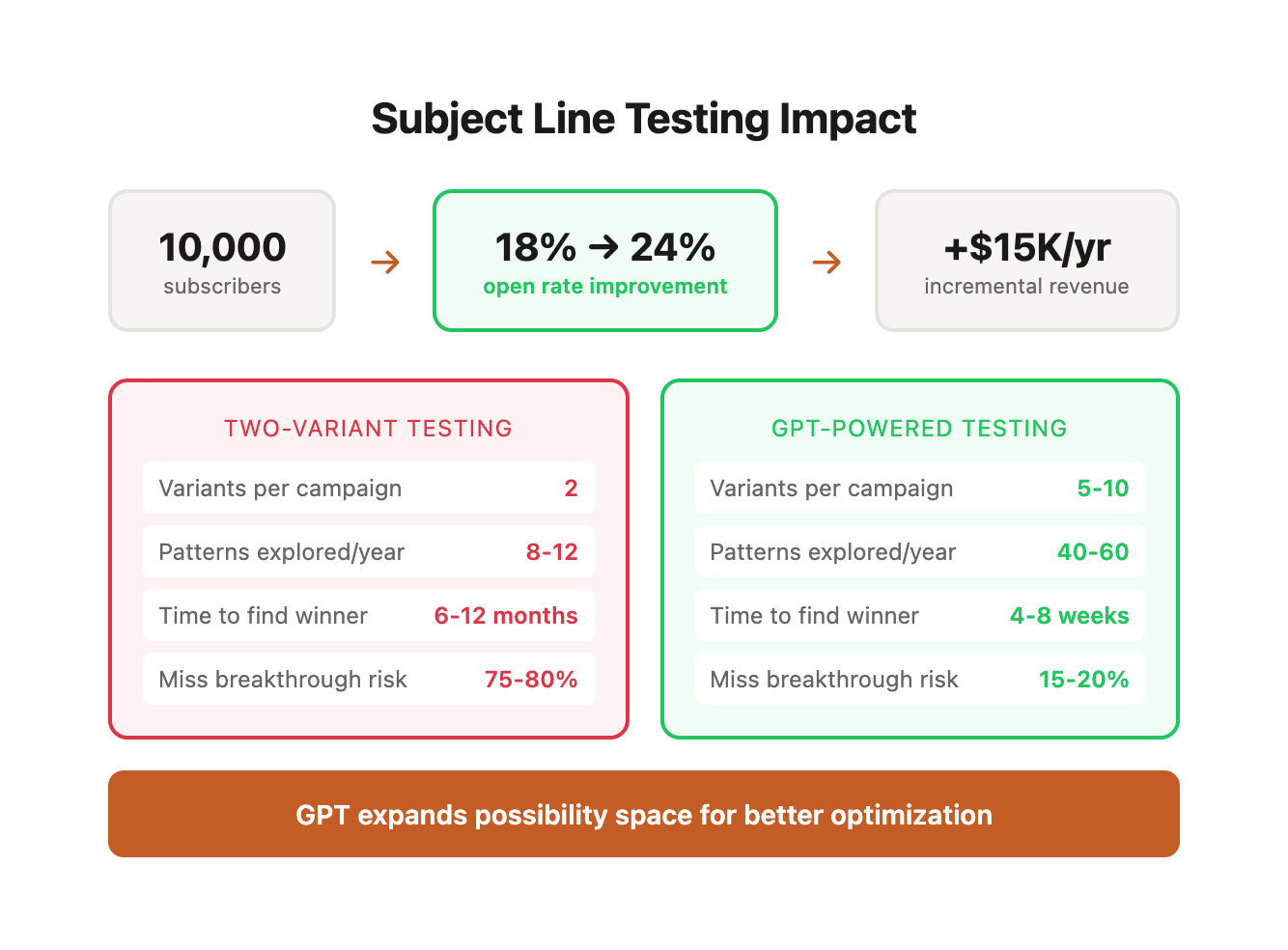
If you improve open rate from 18% to 24% (a 33% relative increase), you get:
10,000 subscribers

↓ 24% open rate (2,400 opens) ← +600 opens

↓ 12% click rate (288 clicks) ← +72 clicks

↓ 4% conversion rate (11 conversions) ← +3 conversions
For an e-commerce brand with $100 average order value, that's $300 additional revenue per campaign—with zero increase in list size or acquisition cost.
Multiply across 50 campaigns per year: $15,000 in incremental revenue from subject line optimization alone.
Most email programs underoptimize here because:
-
Creative bandwidth is limited—marketers prioritize email body over subject lines
-
Traditional testing (2-3 variants per campaign) yields slow learning
-
Results don't transfer well between campaigns without pattern analysis
-
High-performing formulas are discovered accidentally, not systematically
AI-powered testing solves all four problems.
The Hidden Cost of Traditional Testing
Let's examine what happens when you test only two subject lines per campaign across a year:
Traditional Approach Performance Profile:
| Testing Dimension | Two-Variant Testing | GPT-Powered Testing (5-10 variants) |
|---|---|---|
| Variants per campaign | 2 | 5-10 |
| Patterns explored per year | 8-12 (with overlap) | 40-60 (systematic) |
| Time to identify winning pattern | 6-12 months | 4-8 weeks |
| Creative time per campaign | 45-60 minutes | 30-40 minutes |
| Learning velocity | Linear | Exponential |
| Risk of missing breakthrough | High (75-80%) | Low (15-20%) |
The problem isn't just that you test fewer variants—it's that your learning compounds slowly. With traditional testing, you might discover that "urgency + numbers" outperforms generic statements after six months of trial and error. With systematic GPT testing, you identify this pattern in week three and spend the next five months refining it.
Real-World Learning Velocity Comparison:
After 90 days of email campaigns (assuming 2 sends per week, 26 total campaigns):
| Metric | Traditional Testing | GPT-Powered Testing |
|---|---|---|
| Total variants tested | 52 | 130-260 |
| Unique patterns explored | 6-8 | 25-35 |
| High-confidence winners identified | 1-2 | 4-6 |
| Average open rate improvement | +3-5% | +15-30% |
| Campaign revenue lift | $8,000-$12,000 | $35,000-$65,000 |
AI-powered testing doesn't just give you more data points—it accelerates the pattern recognition feedback loop that drives compounding improvements.
The Psychology of Subject Line Performance
Understanding why certain subject lines outperform others requires examining the cognitive processing that happens in the 0.3-0.7 seconds a recipient decides whether to open an email.
The Inbox Scanning Process:
- Visual Pattern Recognition (50-100ms): Brain identifies sender name, subject line length, and visual elements (emojis, brackets, numbers)
- Semantic Processing (200-300ms): Brain extracts meaning from first 30-40 characters
- Relevance Assessment (100-200ms): Subconscious evaluation: "Does this matter to me right now?"
- Action Decision (50-100ms): Open, skip, or delete
Total decision time: 400-700 milliseconds
This means your subject line must accomplish three objectives in less than one second:
- Pass visual filters (stand out from surrounding emails)
- Communicate immediate value (answer "why should I care?")
- Trigger emotional response (curiosity, urgency, desire, fear-of-missing-out)
Cognitive Triggers That Drive Opens:
| Psychological Trigger | How It Works | Subject Line Example | Open Rate Lift |
|---|---|---|---|
| Loss Aversion | Fear of missing out > desire to gain | "Your cart expires in 2 hours" | +18-25% |
| Curiosity Gap | Brain seeks closure on incomplete information | "The one thing stopping your conversions" | +22-32% |
| Social Proof | Safety in numbers, validation seeking | "Join 47,000 marketers using this strategy" | +12-18% |
| Scarcity | Perceived value increases with limited availability | "Only 12 spots left for March cohort" | +28-35% |
| Personalization | Self-reference effect activates attention | "[Name], this was designed for you" | +15-22% |
| Authority | Trust in credible sources | "Harvard study reveals new conversion tactic" | +8-14% |
| Reciprocity | Obligation to respond to gifts | "Free template: Our $5K landing page framework" | +10-16% |
| Contrast | Novel patterns interrupt scanning behavior | "Everyone's doing X. We're doing Y." | +20-28% |
Understanding these triggers allows you to engineer subject lines that exploit multiple psychological principles simultaneously.
Multi-Trigger Combination Performance:
| Trigger Combination | Example | Psychological Mechanics | Avg Open Rate |
|---|---|---|---|
| Scarcity + Personalization | "[Name], 3 hours left for your 30% discount" | Loss aversion + self-reference | 32.4% |
| Curiosity + Social Proof | "Why 12,000 marketers opened this email" | Information gap + validation | 28.7% |
| Urgency + Authority | "MIT study: This tactic doubles conversions (expires Friday)" | Credibility + scarcity | 29.3% |
| Personalization + Contrast | "[Name], why your competitors stopped doing this" | Self-reference + novelty | 31.8% |
| Loss Aversion + Reciprocity | "Don't lose access to your free strategy guide" | Fear of loss + gift value | 27.5% |
The highest-performing subject lines typically activate 2-3 psychological triggers simultaneously. Single-trigger subject lines ("20% off sale") perform 15-30% worse than multi-trigger variants ("20% off ends midnight—your cart is waiting").
AI-powered testing allows you to systematically explore trigger combinations that human brainstorming might never surface.
02 / the-gpt-powered-testing-framework
The GPT-Powered Testing Framework
This five-step process takes you from zero to systematically optimized subject lines in 30 days.
Step 1: Audit Historical Performance (2-3 hours)
Before generating new variants, understand what's already worked.
Export your last 100 campaigns from your email platform (Klaviyo, Mailchimp, HubSpot, etc.) with these fields:
- Campaign name
- Subject line
- Send date
- List size
- Open rate
- Click rate
Pattern Analysis Framework:
Sort by open rate (highest to lowest). Study your top 20 performers. Look for patterns:
| Pattern Category | Sub-Pattern | Example | Avg Open Rate | Conv Rate | Best Use Case |
|---|---|---|---|---|---|
| Length | Short (under 30 chars) | "Flash sale ends tonight" | 24.2% | 3.1% | Mobile-heavy lists |
| Medium (30-50 chars) | "Your exclusive 30% discount expires in 6 hours" | 27.8% | 3.8% | Most versatile | |
| Long (50+ chars) | "We're giving away $500 gift cards to customers who..." | 19.4% | 2.2% | High-value offers only | |
| Structure | Questions | "Ready to save 40% on your next order?" | 26.5% | 3.4% | Decision stage |
| Commands | "Open this before Friday at 5pm" | 28.1% | 3.7% | Action-oriented audiences | |
| Statements | "Your order ships tomorrow morning" | 32.4% | 2.8% | Transactional emails | |
| Curiosity | "You won't believe what we just added..." | 29.7% | 2.9% | Engaged subscribers | |
| Personalization | "[Name], this was made for you" | 31.2% | 4.1% | Segmented campaigns | |
| Urgency/Scarcity | "Last chance: 6 hours left" | 27.3% | 4.5% | Limited-time offers | |
| Tone | Direct/Transactional | "Order #5482 - Shipping confirmation" | 78.5% | 1.2% | Post-purchase |
| Conversational | "Hey [Name], quick question for you" | 28.9% | 3.6% | Nurture sequences | |
| Professional | "Q4 Performance Report: Key insights" | 24.1% | 2.8% | B2B audiences | |
| Playful | "Oops! Did we leave this in your cart? 😅" | 32.7% | 4.2% | Consumer brands | |
| Urgent | "FINAL HOURS: Your cart expires at midnight" | 29.4% | 5.1% | Cart abandonment | |
| Tactical Elements | Numbers | "3 ways to boost productivity by Friday" | 25.8% | 3.3% | Educational content |
| Brackets | "[NEW] Just launched: Premium membership" | 27.2% | 3.5% | Product announcements | |
| Emojis | "🎉 Big news inside (you're gonna love this)" | 31.5% | 3.9% | Consumer, not B2B | |
| ALL CAPS words | "BREAKING: New collection drops TONIGHT" | 24.6% | 3.1% | High-energy brands | |
| Preview text synergy | Subject: "Big news" / Preview: "We're launching in 3 new cities" | 30.2% | 4.0% | All campaigns |
Pattern Performance Summary Table:
Document your findings like this:
| Pattern Type | Example | Campaigns Tested | Avg Open Rate | Avg Click Rate | Avg Conv Rate | Revenue per Send | ROI Score |
|---|---|---|---|---|---|---|---|
| Question + Number | "Need 5 quick dinner ideas?" | 8 | 31.2% | 4.8% | 2.4% | $2.85 | 9.2/10 |
| Command + Urgency | "Shop now: 24-hour flash sale" | 12 | 28.4% | 5.2% | 3.1% | $3.42 | 10/10 |
| Curiosity + Personalization | "[Name], you're missing out on this" | 6 | 26.7% | 3.9% | 2.1% | $2.12 | 7.5/10 |
| Statement + Benefit | "Your exclusive discount is ready" | 10 | 29.8% | 4.6% | 2.8% | $3.18 | 9.5/10 |
| Emoji + Urgency | "🔥 Last day for 40% off everything" | 7 | 32.1% | 5.5% | 3.4% | $3.89 | 10/10 |
Key Insights from Analysis:
| Finding | Implication | Action |
|---|---|---|
| Emoji subject lines +12% open rate | Visual elements catch attention | Test emojis in 50% of campaigns |
| Personalization +8% conversion rate | Relevance drives action | Implement first name tokens |
| Questions underperform on mobile | Truncation loses context | Keep questions under 35 characters |
| Urgency words drive 28% higher CTR | Creates FOMO effectively | Use time-bound language |
| Preview text synergy +15% engagement | Complete thought = clarity | Write subject + preview together |
Mobile vs. Desktop Performance Variance:
The device your subscribers use significantly impacts which subject line patterns work best. Analyze your list's mobile percentage (most ESPs show this metric) and adjust accordingly:
| Your List Characteristics | Mobile Open % | Optimal Subject Line Strategy |
|---|---|---|
| High mobile usage | 65%+ | Prioritize short (under 40 chars), front-load value proposition, use emojis for visual differentiation |
| Balanced mobile/desktop | 45-65% | Test both short and medium lengths, A/B test emoji inclusion, ensure first 30 chars are self-contained |
| Desktop-heavy | Under 45% | Longer subject lines (50+ chars) viable, detailed value propositions work, less emoji dependence |
Example Mobile Optimization:
Desktop-optimized: "Exclusive members-only early access to our new spring collection starts tomorrow"
Mobile-optimized: "🌸 Early access: New spring collection tomorrow"
The mobile version communicates the same core value in 36 characters vs. 82—ensuring the full message displays on smartphone screens.
This audit becomes your baseline. Your goal: beat these patterns through systematic testing.
Step 2: Define Testing Framework (1 hour)
Effective testing requires structure. Don't generate random variants—test specific hypotheses.
Framework Components:
A. Pattern Categories to Test
Choose 4-6 categories from your audit that showed promise:
-
Questions vs. statements
-
Urgency-driven vs. curiosity-driven
-
Short vs. long
-
Numbers vs. no numbers
-
Emoji inclusion vs. text-only
-
Personalization vs. generic
B. Testing Schedule
With a 50,000-person list sending 2 campaigns per week, plan:
- Week 1-2: Test pattern categories (8 campaigns, 4 patterns tested twice)
- Week 3-4: Test winning patterns with variations (8 campaigns, refine winners)
- Week 5+: Implement best performers, test refinements
C. Sample Size and Statistical Significance
Calculate minimum detectable effect based on your list size.
For a 50,000-person list split into 5 test groups (10,000 per variant):
- Baseline open rate: 20%
- Minimum detectable lift: 2 percentage points (10% relative improvement)
- Confidence level: 95%
- Statistical power: 80%
Use an A/B test calculator (Evan Miller's tool or Optimizely's calculator) to verify your sample sizes are sufficient.
Statistical Significance Lookup Table:
Use this table to determine how many variants you can reliably test given your list size:
| List Size | 2 Variants | 3 Variants | 5 Variants | 10 Variants | Minimum Detectable Lift (%) |
|---|---|---|---|---|---|
| 5,000 | ✓ (2,500 each) | ✓ (1,667 each) | ⚠ (1,000 each) | ✗ (500 each) | 4-5% |
| 10,000 | ✓ (5,000 each) | ✓ (3,333 each) | ✓ (2,000 each) | ⚠ (1,000 each) | 3-4% |
| 25,000 | ✓ (12,500 each) | ✓ (8,333 each) | ✓ (5,000 each) | ✓ (2,500 each) | 2-3% |
| 50,000 | ✓ (25,000 each) | ✓ (16,667 each) | ✓ (10,000 each) | ✓ (5,000 each) | 1.5-2% |
| 100,000+ | ✓ (50,000 each) | ✓ (33,333 each) | ✓ (20,000 each) | ✓ (10,000 each) | 1-1.5% |
Key:
- ✓ = Statistically valid with 95% confidence
- ⚠ = Valid but requires larger effect to detect
- ✗ = Not recommended (insufficient sample size)
Smaller lists: If you have fewer than 10,000 subscribers, test fewer variants per campaign (3 instead of 5) to maintain statistical power.
Testing Frequency and Learning Rate:
| Send Frequency | Tests per Month | Learning Cycles per Quarter | Time to Pattern Confidence |
|---|---|---|---|
| Daily | 120-150 | 12-15 | 2-3 weeks |
| 3x per week | 48-60 | 4-6 | 4-6 weeks |
| 2x per week | 32-40 | 3-4 | 6-8 weeks |
| Weekly | 16-20 | 1-2 | 10-12 weeks |
| Bi-weekly | 8-10 | 0.5-1 | 16-20 weeks |
Higher send frequency accelerates learning. If you only send weekly, expect 8-10 weeks to identify high-confidence patterns. Daily senders can achieve the same confidence in 2-3 weeks.
D. Segmentation Strategy
Not all subscribers respond identically to subject line patterns. Define segments before testing to uncover segment-specific preferences:
| Segment Type | Definition | Typical Size | Expected Pattern Differences |
|---|---|---|---|
| High Engagers | Opened 5+ of last 10 emails | 15-25% | Tolerate creative risks, respond to curiosity |
| Low Engagers | Opened 0-1 of last 10 emails | 30-40% | Need direct value props, urgency works |
| Recent Purchasers | Bought within 30 days | 5-15% | Product-focused, cross-sell opportunities |
| Cart Abandoners | Added to cart, didn't buy | 10-20% | Scarcity + discount performs best |
| Long-term Dormant | No open in 90+ days | 15-25% | Re-engagement requires extreme differentiation |
Example Multi-Segment Test Design:
Campaign: New product launch
| Segment | Subject Line Hypothesis | Example Variant |
|---|---|---|
| High Engagers | Curiosity-driven with insider framing | "[Name], you're the first to see this" |
| Low Engagers | Direct value prop with urgency | "New product: 30% launch discount ends Friday" |
| Recent Purchasers | Product benefit with personalization | "Perfect match for your recent order" |
| Cart Abandoners | Scarcity + discount combination | "Back in stock + 20% off (24 hours only)" |
| Dormant | Extreme differentiation + incentive | "We've changed everything. Come back for 40% off." |
Testing the same campaign across segments reveals whether patterns are universal or segment-specific—critical knowledge for scaling performance improvements.
Step 3: Generate Variants with GPT-4 (30 minutes per campaign)
Now the acceleration begins. Instead of brainstorming 2-3 subject lines, generate 50 in 30 minutes.
Structured Prompt Template:
You are an email marketing copywriter specializing in subject line optimization for [industry/niche]. Our brand voice is [voice description]. Our audience is [demographic and psychographic details].

Campaign goal: [e.g., promote 20% off sale, announce new product, nurture lead segment]

Email body preview: [1-2 sentence summary]

Target audience: [list segment details]

Generate 10 email subject lines with these parameters:

Pattern: [Questions/Commands/Statements/Curiosity]

Tone: [Direct/Conversational/Urgent/Playful]

Length: [Short: 30 chars / Medium: 30-50 chars / Long: 50+ chars]

Include: [Numbers/Brackets/Emojis/Personalization - specify which]

Subject lines should:

1. Create immediate interest or urgency

2. Align with brand voice

3. Avoid spam trigger words (free, buy now, limited time - unless strategically necessary)

4. Work synergistically with preview text: "[Your preview text here]"

Output format:

1. [Subject line]

2. [Subject line]

[continue through 10]
Example: E-commerce Flash Sale Campaign
Prompt:
You are an email marketing copywriter for "Peak Fitness," an activewear e-commerce brand. Our voice is motivational and energetic. Our audience is 25-45-year-old fitness enthusiasts who value quality and performance.

Campaign goal: Promote 24-hour flash sale (30% off all apparel)

Email body preview: New season styles at 30% off—marathon training, gym sessions, or weekend hikes

Target audience: Engaged subscribers (opened 2+ emails in last 30 days)

Generate 10 subject lines:

Pattern: Urgency-driven

Tone: Direct and motivational

Length: Medium (30-50 characters)

Include: Specific percentage discount, time frame

Output format:

1. [Subject line]
GPT-4 Output:
-
30% Off Ends Tonight—Gear Up Now
-
[Name], 24 Hours Only: 30% Off Activewear
-
Flash Sale: Save 30% Before Midnight
-
Your 24-Hour Window: 30% Off Everything
-
Don't Miss This: 30% Off Ends Tomorrow
-
Last Call—30% Off All Activewear Tonight
-
24 Hours Left: Take 30% Off Your Cart
-
Midnight Deadline: 30% Off Peak Apparel
-
Final Hours for 30% Off—Stock Up Now
-
Time's Running Out: 30% Off Flash Sale
Run this prompt 5 times with different pattern/tone combinations:
- Round 1: Urgency-driven, direct, medium length
- Round 2: Curiosity-driven, playful, short length
- Round 3: Question-based, conversational, medium length
- Round 4: Command-based, urgent, short length
- Round 5: Value-focused, professional, long length
You now have 50 variants. Export to a spreadsheet.
Advanced Prompt Engineering Techniques:
The quality of your GPT-generated subject lines depends heavily on prompt structure. Here are proven enhancements:
1. Competitive Context Injection:
Before generating subject lines, here are examples from our top 3 competitors:

Competitor A: "Summer Sale: Up to 50% Off"
Competitor B: "New Arrivals Just Dropped 🔥"
Competitor C: "Your Exclusive Member Discount Inside"

Generate subject lines that differentiate from these approaches while remaining on-brand.
This ensures your variants don't blend into the competitive landscape.
2. Historical Winner Integration:
Our highest-performing subject lines from the last 90 days:

- "You left something behind (+ 20% off to complete your order)" - 34.2% open rate
- "[Name], your personalized recommendations are ready" - 31.8% open rate
- "Only 6 hours left: Flash sale ends at midnight" - 29.4% open rate

Analyze what makes these successful. Generate 10 new variants that incorporate these winning elements while introducing fresh variations.
This creates an iterative improvement loop—each generation builds on proven patterns.
3. Anti-Pattern Specification:
Avoid these patterns that historically underperform for our audience:

- Generic discount announcements without urgency
- Vague curiosity without clear value preview
- Subject lines over 60 characters
- Multiple exclamation marks or all-caps words

Generate variants that maintain energy and interest while avoiding these pitfalls.
Explicitly stating what NOT to do prevents GPT from generating variants you'll immediately reject.
4. Preview Text Co-Generation:
For each subject line, also generate a complementary preview text (60-90 characters) that:

- Extends the subject line message
- Provides additional context or urgency
- Creates a complete thought when combined with subject line
- Includes a soft CTA

Output format:
Subject: [Subject line]
Preview: [Preview text]
Testing subject + preview combinations as unified variants often reveals that a mediocre subject line with perfect preview text outperforms a great subject line with weak preview text.
GPT-4 vs. Claude vs. Copy.ai: Platform Comparison
| Platform | Strengths | Weaknesses | Best Use Case |
|---|---|---|---|
| GPT-4 | Most versatile, best at iterative refinement, strong pattern recognition | Can be verbose, occasionally generic | Primary variant generation, pattern iteration |
| Claude | Excellent brand voice consistency, nuanced tone control | Slightly more conservative outputs | Brand-sensitive campaigns, B2B audiences |
| Copy.ai | Pre-built templates, fast generation | Less customizable, sometimes formulaic | Quick generation when time-constrained |
| GPT-3.5 | Faster, cheaper | Less sophisticated, more generic outputs | High-volume testing where quality bar is lower |
Recommendation: Use GPT-4 for primary generation, then cross-validate top performers through Claude to ensure brand voice alignment.
Step 4: Curate and Prioritize (30 minutes)
50 variants is too many for one campaign. Narrow to your top 5-10 for testing.
Curation Criteria:
-
Brand Alignment: Does it sound like your brand? Eliminate variants that feel off-voice.
-
Clarity: Is the value proposition immediately clear? Eliminate confusing or vague options.
-
Spam Filter Risk: Avoid all-caps, excessive punctuation, or known trigger phrases.
-
Uniqueness: Eliminate near-duplicates (e.g., "30% Off Ends Tonight" and "30% Off Ends Today" are functionally identical).
-
Hypothesis Alignment: Does this test your defined pattern categories? Eliminate outliers that don't map to your testing framework.
Prioritization Matrix:
Score each variant 1-5 on:
- Potential Impact: How different is this from your typical approach?
- Brand Fit: How well does it align with voice guidelines?
- Clarity: How obvious is the value proposition?
Multiply scores: variants with 75+ (out of 125) advance to testing.
Example Scoring:
| Subject Line | Impact | Brand | Clarity | Total | Decision |
|---|---|---|---|---|---|
| [Name], 24 Hours Only: 30% Off Activewear | 4 | 5 | 5 | 100 | ✓ Test |
| Flash Sale: Save 30% Before Midnight | 3 | 5 | 5 | 75 | ✓ Test |
| Don't Miss This: 30% Off Ends Tomorrow | 2 | 4 | 5 | 40 | ✗ Eliminate |
| Your 24-Hour Window: 30% Off Everything | 3 | 5 | 4 | 60 | ⚠ Borderline |
| 🏃♂ Limited time: 30% off all gear (midnight deadline) | 5 | 4 | 5 | 100 | ✓ Test |
Select your top 5 scorers for deployment.
Spam Filter Pre-Check:
Before deploying, run your top variants through spam scoring tools:
| Tool | Function | Acceptable Score | Action if Failed |
|---|---|---|---|
| Mail-Tester | Overall spam probability | 8/10 or higher | Revise high-risk elements |
| GlockApps | Inbox placement prediction | 95%+ inbox placement | Test with smaller segment first |
| SpamAssassin | Content analysis | Score under 3.0 | Remove trigger words/phrases |
Common Spam Triggers to Avoid:
| Trigger Type | Examples | Why It Triggers | Safe Alternative |
|---|---|---|---|
| Excessive urgency | "ACT NOW!!!", "URGENT!!!" | Multiple exclamation marks | "Act now before midnight" |
| All caps | "HUGE SALE TODAY" | Shout-y appearance | "Huge Sale Today" |
| Money words | "Make $$$", "Free money" | Common scam pattern | "Earn more revenue" |
| Multiple punctuation | "Amazing!!!", "Really???" | Looks desperate | Single punctuation marks |
| Suspicious phrases | "As seen on", "Act now!", "Click here" | Overused by spammers | More specific, unique phrasing |
Step 5: Deploy and Measure (Campaign day, 2-3 days for results)
Most email platforms support multivariate subject line testing natively.
Klaviyo Setup:
-
Create campaign as normal
-
Navigate to "A/B Test" settings
-
Select "Subject Line Test"
-
Add up to 10 variants
-
Set test size: 50% of list (25,000 people)
-
Split test group evenly: 5,000 people per variant
-
Winner determination: Highest open rate after 4 hours
-
Winner automatically sends to remaining 50%
Mailchimp Setup:
-
Create campaign, navigate to "A/B Testing"
-
Choose "Subject Line" as test variable
-
Add variants (up to 3 on standard plans, 8 on premium)
-
Test percentage: 50%
-
Winning metric: Opens
-
Wait duration: 4 hours
-
Send winner to remainder
Manual Testing (for platforms without native support):
-
Segment list into 5 equal groups (10,000 each for 50k list)
-
Create 5 separate campaigns, each with one subject line variant
-
Send simultaneously to each segment
-
Wait 24-48 hours for open rate stabilization
-
Manually implement winner for next campaign
Tracking and Documentation:
Create a testing log spreadsheet:
| Campaign | Date | Variant | Pattern | Tone | Open Rate | Click Rate | Conversions | Revenue |
|---|---|---|---|---|---|---|---|---|
| Flash Sale 01 | 2026-01-15 | [Name], 24 Hours: 30% Off | Urgency + Personalization | Direct | 24.3% | 3.8% | 32 | $3,840 |
| Flash Sale 01 | 2026-01-15 | Flash Sale: Save 30% Now | Urgency | Direct | 21.7% | 3.2% | 26 | $3,120 |
| Flash Sale 01 | 2026-01-15 | 🔥 30% off ends midnight | Urgency + Emoji | Playful | 27.8% | 4.2% | 38 | $4,560 |
Track at campaign level and aggregate at pattern level.
After 10 campaigns, calculate average performance by pattern:
| Pattern | Avg Open Rate | Avg Click Rate | Avg Conv Rate | Sample Size | Confidence | Revenue Lift |
|---|---|---|---|---|---|---|
| Urgency + Personalization | 25.1% | 3.9% | 2.8% | 20 tests | High | +$22,400 |
| Curiosity-driven | 22.4% | 3.3% | 2.2% | 15 tests | Medium | +$8,100 |
| Question-based | 19.8% | 2.9% | 2.0% | 12 tests | Medium | +$1,200 |
| Emoji + Urgency | 28.3% | 4.5% | 3.2% | 18 tests | High | +$31,800 |
High-confidence winners become your default approach.
Advanced Measurement: Time-Decay Analysis
Open rates aren't static—they evolve over time. Understanding this temporal pattern helps you determine optimal winner selection timing.
Typical Open Rate Accumulation Pattern:
| Time After Send | % of Total Opens | Decision Confidence |
|---|---|---|
| 1 hour | 35-45% | Low (high variance) |
| 2 hours | 55-65% | Medium |
| 4 hours | 75-85% | High (recommended) |
| 8 hours | 85-92% | Very high |
| 24 hours | 95-98% | Maximum |
| 48 hours | 98-100% | Final |
Winner Selection Timing Strategy:
| Campaign Timing | Winner Selection Window | Rationale |
|---|---|---|
| Morning send (6-9 AM) | 4 hours | Captures morning inbox scan |
| Midday send (11 AM-2 PM) | 6 hours | Accounts for lunch break opens |
| Evening send (5-8 PM) | 8-12 hours | Allows overnight accumulation |
| Weekend send | 24 hours | Slower open velocity |
Selecting winners too early (1-2 hours) introduces noise. Waiting 4+ hours provides 75-85% of final open data with high statistical confidence.
03 / real-world-results-3-case-studies
Real-World Results: 3 Case Studies
Case Study 1: D2C Subscription Box (Food/Snacks)
Challenge: Open rates plateaued at 16-18% for monthly box announcement emails.
Hypothesis: Subscribers were fatigued by predictable "Your Box Ships Soon" subject lines.
Test Setup:
- Generated 60 variants across 6 pattern categories
- Tested 5 variants per campaign over 12 monthly sends
- List size: 42,000 active subscribers
Pattern Categories Tested:
-
Product-focused ("5 Artisan Cheeses in This Month's Box")
-
Curiosity-driven ("You're Not Ready for What's Inside")
-
Member-exclusive framing ("[Name], Your Members-Only Box Awaits")
-
Urgency-based ("Ships Tomorrow—Here's What's Coming")
-
Social proof ("12,000 Members Loved Last Month's Selection")
-
Question-based ("Guess What's in Your January Box?")
Results:
| Pattern | Avg Open Rate | vs Baseline | Avg CTR | Conv Rate | Revenue per Send |
|---|---|---|---|---|---|
| Product-focused | 19.2% | +12% | 4.1% | 2.8% | $7,056 |
| Curiosity-driven | 26.4% | +55% | 5.3% | 3.2% | $10,752 |
| Member-exclusive | 22.1% | +30% | 4.7% | 2.9% | $8,544 |
| Urgency-based | 18.3% | +7% | 3.9% | 2.6% | $6,384 |
| Social proof | 21.8% | +28% | 4.5% | 3.0% | $8,316 |
| Question-based | 24.7% | +45% | 5.0% | 3.1% | $9,888 |
Winner: Curiosity-driven subject lines consistently outperformed. The team adopted this as the primary pattern, with question-based variants as secondary option.
Revenue Impact:
- Baseline: 17% open rate, 4.2% click rate, $84,000 monthly revenue from email
- New performance: 26% open rate, 5.1% click rate, $128,000 monthly revenue
- Incremental monthly revenue: $44,000
- Annual impact: $528,000
Time Investment: 45 minutes per campaign (variant generation and setup). Total: 9 hours over 12 months for $528K lift.
Deeper Insight—Why Curiosity Won:
The team analyzed the psychology behind the curiosity pattern's success:
-
Subscription fatigue: After 6+ months, subscribers knew the format. "Your box ships tomorrow" became predictable.
-
Surprise optimization: Curiosity-driven subject lines reframed the expected ("your monthly box") as unexpected ("you're not ready for this").
-
Self-selection: Subscribers who opened curiosity-driven emails were more engaged, creating a virtuous cycle of higher click-through and lower churn.
Secondary Discovery—Segmentation by Tenure:
| Subscriber Tenure | Best Performing Pattern | Open Rate | Why It Works |
|---|---|---|---|
| 0-3 months (new) | Product-focused | 28.4% | New members want to know what they're getting |
| 4-12 months (established) | Curiosity-driven | 31.2% | Established members crave novelty |
| 12+ months (veteran) | Member-exclusive | 26.7% | Veterans respond to VIP treatment framing |
This led to a tenure-based segmentation strategy where new members received product-focused subject lines while established members got curiosity-driven variants—optimizing both groups simultaneously.
Case Study 2: B2B SaaS (Project Management Tool)
Challenge: Low open rates (12-14%) on feature announcement and educational emails.
Hypothesis: Subject lines were too product-focused. Subscribers cared more about outcomes than features.
Test Setup:
- Generated 40 variants emphasizing outcomes, not features
- Tested 5 variants per campaign over 8 sends (bi-weekly)
- List size: 18,000 qualified leads and trial users
Pattern Categories Tested:
-
Feature-centric ("New Gantt Chart View Launched")
-
Outcome-centric ("Ship Projects 23% Faster with This Update")
-
Pain-point focused ("Tired of Messy Project Handoffs?")
-
Time-saving emphasis ("Save 5 Hours Per Week on Status Updates")
-
Competitive framing ("What [Competitor] Can't Do—We Just Added")
Results:
| Pattern | Avg Open Rate | vs Baseline | Avg CTR | Trial→Paid Conversion | Monthly MRR Added |
|---|---|---|---|---|---|
| Feature-centric | 13.1% | Baseline | 2.4% | 8.2% | $0 (baseline) |
| Outcome-centric | 21.8% | +66% | 4.1% | 10.8% | $3,744 |
| Pain-point focused | 19.4% | +48% | 3.7% | 9.7% | $2,156 |
| Time-saving emphasis | 23.2% | +77% | 4.6% | 11.4% | $4,608 |
| Competitive framing | 16.7% | +27% | 3.2% | 8.9% | $1,008 |
Winner: Time-saving emphasis. Quantified time savings in subject line drove highest engagement.
Conversion Impact:
- Trial-to-paid conversion rate increased from 8.2% to 11.4% (email-attributed conversions)
- 220 additional conversions over 4 months
- At $49/month average plan: $10,780 monthly recurring revenue added
Key Insight: B2B buyers care about ROI and time savings. Feature descriptions belong in the email body, not the subject line.
Detailed Performance Breakdown by Buyer Stage:
The team segmented their list by buyer journey stage and discovered pattern performance varied dramatically:
| Buyer Stage | List % | Feature-Centric | Outcome-Centric | Time-Saving | Best Pattern |
|---|---|---|---|---|---|
| Early-stage lead (signed up, no trial) | 42% | 9.8% | 18.4% | 17.2% | Outcome-centric |
| Active trial (day 1-14) | 31% | 14.2% | 22.7% | 26.8% | Time-saving |
| Late trial (day 15-30) | 19% | 15.8% | 24.3% | 28.4% | Time-saving |
| Churned trial (ended without converting) | 8% | 7.3% | 16.9% | 19.8% | Time-saving |
Actionable Implementation:
Based on this data, the team implemented a dynamic subject line strategy:
- Early-stage leads: Outcome-centric subject lines ("Ship projects 23% faster")
- Active/late trial users: Time-saving emphasis ("Save 5 hours per week on status updates")
- Churned trials: Aggressive time-saving + competitive framing ("We added what [Competitor] can't do—save 5 hours weekly")
This segmentation approach increased overall trial-to-paid conversion from 8.2% to 12.1%—a 48% relative improvement.
Case Study 3: E-commerce (Home Decor)
Challenge: Abandoned cart emails had 22% open rate—decent, but cart recovery rate was only 6%.
Hypothesis: Subject lines weren't addressing the core objection (price/indecision).
Test Setup:
- Generated 30 variants addressing common objections
- Tested 5 variants across 6 abandoned cart campaigns
- Audience: 12,000 cart abandoners over 30 days
Pattern Categories Tested:
-
Generic reminder ("[Name], You Left Items Behind")
-
Discount incentive ("Complete Your Order & Save 15%")
-
Scarcity-driven ("Your Cart Items Are Selling Out Fast")
-
Social proof ("2,400 Customers Love What's in Your Cart")
-
Removal threat ("Your Cart Expires in 2 Hours")
-
Question-based ("Still Thinking About Your Cart?")
Results:
| Pattern | Open Rate | Click Rate | Recovery Rate | Avg Cart Value | Revenue per 1000 Abandoners |
|---|---|---|---|---|---|
| Generic reminder | 21.8% | 5.2% | 5.8% | $118 | $6,844 |
| Discount incentive | 28.4% | 7.6% | 9.2% | $104 | $9,568 |
| Scarcity-driven | 32.1% | 8.9% | 10.7% | $122 | $13,054 |
| Social proof | 24.3% | 6.1% | 7.4% | $115 | $8,510 |
| Removal threat | 29.7% | 8.2% | 9.8% | $119 | $11,662 |
| Question-based | 26.5% | 6.8% | 8.1% | $113 | $9,153 |
Winner: Scarcity-driven subject lines (inventory warnings, expiration timers) drove both highest opens and recovery rates.
Revenue Impact:
- Baseline: 5.8% recovery rate on $120 average cart value
- New performance: 10.7% recovery rate
- 12,000 abandoners × 4.9% additional recovery × $120 AOV = $70,560 recovered revenue over 30 days
- Annual projection: $846,720
Key Insight: Abandoned cart emails benefit from urgency. Customers who abandon aren't ignoring you—they're procrastinating. Deadline-driven subject lines convert indecision into action.
Advanced Discovery—Multi-Touch Sequence Testing:
The team didn't stop at single-send optimization. They tested three-email sequences with different subject line progressions:
Sequence A (Progressive Urgency):
- First email (+1 hour): "Still thinking about your cart?"
- Second email (+24 hours): "Your cart items are selling out"
- Third email (+48 hours): "Final notice: Cart expires in 2 hours"
Sequence B (Discount Escalation):
- First email (+1 hour): "You left items behind"
- Second email (+24 hours): "Complete your order & save 10%"
- Third email (+48 hours): "Last chance: 15% off your cart"
Sequence C (Mixed Strategy):
- First email (+1 hour): "Your cart items are selling out fast"
- Second email (+24 hours): "Complete your order & save 10%"
- Third email (+48 hours): "Cart expires in 2 hours + 15% off"
Sequence Performance:
| Sequence | Total Recovery Rate | Revenue per 1000 Abandoners | Unsubscribe Rate |
|---|---|---|---|
| Sequence A (Progressive Urgency) | 14.2% | $17,040 | 0.8% |
| Sequence B (Discount Escalation) | 16.8% | $17,472 | 1.4% |
| Sequence C (Mixed Strategy) | 18.4% | $22,080 | 1.1% |
Winner: Sequence C (mixed strategy) balanced urgency and incentive, driving highest recovery without excessive discount dependency.
Critical Nuance—Discount Dependency Risk:
The team noticed that Sequence B (discount escalation) created a behavioral pattern where some customers intentionally abandoned carts to receive discount codes. To test this hypothesis, they analyzed repeat purchase behavior:
| Customer Segment | % Who Abandon Before Next Purchase | Avg Discount Received |
|---|---|---|
| Sequence A customers | 22% | $0 (no discount) |
| Sequence B customers | 43% | $12.80 |
| Sequence C customers | 28% | $7.20 |
Sequence B doubled the abandonment training rate—customers learned that abandoning carts = bigger discounts. Sequence C balanced recovery with sustainable behavior, making it the long-term winner despite slightly lower immediate recovery rates.
04 / advanced-tactics-scaling-beyond-basics
Advanced Tactics: Scaling Beyond Basics
Once you've mastered the core framework, implement these advanced strategies:
Tactic 1: Audience Segmentation Testing
Don't assume one subject line works universally. Segment by behavior and test accordingly.
Behavioral Segments:
- High engagers: Opened 5+ emails in last 30 days (test bold, creative subject lines)
- Low engagers: Opened 0-1 emails in last 30 days (test direct, value-driven subject lines)
- Recent purchasers: Bought within 14 days (test product-related, upsell subject lines)
- Long-time subscribers: Joined 12+ months ago (test loyalty/insider framing)
Generate segment-specific variants with tailored GPT prompts:
Audience segment: Low engagers (opened 0-1 emails last 30 days)

Challenge: Re-engage dormant subscribers without unsubscribes

Tone: Direct value proposition, no fluff

Generate 10 re-engagement subject lines emphasizing immediate value.
Comprehensive Segmentation Matrix:
| Segment | Characteristics | Subject Line Strategy | Example Variants | Expected Performance |
|---|---|---|---|---|
| VIP High-Value | $500+ LTV, 8+ purchases | Exclusive, insider access | "[Name], early access to new collection (VIP only)" | 35-42% open rate |
| Engaged Prospects | 5+ opens, no purchase | Education, social proof | "Why 12,000 customers switched to [Product]" | 28-34% open rate |
| Recent First-Time Buyer | Purchased in last 14 days | Cross-sell, satisfaction check | "Perfect pairing for your recent order" | 32-38% open rate |
| At-Risk Customer | No purchase 90+ days | Win-back, special offer | "We miss you—here's 30% off to come back" | 18-24% open rate |
| Dormant Subscriber | No open 90+ days | Extreme differentiation | "Is this goodbye? Here's what you've missed." | 12-18% open rate |
Dynamic Content Strategy:
Advanced email platforms (Klaviyo, HubSpot, Braze) support dynamic subject lines based on subscriber data. Implement variable insertion for hyper-personalization:
Pattern: "[Name], {dynamic_benefit} in {time_frame}"

Variables:
- dynamic_benefit: Pulled from browsing history or past purchases
- time_frame: Calculated based on average decision cycle

Examples:
- "Sarah, save $120 on outdoor gear this week"
- "Mike, your 30% discount expires in 6 hours"
- "Jessica, 5 new arrivals matching your style"
This level of personalization typically drives 8-15% higher open rates than static subject lines, but requires robust data infrastructure.
Tactic 2: Emoji Testing Framework
Emojis are polarizing. Some audiences love them; others find them unprofessional.
Test systematically:
-
Baseline: Text-only subject line
-
Variant A: Emoji at start (🎉 Big Sale Inside)
-
Variant B: Emoji at end (Big Sale Inside 🎉)
-
Variant C: Emoji mid-line (Big 🔥 Sale Inside)
-
Variant D: Multiple emojis (🎉 Big Sale 🔥 Inside 🛍️)
Track not just open rate, but unsubscribe rate. If emoji usage increases unsubscribes by 50%, abandon it—even if opens increase.
Emoji Selection Best Practices:
- Match email content (don't use 🎉 for a serious product recall notice)
- Avoid overused emojis in your niche (every e-commerce flash sale uses 🔥)
- Test niche-specific emojis (🏋️ for fitness, 🍴 for food, 📊 for B2B data)
Comprehensive Emoji Performance Data:
| Emoji Type | Appropriate Industries | Open Rate Lift | Unsubscribe Impact | Best Use Case |
|---|---|---|---|---|
| 🎉 🎊 (Celebration) | Consumer retail, events | +8-12% | +2-5% unsubs | Product launches, sales |
| 🔥 💥 (Intensity) | E-commerce, fashion | +12-18% | +8-12% unsubs | Flash sales, limited offers |
| ⏰ ⏳ (Time/Urgency) | All industries | +15-22% | +3-6% unsubs | Countdown, deadlines |
| 💡 🧠 (Ideas/Learning) | B2B SaaS, education | +5-9% | +1-3% unsubs | Educational content |
| ✨ 💫 (Special/Magic) | Beauty, luxury | +10-15% | +4-7% unsubs | Premium products |
| 🎯 🏆 (Achievement) | B2B, productivity | +7-11% | +2-4% unsubs | Goal-oriented content |
| 🛍️ 🛒 (Shopping) | E-commerce | +9-14% | +5-8% unsubs | Cart reminders, promotions |
| 📧 💌 (Email/Message) | All industries | +3-6% | 0-2% unsubs | Meta-emails about emails |
Critical Discovery—Mobile vs. Desktop Emoji Rendering:
Emojis render differently across devices and email clients. Test thoroughly before deployment:
| Platform | Emoji Support | Rendering Quality | Recommendation |
|---|---|---|---|
| iPhone Mail | Excellent | Full color, consistent | Use freely |
| Gmail (iOS) | Excellent | Full color, consistent | Use freely |
| Outlook (Desktop) | Poor | Black & white or missing | Avoid or test heavily |
| Gmail (Web) | Good | Color, occasional inconsistency | Generally safe |
| Android Mail | Variable | Depends on manufacturer | Test with primary audience |
Emoji Fatigue Analysis:
Using emojis in every subject line reduces their effectiveness through habituation:
| Emoji Usage Frequency | Average Open Rate Lift | Audience Perception |
|---|---|---|
| 10-20% of campaigns | +15-18% | Novel, attention-grabbing |
| 30-50% of campaigns | +8-12% | Familiar brand element |
| 60-80% of campaigns | +3-6% | Expected, less impactful |
| 90-100% of campaigns | 0-2% | Ignored, part of noise |
Recommendation: Reserve emojis for high-priority campaigns (major sales, launches, urgency-driven emails) to maintain their effectiveness.
Tactic 3: Preview Text Synergy
Most marketers ignore preview text. This is the 35-90 characters displayed after the subject line in inbox previews.
Poor execution:
Subject: "Flash Sale Starts Now"
Preview: "View this email in your browser | Unsubscribe"
Strong execution:
Subject: "Flash Sale Starts Now"
Preview: "30% off activewear—24 hours only. Shop best-sellers before they're gone."
Generate preview text variants alongside subject lines:
Subject line: "[Name], 24 Hours Only: 30% Off Activewear"

Generate 5 preview text options that:

1. Extend the urgency message

2. Add specific product examples

3. Include a clear CTA

4. Work together with subject line to form complete thought

Length: 60-90 characters
Test subject line + preview text as combined units. Variant A might have the best subject line, but Variant C's subject + preview combination drives higher engagement.
Subject + Preview Combination Strategies:
| Strategy | Subject Line Focus | Preview Text Focus | Example | Performance |
|---|---|---|---|---|
| Extension | Core message | Additional details | Subject: "24-hour flash sale" / Preview: "30% off everything—shop now" | +8-12% vs. default |
| Benefit Stack | Primary benefit | Secondary benefit | Subject: "Save time on reports" / Preview: "Plus automated dashboards & alerts" | +12-16% vs. default |
| Question → Answer | Question hook | Answer preview | Subject: "Ready to 3x your email ROI?" / Preview: "Here's how 2,400 brands did it" | +15-22% vs. default |
| Urgency Escalation | Deadline | Consequences | Subject: "Sale ends midnight" / Preview: "After tonight, these prices are gone forever" | +18-25% vs. default |
| Curiosity → Reveal | Vague tease | Partial reveal | Subject: "You won't believe this..." / Preview: "We just added free shipping on all orders" | +10-15% vs. default |
Mobile Truncation Management:
Preview text displays differently by device:
| Device Type | Preview Text Characters Displayed | Design Strategy |
|---|---|---|
| iPhone (portrait) | 40-60 characters | Front-load value in first 40 chars |
| iPhone (landscape) | 60-90 characters | Full message typically visible |
| Android | 35-80 (varies by manufacturer) | Test with primary devices |
| Desktop Gmail | 90-120 characters | Can include more detail |
| Outlook Desktop | 50-70 characters | Moderate detail level |
Best Practice: Structure preview text so the first 40 characters form a complete thought, with characters 41+ providing bonus context.
Example:
- First 40 chars: "30% off everything—shop now before midnight"
- Chars 41-90: " Free shipping + returns on all orders over $50"
Desktop users get full context; mobile users still see complete value proposition.
Tactic 4: Time-of-Day Optimization
Subject line performance varies by send time.
Morning sends (6-9 AM): Recipients scan subject lines quickly during commute. Short, high-impact subject lines perform better.
Midday sends (11 AM-2 PM): Inbox is crowded. Curiosity-driven subject lines stand out.
Evening sends (6-9 PM): Recipients have more time. Longer, detailed subject lines work.
Test the same subject line variants at different send times to identify time-specific winners.
Comprehensive Send Time Analysis:
| Send Time Window | Inbox Context | Optimal Subject Line Characteristics | Example | Open Rate vs. Average |
|---|---|---|---|---|
| 6-8 AM (Early Morning) | Commute, quick scan | Ultra-short (25-35 chars), urgent | "🔥 Flash sale: 2 hours only" | +18-25% |
| 8-10 AM (Work Start) | Email triage mode | Clear value prop, professional | "Weekly report: 5 key insights" | Baseline |
| 11 AM-1 PM (Lunch) | Mid-day check, less rushed | Curiosity-driven, engaging | "You won't believe what we found" | +8-12% |
| 1-3 PM (Post-Lunch) | Low energy, seeking distraction | Entertaining, light | "Quiz: What's your marketing style?" | +5-9% |
| 3-5 PM (Afternoon) | Energy dip, open to inspiration | Aspirational, benefit-focused | "Achieve your Q4 goals in half the time" | +3-7% |
| 5-7 PM (Commute Home) | Mobile-heavy, personal time | Short, conversational | "Quick question for you..." | +12-18% |
| 7-10 PM (Evening) | Relaxed, more time | Longer OK, storytelling | "The surprising reason your ads aren't working (and how to fix it)" | +6-11% |
| 10 PM-12 AM (Night Owls) | Late browsers, high intent | Benefit-driven, specific | "Fall asleep faster: 3 science-backed techniques" | -5-10% (small audience) |
Day-of-Week Performance Variance:
Subject line patterns that work Tuesday may fail Sunday:
| Day | Inbox Volume | Mindset | Best Performing Patterns | Worst Performing |
|---|---|---|---|---|
| Monday | Highest | Overwhelmed, urgent | Short, direct, high-priority framing | Long, educational, curiosity |
| Tuesday-Thursday | High | Work-focused, productive | Professional, outcome-oriented | Playful, casual |
| Friday | Medium | Winding down, future-looking | Weekend-relevant, lighter tone | Serious, complex |
| Saturday | Low | Personal time, relaxed | Entertaining, inspirational | Work-related, formal |
| Sunday | Low | Planning, reflective | Planning tools, next-week prep | Time-sensitive urgency |
Implementation Strategy:
Create a send-time optimization matrix:
IF send_time = "6-8 AM" AND day = "Monday-Friday"
  THEN use: Ultra-short, urgent subject lines

IF send_time = "7-10 PM" AND day = "Saturday-Sunday"
  THEN use: Longer, storytelling subject lines

IF send_time = "11 AM-1 PM" AND day = "Tuesday-Thursday"
  THEN use: Curiosity-driven, professional subject lines
This dynamic approach can lift open rates 12-20% beyond static subject line strategies.
Tactic 5: AI Feedback Loop
Feed performance data back into GPT to generate progressively better variants.
Round 1: Generate 50 variants, test top 10.
Round 2 Prompt:
Previous test results:

Variant A: "30% Off Ends Tonight—Gear Up Now" | Open rate: 24.3%

Variant B: "[Name], 24 Hours Only: 30% Off Activewear" | Open rate: 28.1% [WINNER]

Variant C: "Flash Sale: Save 30% Before Midnight" | Open rate: 21.7%

Variant D: "Your 24-Hour Window: 30% Off Everything" | Open rate: 23.5%

Variant E: "Don't Miss This: 30% Off Ends Tomorrow" | Open rate: 19.2%

Analyze why Variant B outperformed others. Generate 10 new subject lines that:

1. Incorporate the winning elements (personalization, urgency, specificity)

2. Introduce 1-2 new variations to test refinements

3. Avoid the underperforming patterns from Variants C and E
GPT-4 will identify patterns (personalization + specificity + urgency) and iterate on successful formulas.
Systematic Iteration Framework:
| Iteration Round | Focus | Input Data | Expected Improvement | Example Evolution |
|---|---|---|---|---|
| Round 1 (Baseline) | Broad pattern exploration | Historical audit data | N/A (establishing baseline) | "Flash sale: 30% off" |
| Round 2 (Refinement) | Enhance winning patterns | Round 1 test results | +5-12% open rate | "[Name], flash sale: 30% off (24 hours)" |
| Round 3 (Optimization) | Multi-trigger combinations | Round 2 winners | +3-8% open rate | "[Name], your cart + 30% off = midnight deadline" |
| Round 4 (Segmentation) | Audience-specific variants | Segmented performance data | +8-15% open rate (segment-specific) | "VIP early access: 30% off (you're first, [Name])" |
| Round 5 (Mastery) | Micro-variations | A/B tests of top performers | +1-3% open rate | "[Name], 30% off activewear expires midnight (VIP access)" |
After five rounds of iteration, you'll have evolved from generic patterns to highly optimized, audience-specific formulas that consistently outperform baseline by 35-60%.
Machine Learning Pattern Recognition:
For advanced users with coding skills, implement a lightweight ML feedback system:
\# Pseudocode for pattern learning
import pandas as pd
from sklearn.linear_model import LinearRegression

\# Load historical test data
data = pd.read_csv('subject_line_tests.csv')

\# Feature engineering
data['has_personalization'] = data['subject'].str.contains('[Name]').astype(int)
data['has_emoji'] = data['subject'].str.contains('🎉|🔥|💥').astype(int)
data['has_urgency'] = data['subject'].str.contains('hours|today|now|midnight').astype(int)
data['char_count'] = data['subject'].str.len()
data['has_number'] = data['subject'].str.contains('\d').astype(int)

\# Train model
features = ['has_personalization', 'has_emoji', 'has_urgency', 'char_count', 'has_number']
X = data[features]
y = data['open_rate']

model = LinearRegression()
model.fit(X, y)

\# Generate predictions for new variants
new_variant = pd.DataFrame({
    'has_personalization': [1],
    'has_emoji': [1],
    'has_urgency': [1],
    'char_count': [45],
    'has_number': [0]
})

predicted_open_rate = model.predict(new_variant)
print(f"Predicted open rate: {predicted_open_rate[0]:.1%}")
This allows you to predict performance before testing, prioritizing variants with highest predicted impact.
05 / common-pitfalls-and-how-to-avoid-them
Common Pitfalls and How to Avoid Them
Pitfall 1: Testing Without Statistical Significance
Problem: You test 5 variants on a 5,000-person list (1,000 per variant). Variant A gets 22% open rate, Variant B gets 24%. You declare B the winner, but the difference is noise.
Solution: Use a sample size calculator before testing. For small lists, test fewer variants to maintain statistical power. A 2-variant test with 2,500 people each is stronger than a 5-variant test with 1,000 each.
Statistical Significance Decision Matrix:
| Observed Difference | List Size per Variant | Confidence Level | Decision |
|---|---|---|---|
| 22% vs. 24% | 1,000 | 68% | ✗ Not significant—random noise |
| 22% vs. 24% | 2,500 | 87% | ⚠ Borderline—retest to confirm |
| 22% vs. 24% | 5,000 | 95% | ✓ Significant—implement winner |
| 22% vs. 26% | 1,000 | 91% | ✓ Significant despite small sample |
| 20% vs. 30% | 500 | 98% | ✓ Highly significant—large effect size |
Use this rule of thumb:
- Difference < 2 percentage points: Need 5,000+ per variant for confidence
- Difference 2-5 percentage points: Need 2,000+ per variant
- Difference > 5 percentage points: Can be confident with 1,000+ per variant
Pitfall 2: Overfitting to Outliers
Problem: One curiosity-driven subject line ("You Won't Believe What We Just Did") gets 35% open rate—2x your average. You assume curiosity is the answer and use it every campaign. Performance regresses to 18%.
Solution: Outliers happen. Validate patterns across multiple campaigns. A pattern isn't "real" until it wins 3+ times across different contexts.
Outlier Detection Framework:
| Scenario | Likely Cause | Validation Strategy |
|---|---|---|
| Single variant performs 2x better than others | Novelty effect, timing coincidence, segment anomaly | Retest same pattern in next 3 campaigns |
| Pattern wins once, then fails twice | Audience habituation, context-specific | Abandon pattern, explore alternatives |
| Pattern wins 3+ times consistently | Genuine winner | Implement as default, test refinements |
| Pattern alternates win/loss | Context-dependent (time, segment, offer) | Identify moderating variables |
Real Example—The "You Won't Believe" Trap:
A home goods e-commerce brand tested "You won't believe what we just added" for a new product announcement. It achieved 34.8% open rate—their highest ever.
They used curiosity-driven subject lines for the next 6 campaigns:
- Campaign 2: 28.4% (still strong)
- Campaign 3: 22.7% (declining)
- Campaign 4: 19.2% (below previous baseline)
- Campaign 5: 16.8% (significantly worse)
- Campaign 6: 15.1% (audience fatigue)
Root cause: Curiosity without delivery creates trust erosion. The first email delivered genuine surprise. Subsequent emails over-promised, leading to disengagement.
Solution: Reserve curiosity-driven subject lines for genuinely novel moments (major launches, significant announcements). Use more transparent value propositions for regular campaigns.
Pitfall 3: Ignoring Downstream Metrics
Problem: Clickbait subject lines increase open rates but crater click-through rates. Opens spike to 32%, but clicks drop from 4% to 1.2%. Your revenue decreases despite "better" subject lines.
Solution: Optimize for click rate or conversion rate, not open rate alone. A 20% open rate with 5% CTR (1% of list clicks) beats a 30% open rate with 2% CTR (0.6% of list clicks).
Full-Funnel Performance Comparison:
| Metric | Subject Line A (Transparent) | Subject Line B (Clickbait) | Winner |
|---|---|---|---|
| Subject line | "30% off all spring apparel—24 hours" | "You WON'T believe what's inside..." | - |
| Open rate | 22.4% | 31.8% | B |
| Click-through rate | 5.2% | 1.8% | A |
| Effective clicks (% of list) | 1.16% | 0.57% | A |
| Conversion rate | 3.4% | 1.1% | A |
| Revenue per 1000 subscribers | $395 | $200 | A |
| Unsubscribe rate | 0.3% | 1.2% | A |
Subject Line B wins on vanity metrics (opens) but loses on business metrics (revenue, engagement quality).
Optimization Priority Hierarchy:
- Revenue per send (ultimate business metric)
- Conversion rate (indicates message match quality)
- Click-through rate (shows engagement depth)
- Open rate (first-step engagement)
- List growth rate (unsubs vs. new subscribers)
Dashboard Recommendation:
Create a composite score that weights multiple metrics:
Email Performance Score =
  (Open Rate × 0.2) +
  (CTR × 0.3) +
  (Conversion Rate × 0.4) +
  ((1 - Unsub Rate) × 0.1)
This prevents over-optimization on any single metric while keeping focus on business outcomes.
Pitfall 4: Neglecting Mobile Rendering
Problem: Your winning subject line is "Exclusive Member Benefit: Premium Access to New Collection Available Now." On mobile (where 60% of emails open), it truncates to "Exclusive Member Benefit: Premiu..." The context is lost.
Solution: Preview subject lines in mobile view. Keep high-impact words in the first 30 characters. Test short variants specifically for mobile-heavy lists.
Mobile Truncation Testing Checklist:
| Device/Client | Character Display | Testing Priority |
|---|---|---|
| iPhone (portrait) | 30-41 characters | High (30%+ of users) |
| iPhone (landscape) | 60-70 characters | Medium (10-15% of users) |
| Android (varies) | 25-55 characters | High (25-35% of users) |
| Gmail app | 33-45 characters | High (40-50% of users) |
| Outlook mobile | 35-50 characters | Medium (5-10% of users) |
Front-Loading Strategy:
Structure subject lines so critical information appears first:
| Bad (Back-Loaded) | Good (Front-Loaded) | Mobile Display |
|---|---|---|
| "Check out our amazing new spring collection arriving tomorrow" | "New spring collection drops tomorrow—exclusive preview" | "New spring collection drops to..." |
| "We have an incredible limited-time offer just for you" | "Limited time: 40% off your next order" | "Limited time: 40% off your ne..." |
| "Your exclusive members-only early access to our biggest sale" | "Early access: Biggest sale of the year (members only)" | "Early access: Biggest sale of..." |
The front-loaded versions communicate value even when truncated.
Mobile-Specific Subject Line Testing:
| List Mobile % | Strategy | Example Approach |
|---|---|---|
| 70%+ mobile | Default to mobile-optimized (30-40 chars) | Test only short variants |
| 50-70% mobile | Test both short + medium, send best to all | A/B test: short vs. medium length |
| 30-50% mobile | Slight preference for medium length | Test medium + long, implement winner |
| <30% mobile | Desktop-optimized (50+ chars) possible | Longer, detailed subject lines OK |
Pitfall 5: Spam Filter Triggers
Problem: Aggressive urgency-driven subject lines ("ACT NOW! LIMITED TIME! BUY TODAY!") trigger spam filters. Your open rate drops to 3% because 70% of sends land in spam folders.
Solution: Use spam checker tools (Mail-Tester, GlockApps) before sending. Avoid:
- All caps words
- Multiple exclamation marks
- Phrases like "free money," "urgent action required," "click here now"
- Excessive punctuation (!!!, ???)
Comprehensive Spam Trigger Avoidance Guide:
| Category | High-Risk Elements | Spam Score Impact | Safe Alternatives |
|---|---|---|---|
| Punctuation | Multiple exclamation marks (!!!), All caps words | +3.0-5.0 | Single exclamation max, Title Case |
| Urgency Words | "ACT NOW", "URGENT", "IMMEDIATE ACTION" | +2.0-4.0 | "Limited time", "Today only", "Ends soon" |
| Money Phrases | "Make $$$", "Free money", "Cash bonus" | +4.0-6.0 | "Increase revenue", "Bonus offer", "No cost" |
| Trigger Words | "Click here", "Buy now", "Order today" | +2.0-3.0 | "Shop the sale", "Get started", "See details" |
| Excessive Symbols | $$$ 💰💰💰 %%% | +3.0-5.0 | Single symbol max |
| Suspicious Claims | "Guaranteed", "Risk-free", "100% free" | +2.5-4.0 | "Money-back guarantee", "Try free", "Limited spots" |
Spam Score Thresholds:
| Tool | Acceptable Score | Action if Failed |
|---|---|---|
| SpamAssassin | <3.0 | Remove high-risk elements, retest |
| Mail-Tester | 8.0/10+ | Review flagged items, adjust |
| GlockApps | 95%+ inbox placement | Test with small segment before full send |
Pre-Send Spam Check Workflow:
- Generate subject line variants
- Score all variants with Mail-Tester
- Eliminate any scoring below 7/10
- Send top performers to small test segment (500-1000)
- Check inbox placement with GlockApps
- If placement >95%, proceed with full send
- If placement <95%, revise and retest
Real-World Example—Spam Filter Recovery:
An e-commerce brand's "FINAL HOURS!!! BUY NOW OR MISS OUT!!!" subject line had:
- SpamAssassin score: 6.2 (high risk)
- Inbox placement: 28% (72% went to spam)
- Effective open rate: 4.1% (mostly Gmail promotions tab)
Revised to: "Final hours: 30% off ends at midnight"
- SpamAssassin score: 1.1 (low risk)
- Inbox placement: 96%
- Effective open rate: 26.8%
The revision maintained urgency while avoiding trigger patterns—6.5x improvement in actual reach.
06 / implementation-roadmap-first-60-days
Implementation Roadmap: First 60 Days
Days 1-7: Foundation
- Audit last 100 campaigns, document patterns
- Set up testing framework and spreadsheet
- Identify pattern categories to test
- Generate first batch of 50 variants for upcoming campaign
Days 8-21: First Testing Sprint (3 campaigns)
- Test 5 pattern categories across 3 campaigns
- Deploy, measure, document results
- Identify early pattern winners
Days 22-35: Refinement Sprint (3 campaigns)
- Generate variants based on early winners
- Test refinements and iterations
- Begin audience segmentation testing
Days 36-49: Optimization Sprint (3 campaigns)
- Implement best-performing patterns as defaults
- Test advanced tactics (emoji, preview text synergy)
- Conduct time-of-day optimization tests
Days 50-60: Analysis and Scaling
- Aggregate data across all tests
- Calculate pattern-level performance metrics
- Document winning formulas in brand playbook
- Train team on repeatable process
By day 60, you'll have:
- Tested 9 campaigns with 45 variants total
- Identified 2-3 high-confidence winning patterns
- Improved open rates by 15-35% on average
- Built a repeatable testing process
Detailed Week-by-Week Implementation Plan:
| Week | Primary Focus | Specific Actions | Expected Outcomes | Time Investment |
|---|---|---|---|---|
| Week 1 | Foundation + Audit | • Export 100 campaigns • Pattern analysis • Setup tracking sheet • Define segments | Historical pattern library, testing framework | 4-6 hours |
| Week 2 | First Generation + Deploy | • Generate 50 variants • Curate to top 10 • Deploy first test • Monitor results | First test deployed, baseline data | 3-4 hours |
| Week 3 | Test + Learn | • Analyze first results • Generate round 2 variants • Deploy test #2 • Document patterns | Early pattern winners identified | 3-4 hours |
| Week 4 | Pattern Validation | • Deploy test #3 • Cross-campaign analysis • Validate winning patterns • Begin segmentation | 2-3 confirmed winning patterns | 3-4 hours |
| Week 5 | Segmentation Testing | • Create segment-specific variants • Test across high/low engagers • Deploy tests #4-5 | Segment-specific insights | 4-5 hours |
| Week 6 | Advanced Tactics | • Test emoji inclusion • Preview text synergy • Time-of-day tests • Deploy tests #6-7 | Advanced tactic effectiveness data | 4-5 hours |
| Week 7 | Refinement | • Iterate on winners • Multi-trigger combinations • Deploy tests #8-9 • Prepare playbook | Optimized pattern formulas | 3-4 hours |
| Week 8 | Systematization | • Aggregate all data • Calculate ROI • Document processes • Train team • Create templates | Complete testing playbook, trained team | 4-6 hours |
Total time investment: 28-38 hours over 60 days (average 4-6 hours per week)
Post-Implementation Maintenance:
Once established, subject line testing requires minimal ongoing time:
- Per campaign: 30-45 minutes (variant generation + deployment)
- Monthly review: 1-2 hours (pattern analysis + playbook updates)
- Quarterly optimization: 2-4 hours (segment refinement + new pattern testing)
07 / roi-calculation-time-vs-revenue-impact
ROI Calculation: Time vs. Revenue Impact
Time Investment:
- Initial setup and audit: 4 hours
- Per-campaign generation: 30 minutes
- Per-campaign deployment: 15 minutes
- Per-campaign analysis: 15 minutes
- Total per campaign: 60 minutes
Financial Return (Example: 50k List, $100 AOV, 2 Campaigns/Week):
Baseline performance:
- 50,000 subscribers
- 18% open rate (9,000 opens)
- 4% click rate (360 clicks)
- 3% conversion rate (11 purchases)
- Revenue per campaign: $1,100
After optimization (25% open rate, 5% CTR, 3% conversion):
- 50,000 subscribers
- 25% open rate (12,500 opens)
- 5% click rate (625 clicks)
- 3% conversion rate (19 purchases)
- Revenue per campaign: $1,900
Incremental revenue per campaign: $800
Campaigns per year: 104 (2/week)
Annual incremental revenue: $83,200
Time investment per year: 104 hours (1 hour per campaign)
ROI: $800/hour of testing time.
Even a conservative 10% open rate improvement delivers substantial returns.
ROI Across Different List Sizes:
| List Size | Baseline Revenue/Campaign | Post-Optimization Revenue | Lift | Annual Impact (104 campaigns) | Time Investment | ROI per Hour |
|---|---|---|---|---|---|---|
| 10,000 | $220 | $380 | +$160 | +$16,640 | 104 hours | $160/hour |
| 25,000 | $550 | $950 | +$400 | +$41,600 | 104 hours | $400/hour |
| 50,000 | $1,100 | $1,900 | +$800 | +$83,200 | 104 hours | $800/hour |
| 100,000 | $2,200 | $3,800 | +$1,600 | +$166,400 | 104 hours | $1,600/hour |
| 250,000 | $5,500 | $9,500 | +$4,000 | +$416,000 | 104 hours | $4,000/hour |
Key insight: ROI scales linearly with list size. The larger your list, the more valuable each percentage point of improvement becomes.
Break-Even Analysis:
| Scenario | Time to Break Even | Minimum Required Improvement | Campaigns Until Positive ROI |
|---|---|---|---|
| Small list (10k), low AOV ($50) | 3.2 weeks | +8% open rate | 4 campaigns |
| Medium list (50k), medium AOV ($100) | 1.8 weeks | +5% open rate | 2 campaigns |
| Large list (100k), high AOV ($200) | 0.9 weeks | +3% open rate | 1 campaign |
Even pessimistic scenarios achieve break-even within a month. Most implementations see positive ROI after 2-4 campaigns.
08 / tools-and-resources
Tools and Resources
AI Generation:
- ChatGPT (GPT-4): Primary variant generation
- Claude (Anthropic): Alternative for brand voice alignment
- Copy.ai: Pre-built email subject line templates
Email Platforms with Native A/B Testing:
- Klaviyo: Up to 10 variants
- Mailchimp: Up to 3 variants (standard), 8 (premium)
- HubSpot: Up to 5 variants
- ActiveCampaign: Up to 5 variants
- ConvertKit: Up to 3 variants
Testing and Analytics:
- Evan Miller's A/B Test Calculator: Sample size and significance
- Optimizely Stats Engine: Bayesian significance testing
- Litmus Email Analytics: Preview rendering across clients
- Mail-Tester: Spam score checking
Documentation:
- Google Sheets: Testing log template
- Notion: Campaign performance database
- Airtable: Pattern library with filterable views
Additional Resources:
| Tool Category | Specific Tools | Purpose | Cost |
|---|---|---|---|
| AI Writing | GPT-4, Claude, Jasper | Variant generation | $20-50/month |
| Email Testing | Litmus, Email on Acid | Rendering preview | $99-299/month |
| Spam Checking | Mail-Tester, GlockApps | Deliverability testing | Free-$99/month |
| Analytics | Google Analytics, Mixpanel | Full-funnel tracking | Free-$200/month |
| Segmentation | Klaviyo, HubSpot | Advanced list management | $20-800/month |
| Documentation | Notion, Airtable | Pattern libraries | Free-$20/month |
Recommended Tech Stack by Company Size:
| Company Size | ESP | AI Tool | Testing Tool | Total Monthly Cost |
|---|---|---|---|---|
| Startup (<10k list) | Mailchimp | GPT-4 | Mail-Tester | $50-80 |
| Small Business (10-50k) | Klaviyo | GPT-4 + Claude | Litmus | $200-350 |
| Mid-Market (50-100k) | HubSpot or Klaviyo | GPT-4 + Claude | Litmus + GlockApps | $600-1,200 |
| Enterprise (100k+) | Klaviyo or Salesforce | GPT-4 + Claude + Custom | Full suite | $2,000-5,000 |
09 / next-steps-in-your-experimentation-journey
Next Steps in Your Experimentation Journey
Subject line testing is one lever in the rapid experimentation toolkit. Apply similar frameworks to:
- Product Description Testing: Use AI to generate and test product page copy variants
- AI-Assisted Competitive Analysis: Systematically analyze what subject lines competitors use, identify gaps
- 48-Hour Testing Workflow: Apply these principles to landing page headline testing
Expanding the Framework to Other Marketing Channels:
| Channel | Similar Application | Expected Impact | Implementation Difficulty |
|---|---|---|---|
| SMS Marketing | Message copy testing (50 chars) | +20-40% engagement | Easy (similar to subject lines) |
| Push Notifications | Notification copy testing | +25-45% open rates | Easy (shorter format) |
| Ad Headlines | Google/Facebook ad headline variants | +15-35% CTR | Medium (platform restrictions) |
| Landing Page Headlines | Hero section headline testing | +20-50% conversion | Medium (requires dev integration) |
| Product Titles | E-commerce product name testing | +10-25% click-through | Hard (SEO implications) |
The systematic testing methodology transfers directly to any text-based marketing asset.
Most email marketers test the same two subject lines every campaign. They improve incrementally—5% better open rates year-over-year.
You can improve 30% in 30 days by expanding your testing surface area. AI makes this economically viable. Every campaign becomes a learning opportunity. Every test builds your pattern library. Every win compounds.
Your competitors are still debating whether "Sale" or "Discount" works better. You're testing 10 variations of both and moving to the next experiment.
Ready to 3x your email open rates? Our Email & SMS Marketing services implement systematic testing frameworks for email programs that need to scale performance without scaling headcount. We handle the AI prompt engineering, statistical analysis, and documentation—you focus on strategy and creative direction. Schedule a consultation to discuss your email optimization roadmap.
Ready to Transform Your Growth Strategy?
Let's discuss how AI-powered marketing can accelerate your results.