Most B2B sites don't lack content ideas. They lack connections.
A guide ranks for an early research query. The comparison page sits three clicks away. The service page that could convert the visitor gets no context. You end up with more content, more upkeep, and no clearer path to revenue.
A topic cluster fixes that. It's a group of pages built around one buyer job, one important hub page, and a deliberate set of internal links. It works when every page has a role. Article count has nothing to do with it.
By the end, you'll know:
- How to pick a hub page tied to revenue
- How to map buyer questions to pages before you write
- How to link those pages so buyers and Google can follow them
- How to measure a cluster without vanity metrics
- How to ship one working cluster in 30 days
It's an 11-minute read. Short on time? Skip to the 30-day rollout near the end. It works on its own.
We built this from WE•DO's own page performance, plus Google's guidance on links, helpful content, and AI search features.
01 / what-is-a-b2b-topic-cluster
What is a B2B topic cluster?
A B2B topic cluster is a map from a buyer problem to your service page. It has three parts:
- A hub or pillar page: the broad resource that frames the problem and points readers to the right next step.
- Supporting pages: focused articles, comparisons, checklists, case studies, or implementation guides.
- A link architecture: contextual links that show how the pages relate and where the commercial destination sits.
The hub doesn't have to be a blog post. It can be a service page, industry page, buyer's guide, or resource hub. Pick the format that fits the job.
A service page helps someone evaluate an offer. A pillar guide helps someone understand a category. Force both into one template and the content gets vague.
Google's SEO Starter Guide says logical organization helps users and search engines see how pages relate. Its link best practices recommend three things. Use crawlable links. Write descriptive anchor text (the clickable words in a link). Give every important page at least one internal link.
That's the honest case for clusters. You aren't tricking an algorithm into a "topical authority" badge. You're making the site match how a buyer researches a problem.
What our own page data shows
Our page, Topic Clusters for B2B: Step-by-Step Guide, had the raw material for a refresh. Here's what didn't work.
In GSC (Google Search Console), from Jun 12 to Sep 9, 2026, it earned 1,736 impressions, 5 clicks, a 0.29% CTR (click-through rate), and an average position of 10.9. That's across 24 query rows.
Google showed it. Almost nobody clicked.
The biggest miss was a decision-shaped query: "which platforms deliver the most relevant pillar and cluster content model for corporate blogs." It drew 977 impressions at position 10.6 and 0 clicks. The page also showed up for "how to use content clusters for better B2B SEO" at position 11.9.
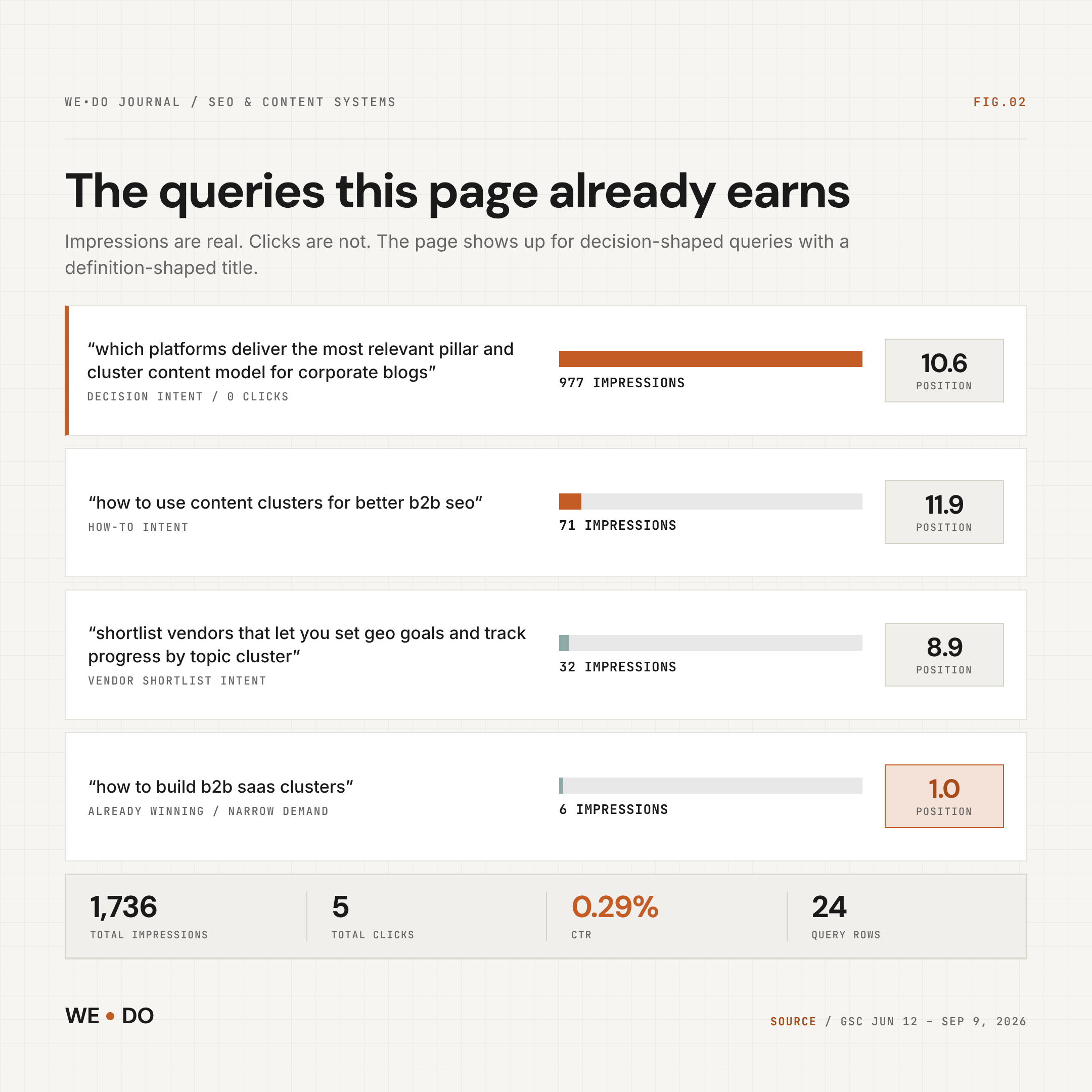
That changed the assignment. The refresh had to help a B2B operator choose a structure, evaluate tools, and connect content to a sale. Another generic definition wouldn't do that.
WE•DO DATA NOTE
These figures justify the refresh decision.
They do not prove that a future refresh caused a traffic or pipeline lift.
02 / step-1-start-with-the-buyer-job-and-the-commerci
Step 1: Start with the buyer job and the commercial destination
Start with a buyer job, not a keyword spreadsheet. A buyer job is the task someone is trying to finish:
- explain why qualified leads are not finding the company
- compare SEO, paid search, and email before allocating budget
- build a content system an internal team can maintain
- prove that organic work influences pipeline
- choose an agency or consultant without buying a black box
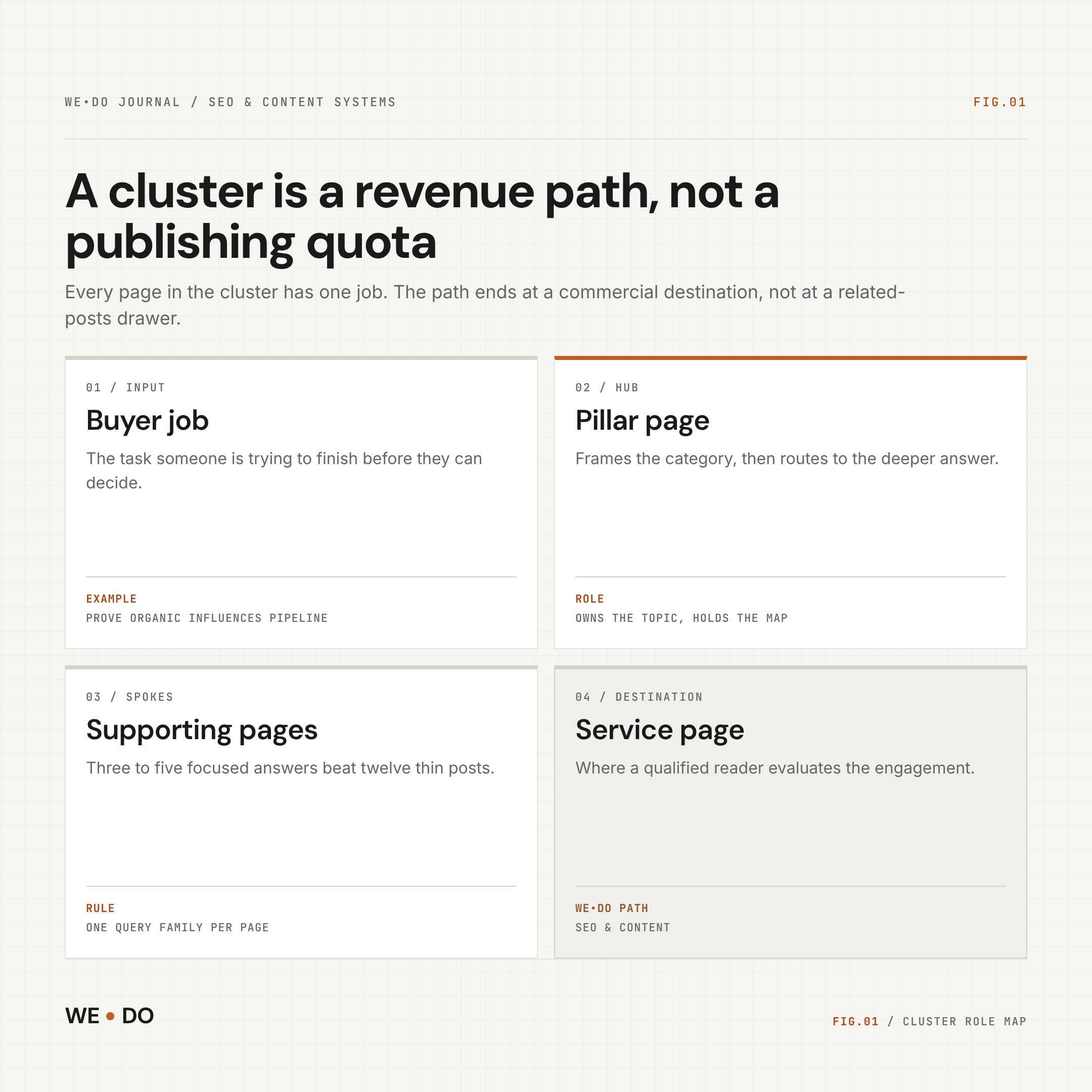
Then name the commercial destination: the page that helps with that job. For our SEO and Content work, that's the SEO & Content service. The cluster helps the reader understand the problem and judge the approach. Then it asks for action.
| Buyer job | Page role | Example page | Next step |
|---|---|---|---|
| Name the problem | Problem page | Why isolated B2B posts fail | Read the framework |
| Understand the solution | Hub or pillar | B2B content strategy | Review the map |
| Evaluate options | Comparison page | SEO vs. Google Ads vs. Email | Compare trade-offs |
| Reduce risk | Checklist, case study, or service page | SEO content audit checklist | Request an audit |
This keeps a cluster from turning into a pile of loosely related articles. Each page has a job. Each link has a reason.
Here's a practical SEO and content cluster for a B2B service company:
- Topic clusters for B2B service companies
- How to audit internal linking for a content hub
- B2B SEO best practices for decision-stage buyers
- SEO vs. Google Ads vs. Email: where to invest first
- How to measure SEO content ROI in GA4
- How to refresh a blog post already ranking on page one
The hub gives the category-level answer. Supporting pages handle focused questions. The service page gives a qualified reader a place to evaluate the work.
You don't need 15 articles before the cluster "counts." Three strong supporting pages beat twelve thin posts.
03 / step-2-map-the-cluster-before-you-write
Step 2: Map the cluster before you write
Start with an inventory, not a prompt. Export relevant URLs from your CMS (content management system), sitemap, Search Console, or crawler. Put every page in one of four buckets:
- Hub: the broad page that owns the topic or commercial category.
- Spoke: a focused page that answers one related question.
- Bridge: a page that connects the cluster to another service, industry, or proof asset.
- Orphan or overlap: a page with no useful path, or multiple pages competing for the same intent.
For each page, record eight things: target query, impressions, position, clicks, conversion role, last update, links in, and links out. You want to see where the site already does the work. Then decide if you need another URL.
Use keyword data as a filter, not a strategy
In the table, KD is keyword difficulty (0 to 100) and CPC is what advertisers pay per click.
| Query | Monthly searches | KD | CPC | Intent | Role |
|---|---|---|---|---|---|
| B2B content strategy | 140 | 18 | $18.15 | Commercial | Primary framing |
| Topic cluster SEO | 90 | 28 | $3.13 | Commercial | Core mechanism |
| B2B SEO best practices | 70 | 1 | $31.33 | Commercial | Decision support |
| Topic cluster examples | 70 | Low paid competition | Not returned | Informational | Examples and FAQ |
DataForSEO didn't return volume for every long-tail phrase. That includes the exact phrase "topic clusters for B2B." We didn't fill the gaps with guesses. GSC shows the topic has live demand for this site. The keyword data shows the commercial themes next to it.
Prioritize with four inputs: demand, difficulty, business fit, and information gain (what your page adds that others don't).
The brief should also name the evidence each page needs:
- Recommending a link density? Label it a rule of thumb.
- Claiming a traffic lift? Attach the study or cut the number.
- Covering AI search? Cite a current primary source and say what it doesn't prove.
04 / step-3-build-the-internal-link-architecture-on-p
Step 3: Build the internal-link architecture on purpose
Links turn a group of pages into a cluster. Labels don't.
- Hub to spokes: Link from the hub where the deeper answer belongs. A generic related-posts drawer isn't enough.
- Spokes to hub: Put the upward link early, with descriptive anchor text.
- Lateral paths: Link to two or three peer pages, but only when the buyer would use them.
- Commercial path: Decision-ready spokes should point to the relevant service, case study, pricing explainer, or audit.
- Crawlable links: Use standard HTML anchors with real
hrefvalues. Google's link documentation recommends concise, descriptive, relevant anchor text.
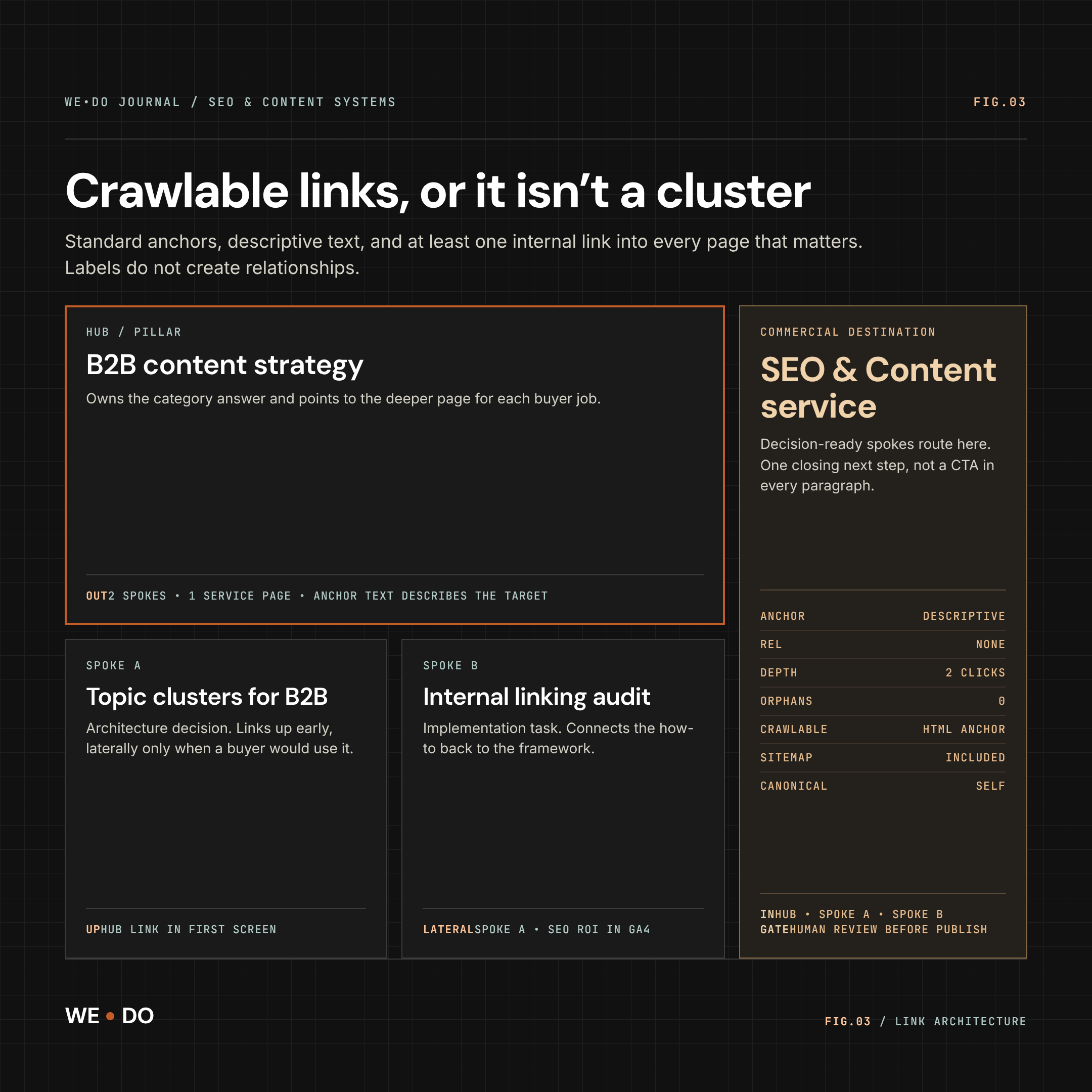
A simple map looks like this:
| From | Link to | Why |
|---|---|---|
| B2B content strategy hub | Topic clusters for B2B | Deepens the architecture decision |
| Topic clusters for B2B | B2B content strategy hub | Restores broader context |
| Topic clusters for B2B | SEO content service | Gives ready buyers a next step |
| Internal linking audit | Topic clusters for B2B | Connects the implementation task to the framework |
| SEO ROI in GA4 | SEO content service | Connects measurement to an engagement decision |
Don't create a second URL for the same intent. If a page already ranks, refresh it. Fix the links around it. Make its title and opening match the query.
05 / step-4-audit-what-you-already-have-before-you-pu
Step 4: Audit what you already have before you publish more
Start with pages already ranking in positions 8 to 20. They beat a blank page. They already have crawl history and query associations. That won't guarantee a lift, but it gives the refresh a baseline.
Our page is a clear example:
- Indexing: GSC inspection passed. It's indexed, allowed by robots.txt, fetched successfully, in the sitemap, and canonical-aligned (Google treats it as the main version).
- Visibility: 1,736 impressions, 5 clicks, position 10.9, and 0.29% CTR in the current pull.
- Behavior: GA4 recorded 48 pageviews and 50 users for the path family. Organic brought 6 sessions, 5 users, 5 pageviews, 83.3% engagement, and about 166 seconds average session duration.
- Friction: The page earns decision-shaped queries. But the title and structure still read like a general definition guide.
The GA4 sample is small. Treat it as a signal, not a benchmark.
Run the audit in this order:
- Check index and canonical health.
- Group real queries by intent: definition, problem, evaluation, comparison, and implementation.
- Match the title promise to the SERP (the search results page).
- Add evidence, examples, and internal paths where the reader needs them.
- Check for overlap before you create a near-duplicate.
06 / step-5-write-sections-that-people-and-ai-search
Step 5: Write sections that people and AI search can both use
Write every section so it answers the question on its own. Google's AI features guidance says the fundamentals haven't changed. The page must be indexed and eligible for a snippet. It should be helpful, reliable, and written for people. No secret markup rescues a weak page.
For each section:
- Answer first: Put the direct answer in the opening paragraph.
- Name the object: Say whether you mean a pillar, spoke, service page, or link.
- Show the decision: Give a rule, comparison, checklist, or worked example.
- Attach evidence: Put the source, first-party data, or method next to the claim.
- Admit the limit: Say what the evidence can't prove.
- Use answer-shaped headings: "How many pages do you need?" beats "Scale the system."
For examples, change the decision context, not only the industry name. SaaS may need onboarding and integration content. A consultancy may need process improvement and ROI content. A manufacturer may need implementation and maintenance content.
07 / step-6-measure-cluster-influence-without-fooling
Step 6: Measure cluster influence without fooling yourself
Report four layers separately: visibility, behavior, commercial action, and technical health.
| Layer | Metrics | What it tells you |
|---|---|---|
| Visibility | GSC impressions, clicks, CTR, position, query breadth | Whether pages are retrieved |
| Behavior | Engaged sessions, pageviews, internal-link clicks | Whether research continues |
| Commercial | Service visits, form starts, submissions, pipeline touchpoints | Whether the cluster supports a business outcome |
| Health | Indexed URLs, canonicals, orphan count, broken links | Whether the architecture remains usable |
Don't report "the cluster caused a 40% traffic increase" without a real test design and a source. Report what changed, over what window, and what else changed at the same time.
For a refresh, capture the baseline before you edit. Review at 14, 30, and 90 days.
Say the page moves from position 11 to 7 but earns no qualified action. The job isn't done. Now say impressions stay flat, but the page sends engaged visitors to the service page. That's still a useful signal.
Google says AI feature traffic is included in Search Console's Web search data. Pair GSC with analytics and CRM data. Then label the limits clearly.
08 / how-do-you-roll-out-one-cluster-in-30-days
How do you roll out one cluster in 30 days?
Pick one lane, one owner, and a visible gate at each step. You don't need a new content department.
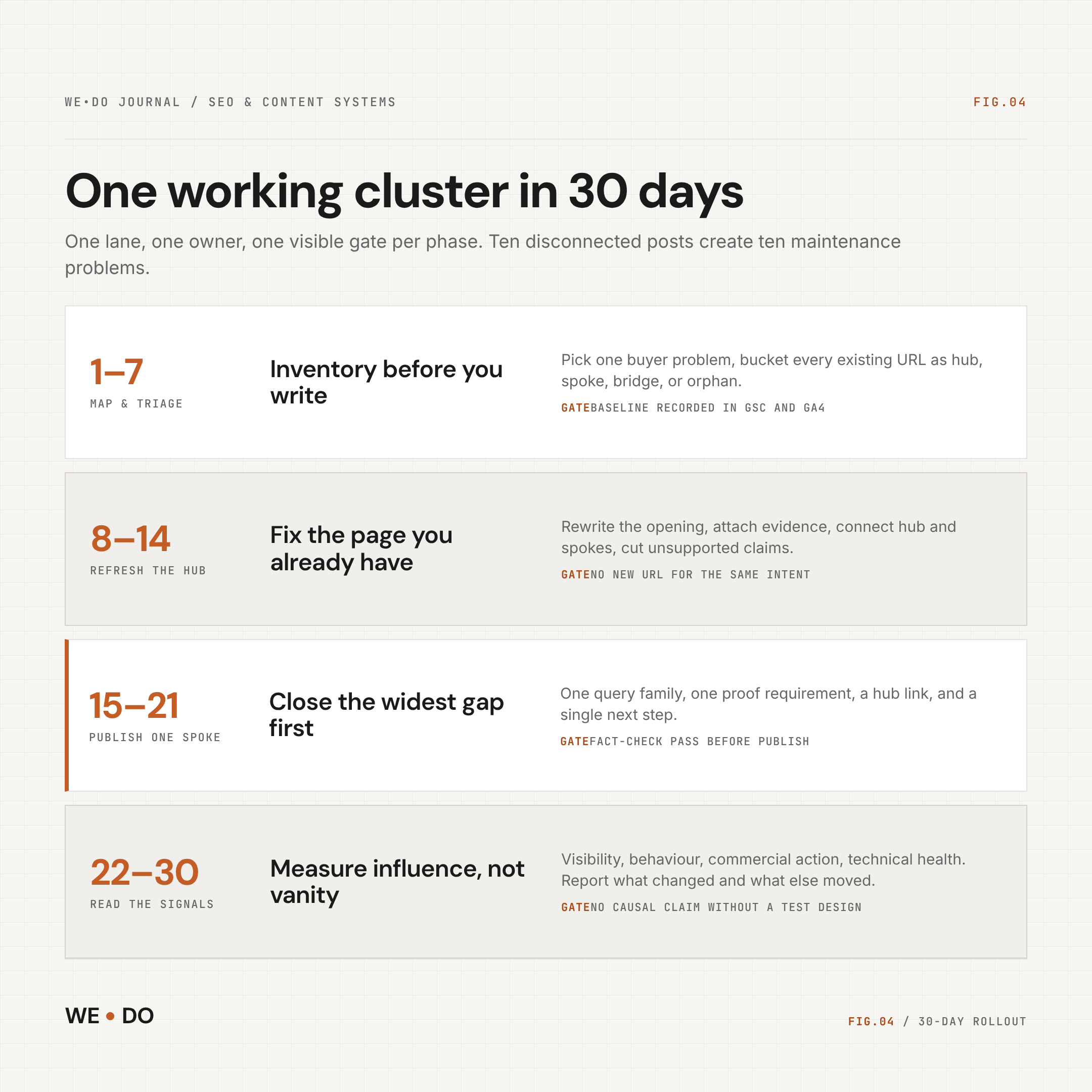
Days 1 to 7: Map and triage
Pick one buyer problem. Inventory existing pages. Choose the hub, the first three supporting pages, and the commercial destination. Record the baseline.
Days 8 to 14: Refresh the hub and fix the paths
Rewrite the opening and add evidence. Connect the hub and spokes. Remove duplicate or unsupported claims.
Days 15 to 21: Publish one high-value spoke
Give one supporting page a query family, a proof requirement, a hub link, lateral links, and a next step.
Days 22 to 30: Read the signals and adjust
Review visibility, behavior, commercial paths, and technical health. Then decide whether to expand.
The order matters. Ten disconnected posts create ten maintenance problems. One coherent lane gives you a system you can improve.
09 / what-should-you-do-next
What should you do next?
Audit the pages you already have. A B2B topic cluster earns its keep when it moves a buyer from a problem to a decision, and the site makes that path obvious.
Choose a hub tied to revenue. Map the buyer jobs around it. Publish only the pages that close real gaps. Link them with intent.
At WE•DO, content architecture lives inside the SEO & Content system, not a disconnected blog calendar. If you'd like a second set of eyes, we'll look at the pages you have, the queries they earn, and the paths that turn visibility into a sales conversation.
Sources and methodology
- First-party WE•DO GSC and GA4 pulls, Jun 12 to Sep 9, 2026.
- DataForSEO United States keyword data, retrieved Sep 10, 2026.
- Google Search Central, SEO Starter Guide, Link best practices, and AI features and your website.
- Semrush, CXL, Directive, and Ironpaper used for SERP and gap analysis. Third-party performance claims were not repeated without primary support.