Your team needs AI capabilities. The question isn't whether to adopt AI--it's whether to build custom solutions or buy existing platforms. Before making this decision, having a clear AI enablement strategy helps you understand what capabilities matter most and where custom investment pays off.
Get this decision wrong and you'll either waste six months building something that already exists, or you'll pay for overpriced tools that don't fit your workflow.
Here's the framework we use to make build-vs-buy decisions for our clients. It's saved hundreds of thousands in wasted development costs and eliminated months of delays.
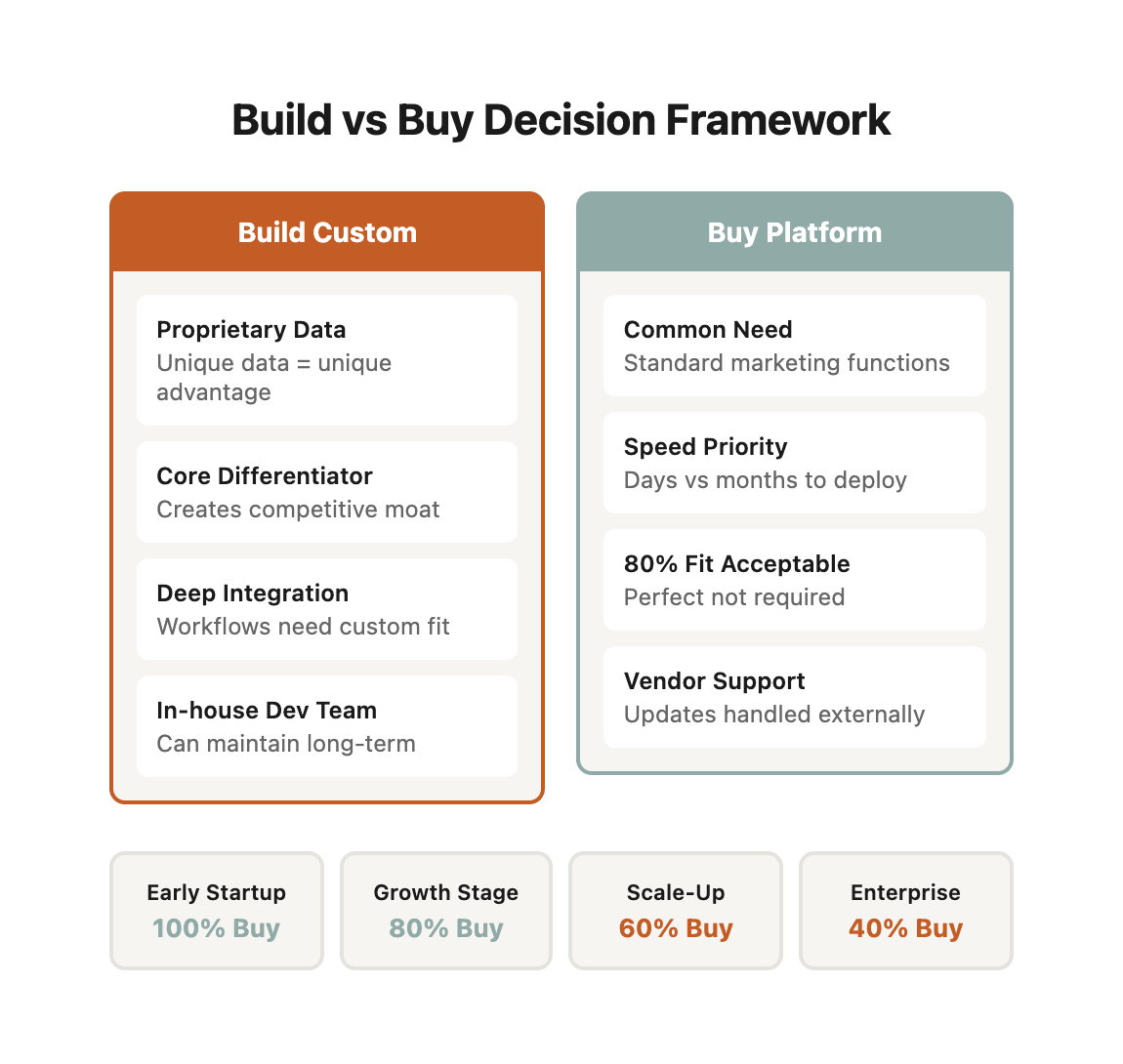
01 / build-vs-buy-comparison-overview
Build vs Buy Comparison Overview
Quick Decision Guide
| Scenario | Build Score | Buy Score | Recommendation | Est. 3-Year TCO |
|---|---|---|---|---|
| Generic content creation | 2/10 | 9/10 | Buy (Jasper, Copy.ai) | $10,800 |
| Email subject lines | 1/10 | 10/10 | Buy (Seventh Sense) | $16,200 |
| Social scheduling | 1/10 | 10/10 | Buy (Buffer, Hootsuite) | $5,400 |
| Proprietary data analysis | 9/10 | 2/10 | Build custom | $180,000 |
| Competitive intelligence | 8/10 | 4/10 | Build custom | $140,000 |
| Unique workflow automation | 8/10 | 3/10 | Build custom | $160,000 |
| Ad copy generation | 2/10 | 9/10 | Buy (platform-specific) | $12,000 |
| Basic chatbot | 3/10 | 8/10 | Buy (Intercom, Drift) | $21,600 |
| Complex customer journey | 7/10 | 5/10 | Hybrid approach | $95,000 |
| Product descriptions | 2/10 | 9/10 | Buy (Jasper, Copysmith) | $3,600 |
Tool Selection Matrix by Company Stage
| Company Stage | Team Size | Budget | Build Capacity | Recommendation |
|---|---|---|---|---|
| Early Startup | 1-10 | Under $50k/yr | None | 100% Buy |
| Growth Stage | 11-50 | $50k-200k/yr | Limited | 80% Buy, 20% Build |
| Scale-Up | 51-200 | $200k-500k/yr | Moderate | 60% Buy, 40% Build |
| Enterprise | 201+ | $500k+/yr | Strong | 40% Buy, 60% Build |
02 / the-core-decision-matrix
The Core Decision Matrix
Use this matrix to evaluate every AI tool decision:
| Factor | Build Custom | Buy Platform |
|--------|--------------|--------------|
| Use Case Uniqueness | Highly specific to your business | Common marketing need |
| Technical Complexity | Your team has AI/ML expertise | Limited technical resources |
| Budget | Large upfront, lower ongoing | Lower upfront, higher monthly |
| Speed to Market | 3-6 months development | Days to weeks |
| Customization Need | Exact fit required | 80% fit acceptable |
| Integration Depth | Deep workflow integration | Standalone or light integration |
| Competitive Advantage | Core differentiator | Supporting function |
| Maintenance Capacity | In-house dev team | Prefer vendor support |
Decision rule: If 5+ factors point to the same direction, the choice is clear. If it's split, dig deeper into the factors that matter most for your specific situation. ---
03 / when-to-build-custom-ai-solutions
When to Build Custom AI Solutions
Scenario 1: Proprietary Data Advantage
Build when: Your competitive advantage comes from unique data that generic tools can't leverage.
Real-world example: Luxury Travel Portfolio Optimization
A boutique luxury travel company managing 47 high-end properties across Europe had accumulated 10 years of granular booking data—not just reservation dates, but deep behavioral patterns: which room features drove repeat bookings, seasonal preferences by guest demographic, property amenities that commanded premium pricing, and guest journey touchpoints that influenced lifetime value.
They built a custom AI agent that analyzed this proprietary dataset to:
- Predict which property improvements would drive the highest ROI
- Identify underutilized amenities that could be repurposed
- Recommend optimal pricing strategies based on historical guest behavior patterns
- Flag properties likely to lose repeat guests based on maintenance degradation signals
The data advantage breakdown:
| Data Type | Generic Tool Coverage | Proprietary Data Depth | Competitive Value |
|---|---|---|---|
| Booking patterns | 30-day window | 10-year historical | High |
| Guest preferences | Basic demographics | Behavioral psychographics | Very High |
| Property performance | Industry benchmarks | Property-specific ROI | High |
| Repeat guest triggers | Not captured | Detailed attribution | Very High |
| Seasonal dynamics | Regional averages | Property-level patterns | Medium |
Why off-the-shelf tools failed them:
-
Data dilution: Tools like Revinate or TravelClick use aggregated hospitality data across thousands of properties. Their luxury segment represented only 3% of training data, making recommendations generic.
-
Attribution gaps: Generic tools couldn't connect property-level improvements to specific guest retention rates because they lacked 10 years of longitudinal data.
-
Competitive intelligence: Their proprietary data revealed that rooms with specific artwork styles had 23% higher repeat booking rates—an insight no generic tool could surface because it's unique to their brand positioning.
Build cost and ROI detail:
- Initial development: $40,000-$60,000 (4-month build)
- Ongoing maintenance: $2,000-$3,000/month
- Infrastructure: $400/month (AWS hosting, data storage)
- First-year total cost: $73,600-$108,800
Measured outcomes after 18 months:
- Property investment accuracy improved 300% (measured by ROI on renovations)
- Reduced wasted capital expenditure by $2.1M (avoided low-ROI improvements)
- Increased repeat guest rate from 34% to 51% (attributed to data-driven improvements)
- Payback period: 7 months
Scenario 2: Workflow-Specific Requirements
Build when: Your process is so unique that forcing it into existing tools creates more friction than value.
Real-world example: Enterprise Content Approval Engine
A B2B cybersecurity SaaS company producing 200+ pieces of content monthly (whitepapers, case studies, blog posts, webinars, sales collateral) had developed a 47-step approval workflow over 8 years—the result of multiple regulatory requirements, competitive positioning constraints, and hard-learned lessons from compliance violations.
Their workflow complexity:
| Approval Stage | Stakeholders | Average Duration | Failure Rate | Rework Loops |
|---|---|---|---|---|
| Technical accuracy | 3 SMEs | 2.1 days | 18% | 1.4x |
| Security compliance | 2 compliance officers | 1.8 days | 12% | 1.2x |
| Legal review | 1-2 attorneys | 3.4 days | 24% | 1.7x |
| Competitive positioning | VP Marketing | 1.2 days | 8% | 1.1x |
| Brand voice | Content lead | 0.9 days | 15% | 1.3x |
| Final approval | CMO | 2.3 days | 6% | 1.0x |
| Total cycle | 9-12 people | 14.2 days avg | 31% reject | 2.1 loops |
What made their workflow unbuyable:
-
Conditional routing logic: Legal review was required for claims about threat detection, but only if claims exceeded industry-standard metrics. Generic workflow tools couldn't encode "if threat detection claim > industry benchmark, route to legal + add competitive analysis check."
-
Context-aware escalation: If content sat with technical reviewers for more than 48 hours and mentioned vulnerabilities disclosed in the last 30 days, it auto-escalated to the security response team. No off-the-shelf tool supported this temporal + content-based escalation.
-
Parallel vs. sequential dependencies: Some stages could run in parallel (brand voice + technical accuracy), but others required strict sequencing (compliance must complete before legal). The dependency map changed based on content type.
Tools they evaluated and why each failed:
| Tool Evaluated | Cost | What It Couldn't Do | Workaround Complexity |
|---|---|---|---|
| Monday.com | $39/user/mo | Conditional routing based on content analysis | High—required manual triage |
| Asana | $24/user/mo | Context-aware escalations | Very high—needed external monitoring |
| Jira | $7/user/mo | Content-type-specific workflows | Medium—could configure but brittle |
| Airtable | $24/user/mo | Automated content analysis for routing | High—manual tagging required |
| Custom Zapier flows | $600/mo | Parallel dependencies with fallback logic | Very high—fragile, broke weekly |
The custom build solution:
They built an AI agent that:
- Analyzed content upon submission and automatically classified by type, risk level, and required approvals
- Routed to appropriate stakeholders based on content characteristics, not just manual categorization
- Monitored approval velocity and escalated stalled content with context-aware nudges
- Learned from past approval patterns to predict likely rejection points before they happened
- Generated approval-ready summaries for each stakeholder showing only relevant sections
Build specifications:
- Development time: 5 months
- Core features: NLP content analysis, conditional workflow engine, stakeholder notification system
- Integrations: Slack, Google Docs, internal CMS
- Tech stack: Python (FastAPI), PostgreSQL, OpenAI API for content analysis
Cost breakdown:
- Initial build: $50,000-$80,000
- Monthly maintenance: $3,000-$4,000
- Infrastructure: $600/month
- First-year total: $93,800-$129,800
Measured outcomes after 12 months:
- Average approval cycle: 14.2 days → 5.6 days (60% reduction)
- First-pass approval rate: 69% → 84% (fewer rejection loops)
- Content production volume: 200/month → 340/month (same team size)
- Compliance violations: 3 incidents/year → 0 incidents
- Team satisfaction: 4.2/10 → 8.7/10 (workflow frustration eliminated)
- Payback period: 11 months (calculated on time savings valued at loaded labor costs)
Why this couldn't be replicated with purchased tools:
Even spending $15,000 in professional services to customize Jira or Asana, they would have:
- Lost the content analysis capability (manual tagging required)
- Sacrificed conditional routing intelligence
- Maintained fragile configuration that broke with platform updates
- Required ongoing professional services for each workflow modification ($3,000-$5,000 per change)
The custom build delivered not just cost savings, but operational flexibility that became a competitive advantage—they could launch new content types in days vs. weeks because the AI understood approval logic, not hardcoded rules.
Scenario 3: Competitive Differentiation
Build when: The AI capability itself is what sets you apart from competitors. Example:
A marketing agency built a custom AI agent that analyzes competitor website changes in real-time and automatically generates strategic response recommendations for their clients.
Why buy doesn't work: If competitors can buy the same tool, it's not differentiation—it's table stakes. Build cost: $80,000-$120,000 Ongoing: $5,000-$7,000/month ROI: 15% premium pricing justified by unique capability ---
Scenario 4: Integration Complexity
Build when: You need deep integration across multiple systems that existing tools can't bridge. Example:
An e-commerce brand built a custom AI that pulls data from Shopify, Google Analytics, Facebook Ads, email platform, and inventory system to generate unified customer insights and automated cross-channel campaign adjustments.
Why buy doesn't work: Point solutions excel at single channels but can't synthesize cross-platform intelligence at this depth. Build cost: $60,000-$90,000 Ongoing: $4,000-$6,000/month ROI: 25% improvement in customer lifetime value through coordinated campaigns ---
Scenario 5: Data Privacy Requirements
Build when: Regulatory or competitive concerns require keeping data in-house. Example:
A healthcare marketing firm built custom AI agents that process patient data on their own infrastructure to maintain HIPAA compliance and avoid third-party data sharing.
Why buy doesn't work: SaaS tools introduce data privacy risks and compliance complications. Build cost: $70,000-$100,000 Ongoing: $6,000-$8,000/month (higher due to security requirements) ROI: Avoid HIPAA violation penalties ($100,000-$50,000,000 per incident) ---
04 / when-to-buy-off-the-shelf-ai-tools
When to Buy Off-the-Shelf AI Tools
Scenario 1: Proven Use Cases
Buy when: Your need matches a well-established AI application with mature vendor solutions. Example:
Email subject line optimization, social media scheduling, chatbots for common customer service questions.
Why build doesn't make sense: These problems are solved. Vendors have years of data and refinement. Your custom version will be inferior for 2-3 years. Buy cost: $100-$500/month per tool ROI: Immediate—start using day one Recommended tools:
- Email optimization: Seventh Sense, Mailchimp Smart Send
- Social scheduling: Buffer, Hootsuite
- Chatbots: Intercom, Drift, Qualified
---
Scenario 2: Limited Technical Resources
Buy when: You don't have developers or AI expertise in-house. Reality check: Building AI tools requires:
- Machine learning engineers ($150,000-$200,000/year)
- Backend developers ($120,000-$160,000/year)
- DevOps for infrastructure ($130,000-$180,000/year)
- Data scientists ($140,000-$190,000/year)
Minimum viable team: 2-3 people = $350,000-$500,000/year in salary alone. Buy alternative: $5,000-$15,000/month in SaaS subscriptions managed by your existing marketing team. Cost difference: $160,000-$480,000 annual savings by buying. ---
Scenario 3: Fast Time to Value
Buy when: You need results in weeks, not months. Example:
You're launching a new product line next quarter and need AI-powered ad creative testing now.
Build timeline:
- Requirements gathering: 2-4 weeks
- Development: 8-16 weeks
- Testing: 2-4 weeks
- Deployment: 1-2 weeks
Total: 13-26 weeks Buy timeline:
- Vendor evaluation: 1 week
- Onboarding: 1-2 weeks
- Training: 1 week
Total: 3-4 weeks Decision driver: Launch window won't wait for custom development. ---
Scenario 4: Exploratory Phase
Buy when: You're testing AI capabilities to learn what works for your business. Approach: Start with affordable tools to validate use cases before committing to custom development. Example process:
1. Month 1-3: Use Jasper AI for content generation
2. Month 4-6: Analyze usage patterns, identify what works
3. Month 7: Decision point—keep using Jasper or build custom agent trained on your brand voice?
Why this works: You've learned what you actually need before investing $50,000+ in development. ---
Scenario 5: Commodity Capabilities
Buy when: The AI capability is becoming standard across your industry. Example: Keyword research, competitor analysis, basic content optimization. Logic: If everyone needs it and it doesn't differentiate you, buy the most cost-effective solution and focus your custom development budget on true competitive advantages. Cost comparison:
- Buy: SEMrush Enterprise at $450/month = $5,400/year
- Build: Custom competitor analysis tool = $60,000+ initial + $3,000/month
Build only makes sense if: Your analysis needs are so specific that generic tools miss 40%+ of relevant insights. ---
05 / the-hybrid-approach-best-of-both-worlds
The Hybrid Approach: Best of Both Worlds
The smartest teams don't choose exclusively build or buy—they combine both strategically. Here are three proven models with real implementation details.
Model 1: Buy the Platform, Build the Connectors
Use case: Core capabilities from vendors, custom integration layer to unlock cross-platform intelligence.
Real-world implementation: Multi-channel marketing intelligence
A growth-stage SaaS company (250 employees, $40M ARR) used best-in-class platforms for each channel but lacked unified intelligence across them.
What they bought:
- HubSpot Marketing Hub: $3,200/month (email, landing pages, forms)
- Google Ads: ~$45,000/month ad spend
- Facebook Ads: ~$30,000/month ad spend
- LinkedIn Ads: ~$15,000/month ad spend
- Intercom: $799/month (customer messaging)
- Mixpanel: $899/month (product analytics)
Total platform cost: $5,898/month subscriptions + $90,000/month ad spend
What they built:
A custom intelligence layer that:
- Unified customer journey tracking across all platforms
- Attribution modeling that showed true multi-touch conversion paths
- Automated optimization recommendations based on cross-channel performance
- Predictive budget allocation using historical cross-channel data
- Anomaly detection that flagged performance drops before humans noticed
Technical architecture:
┌─────────────────────────────────────────────────┐
│            Custom Intelligence Layer            │
│  (Python FastAPI + PostgreSQL + Redis Cache)   │
└────────────┬────────────────────────────────────┘
             │
    ┌────────┴─────────┐
    │                  │
    ▼                  ▼
┌─────────┐      ┌──────────┐
│ Data    │      │ AI       │
│ Pipeline│      │ Analysis │
└────┬────┘      └────┬─────┘
     │                │
     └────────┬───────┘
              │
    ┌─────────┼─────────────┐
    ▼         ▼             ▼
[HubSpot] [Google Ads] [Facebook Ads]
[LinkedIn] [Intercom] [Mixpanel]
Build cost and timeline:
- Development: 4 months, $42,000
- Infrastructure: $650/month (AWS, data warehouse)
- Maintenance: $2,500/month (bug fixes, platform API updates)
- First-year total: $71,500
Measured outcomes after 12 months:
- Cross-channel attribution accuracy: 40% → 87% (vs. last-click attribution)
- Marketing efficiency: 23% improvement in CAC (better budget allocation)
- Response time to performance issues: 3 days → 4 hours (automated alerts)
- Strategic insights: Discovered that LinkedIn ads drove 3x higher LTV customers despite 2x higher CPA—shifted budget accordingly
- ROI: $580,000 additional revenue attributed to better allocation (8.1x return on build investment)
Why this model works:
| Aspect | Benefit | Why Buy Alone Fails | Why Build Alone Fails |
|---|---|---|---|
| Platform expertise | Vendors excel at their specialty | Cross-platform blind spots | Can't match vendor R&D |
| Data synthesis | Custom layer sees everything | Each tool in silo | Too expensive to build everything |
| Maintenance burden | Vendors handle 80% of work | No unified intelligence | 100% maintenance burden |
| Cost efficiency | Best of both worlds | Missing insights = wasted spend | Build cost for commodity features |
Model 2: Buy for 80%, Build for the Critical 20%
Use case: Standard tools for most needs, custom solutions for competitive advantage. Example:
- Buy: Jasper for general content, Ahrefs for SEO, Later for social scheduling
- Build: Custom AI agent that analyzes all your content performance data and generates strategic content calendar recommendations
Cost:
- Tools: $800-$1,500/month
- Custom agent: $40,000 build + $2,500/month maintenance
Value: Commodity tasks automated cheaply, strategic edge from custom intelligence. ---
Model 3: Buy to Learn, Build to Scale
Use case: Validate with purchased tools, then build custom for volume/cost efficiency. Example: Phase 1 (Months 1-6):
- Buy: Copy.ai for ad copy generation
- Cost: $200/month
- Volume: 500 ads/month
- Goal: Learn what types of ads perform best
Phase 2 (Month 7+):
- Build: Custom ad copy agent trained on your winning formulas
- Cost: $35,000 build + $2,000/month
- Volume: 5,000+ ads/month
- Unit economics: $4 per 1,000 ads vs. $400 with Copy.ai at scale
ROI: Custom build pays for itself in 4 months at scale volume. ---
06 / the-total-cost-of-ownership-framework
The Total Cost of Ownership Framework
Don't just compare sticker prices. Calculate true cost over 3 years—including hidden costs that destroy most build-vs-buy analyses.
Build Cost Components
Initial development (detailed breakdown):
| Cost Category | Low End | Mid Range | High End | What Drives Cost Higher |
|---|---|---|---|---|
| Requirements gathering | $5,000 | $10,000 | $15,000 | Complex integrations, unclear scope |
| System architecture | $10,000 | $17,500 | $25,000 | Multiple systems, scalability needs |
| Core development | $25,000 | $52,500 | $80,000 | Custom ML models, complex logic |
| UI/UX design | $3,000 | $7,500 | $12,000 | Custom dashboards, mobile support |
| Testing and QA | $5,000 | $10,000 | $15,000 | Edge cases, integration testing |
| Deployment setup | $3,000 | $5,500 | $8,000 | Multi-environment, CI/CD pipelines |
| Documentation | $2,000 | $4,000 | $6,000 | API docs, user guides, runbooks |
| Total initial | $53,000 | $107,000 | $161,000 |
Ongoing costs (annual breakdown):
| Cost Category | Low End | Mid Range | High End | Often Underestimated |
|---|---|---|---|---|
| Cloud infrastructure | $6,000 | $10,500 | $15,000 | Data storage scales with usage |
| Bug fixes and patches | $12,000 | $21,000 | $30,000 | Critical bugs need immediate fixes |
| Feature enhancements | $15,000 | $27,500 | $40,000 | User requests accumulate |
| Security updates | $5,000 | $8,500 | $12,000 | Dependency vulnerabilities |
| Performance optimization | $4,000 | $7,000 | $10,000 | Scale issues emerge over time |
| Technical support | $8,000 | $14,000 | $20,000 | Internal users need help |
| Monitoring and alerts | $2,000 | $3,500 | $5,000 | Uptime tracking, log analysis |
| Total annual | $52,000 | $92,000 | $132,000 |
3-year TCO: $209,000-$425,000
Hidden costs that kill build projects:
- Opportunity cost: Developer time spent maintaining internal tools vs. building revenue-generating features
- Key person risk: If the original developer leaves, knowledge transfer costs $15,000-$40,000
- Technical debt: Shortcuts taken during initial build compound into 2-3x maintenance costs by year 3
- Scale surprises: Infrastructure costs can 3x when usage grows beyond initial projections
Buy Cost Components
Initial costs (detailed breakdown):
| Cost Category | Low End | Mid Range | High End | What Drives Cost Higher |
|---|---|---|---|---|
| Annual subscription | $6,000 | $18,000 | $30,000 | Users, features, usage volume |
| Setup fees | $0 | $2,500 | $5,000 | Enterprise plans, custom configs |
| Onboarding training | $2,000 | $6,000 | $10,000 | Team size, complexity |
| Initial configuration | $3,000 | $9,000 | $15,000 | Custom workflows, integrations |
| Professional services | $0 | $7,500 | $15,000 | Complex implementations |
| Total initial | $11,000 | $43,000 | $75,000 |
Ongoing costs (annual breakdown):
| Cost Category | Low End | Mid Range | High End | Often Underestimated |
|---|---|---|---|---|
| Subscription renewal | $6,000 | $18,000 | $30,000 | Price increases 5-15% annually |
| Additional seats/users | $2,000 | $6,000 | $10,000 | Team growth, usage expansion |
| Usage overage fees | $1,000 | $4,000 | $8,000 | API calls, storage, compute |
| Training (new hires) | $1,000 | $3,000 | $5,000 | Onboarding, role changes |
| Integration maintenance | $3,000 | $7,500 | $12,000 | API changes, updates |
| Add-on features | $2,000 | $6,000 | $10,000 | Premium features, modules |
| Support tier upgrades | $0 | $3,500 | $7,000 | SLA requirements |
| Total annual | $15,000 | $48,000 | $82,000 |
3-year TCO: $56,000-$239,000
Hidden costs that surprise buyers:
- Vendor lock-in migration costs: If you need to switch vendors in year 3, expect $20,000-$60,000 in migration costs
- Customization trap: Professional services to customize the tool to your workflow can exceed the subscription cost
- Integration brittleness: Vendor API changes break your integrations, requiring ongoing developer time
- Data export fees: Some vendors charge thousands to extract your data if you leave
Break-Even Analysis (with real scenarios)
Scenario comparison matrix:
| Build Cost Profile | Buy Cost Profile | Break-Even Point | 3-Year TCO Difference | Winner |
|---|---|---|---|---|
| Low build + Low maintain | Low buy + Low annual | Never breaks even | Buy saves $100K+ | Buy |
| Mid build + Mid maintain | Mid buy + Mid annual | 22 months | Even at 3 years | Tie |
| High build + High maintain | High buy + High annual | 16 months | Build saves $125K | Build |
| Low build + High maintain | Mid buy + Low annual | 31 months | Buy saves $45K | Buy |
| High build + Low maintain | Low buy + High annual | 11 months | Build saves $180K | Build |
Build becomes cheaper when:
- Long commitment: You're certain you'll use this for 3+ years (verified by business plan, not hope)
- High usage volume: Monthly subscription exceeds $2,500 and scales linearly with usage
- Customization costs: Off-the-shelf requires $40,000+ in professional services to be usable
- Competitive moat: The capability provides defensible competitive advantage worth protecting
- Integration depth: You need to integrate with 5+ internal systems (buy tools rarely support this depth)
Buy stays cheaper when:
- Rapid evolution: The capability is changing fast and vendors absorb R&D costs (e.g., AI model improvements)
- Occasional usage: You need it monthly, not daily (build costs are fixed regardless of usage)
- Network effects: Tool gets better as more users join (e.g., spam detection, fraud prevention)
- Commoditization: The capability is becoming table stakes in your industry (don't build commodity)
- Regulatory compliance: Vendor handles compliance certifications that would cost you $50,000+ to maintain
Decision calculator:
Annual Build Cost = (Initial Cost / 3) + Annual Maintenance
Annual Buy Cost = Subscription + Overages + Training + Integrations

If (Annual Build Cost < Annual Buy Cost) AND (Commitment >= 3 years):
    Build is cheaper
Else:
    Buy is cheaper

But also consider:
- Opportunity cost (what else could your team build?)
- Risk (what if requirements change?)
- Speed to market (can you wait 4-6 months?)
Real example: Marketing automation platform
| Build Custom | Buy HubSpot | |
|---|---|---|
| Initial cost | $85,000 | $25,000 (setup + training) |
| Year 1 ongoing | $72,000 | $38,400 ($3,200/mo) |
| Year 2 ongoing | $78,000 (+8% for enhancements) | $42,240 (10% price increase) |
| Year 3 ongoing | $84,000 | $46,464 |
| 3-year total | $319,000 | $152,104 |
| Break-even | Never | N/A |
| Winner | Buy saves $167K |
Why buy won: HubSpot invests millions in R&D annually. Their platform improves faster than a custom build could, and they handle compliance, security, and infrastructure.
Real example: Proprietary recommendation engine
| Build Custom | Buy Dynamic Yield | |
|---|---|---|
| Initial cost | $125,000 | $45,000 (implementation) |
| Year 1 ongoing | $68,000 | $84,000 ($7,000/mo) |
| Year 2 ongoing | $71,000 | $92,400 (10% increase) |
| Year 3 ongoing | $74,000 | $101,640 |
| 3-year total | $338,000 | $323,040 |
| Break-even | 18 months | N/A |
| Winner | Build saves $15K |
Why build won: The recommendation logic incorporated proprietary customer behavior data that generic tools couldn't leverage. The competitive advantage justified the investment.
07 / the-decision-framework-8-questions
The Decision Framework: 8 Questions
Answer these eight questions to make your build-vs-buy decision:
1. Competitive Impact
Question: Will this AI capability differentiate us from competitors? Score:
- High differentiation (unique to our business) = +3 points toward BUILD
- Medium differentiation (rare in our industry) = +1 point toward BUILD
- Low differentiation (common capability) = +3 points toward BUY
---
2. Technical Complexity
Question: Do we have the in-house expertise to build and maintain this? Score:
- Yes, we have AI/ML team = +3 points toward BUILD
- Partial, we can hire/learn = +1 point toward BUILD
- No, and no plans to build team = +3 points toward BUY
---
3. Customization Requirements
Question: How much does the solution need to match our exact workflows? Score:
- Must be perfect fit (80%+ custom) = +3 points toward BUILD
- Mostly custom (50-80%) = +1 point toward BUILD
- Standard solution works (under 50% custom) = +3 points toward BUY
---
4. Data Sensitivity
Question: Does this involve proprietary data that provides competitive advantage? Score:
- Highly sensitive, core IP = +3 points toward BUILD
- Somewhat sensitive = +1 point toward BUILD
- Standard marketing data = +3 points toward BUY
---
5. Integration Needs
Question: How deeply must this integrate with our systems? Score:
- Deep integration across 5+ systems = +3 points toward BUILD
- Moderate integration (2-4 systems) = +1 point toward BUILD
- Standalone or simple integration = +3 points toward BUY
---
6. Timeline Pressure
Question: How quickly do we need this capability? Score:
- Need results in 3+ months, can wait = +3 points toward BUILD
- Flexible timeline = +1 point either way
- Need results in under 6 weeks = +3 points toward BUY
---
7. Budget Availability
Question: Can we invest $50,000-$100,000+ upfront? Score:
- Yes, budget available = +3 points toward BUILD
- Limited budget initially = +1 point toward BUY
- No large upfront budget = +3 points toward BUY
---
8. Scale Requirements
Question: What's our usage volume? Score:
- Very high volume where unit cost matters = +3 points toward BUILD
- Medium volume = +1 point either way
- Low to moderate volume = +3 points toward BUY
---
Scoring Interpretation
Add up your points:
- 18-24 points toward BUILD: Strong case for custom development
- 12-17 points toward BUILD: Lean toward building, but evaluate hybrid approach
- 8-11 points mixed: Hybrid approach—buy platforms, build connectors
- 12-17 points toward BUY: Lean toward purchasing, but consider building later if scale demands it
- 18-24 points toward BUY: Strong case for off-the-shelf tools
---
08 / real-world-decision-examples
Real-World Decision Examples
Case Study 1: E-Commerce Product Description Generator
Company: 5,000-SKU e-commerce brand Decision factors:
- Competitive impact: Low (commodity capability) = +3 BUY
- Technical complexity: Medium = +1 BUY
- Customization: Need brand voice, but not complex = +1 BUILD
- Data sensitivity: Low = +3 BUY
- Integration: Just Shopify = +3 BUY
- Timeline: Need before Q4 shopping season = +3 BUY
- Budget: Limited = +3 BUY
- Scale: 5,000 SKUs, but one-time use = +3 BUY
Total: 19 points toward BUY Decision: Purchased Jasper AI ($99/month) Outcome: Generated all 5,000 descriptions in 2 weeks, cost $99 vs. $60,000+ to build ---
Case Study 2: Competitive Intelligence Dashboard
Company: Marketing agency serving 50+ clients Decision factors:
- Competitive impact: High (core service differentiator) = +3 BUILD
- Technical complexity: Have dev team = +3 BUILD
- Customization: Client-specific analysis logic = +3 BUILD
- Data sensitivity: Client competitive data = +3 BUILD
- Integration: 15+ data sources = +3 BUILD
- Timeline: Can invest 4 months = +3 BUILD
- Budget: $80,000 available = +3 BUILD
- Scale: 50 clients x monthly reports = +3 BUILD
Total: 24 points toward BUILD Decision: Built custom dashboard Outcome: $80,000 build + $4,000/month maintenance. Justifies 15% price premium on all client contracts. ROI in 8 months. ---
Case Study 3: Email Subject Line Optimizer
Company: B2B SaaS, 80,000-person email list Decision factors:
- Competitive impact: Low (everyone optimizes subject lines) = +3 BUY
- Technical complexity: Don't have ML team = +3 BUY
- Customization: Standard optimization = +3 BUY
- Data sensitivity: Standard email metrics = +3 BUY
- Integration: Just email platform = +3 BUY
- Timeline: Want results this quarter = +3 BUY
- Budget: Limited = +3 BUY
- Scale: High email volume = +1 BUILD (only factor toward build)
Total: 20 points toward BUY Decision: Purchased Seventh Sense ($450/month) Outcome: 18% open rate improvement in 30 days. Would take 6+ months and $40,000+ to build equivalent. ---
09 / vendor-evaluation-framework
Vendor Evaluation Framework
When you decide to buy, don't rush into the first tool with good marketing. Use this framework to evaluate vendors systematically.
The 12-Factor Vendor Scorecard
Rate each vendor on a 1-10 scale for each factor. Multiply by the weight. Total score determines your shortlist.
| Factor | Weight | What to Evaluate | Red Flags | Green Flags |
|---|---|---|---|---|
| Core Capability Fit | 20% | Does it solve your actual problem? | Generic features, no industry fit | Purpose-built for your use case |
| Integration Quality | 15% | API quality, pre-built connectors | Poor documentation, limited API | Rich API, Zapier/webhook support |
| Data Security | 15% | Compliance, encryption, access controls | Vague security page | SOC 2, GDPR, HIPAA certified |
| Vendor Stability | 10% | Financial health, customer base | <2 years old, no funding | Profitable or well-funded |
| Exit Flexibility | 10% | Can you leave easily? | No data export, proprietary formats | Full export, open standards |
| Pricing Transparency | 8% | Clear pricing, no surprises | "Contact sales", hidden fees | Self-serve, usage-based pricing |
| Support Quality | 7% | Response time, expertise level | Email-only, 48hr response | Chat/phone, <4hr response |
| User Experience | 5% | Interface quality, learning curve | Clunky UI, steep learning curve | Intuitive, minimal training needed |
| Customization | 5% | Can you adapt it to your workflow? | Rigid, take-it-or-leave-it | Flexible workflows, custom fields |
| Performance/Reliability | 3% | Uptime, speed, scalability | Frequent outages, slow | 99.9%+ uptime, fast |
| Roadmap Alignment | 2% | Are they building what you need? | Stagnant, wrong direction | Active development, your requests matter |
Scoring interpretation:
- 8.0-10.0: Excellent fit, move to contract negotiation
- 6.5-7.9: Good fit, but investigate concerns before committing
- 5.0-6.4: Marginal fit, consider alternatives or building
- Below 5.0: Poor fit, don't buy
Real Vendor Evaluation Example
Scenario: E-commerce company needs email marketing automation.
Vendors evaluated: Mailchimp, Klaviyo, HubSpot, Custom Build
| Factor | Weight | Mailchimp | Klaviyo | HubSpot | Custom |
|---|---|---|---|---|---|
| Core capability | 20% | 7.0 (1.4) | 9.5 (1.9) | 8.0 (1.6) | 8.5 (1.7) |
| Integration | 15% | 8.0 (1.2) | 9.0 (1.35) | 9.5 (1.43) | 10.0 (1.5) |
| Security | 15% | 8.5 (1.28) | 9.0 (1.35) | 9.5 (1.43) | 7.0 (1.05) |
| Vendor stability | 10% | 10.0 (1.0) | 9.0 (0.9) | 10.0 (1.0) | 6.0 (0.6) |
| Exit flexibility | 10% | 6.0 (0.6) | 7.0 (0.7) | 5.0 (0.5) | 10.0 (1.0) |
| Pricing transparency | 8% | 9.0 (0.72) | 7.0 (0.56) | 4.0 (0.32) | 6.0 (0.48) |
| Support quality | 7% | 6.0 (0.42) | 8.0 (0.56) | 7.0 (0.49) | 5.0 (0.35) |
| User experience | 5% | 8.0 (0.4) | 7.5 (0.38) | 6.5 (0.33) | 7.0 (0.35) |
| Customization | 5% | 6.0 (0.3) | 8.5 (0.43) | 7.5 (0.38) | 10.0 (0.5) |
| Performance | 3% | 8.0 (0.24) | 9.0 (0.27) | 8.0 (0.24) | 8.0 (0.24) |
| Roadmap alignment | 2% | 6.0 (0.12) | 8.5 (0.17) | 7.0 (0.14) | 10.0 (0.2) |
| Total Score | 100% | 7.68 | 8.57 | 7.85 | 7.97 |
Decision: Klaviyo wins with 8.57—purpose-built for e-commerce, excellent Shopify integration, strong support despite higher price.
Why not custom build despite high score (7.97): Close on total score, but vendor stability (6.0) and support (5.0) are concerning. Email deliverability requires ongoing IP reputation management that vendors handle better.
The Due Diligence Checklist
Before signing any contract, complete this checklist:
Technical Validation:
- Test API with your actual data (not demo data)
- Verify all claimed integrations work as advertised
- Load test with your expected volume (some vendors choke at scale)
- Test data export—can you actually get your data out?
- Review API rate limits and overage charges
Security & Compliance:
- Request SOC 2 report (if they won't share it, walk away)
- Review data processing agreement for GDPR/CCPA compliance
- Verify data residency requirements (where is data stored?)
- Check security incident history (have they been breached?)
- Audit user permission controls (can you restrict access properly?)
Financial:
- Clarify what happens when you exceed limits (auto-upgrade or overage fees?)
- Negotiate multi-year discount (typically 10-20% off)
- Get pricing lock-in clause (prevent surprise increases)
- Understand contract auto-renewal terms
- Request customer references in your industry and size
Exit Strategy:
- Test data export process (don't wait until you need to leave)
- Understand contract cancellation terms (30/60/90 days?)
- Identify switching costs (what breaks if you leave?)
- Document all customizations (you'll need to rebuild elsewhere)
Contract Negotiation Power Moves
Most SaaS contracts are negotiable if you know what to ask for:
Pricing concessions you can request:
| Concession | When to Ask | Typical Savings |
|---|---|---|
| Multi-year discount | Always | 10-20% off |
| Startup discount | <$5M ARR, <50 employees | 25-50% off year 1 |
| Quarterly vs. annual billing | Cash flow constrained | Worth asking |
| Usage buffer | High growth expected | 20% buffer before overage |
| Price lock | Multi-year deal | Lock year 2-3 pricing |
Contract terms worth negotiating:
- Termination for convenience: You can leave with 30-60 days notice (not just for cause)
- Service level agreement (SLA): Uptime guarantees with refund clauses
- Data ownership: Explicitly state you own all data, not shared license
- Feature deprecation protection: If they remove features you depend on, you can exit
- Vendor change-of-control: If acquired, you can renegotiate or leave
Example negotiation win:
A company negotiating with a marketing automation vendor:
- Initial offer: $4,200/month, annual contract, auto-renewal
- Final negotiated: $2,900/month (31% discount), quarterly billing, 30-day termination clause, price lock for year 2
- How: Committed to 2-year term, paid annually in advance, agreed to be a case study customer
10 / common-decision-mistakes
Common Decision Mistakes
Mistake 1: Building Because You Can
Problem: Dev team wants to build everything as a technical challenge.
Real scenario: A fintech startup with a strong engineering team spent 6 months building a custom email platform "because we can do it better." Final product was inferior to Mailchimp and cost $180,000+ in developer time.
Reality: Development time is opportunity cost. Every hour building commodity tools is an hour not building actual competitive advantages.
The math that shows why this fails:
| Resource | Building Email Platform | Building Core Product |
|---|---|---|
| Developer time (6 months) | 100% allocated | 0% allocated |
| Opportunity cost | $180,000 | 3 major features unbuilt |
| Result | Worse than Mailchimp | Delayed product roadmap |
| Competitive impact | Zero (commodity) | High (differentiation) |
Fix: Reserve custom development for capabilities that differentiate you. Apply the "would we win a competitive deal because of this?" test. If the answer is no, buy it.
Decision framework:
If (capability == commodity) AND (vendors exist):
    Buy, don't build
Else if (capability == competitive advantage):
    Consider building
Else:
    Default to buy
Mistake 2: Buying Because It's Easier
Problem: Avoiding custom development when it's clearly the right strategic choice. Reality: Some capabilities are so core to your business that buying means renting your competitive moat from a vendor who sells to your competitors. Fix: Be willing to invest in what truly matters, even if buying is tempting. ---
Mistake 3: Not Considering Hybrid
Problem: Treating it as binary—all build or all buy. Reality: The best teams use platforms for commodity capabilities and build for differentiation. Fix: Map each capability independently. Your stack will be a mix. ---
Mistake 4: Ignoring Switching Costs
Problem: Buying without considering vendor lock-in. Reality: Some platforms make it nearly impossible to leave. Proprietary data formats, no export options, integrated deeply into workflows. Fix: Evaluate exit difficulty before buying. Can you export data? Switch to competitors? Bring functionality in-house later? ---
Mistake 5: Underestimating Build Costs
Problem: Assuming custom development will be quick and cheap. Reality: Initial build is just the start. Maintenance, updates, bug fixes, and enhancements add 40-100% of initial cost annually. Fix: Budget for 3-year total cost of ownership, not just initial development. ---
11 / decision-framework-worksheet
Decision Framework Worksheet
Use this worksheet for every AI tool decision:
Tool/Capability: _________________________ Business case: _________________________ Competitive impact (Low/Medium/High): _________ Technical complexity (Can we build?): Y / N Customization need (%): _____% Data sensitivity (Low/Medium/High): _________ Integration complexity (# of systems): _____ Timeline constraint (weeks needed): _____ Budget available (upfront): $_________ Scale requirements (volume): _________ Build or Buy Score: _____ points toward _______ Decision: BUILD / BUY / HYBRID If HYBRID, specify: _________________________ Expected ROI: _________________________ Next steps: _________________________ ---
12 / making-the-decision-stick
Making the Decision Stick
Once you've made your build-vs-buy decision:
If Building:
1. Define clear requirements: Detailed spec before any coding
2. Set milestone payments: Tie vendor payments to deliverables
3. Plan for maintenance: Budget 30-50% of build cost annually
4. Document everything: Avoid developer dependency
5. Build for flexibility: Needs will change, architecture should accommodate
If Buying:
1. Negotiate contract terms: Lock in pricing, test exit clauses
2. Verify integrations: Test API connections before committing
3. Plan for onboarding: Budget 20-40 hours for team training
4. Monitor usage: Track adoption and ROI monthly
5. Schedule review: Quarterly evaluation—is it still the right fit?
---
13 / implementation-roadmap-90-day-plan
Implementation Roadmap: 90-Day Plan
You've made your decision. Here's how to implement it successfully in the next 90 days.
Weeks 1-2: Foundation Phase
If you decided to BUILD:
| Task | Owner | Deliverable | Time Investment |
|---|---|---|---|
| Write detailed requirements doc | Product/Marketing | 10-page spec with user stories | 12-16 hours |
| Define success metrics | Leadership | KPIs with baseline measurements | 4-6 hours |
| Create technical architecture | Engineering lead | System design diagram + tech stack | 8-12 hours |
| Estimate build timeline | Dev team | Milestone schedule with dependencies | 6-8 hours |
| Identify integration points | Operations | List of systems to connect | 4-6 hours |
| Set up project tracking | Project manager | Jira/Linear board with sprints | 2-3 hours |
If you decided to BUY:
| Task | Owner | Deliverable | Time Investment |
|---|---|---|---|
| Create vendor shortlist | Marketing ops | 3-5 vendors matching criteria | 4-6 hours |
| Request demos | Procurement | Scheduled demos with stakeholders | 2-3 hours |
| Test with real data | Technical lead | POC with actual workflows | 8-12 hours |
| Review contracts | Legal/Finance | Red-lined contract terms | 4-6 hours |
| Negotiate pricing | Finance | Final pricing agreement | 3-5 hours |
| Plan onboarding | Team lead | Training schedule + responsibilities | 4-6 hours |
Weeks 3-6: Execution Phase
If BUILDING:
Week 3-4: Core Development
- Sprint 1: Data pipeline + core logic
- Daily standups (15 min)
- Weekly stakeholder check-ins (30 min)
- Risk: Scope creep—stick to MVP features
Week 5-6: Integration + Testing
- Connect to existing systems
- Edge case testing
- Security audit
- Risk: Integration bugs—allocate buffer time
If BUYING:
Week 3-4: Implementation
- Complete vendor onboarding
- Configure workflows
- Set up integrations
- Import historical data
- Risk: Data migration issues—test with small batch first
Week 5-6: Training + Rollout
- Train power users (2-3 people)
- Create internal documentation
- Pilot with small team (5-10 people)
- Gather feedback + iterate
- Risk: Low adoption—identify champions early
Weeks 7-10: Optimization Phase
For BUILD and BUY:
| Week | Focus | Key Activities | Success Metric |
|---|---|---|---|
| Week 7 | Usage monitoring | Track daily active users, feature usage | >60% team adoption |
| Week 8 | Performance tuning | Fix bottlenecks, optimize slow queries | <2 sec response time |
| Week 9 | Feedback integration | User interviews, prioritize improvements | 5+ actionable insights |
| Week 10 | ROI measurement | Compare baseline to current metrics | Positive ROI trend |
Weeks 11-12: Scale Phase
Expand rollout to full team:
-
Week 11: Full team training
- Host live training sessions (2x 1-hour sessions)
- Record for future reference
- Create FAQ document
- Assign support channel (Slack/Teams)
-
Week 12: Process integration
- Update standard operating procedures
- Build into existing workflows
- Set up automated monitoring
- Schedule quarterly review
Success criteria by day 90:
| Metric | Target | How to Measure |
|---|---|---|
| Team adoption rate | >75% | Active users / total users |
| Time savings | >20% | Before/after task duration |
| Quality improvement | Measurable lift | Error rate, output quality |
| Cost efficiency | ROI positive | (Value created - cost) / cost |
| User satisfaction | >7/10 | Internal survey |
14 / risk-mitigation-strategies
Risk Mitigation Strategies
Every build-vs-buy decision carries risks. Here's how to minimize them.
Build Risks and Mitigation
| Risk | Probability | Impact | Mitigation Strategy |
|---|---|---|---|
| Scope creep extends timeline | High | High | Lock scope at week 2, defer features to v2 |
| Key developer leaves | Medium | Very High | Document everything, pair programming |
| Integration more complex than expected | Medium | High | POC integrations in week 1-2 |
| Performance issues at scale | Low | High | Load testing before production launch |
| Security vulnerabilities | Medium | Very High | Security audit by third party |
Build insurance policy:
- Technical debt budget: Allocate 20% of ongoing development time to refactoring
- Documentation requirement: Every feature needs README + runbook before merge
- Bus factor protection: Minimum 2 developers familiar with every component
- Rollback plan: Can revert to manual process if system fails
Buy Risks and Mitigation
| Risk | Probability | Impact | Mitigation Strategy |
|---|---|---|---|
| Vendor raises prices significantly | Medium | Medium | Price lock clause in contract |
| Low team adoption | High | Very High | Pilot with champions, iterate before rollout |
| Vendor shuts down / acquired | Low | Very High | Quarterly financial health checks, exit plan |
| Integration breaks after updates | Medium | Medium | Staging environment for testing updates |
| Vendor lock-in makes switching expensive | High | High | Regular data exports, avoid proprietary formats |
Buy insurance policy:
- Quarterly data exports: Automated backups of all data
- Multi-vendor strategy: Never bet entire workflow on single vendor
- Contract flexibility: 30-60 day termination clause
- Integration layer: Abstract vendor-specific code behind interfaces
15 / decision-tree-your-next-steps
Decision Tree: Your Next Steps
Use this decision tree to determine your immediate next action:
START: Need AI capability
│
├─ Is this core to competitive advantage?
│  ├─ YES → Do you have technical team?
│  │  ├─ YES → Do you have $50K+ budget?
│  │  │  ├─ YES → BUILD (custom development)
│  │  │  └─ NO → START with BUY, migrate to BUILD later
│  │  └─ NO → BUY (can't build without team)
│  │
│  └─ NO → Does a good vendor solution exist?
│     ├─ YES → BUY (don't build commodity)
│     ├─ NO → BUILD (if you need it and it doesn't exist)
│     └─ UNCLEAR → PILOT (buy cheapest option to validate need)
│
NEXT: Follow 90-day implementation roadmap above
Your specific action right now:
- If you haven't decided yet: Complete the 8-question framework (page X) and score your decision
- If you decided BUILD: Start week 1-2 tasks today—requirements doc is your foundation
- If you decided BUY: Create vendor shortlist using the 12-factor scorecard (page Y)
- If you're unsure: Start with the cheapest "buy" option to validate the need before committing
16 / next-steps-implementation
Next Steps: Implementation
You've made your build-vs-buy decision. Now what?
If you're building:
Read 40 AI Agents Every Growth Team Should Have to understand which custom tools deliver the most value.
If you're buying:
Read Training Your Team on AI Tools Without the Overwhelm to ensure adoption and ROI from your purchased tools.
Also helpful:
- 40 AI Agents Every Growth Team Should Have to see which specific capabilities to prioritize
- AI Enablement Framework for a structured approach to implementing AI across your organization
- Small Business AI Consulting if you need hands-on guidance for your build-vs-buy decisions
--- About WE•DO: We help marketing teams make smart build-vs-buy decisions and implement the right mix of custom and off-the-shelf AI tools. From vendor evaluation to custom agent development, we handle the technical complexity. See how we work →
Ready to Transform Your Growth Strategy?
Let's discuss how AI-powered marketing can accelerate your results.