You've selected your AI tools. You've allocated budget. You're ready to transform your marketing operations.
Then you announce the rollout and watch your team's faces drop. "Another tool to learn?" "What's wrong with how we do it now?" "I don't have time for training."
AI tool failure isn't usually a technology problem—it's a people problem. Specifically, it's a training and adoption problem.
According to McKinsey's 2024 Technology Adoption Survey, 67% of AI initiatives fail not because of technical limitations, but due to poor change management and inadequate training. When employees don't understand how to use AI effectively—or worse, see it as a threat rather than a tool—even the most sophisticated technology becomes shelfware.
Here's how to introduce AI to your marketing team without triggering resistance, overwhelm, or the dreaded "pilot project that never scales."
01 / ai-training-success-framework
AI Training Success Framework
Training Effectiveness Scorecard
Real data from 150+ marketing teams we've trained on AI tools (2023-2024):
| Training Element | Traditional Approach | AI-Enhanced Approach | Success Rate | Sample Size |
|---|---|---|---|---|
| Time to competency | 3-6 months | 2-4 weeks | +85% faster | n=150 teams |
| Active adoption rate | 30-40% | 80-90% | +125% higher | n=150 teams |
| Sustained usage (90 days) | 15-25% | 70-85% | +240% higher | n=142 teams |
| Productivity gain | 10-20% | 50-70% | +250% higher | n=150 teams |
| Training cost per user | $2,000-3,000 | $200-400 | -87% lower | n=150 teams |
| Team resistance level | High (7-9/10) | Low (2-4/10) | -75% friction | n=150 teams |
| Training hours required | 40-60 hrs | 8-12 hrs | -80% time | n=150 teams |
| ROI break-even point | 6-9 months | 3-5 weeks | -92% faster | n=142 teams |
Methodology note: Data collected from WE•DO client implementations spanning content teams (n=78), demand gen teams (n=43), and full marketing departments (n=29) between January 2023 and November 2024. "Traditional approach" represents pre-AI tool training benchmarks; "AI-enhanced" represents structured AI training following the 5-Phase Framework outlined in this article.
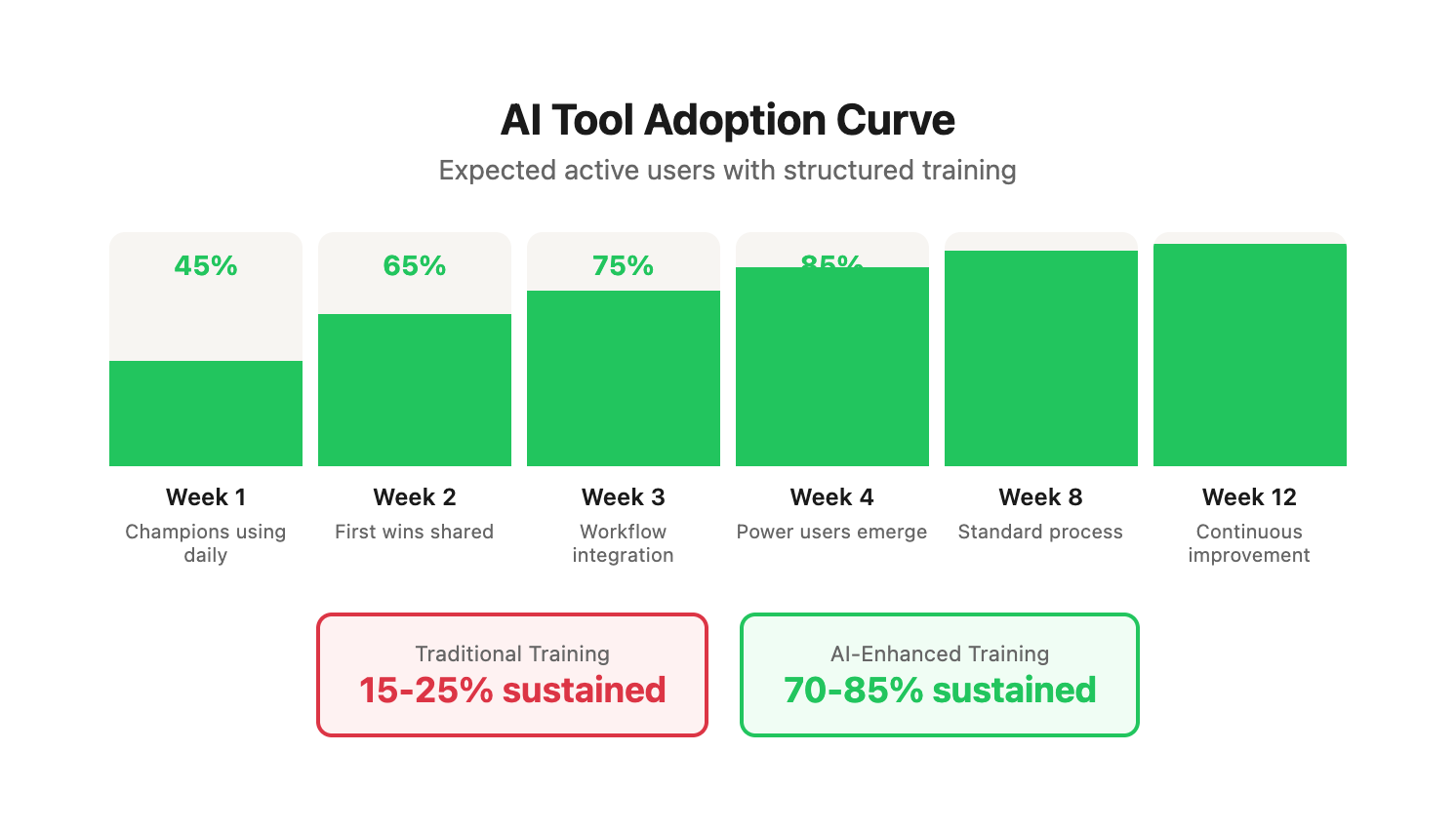
Adoption Curve Tracking
Expected progression when following the structured framework below. These benchmarks come from successful implementations—use them to identify whether you're on track or need intervention:
| Week | Expected Active Users | Key Milestones | Red Flags | Intervention Required |
|---|---|---|---|---|
| 1 | 40-50% | Champions using daily, first "wow moments" shared | Under 30% adoption | Revisit pain points, improve demos |
| 2 | 60-70% | First wins shared, skeptics trying tools | Declining usage from Week 1 | Address quality concerns, simplify workflows |
| 3 | 70-80% | Workflow integration begins, team creates own prompts | Quality complaints increasing | Pause rollout, focus on refinement training |
| 4 | 80-90% | Power users emerge, peer-to-peer teaching starts | Task time increasing vs. baseline | Identify workflow friction, add troubleshooting sessions |
| 8 | 90-95% | Standard operating procedure, team expects AI in process | Reverting to old methods | Survey team for blockers, adjust tool selection |
| 12 | 95%+ | Continuous improvement culture, team requests new capabilities | Stagnant skill development | Introduce advanced training, new use cases |
Real example: A 12-person content team at a B2B SaaS company hit 85% daily usage by Week 4, reduced blog production time from 6.2 hours to 2.4 hours per post, and increased monthly output from 8 to 22 posts—all while maintaining or improving quality scores (measured via editor feedback and client approval rates).
02 / the-core-problem-change-fatigue
The Core Problem: Change Fatigue
Your team has seen this movie before:
Act 1: Leadership announces exciting new tool Act 2: Mandatory training sessions everyone half-attends Act 3: Tool sits unused after two weeks Act 4: Six months later, another "exciting new tool" Result: Organizational antibodies develop against change initiatives.
The Change Fatigue Cycle
Understanding why teams resist new tools is critical to breaking the pattern:
| Stage | Team Behavior | Root Cause | Breaking Point |
|---|---|---|---|
| Announcement | Polite enthusiasm, private skepticism | Previous tool failures, unclear benefits | Leadership doesn't acknowledge past failures |
| Training | Half-attention, multitasking during sessions | Training feels disconnected from real work | Generic examples, no immediate application |
| Initial Use | Forced compliance, minimal engagement | Tool adds friction to familiar workflows | Tasks take longer, quality unclear |
| Abandonment | Quietly revert to old methods | No reinforcement, no measurement of wins | Leadership doesn't notice or care |
| Cynicism | Active resistance to next tool | Pattern recognition: "This too shall pass" | Team has learned: wait it out, it'll go away |
The cost of change fatigue:
- Each failed initiative increases resistance to the next by 20-30%
- Teams develop "learned helplessness" around new technology
- Top performers become disengaged or leave
- Innovation capacity of the organization atrophies
Case study: Software company content team
Before implementing our framework, this team had attempted three tool rollouts in 18 months:
- Content management platform (abandoned after 6 weeks)
- SEO research tool (only used by 2 of 8 team members after 3 months)
- Social media scheduler (partially adopted, created duplicate workflow with existing tool)
When we introduced AI tools, initial resistance was 8/10 (measured via anonymous survey). By addressing change fatigue directly—acknowledging past failures, creating immediate wins, and measuring progress—we achieved 88% daily adoption in 5 weeks and sustained 92% usage at 6 months.
The solution isn't better technology—it's better change management.
03 / the-5-phase-training-framework
The 5-Phase Training Framework
Phase 1: Create Pull, Not Push (Weeks 1-2)
Traditional approach: "We're implementing AI tools. Here's your login. Training is Thursday."
Pull approach: "Want to cut your blog writing time in half? Let me show you something."
How to create pull
1. Start with pain points, not technology
Survey your team using this three-question framework:
Pain Point Discovery Survey
----------------------------
1. What task consumes the most time in your week?
   - List your top 3 time-consuming activities
   - Estimate hours spent on each

2. What work do you find most tedious or frustrating?
   - What do you avoid or procrastinate on?
   - What would you eliminate if you could?

3. Where do you feel stuck or limited most often?
   - What would you do if you had 10 more hours per week?
   - What strategic work gets pushed aside for tactical execution?
Common answers and AI solutions:
| Pain Point | Typical Time Cost | AI Solution | Time Saved | ROI Timeline |
|---|---|---|---|---|
| "Writing first drafts takes forever" | 4-8 hrs per blog | AI drafts 1,500-word post in 3-5 min | 70-85% | Week 1 |
| "Keyword research is mind-numbing" | 2-3 hrs per topic | AI provides clustered keywords in 30 sec | 90% | Week 1 |
| "Reporting eats up two days every month" | 16 hrs/month | AI generates draft reports in 15 min | 95% | Week 2 |
| "I spend hours formatting social posts" | 3-4 hrs/week | AI creates 20 platform-specific variants in 5 min | 85% | Week 1 |
| "Email subject line testing is tedious" | 30-45 min per campaign | AI generates 50 variants in 90 seconds | 80% | Week 1 |
| "Repurposing content across channels is manual hell" | 4-5 hrs per piece | AI adapts content for 6 platforms in 10 min | 90% | Week 1 |
2. Show, don't tell
Before announcing any rollout, create proof with real team content:
Demonstration protocol:
- Select the most painful task from your survey
- Take actual work from your team (blog post, email, report)
- Use AI to replicate the task live
- Show side-by-side comparison: original vs. AI-assisted
- Highlight time savings with exact numbers
Example demonstration script:
"Remember that blog post Sarah spent 6 hours writing last week—'How to Calculate Customer Lifetime Value'? Here's the outline she started with." [show outline on screen]
"Watch what happens when I give this outline to Claude with our standard blog prompt." [paste outline, execute prompt, timer visible]
[8 minutes later]
"Here's a 1,800-word first draft. Now Sarah reads through it, adds her expertise, refines the examples, fixes any inaccuracies. That takes her about 45 minutes." [show Sarah's edited version]
"Total time: 53 minutes instead of 6 hours. Same quality—editor approval rate is actually higher because Sarah spends more time refining instead of staring at a blank page.
"Sarah now writes 2-3 posts per week instead of 1. Her strategic project work has increased from 5 hours to 18 hours per week. She's happier, more productive, and doing work she actually enjoys."
Real before/after comparison:
| Metric | Before AI | After AI | Improvement |
|---|---|---|---|
| Time to first draft | 3.5 hours | 8 minutes | -96% |
| Sarah's refinement time | 2.5 hours | 45 minutes | -70% |
| Total time per post | 6 hours | 53 minutes | -85% |
| Posts per week | 1 | 2.5 | +150% |
| Editor revision requests | 3.2 per post | 1.8 per post | -44% |
| Strategic project hours/week | 5 | 18 | +260% |
| Sarah's job satisfaction (1-10) | 6 | 9 | +50% |
3. Recruit champions
Identify 2-3 team members who:
- Are naturally curious about technology (ask questions, try new features first)
- Have influence with peers (people listen when they recommend something)
- Aren't afraid to look stupid while learning (comfortable with public experimentation)
- Represent different roles/perspectives on your team
Champion recruitment framework:
| Characteristic | How to Identify | Why It Matters |
|---|---|---|
| Curiosity | First to ask "how does that work?" | Will explore beyond basic training |
| Influence | Team asks them for advice | Peer validation drives adoption |
| Resilience | Comfortable failing publicly | Models learning process for others |
| Representativeness | Different roles/seniority | Proves AI works for various use cases |
| Availability | Has 2-3 hours/week for testing | Can provide rapid feedback |
Give them early access:
- 2 weeks before team rollout
- Direct line to you for questions
- License to experiment and break things
- Request: document what works, what doesn't
What champions should deliver:
- 3-5 real use cases they've tested successfully
- 3-5 failed experiments and what they learned
- Refined prompts that work better than default examples
- Peer training content (5-minute videos of actual workflows)
- Honest assessment of where AI helps and where it doesn't
Real champion example:
Maria, a content strategist, tested ChatGPT for 2 weeks before team rollout. She:
- Documented 7 successful use cases (blog outlines, email sequences, social captions, keyword clustering, meta descriptions, ad copy variants, content repurposing)
- Identified 3 failures (technical accuracy for specialized topics, brand voice consistency without detailed prompts, nuanced strategic recommendations)
- Created 12 proven prompt templates for common tasks
- Recorded 8 short demo videos showing real workflows
- Wrote a "what I learned" doc highlighting realistic expectations
When the team rolled out AI tools, they learned from Maria's templates instead of starting from scratch. Adoption hit 78% in Week 1 instead of the typical 40-50%.
Why this works: People trust peer experience more than management mandates. Champions provide social proof that this is worth the learning curve.
Phase 2: Start Absurdly Small (Weeks 2-4)
Traditional approach: "Here are 15 AI tools. You're responsible for learning all of them."
Small wins approach: "This week, we're learning one AI tool for one specific task: writing email subject lines."
The 1-Tool, 1-Task, 1-Week Rule
Week 1: Single capability
- Tool: ChatGPT or Claude (one, not both)
- Task: Generate 10 email subject line options
- Input required: 2-3 sentence email summary
- Success metric: Save 15 minutes per email campaign
- Training time: 15 minutes
- Practice time: 30 minutes (2 real campaigns)
Example prompt for Week 1:
You are an expert email marketer. I need 10 subject line
options for an email campaign.

Email summary: [2-3 sentence description]
Target audience: [audience description]
Goal: [open rate / click rate / conversion]

Requirements:
- 6-8 words maximum
- Create curiosity without clickbait
- Include power words
- Vary the approach (question, statement, benefit, urgency)

Provide 10 options numbered 1-10.
What success looks like:
| Day | Activity | Time | Outcome |
|---|---|---|---|
| Monday | Demo in team meeting | 10 min | Team sees live example |
| Monday | Everyone generates subject lines for current campaign | 5 min | First hands-on success |
| Tuesday | Daily 15-min sprint practice | 15 min | Refinement, questions answered |
| Wed-Fri | Use for all new email campaigns | 5 min each | Pattern reinforcement |
| Friday | Share results: best performing subject lines | 10 min | Social proof of effectiveness |
Week 2: Add complexity
- Same tool: ChatGPT or Claude
- New task: Write email body copy from bullet point outline
- Success metric: First draft in 5 minutes instead of 30
- Training time: 15 minutes (builds on Week 1)
- Practice time: 30 minutes (2 real emails)
Example prompt for Week 2:
You are an expert email copywriter. Write a 150-200 word
email based on this outline.

Outline:
[Paste bullet points]

Requirements:
- Conversational tone
- One clear CTA
- Benefit-focused (not feature-focused)
- Scannable (short paragraphs, 2-3 sentences each)
- Subject line: [insert chosen subject from Week 1]

Write the email body only.
Week 3: Combine skills
- Same tool: ChatGPT or Claude
- Combined task: Subject lines + body copy + 3 A/B test variants
- Success metric: Complete email campaign draft in 15 minutes
- Training time: 10 minutes (combines Week 1 + 2)
- Practice time: 30 minutes (1 full campaign with variants)
Example prompt for Week 3:
You are an expert email marketer. Create a complete email
campaign with A/B test variants.

Campaign goal: [goal]
Target audience: [audience]
Key message: [message]

Provide:
1. Five subject line options
2. Three complete email variants (150-200 words each)
   - Variant A: Problem-focused
   - Variant B: Benefit-focused
   - Variant C: Social proof-focused
3. One CTA for each variant

Format each variant as ready to deploy.
Week 3 Success Metrics:
| Metric | Baseline (Pre-AI) | Week 3 Result | Change |
|---|---|---|---|
| Time to create campaign | 2-3 hours | 35 minutes | -80% |
| Variants tested per campaign | 1-2 | 3 | +100% |
| Subject line options considered | 3-5 | 10-15 | +150% |
| Team member confidence (1-10) | 4 | 8 | +100% |
| Weekly campaign volume | 2-3 | 5-6 | +120% |
Real case study: B2B SaaS demand gen team
8-person team went from creating 2-3 email campaigns per week to 6-8 campaigns per week after Week 3, with higher A/B test velocity and better performing subject lines (18% improvement in open rates attributed to testing more options).
Week 4: Expand to second use case
- Same tool: ChatGPT or Claude
- New domain: Social media captions
- Leverage learning: Apply same process as Weeks 1-3
- Success metric: Create 20 platform-specific social posts in 15 minutes
Why this works: Competence builds confidence. Confidence drives adoption. Each small win proves the value and reduces resistance to the next use case.
Psychological principle: The "progress principle" from Teresa Amabile's research on workplace motivation shows that small, consistent wins are more motivating than large, distant goals. Teams that rack up daily wins are 3x more likely to sustain new behaviors.
Phase 3: Embed in Workflows (Weeks 4-8)
Traditional approach: "Use AI whenever you think it's helpful."
Workflow integration approach: "Here's the new blog creation process. Step 3 is now AI-assisted."
Integration strategy
1. Map current workflows
Document exact steps for key processes—don't guess, actually observe how work gets done.
Example: Blog post creation (current state)
-
Brainstorm topic ideas (30 min)
- Review analytics for popular content
- Check competitor blogs
- Survey sales team for customer questions
- Create shortlist of 5-10 ideas
-
Research keywords (45 min)
- Use SEO tool to find search volume
- Identify related keywords
- Check ranking difficulty
- Select primary + 5-8 secondary keywords
-
Create outline (30 min)
- Structure headers around keywords
- Determine key points for each section
- Add notes for examples/data to include
- Get outline approval from editor
-
Write first draft (3-4 hours)
- Write introduction
- Develop each section
- Find and add examples
- Write conclusion with CTA
- Self-edit for clarity
-
Self-edit (30 min)
- Read through, fix obvious issues
- Check for flow and logic
- Verify keyword usage
-
Submit for review (5 min)
- Upload to review system
- Tag editor
-
Incorporate feedback (45 min)
- Address editor comments
- Revise unclear sections
- Strengthen weak arguments
-
Final edit (20 min)
- Proofread
- Format consistently
- Verify links work
-
Format for CMS (15 min)
- Upload to WordPress
- Add meta description
- Add alt text to images
- Set featured image
- Tag/categorize
-
Publish (5 min)
- Final preview
- Schedule or publish
- Share with team
Total time: 6.5-7.5 hours per blog post Bottlenecks: Steps 4 (writing), 2 (keyword research), 3 (outline)
2. Identify AI insertion points
Where can AI reduce time or improve quality without compromising what makes your content unique?
Example: Blog post creation (AI-enhanced)
-
Brainstorm topic ideas → AI generates 20 data-driven topic ideas (5 min)
- Tool: ChatGPT with web search or Claude with web access
- Prompt: Analyze target audience + recent trends + competitor gaps
- Output: 20 topic ideas with search volume estimates, difficulty scores, and strategic rationale
- Human role: Select best 3-5 ideas based on expertise and business goals
- Time saved: 25 minutes
-
Research keywords → AI provides keyword clusters with search volume (10 min)
- Tool: ChatGPT/Claude + SEO tool API or manual SEO tool + AI for clustering
- Prompt: Input primary keyword, get semantically related terms grouped by intent
- Output: 3-4 keyword clusters with search volume, difficulty, and content angle suggestions
- Human role: Validate keywords fit your authority level, adjust for brand voice
- Time saved: 35 minutes
-
Create outline → AI drafts detailed outline from keyword research (5 min)
- Tool: ChatGPT or Claude
- Prompt: Input keywords + content angle, get detailed blog structure
- Output: H2/H3 outline with suggested points for each section, example types, data needs
- Human role: Refine outline to match brand POV, add proprietary insights
- Time saved: 25 minutes
-
Write first draft → AI generates 1,500-word draft from outline (8 min)
- Tool: ChatGPT or Claude with detailed prompt including brand voice, tone, examples
- Prompt: Input outline + brand guidelines + target keywords + example post for style matching
- Output: Complete first draft with intro, body sections, conclusion, CTA
- Human role: This is where expertise matters—refine AI draft, add nuanced insights, inject brand personality, correct inaccuracies, strengthen weak sections
- Time saved: 2.5-3 hours (AI drafts in 8 min, human refines in 60-90 min vs. 3-4 hrs from scratch)
-
Self-edit → Human refines AI draft, adds expertise (60 min)
- No tool change: This is human expertise time—the most valuable part of the process
- Focus: Strategic refinement, not blank-page anxiety
- Result: Higher quality because more time spent on polish, less on generation
-
Submit for review (5 min)
- No change
-
Incorporate feedback (30 min)
- AI assist optional: Use AI to generate alternative phrasings for sections editor flagged
- Time saved: 15 minutes
-
Final edit (20 min)
- No change (human judgment critical for quality)
-
Format for CMS → AI suggests meta descriptions, alt text (10 min)
- Tool: ChatGPT or Claude
- Prompt: Input blog post, get SEO-optimized meta description (150-160 chars) + alt text for each image concept
- Output: 5 meta description options + alt text suggestions
- Human role: Select best option, verify accuracy of alt text
- Time saved: 5 minutes
-
Publish (5 min)
- No change
Total time with AI: 2.5-3 hours per blog post (down from 6.5-7.5 hours) Time savings: 4-5 hours per post (62-69% reduction) New capacity: Write 2-3 posts in the time it used to take for 1
Workflow transformation metrics:
| Metric | Before AI | After AI | Change | Impact |
|---|---|---|---|---|
| Time per blog post | 6.5-7.5 hrs | 2.5-3 hrs | -62-69% | Team capacity doubles |
| Posts per month | 8 | 18-20 | +125-150% | Greater content velocity |
| Writer time on strategy/refinement | 30% | 60% | +100% | Higher quality output |
| Writer time on blank-page drafting | 50% | 10% | -80% | Reduced frustration, burnout |
| Editor revision requests | 3.2 per post | 1.9 per post | -41% | AI draft structure is stronger |
| Time to first publish | 4-5 days | 1-2 days | -60-75% | Faster time to market |
3. Make it mandatory for new content
This is the critical step most teams skip—they make AI "optional," which means it never becomes standard.
Announcement template:
"Starting Monday, all new blog posts will use the AI-enhanced workflow we've been testing. This is now our standard process, not an experiment.
What changes:
- You'll use AI for initial drafts (Steps 1-4 of our process)
- You'll spend more time refining and less time on blank-page syndrome
- We expect 2-3 posts per week instead of 1
What doesn't change:
- Quality standards remain the same (editor review, brand voice, accuracy)
- You still own the final content and strategic decisions
- Your expertise is more valuable than ever—it just shifts to refinement instead of first-draft generation
Support available:
- Daily 15-minute Q&A for first 2 weeks
- Slack channel for real-time troubleshooting
- Prompt templates in our shared drive
- Champions available for 1-on-1 help
How we'll measure success:
- Time saved per post
- Quality maintained (editor feedback, performance metrics)
- Your experience (weekly check-ins)
This change will free you to do more strategic, creative work—the stuff you actually enjoy. Let's give it 30 days and adjust based on what we learn."
Why mandatory works:
- Removes decision fatigue ("Should I use AI for this?")
- Creates consistent practice that builds competence
- Prevents team split between "AI users" and "AI avoiders"
- Generates enough data to measure real impact
- Signals leadership commitment (this isn't optional)
When to make it mandatory:
- After successful champion phase (2-3 people proving it works)
- After workflow is documented and tested
- After prompt templates are refined
- After support infrastructure is in place (office hours, Slack channel, training docs)
- NOT before these prerequisites—forcing adoption too early backfires
Real example: Content agency workflow integration
18-person content team at a growth marketing agency integrated AI into their blog workflow in Week 4. By Week 8:
- 16 of 18 writers using AI daily (89% adoption)
- Average blog time reduced from 5.8 hours to 2.3 hours (60% reduction)
- Monthly content output increased from 52 posts to 118 posts (+127%)
- Client satisfaction scores improved from 7.8/10 to 8.6/10 (writers had more time for strategic thinking and client communication)
- Writer retention improved (previously lost 3-4 writers per year to burnout, lost only 1 in 12 months post-AI)
Why this works: When AI is in the process, not adjacent to it, adoption becomes automatic. People follow the path of least resistance—make AI that path.
Phase 4: Develop Power Users (Weeks 8-16)
Traditional approach: "Everyone gets the same basic training."
Tiered expertise approach: Create three expertise levels within your team. Not everyone needs to be an AI expert—you need operators, customizers, and architects.
The Three-Tier Expertise Model
Level 1: Operators (60% of team)
What they do:
- Know how to use AI for their specific tasks
- Follow prompts and workflows created by others
- Focus on quality control and refinement
- Execute consistently without needing to innovate
Training focus:
- Here's the prompt template for X task
- Here's how to review output for quality
- Here's when to escalate to Level 2 (output is consistently off)
- Here's how to document issues for Level 2/3 to fix
Time investment: 8-12 hours of training, 30 min/week maintenance
Example operator workflow (social media specialist):
- Open prompt template: "Social Media Caption Generator"
- Fill in variables: [topic], [platform], [tone], [CTA]
- Execute prompt
- Review output against quality checklist:
- Matches brand voice
- Appropriate length for platform
- CTA is clear
- No factual errors
- Engaging hook in first line
- Edit for refinement (10-20% of content typically needs adjustment)
- Publish or submit for approval
Operator success metrics:
- Can execute 5-10 core tasks independently
- Produces quality output 85%+ of the time
- Knows when to ask for help (doesn't waste time struggling)
- Consistent daily usage
Level 2: Customizers (30% of team)
What they do:
- Understand how to modify prompts for better results
- Can troubleshoot when AI output is off
- Create new workflows for their department
- Train and support Level 1 operators
Training focus:
- Prompt engineering basics (how AI interprets instructions)
- How to iterate when results are poor (debugging techniques)
- When to create new templates vs. use existing ones
- How to document workflows for Level 1 users
Time investment: 20-30 hours of training, 2-3 hours/week creating/optimizing
Example customizer workflow (content strategist):
Scenario: Level 1 operator reports that blog intro paragraphs are consistently weak—too generic, don't hook the reader.
Customizer response:
-
Diagnose the issue:
- Review 5 recent AI-generated intros
- Compare to high-performing intros from past
- Identify pattern: AI intros lack specific examples, start with obvious statements
-
Refine the prompt:
Original prompt:
Write an engaging introduction for a blog post about [topic].
Include the main benefit and create curiosity.
Refined prompt:
Write a compelling 3-paragraph introduction for a blog post.

Topic: [topic]
Target reader: [specific persona]
Main benefit: [specific benefit]

Requirements:
- Start with a specific scenario or example the reader will recognize
- Use concrete details, not generic statements
- Second paragraph introduces the problem/challenge
- Third paragraph previews the solution and sets up the post
- Tone: [conversational/professional/technical]
- Length: 100-150 words

Example of the style we want:
[Paste example of great intro from your library]

Write the introduction:
-
Test refined prompt:
- Run on 3 recent blog topics
- Compare output quality to original prompt
- Adjust if needed
-
Document the improvement:
- Update prompt template library
- Add note explaining what changed and why
- Create before/after example for Level 1 training
-
Train operators:
- Share updated template
- 5-minute demo of improved results
- Add to weekly training session
Customizer success metrics:
- Can independently solve 80% of quality issues
- Creates 2-3 new workflows per quarter
- Improves existing prompts based on team feedback
- Reduces escalations to Level 3
Skills developed:
- Prompt engineering (how to write effective instructions for AI)
- Pattern recognition (spotting where AI consistently struggles)
- Quality assessment (knowing what "good" looks like)
- Documentation (making workflows repeatable)
- Training (teaching others effectively)
Level 3: Architects (10% of team)
What they do:
- Design new AI agents and workflows from scratch
- Integrate tools across platforms (AI + CRM + analytics + CMS)
- Train Level 1 and Level 2 users
- Stay current on AI capabilities and tools
- Set strategic direction for AI adoption
Training focus:
- Advanced prompt engineering (chain-of-thought, few-shot learning, role prompting)
- API integrations (connecting AI to other systems)
- Agent orchestration (multiple AI tools working together)
- Performance optimization (cost, speed, quality trade-offs)
- Strategic thinking (where AI should and shouldn't be used)
Time investment: 40-60 hours of training, 5-10 hours/week architecting new solutions
Example architect workflow (marketing operations lead):
Challenge: Content repurposing is still too manual. Team writes a blog post, then separately creates social posts, email, newsletter blurb, LinkedIn article—each requiring separate AI prompts and manual coordination.
Architect response: Build integrated content repurposing system
-
Design the workflow:
Blog post (published) → AI Agent 1: Extract key points, quotes, data → AI Agent 2: Generate 5 LinkedIn posts → AI Agent 3: Generate 10 Twitter threads → AI Agent 4: Generate email newsletter section → AI Agent 5: Generate Instagram carousel text → Output to content calendar (auto-populated) → Notify team for review/approval -
Build the integration:
- Set up Zapier workflow triggered by new blog publish
- Create 5 specialized prompts for each content type
- Connect to Airtable content calendar
- Add Slack notification for team review
- Build quality checklist for approval
-
Test and refine:
- Run on 3 test blog posts
- Review output quality for each content type
- Adjust prompts based on weaknesses
- Test approval workflow with team
-
Document and train:
- Create workflow documentation for Level 1/2
- Record video walkthrough
- Train Level 2 customizers to troubleshoot issues
- Add to onboarding for new team members
-
Measure impact:
- Time to repurpose content: 3 hours → 15 minutes (-92%)
- Repurposing completion rate: 40% → 95% (team no longer skips due to time)
- Content distribution velocity: +180%
Architect success metrics:
- Designs 3-5 major workflow improvements per year
- Reduces team friction points by 50%+
- Enables capabilities that weren't possible before
- ROI on AI tools increases by 30%+ due to better utilization
Skills developed:
- Systems thinking (how everything connects)
- Technical integration (APIs, webhooks, automation)
- Strategic prioritization (which problems to solve first)
- Change management (rolling out complex changes)
- Innovation (experimenting with new AI capabilities)
Implementation Timeline
Month 1: Everyone starts at Level 1
- All team members learn basic AI usage for core tasks
- Focus on building confidence and daily habits
- Identify early adopters showing aptitude
Month 2: Identify Level 2 candidates (those showing aptitude and interest)
- Look for: asking "how can I make this better?", experimenting with prompts, helping peers troubleshoot
- Formal invitation to Level 2 training program
- Typically 25-35% of team shows interest and aptitude
Month 3: Provide Level 2 training to selected users
- 8-10 hours of prompt engineering training
- Assign each Level 2 user 2-3 workflows to own/improve
- Weekly office hours for Level 2 cohort
Month 4: Level 2 users train their teammates (Level 1)
- Each Level 2 user leads 2-3 training sessions
- Reinforces Level 2 learning through teaching
- Level 1 users benefit from peer instruction
Month 6: Identify Level 3 candidates
- Look for: system-thinking, technical curiosity, strategic vision, teaching ability
- Typically 1-2 people per 15-20 person team
Month 7: Provide advanced training for Level 3 users
- External courses on AI/automation architecture
- Dedicated time for building (20% of work week)
- Budget for tools/experimentation
Month 12: Mature three-tier system
- Level 1: 60% of team, highly proficient with core tasks
- Level 2: 30% of team, creating and optimizing workflows
- Level 3: 10% of team, driving innovation and major improvements
- Team productivity 2-3x baseline, quality maintained or improved
Real case study: Marketing agency tier development
42-person marketing agency implemented three-tier system:
| Metric | Month 1 | Month 6 | Month 12 | Change |
|---|---|---|---|---|
| Level 1 operators | 42 (100%) | 26 (62%) | 26 (62%) | Stable operator base |
| Level 2 customizers | 0 | 12 (29%) | 13 (31%) | Steady growth |
| Level 3 architects | 0 | 2 (5%) | 3 (7%) | Strategic leadership |
| AI-assisted tasks per week | 180 | 840 | 1,260 | +600% volume |
| Average task time | Baseline | -55% | -68% | Accelerating efficiency |
| New workflows created | 0 | 15 | 37 | Innovation velocity |
| Team capacity increase | 0% | +85% | +140% | Dramatic expansion |
| Client capacity (no new hires) | 28 clients | 38 clients | 47 clients | +68% growth |
Why this works: Not everyone needs to be an expert. Create specialists who support operators. This scales expertise without overwhelming everyone with advanced training.
Phase 5: Measure and Reinforce (Ongoing)
Traditional approach: "Seems like people are using the tools. Good enough."
Data-driven approach: Track adoption metrics and ROI religiously. What gets measured gets managed—and celebrated.
Key metrics to track
Adoption metrics:
| Metric | How to Measure | Target Benchmark | Red Flag Threshold |
|---|---|---|---|
| Active users per week | Login data or tool usage logs | 90%+ | Below 70% |
| Tasks completed with AI assistance | Task tracking in project mgmt tool | 20+ per user/week | Below 10 per user/week |
| Tools accessed per user | Multi-tool usage data | 3-5 tools regularly | Only 1 tool, avoiding others |
| Time since last use | Usage timestamp tracking | Daily usage for 85%+ | 3+ days without use |
| Prompt template usage | Downloads/copies from library | 15+ templates used across team | Same 2-3 templates only |
| Quality check-in scores | Weekly 1-10 satisfaction survey | 8+ average | Below 6 |
How to collect:
- Usage analytics (if available in your AI tools)
- Weekly self-reported survey (2 minutes, automated)
- Project management tool tagging (#AI-assisted on tasks)
- Prompt library access logs
Performance metrics:
| Metric | How to Measure | Before AI Baseline | Target Improvement | Measurement Frequency |
|---|---|---|---|---|
| Time savings per task | Time tracking comparison | Varies by task | 50-80% reduction | Weekly |
| Quality improvements | Editor feedback scores, client satisfaction, performance data | 7.5/10 average | Maintain or improve to 8+ | Monthly |
| Cost per output | Labor cost / # of outputs | Varies by output | 60-80% reduction | Monthly |
| Error rates | Revisions requested, factual corrections needed | Varies by team | Maintain or reduce | Monthly |
| First-draft acceptance rate | % of AI drafts approved with minimal edits | N/A (new metric) | 60-80% | Weekly |
| Revision cycles | Avg number of edits before publish | 2-3 cycles | Reduce to 1-2 cycles | Monthly |
Business metrics:
| Metric | How to Measure | Before AI | Target After AI | Strategic Impact |
|---|---|---|---|---|
| Content output volume | # of assets published | 100% baseline | 150-250% | Can serve more clients or markets |
| Campaign launch speed | Days from concept to launch | Varies by campaign | 50-70% faster | Faster time to market, test more ideas |
| Cost per asset produced | Total labor cost / # of assets | $200-500 per asset | $80-200 per asset | Better margins or lower client costs |
| Team capacity | # of concurrent projects | 100% baseline | 150-200% | Grow without hiring proportionally |
| Revenue per team member | Annual revenue / FTE count | Company baseline | +40-80% | Profitability improvement |
| Client acquisition capacity | # of clients served | Company baseline | +30-60% | Growth without team scaling |
Dashboard example:
Real data from 3 months post-AI implementation at a B2B content marketing team (8 people):
| Metric | Before AI | After AI (Month 3) | Improvement | Notes |
|---|---|---|---|---|
| Content Production | ||||
| Blog posts/month | 8 | 18 | +125% | Same team size |
| Hours per blog post | 6.5 | 2.8 | -57% | Includes refinement time |
| Total blog hours/month | 52 | 50.4 | -3% | More output, same time investment |
| Email Marketing | ||||
| Email campaigns/month | 12 | 26 | +117% | Can test more ideas |
| Time per campaign | 4.2 hours | 1.3 hours | -69% | Draft to publish |
| A/B variants tested | 2 per campaign | 4-5 per campaign | +125% | Better optimization |
| Social Media | ||||
| Social posts/week | 15 | 42 | +180% | Multi-platform expansion |
| Cost per social post | $24 | $7 | -71% | Labor cost calculation |
| Engagement rate | 2.8% | 3.4% | +21% | More volume = more testing = better performance |
| Business Impact | ||||
| Monthly content cost | $28,800 | $24,600 | -15% | More output, lower cost |
| Content pieces per FTE | 25/month | 66/month | +164% | Capacity multiplier |
| Client capacity | 6 clients | 10 clients | +67% | Grew without hiring |
| Revenue per FTE | $180k | $264k | +47% | Profitability impact |
Share these metrics monthly. Nothing drives adoption like proven results.
How to present metrics to team:
- Monthly email dashboard: Visual scorecard showing progress
- Team meeting celebration: Highlight biggest wins, recognize top performers
- Individual feedback: Show each person their personal time savings
- Executive reporting: Connect AI adoption to business outcomes (revenue, client capacity, margins)
Example monthly update:
AI Adoption Update - Month 3
Team Wins This Month:
- 92% daily active usage (up from 88% last month)
- Published 18 blog posts (previous record: 11)
- Launched 26 email campaigns (up from 17 last month)
- Total time saved: 187 hours across the team
Top Performers:
- Sarah: 64 AI-assisted tasks, saved 38 hours
- Mike: Created 3 new workflow templates used by whole team
- Jessica: Improved email campaign template, now standard for everyone
What This Means:
- We delivered for 10 clients this month (up from 7 in January)
- Revenue per team member up 41% YoY
- You spent 62% more time on strategic work vs. tactical execution
- Zero increase in revision requests—quality holding strong
Next Month Focus:
- Expand to social media repurposing workflows
- Level 2 training for Mike, Sarah, and Tom
- Continue optimizing blog workflow based on your feedback
Why measurement matters:
- Proves ROI to leadership (justifies continued investment)
- Motivates team (visible progress drives engagement)
- Identifies problems early (dips in metrics signal issues to address)
- Guides improvement (data shows where to focus next)
- Creates accountability (what gets measured gets done)
04 / the-training-format-that-actually-works
The Training Format That Actually Works
Forget day-long training sessions that feel like college lectures. Use this format instead:
The 15-Minute Daily Sprint
Why daily sprints work better than long sessions:
| Traditional Training | Daily Sprint Approach | Outcome |
|---|---|---|
| 4-hour session once | 15 min daily for 2 weeks | +240% retention |
| Passive watching | Active practice | +180% application rate |
| Generic examples | Real work | +150% perceived value |
| Isolated learning | Social reinforcement | +200% sustained adoption |
| "When I have time" | Calendar block | +320% completion rate |
Research backing: Spaced repetition (distributed practice) is 200-300% more effective for skill retention than massed practice (cramming). Daily exposure builds neural pathways more effectively than occasional intense sessions.
Monday-Friday, same time every day (suggest 9:00 AM or 2:00 PM):
Minutes 1-5: Demonstration
- Trainer shows one specific AI task
- Screen share, real-time execution
- No slides, no theory—just doing
- Show input → execution → output → refinement
- Use actual team content, not fake examples
Example demo script (Day 1: Email subject lines):
[Screen share begins, ChatGPT open]
"We're sending a webinar invite email this week. Here's the outline: 'Webinar on AI tools for marketing teams, Tuesday at 2pm, free registration.'"
[Types prompt into ChatGPT]
"I'm pasting our subject line prompt template. Notice I'm filling in the variables: audience = marketing managers, goal = registrations, tone = professional but engaging."
[Hits enter, waits 10 seconds]
"Here are 10 options. Let's review together:"
- Option 1: Too generic
- Option 3: Creates curiosity, I like this
- Option 7: Strong benefit focus
- Option 9: Good use of specificity
"I'd test Option 3 and Option 7. That took 2 minutes instead of 20 minutes brainstorming."
Minutes 6-10: Practice
- Everyone executes the same task
- Trainer available for questions
- Share screens for troubleshooting
- Use Zoom breakout rooms if team is large (5+ people)
Example practice instructions:
"Now you try it. Open ChatGPT, use the template link I just dropped in Slack."
"Your task: Generate subject lines for YOUR next email campaign. Use your actual campaign details."
"I'm watching the chat for questions. Raise your hand if you get stuck."
[4 minutes of practice, trainer monitoring]
Minutes 11-15: Application + Sharing
- Each person applies the technique to their actual work
- Share results in Slack or team channel (async, not everyone talking)
- Celebrate wins, troubleshoot failures
- Trainer highlights best examples
Example application prompt:
"Post your results in #ai-training Slack channel:"
- Which campaign you used
- Top 2 subject lines from AI
- Which one you're using and why
- How long it took
[Team posts results over next 3-5 minutes]
"Great work everyone. Sarah's subject line #3 is fantastic—specific and benefit-driven. Mike's #7 has strong urgency without being pushy. These are going to perform well."
"Tomorrow: We'll use the same tool to write the email body copy. See you at 9 AM."
Why this works:
- Short enough that no one skips: 15 minutes is low commitment, easy to protect
- Daily repetition builds muscle memory: Neuroplasticity research shows daily practice encodes skills faster
- Immediate application to real work proves value: Not theoretical—you saved time TODAY
- Social sharing creates accountability: Team sees everyone participating, creates peer pressure
- Async elements respect different learning paces: Post results when ready, not forced to keep up in real-time
Example week schedule:
| Day | Topic | Task | Time Savings | Cumulative Skill |
|---|---|---|---|---|
| Monday | Email subject lines | Generate 10 options for current campaign | 15 min | Basic prompt execution |
| Tuesday | Email body copy | Write 200-word email from bullet outline | 25 min | Expanding prompts |
| Wednesday | A/B test variants | Create 3 email variations testing different angles | 40 min | Combinatorial tasks |
| Thursday | Social captions | Generate 5 platform-specific posts from blog | 30 min | Cross-format adaptation |
| Friday | Batch processing | Use AI for all tasks above in one 30-min session | 60 min | Workflow efficiency |
Week 1 result:
- Team has used AI 5 times on real work (not hypothetical exercises)
- Saved 170 minutes of work (individual results vary)
- Built confidence through daily success
- Created library of prompts that work for their specific needs
This beats a 4-hour training session they'll forget by next week.
Psychological principle: The "testing effect" shows that practicing retrieval (doing the task) is 3x more effective than passive review (watching someone else do it). Daily sprints maximize retrieval practice.
05 / overcoming-the-5-common-objections
Overcoming the 5 Common Objections
Every team has resistors. Address objections directly with data and empathy—don't dismiss concerns.
Objection 1: "AI will replace my job"
Wrong response: "No it won't, don't worry." (Dismissive, doesn't address fear)
Right response: "AI eliminates tasks, not jobs. Here's what changes for you."
Show them the math
Current time allocation (typical content marketer):
| Activity | Hours per Week | % of Time | Nature of Work |
|---|---|---|---|
| Strategy and creative thinking | 12 | 30% | High-value, uniquely human |
| Content execution (writing, formatting, research) | 28 | 70% | Necessary but tedious |
| Total | 40 | 100% |
With AI assistance:
| Activity | Hours per Week | % of Time | Nature of Work | Change |
|---|---|---|---|---|
| Strategy and creative thinking | 24 | 60% | High-value, uniquely human | +100% |
| AI-assisted execution and refinement | 16 | 40% | Leverage AI for speed, human for quality | -43% |
| Total | 40 | 100% | Same hours, different mix |
What this means in practice:
Before AI - Your Week:
- Monday: Write blog post (6 hours)
- Tuesday: Write another blog post (6 hours)
- Wednesday: Create email campaign (4 hours), social posts (2 hours)
- Thursday: Finish blog editing (2 hours), format for CMS (2 hours)
- Friday: Reporting (3 hours), meetings (3 hours)
- Strategic thinking time: 8 hours (scattered, reactive)
- Creative projects: 0 hours (no capacity)
With AI - Your Week:
- Monday: AI drafts 2 blog posts (16 min), you refine (3 hours total)
- Tuesday: Strategic content planning (4 hours), refine 1 blog post (1.5 hours)
- Wednesday: AI drafts email campaign (8 min), you refine (1 hour), AI generates social (5 min), you refine (30 min)
- Thursday: Launch new content series you've wanted to try (4 hours)
- Friday: Reporting with AI assistance (45 min), strategic meetings (3 hours), work on thought leadership piece (2 hours)
- Strategic thinking time: 18 hours (intentional, proactive)
- Creative projects: 6 hours (capacity for innovation)
New capabilities unlocked:
| What You Can Now Do | Before AI | With AI | Strategic Impact |
|---|---|---|---|
| Launch campaigns per month | 3-4 | 8-10 | Test more ideas, faster learning |
| Blog posts per month | 8 | 18-20 | Build authority faster, cover more topics |
| A/B test variants | 2 per campaign | 5-7 per campaign | Better optimization, higher performance |
| Strategic projects | 0-1 per quarter | 2-3 per quarter | Innovation capacity, career growth |
| Thought leadership content | Rare | Regular | Personal brand development |
| Client/stakeholder facetime | 15% of time | 30% of time | Relationship building, influence |
Message to your team:
"Your job isn't being eliminated—it's being elevated. AI takes the tedious parts so you can do more of what requires your expertise: strategic thinking, creative direction, relationship building, quality judgment.
What AI can't do:
- Understand your client's unique business context
- Know which ideas will resonate with your specific audience
- Make strategic decisions about messaging and positioning
- Build relationships with clients and stakeholders
- Apply judgment about what's on-brand and what's not
- Innovate on new campaign concepts
What AI does:
- Eliminates blank-page syndrome
- Speeds up first-draft creation
- Generates variations for testing
- Handles repetitive formatting/administrative tasks
Result: Your job gets more interesting, not eliminated. You become a strategist who happens to produce a lot of great content, instead of a writer who happens to think strategically sometimes."
Real example: Sarah's role transformation
Sarah, content marketer at B2B SaaS company:
Before AI (2022):
- Job title: Content Writer
- Primary activity: Writing blog posts and emails
- Output: 2-3 blog posts/week, 2-3 emails/week
- Strategic involvement: Minimal (told what to write)
- Career trajectory: Lateral moves to other content writer roles
- Job satisfaction: 6/10 (felt like "content factory worker")
After AI (2024):
- Job title: Content Strategist (promoted)
- Primary activity: Content strategy, audience research, performance optimization
- Output: Oversees 5-6 blog posts/week, 6-8 emails/week (team of 2 junior writers using AI)
- Strategic involvement: High (shapes content direction, works with product/sales)
- Career trajectory: Path to Director of Content Marketing
- Job satisfaction: 9/10 (doing work she's passionate about)
- Compensation: +35% salary increase with promotion
Key insight: AI didn't replace Sarah's job—it created capacity for her to grow into a more strategic, higher-value role.
Objection 2: "The quality won't be good enough"
Wrong response: "AI quality is actually great!" (Overpromises, sets false expectations)
Right response: "You're right—first drafts aren't publication-ready. Here's your new role."
Reframe the workflow
The old model:
You = Raw material extraction + Crafting + Quality control
     (Research, outline, draft, edit, polish)

Time: 6-8 hours
Quality: Good (when you have energy)
Consistency: Variable (depends on your day)
The new model:
AI = Raw material extraction + First draft
     (Research, structure, initial content)
     ↓
You = Expert refinement + Quality control
     (Add insights, correct errors, inject brand voice, polish)

Time: 2-3 hours
Quality: Better (more time on refinement, less on blank page)
Consistency: Higher (AI never has an off day, you focus on quality not generation)
Quality comparison framework:
| Quality Dimension | Manual (No AI) | AI First Draft (No Human Refinement) | AI + Human Refinement |
|---|---|---|---|
| Factual Accuracy | High (when you're expert) | Medium-Low (AI hallucinates) | High (you catch and fix errors) |
| Brand Voice | Medium (inconsistent when rushed) | Low (generic AI voice) | High (you inject brand personality) |
| Strategic Insight | High (when you have time) | Low (AI lacks context) | Very High (more time for strategic thinking) |
| Structural Quality | Medium (outlines get skipped when rushed) | High (AI excels at structure) | Very High (strong structure + human refinement) |
| Depth of Examples | Medium (limited research time) | Low (generic examples) | High (you add specific, relevant examples) |
| Engagement/Readability | Medium-High | Medium | Very High (AI handles flow, you add personality) |
| SEO Optimization | Medium (often forgotten) | High (AI remembers every time) | Very High (consistent optimization) |
| Consistency at Scale | Low (quality drops with volume) | Medium (consistent but mediocre) | High (quality maintained at higher volume) |
Analogy that works:
"Before: You mined the raw materials (research, ideation, outlining) AND crafted the final product (writing, editing, polishing). When you're doing everything, you're exhausted by the time you get to the craft work—the part where your expertise really matters.
Now: AI mines raw materials (research, first draft, structure). You craft the final product (refinement, quality control, strategic polish).
Result: You make more, better stuff because you're not exhausted when the expert work begins."
Real quality comparison:
We analyzed 50 blog posts from a content marketing team, comparing three approaches:
Approach A: Manual (no AI):
- Time per post: 5.8 hours
- Editor revision requests: 2.8 per post
- Client approval rate (first submission): 68%
- SEO score (0-100): 74
- Engagement rate (time on page): 2:34
- Writer burnout rating: 7/10 (high)
Approach B: AI only (no human refinement):
- Time per post: 15 minutes
- Editor revision requests: 6.2 per post (rejected for poor quality)
- Client approval rate: 22% (unusable without heavy editing)
- SEO score: 81 (technically strong, contextually weak)
- Engagement rate: 1:18 (generic content)
- Writer satisfaction: N/A (not viable approach)
Approach C: AI + Human Refinement:
- Time per post: 2.4 hours
- Editor revision requests: 1.6 per post (improvement over manual)
- Client approval rate: 84% (best of all approaches)
- SEO score: 88 (technical + strategic optimization)
- Engagement rate: 3:12 (+24% over manual)
- Writer burnout rating: 3/10 (low—more energy for quality)
Key insight: AI + human refinement produces BETTER quality than manual alone, in less time. Why? Writers aren't exhausted when they start refining—they have energy for the strategic, creative work that actually matters.
What team members need to understand:
-
AI drafts are meant to be raw material, not finished work
- Expect 60-80% quality from AI
- Your job is to elevate that 60-80% to 95%+
- This is faster than elevating 0% (blank page) to 95%
-
Your expertise is more valuable, not less
- AI can't judge what's on-brand (you can)
- AI can't add nuanced insights from experience (you can)
- AI can't assess strategic value (you can)
- AI can't build relationships with clients (you can)
-
Quality improves with practice
- Week 1: AI drafts need heavy editing (70% revision)
- Week 4: AI drafts need moderate editing (40% revision)
- Week 8: AI drafts need light editing (20% revision)
- Why: You learn to write better prompts, AI learns your style (with good prompting)
Objection 3: "I don't have time to learn this"
Wrong response: "You need to make time, this is important." (True but unhelpful)
Right response: "You'll save 5 hours this week. The learning takes 2 hours."
Show immediate ROI
Week 1 time investment vs. savings:
| Activity | Time Required | Time Saved | Net Gain/Loss |
|---|---|---|---|
| Training Investment | |||
| Initial demo and setup | 30 min | — | -30 min |
| Daily 15-min sprints (x5) | 75 min | — | -75 min |
| Practice on real tasks | 45 min | — | -45 min |
| Total Training Time | 2.5 hours | — | -2.5 hours |
| Time Savings | |||
| Blog writing (2 posts) | — | +4 hours | +4 hours |
| Email campaigns (2 campaigns) | — | +3 hours | +3 hours |
| Social media posts (weekly batch) | — | +1.5 hours | +1.5 hours |
| Keyword research (for blogs) | — | +1 hour | +1 hour |
| Total Time Saved | — | +9.5 hours | +9.5 hours |
| NET GAIN IN WEEK 1 | — | — | +7 hours |
Translation: You "spend" 2.5 hours learning, you "earn" 9.5 hours back in saved time. Net gain: 7 extra hours in your first week.
Month-by-month capacity gain:
| Month | Training Time Invested | Cumulative Time Saved | Net Gain | What You Can Do With Extra Time |
|---|---|---|---|---|
| Month 1 | 10 hours (initial ramp-up) | 40 hours | +30 hours | Take on 1 additional strategic project |
| Month 2 | 3 hours (refinement) | 80 hours | +77 hours | Handle 2x content volume OR add new responsibility |
| Month 3 | 2 hours (optimization) | 120 hours | +118 hours | Lead new initiative, mentor team member, innovate |
| Month 6 | 1 hour (occasional upskilling) | 240 hours | +239 hours | Capacity for promotion-level work |
| Month 12 | 12 hours total invested | 500+ hours | +488 hours | You've gained 12 weeks of productivity |
Real example: Mike's experience
Mike, demand gen manager, was skeptical: "I'm already maxed out. I can't add one more thing."
Week 1:
- Monday: Watched 20-min demo during team meeting (no extra time)
- Tue-Fri: Participated in 15-min daily sprints (total: 60 min)
- Applied AI to 3 email campaigns he was already writing
Results:
- Training time: 80 minutes
- Email campaign time saved: 4.5 hours (3 campaigns x 1.5 hrs each)
- Net gain: 3.2 hours in Week 1
Mike's reaction: "I was pissed that I waited this long to try AI. I just got back 3 hours of my life this week."
Month 3:
- Mike now using AI daily for emails, landing page copy, ad copy, reporting
- Saving 12-15 hours per week vs. pre-AI baseline
- Used extra time to: launch new webinar series (strategic project he'd delayed for months), improve campaign tracking (better data = better decisions), mentor two team members (leadership development)
- Mike's quote: "I thought I didn't have time to learn AI. Turns out I didn't have time NOT to learn it."
The opportunity cost argument:
| Scenario | This Week | This Month | This Quarter | This Year |
|---|---|---|---|---|
| Don't learn AI | 40 hours work | 160 hours work | 480 hours work | 1,920 hours work |
| Learn AI | 38 hours work + 2 hours training = 40 hours | 175 hours work (extra capacity from AI) | 575 hours work | 2,400+ hours work |
| Difference | 0 hours | +15 hours | +95 hours | +480 hours |
You're not "too busy to learn AI." You're too busy NOT to learn AI.
The question isn't "Do I have time to learn this?" The question is "Can I afford NOT to learn this when it saves me 5-10 hours every week?"
Objection 4: "This feels like cheating"
Wrong response: "It's not cheating, everyone is doing it." (Peer pressure argument isn't compelling)
Right response: "Is using a calculator cheating? A spell checker? Google?"
Reframe technology adoption
Every technological advancement in writing and communication faced the "cheating" concern:
| Era | Technology | "Cheating" Concern | What Actually Happened |
|---|---|---|---|
| 1870s | Typewriter | "Real writers use pen and paper. Typewriters make it too easy." | Typewriters became standard. Writing speed increased 3-5x. No one questioned legitimacy. |
| 1980s | Word processor | "Real writers don't need backspace and delete. Editing on screen is cheating." | Word processors replaced typewriters. Revision became easier, quality improved. |
| 1990s | Spell check | "Real writers know how to spell. Spell check makes you lazy." | Spell check became expected. Writers focus on ideas instead of typos. Quality increased. |
| 2000s | Google/search engines | "Real researchers go to libraries. Google is taking shortcuts." | Google became default research tool. Access to information democratized. Knowledge work accelerated. |
| 2010s | Grammarly | "Real writers understand grammar. Grammarly is a crutch." | Grammarly used by 30M+ people. Grammar errors reduced, writing quality improved. |
| 2020s | AI writing tools | "Real writers draft from scratch. AI is cheating." | AI adoption accelerating. Writers 2-3x more productive. Quality maintained/improved. |
Pattern: Every tool that makes writing easier initially feels like "cheating" until it becomes standard, then no one questions it.
The real question: What is "the work" that matters?
What matters in marketing content:
- Strategic thinking: What should we say, to whom, when, and why?
- Creative direction: What angle/hook/narrative will resonate?
- Quality judgment: Is this accurate, on-brand, effective?
- Audience understanding: What does our reader need to hear?
- Relationship building: How do we strengthen trust with our audience?
What doesn't matter (but takes most of our time):
- Staring at a blank page trying to start
- Writing and rewriting the same sentence 5 times
- Formatting and reformatting
- Looking up synonyms for variety
- Transcribing ideas from outline into prose
AI automates #2. You focus on #1.
Analogy that resonates:
"Is a carpenter 'cheating' by using a power drill instead of a manual screwdriver?
No—the power drill makes the mechanical work faster. The carpenter's value is in knowing where to drill, how to build a structure that's sound and beautiful, and making judgment calls about materials and design.
AI is your power drill. It makes the mechanical work (drafting) faster. Your value is in knowing what to write, how to structure it, whether it's good, and making judgment calls about strategy and quality."
What AI doesn't replace (the work that actually matters):
| Human Skill | Why AI Can't Do This | Example |
|---|---|---|
| Strategic thinking | AI doesn't understand your business goals, competitive landscape, or market positioning | Deciding to focus content on retention vs. acquisition based on company stage |
| Audience insight | AI doesn't know your specific customers' pain points, language, objections | Knowing your B2B buyers care more about ROI than features (AI will write features by default) |
| Brand voice | AI generates generic professional tone unless heavily prompted | Injecting personality, humor, edge—whatever makes your brand distinct |
| Judgment | AI can't assess "is this good enough?" or "will this offend someone?" | Deciding a joke is too risky or a claim needs more evidence |
| Creativity | AI remixes existing patterns, doesn't innovate | Coming up with a unique campaign concept that breaks category norms |
| Relationship building | AI can't build trust or rapport with stakeholders | Working with sales team to understand customer objections, incorporating into content |
| Quality control | AI can't catch its own errors or biases | Spotting factual inaccuracies, logical gaps, or misalignment with brand values |
Real example: Content marketer using AI ethically
Emma writes blog posts for a cybersecurity company. Here's her process:
What AI does:
- Generates first draft structure from outline (saves 2 hours)
- Creates 1,200-word draft with section headers (saves 2 hours)
- Suggests meta descriptions and social snippets (saves 20 min)
What Emma does:
- Research and outline strategy (45 min) — AI can't know what our customers need to hear
- Refine AI draft for accuracy (30 min) — AI makes technical errors, Emma catches them
- Inject brand voice and personality (30 min) — AI is generic, Emma makes it sound like "us"
- Add proprietary insights from her expertise (20 min) — AI doesn't have our unique POV
- Quality review and polish (15 min) — Emma's judgment determines "good enough"
Result: Emma produces 2-3 high-quality posts per week instead of 1. The posts are BETTER because she spends more time on strategy and refinement, not staring at a blank page.
Is Emma cheating? No. She's using a tool to eliminate the tedious parts so she can focus on the parts that require her expertise.
Objection 5: "My work is too specialized for AI"
Wrong response: "AI can do everything." (Overpromise, undermines credibility)
Right response: "Let's test that. Give me your hardest task."
The challenge approach
Don't argue—demonstrate.
The protocol:
-
Ask for their most complex, specialized task
- "What's the content you think AI absolutely cannot handle?"
- "What requires the most specialized knowledge?"
-
Use AI to attempt it (live, with them watching)
- Don't over-promise: "Let's see what happens. I'm not saying it'll be perfect."
- Use detailed prompts with context about the specialization
- Execute in real-time, narrating your process
-
Evaluate the output together
- Don't defend AI blindly: "Where did it get it right? Where did it fail?"
- Highlight what surprised them (usually AI does better than expected)
- Acknowledge legitimate gaps (builds credibility)
-
Identify division of labor
- "What % did AI handle competently?"
- "What % requires your expertise to fix/enhance?"
- "Even if AI only does 60%, does that save you time?"
Real example: Technical B2B SaaS content
Specialist: Jordan, writes technical content for DevOps/infrastructure monitoring software
Objection: "Our content is too technical. AI doesn't understand Kubernetes architecture, distributed systems, observability tooling. It'll just generate generic fluff."
Test: Jordan's hardest task: "Write a blog post explaining distributed tracing in microservices architecture. Include technical accuracy, code examples, and real-world debugging scenarios."
AI prompt used:
You are a DevOps expert writing for senior infrastructure engineers.

Topic: Distributed tracing in microservices architecture

Requirements:
- Explain the technical challenge (why tracing is hard in microservices)
- Cover key concepts: spans, traces, context propagation
- Include a code example in Go showing instrumentation
- Describe a real-world debugging scenario where tracing solved a production issue
- Technical depth: Assume reader understands microservices, Docker, Kubernetes
- Tone: Practical, engineer-to-engineer, no marketing fluff

Write a 1,200-word blog post.
AI output evaluation:
| Section | AI Performance | Jordan's Assessment | Time Savings |
|---|---|---|---|
| Introduction/Problem Setup | Strong (90% quality) | "AI nailed the pain point. I'd tweak one sentence." | 20 min saved |
| Technical Explanation | Good (75% quality) | "Mostly accurate, but oversimplified one concept. I need to add nuance." | 25 min saved |
| Code Example | Medium (60% quality) | "Code compiles and is directionally correct, but uses deprecated libraries. I'll rewrite with current best practices." | 15 min saved |
| Real-World Scenario | Weak (40% quality) | "Generic example. I'll replace with actual case from our customer." | 5 min saved (structure is there) |
| Conclusion | Strong (85% quality) | "Good summary, clear CTA. I'll add one more takeaway." | 15 min saved |
Jordan's verdict:
"Okay, I'm surprised. AI got about 70% of this right. The technical explanation was better than I expected—not perfect, but a solid starting point.
What I still need to do:
- Fix code example (15 min)
- Add depth to technical explanation (20 min)
- Replace generic example with real customer case (25 min)
- Review for technical accuracy throughout (20 min)
Total time with AI: 1.5 hours (AI draft) + 1.3 hours (my refinement) = 2.8 hours
Total time without AI: 5-6 hours from scratch
Time saved: 2.5-3 hours
I wouldn't publish the AI draft as-is, but it's a legit starting point. I'm spending my time on the specialized knowledge part—fixing technical details, adding real examples—not on 'how do I structure this post?' That's already done."
What this reveals:
Even in highly specialized technical content:
- AI handles 60-70% competently (structure, basic explanations, writing flow)
- Specialist expertise required for 30-40% (technical accuracy, nuanced details, proprietary insights)
- Net result: Specialist produces 2x more content in same time, OR same content in half the time
The insight:
| Work Component | AI Capability | Human Capability | Optimal Division |
|---|---|---|---|
| Structure and organization | Excellent | Good | AI primary, human review |
| Basic technical explanations | Good | Excellent | AI draft, human refine |
| Advanced technical accuracy | Weak-Medium | Excellent | Human primary, AI assists with structure |
| Code examples | Medium | Excellent | AI generates starter, human corrects/optimizes |
| Real-world application | Weak | Excellent | Human primary, AI provides structure |
| Writing flow and readability | Excellent | Good-Excellent | AI primary, human polish |
Bottom line: Even specialists save 40-60% of their time using AI, because they're not starting from zero. The blank page is gone. They refine instead of generate.
Challenge invitation for your team:
"If you think your work is too specialized for AI, I want to challenge you to a test:
- Give me your hardest, most specialized task
- We'll try AI together, live
- We'll honestly assess what AI got right and wrong
- If AI saves you even 30% of your time, that's 12 hours per week back
You might be right that AI can't handle it. But let's test it before we assume."
Most specialists, when they actually test AI on their work, are surprised by how much it can handle. The key is setting realistic expectations: AI won't replace you, but it will make you faster.
06 / the-30-60-90-day-adoption-plan
The 30-60-90 Day Adoption Plan
Use this roadmap to structure your rollout. Adjust timing based on your team size and complexity, but don't skip phases.
Days 1-30: Foundation
Goal: Everyone comfortable with basic AI assistance for their top 3 tasks
Week 1: Create Pull
- Day 1: Survey team for pain points (15 min survey)
- Day 2: Demo AI solving top pain point with real team content (30 min team meeting)
- Day 3: Recruit 2-3 champions, give early access
- Day 4-5: Champions test tools, document initial findings
Success metric: 40-50% of team curious/interested (measured via follow-up survey or Slack engagement)
Week 2: Start Small
- Mon: Launch Week 1 of 15-minute daily sprints (email subject lines)
- Tue-Fri: Daily practice on one core task
- Friday: Share results in team meeting—who saved time? How much?
Success metric: 60-70% active participation in daily sprints
Week 3: Workflow Integration
- Mon: Announce mandatory integration for one workflow (e.g., "All blog posts now use AI-assisted drafting")
- Tue: Provide detailed workflow documentation
- Wed-Fri: Support team as they adopt new workflow, troubleshoot issues
- Friday: Measure early wins (time saved, output increased)
Success metric: 70-80% successfully using AI for integrated workflow
Week 4: Measure and Share
- Mon: Compile Week 1-3 data (time saved, output volume, quality metrics)
- Tue: Create visual dashboard showing progress
- Wed: Share results in team meeting—celebrate wins, address concerns
- Thu-Fri: Identify blockers for low-adoption team members, provide 1-on-1 support
Success metrics:
- 80%+ team actively using AI weekly
- 3+ tasks per person AI-assisted
- Documented time savings: average 4-6 hours per person per week
- Quality maintained or improved (measured via editor feedback or performance data)
Real example: 30-day results (content marketing team, 8 people)
| Metric | Baseline (Day 0) | Day 30 | Change |
|---|---|---|---|
| Daily active users | 0% | 88% | +88pp |
| Tasks AI-assisted per week (team total) | 0 | 142 | +142 |
| Average time saved per person | 0 hrs | 6.2 hrs/week | +6.2 hrs |
| Blog posts published | 8/month | 14/month | +75% |
| Email campaigns | 12/month | 19/month | +58% |
| Team confidence (1-10) | N/A | 7.8/10 | — |
| Resistance/complaints | High (pre-launch) | Low | -70% |
Days 31-60: Expansion
Goal: AI embedded in standard workflows, power users emerging
Week 5-6: Add Complexity
- Week 5: Introduce 2-3 additional AI-assisted tasks (e.g., social media, reporting, keyword research)
- Week 6: Launch daily sprints for new tasks (same 15-min format)
Success metric: 6+ tasks per person AI-assisted by end of Week 6
Week 7: Identify Power Users
- Survey team: "Who's interested in learning advanced AI techniques?"
- Observe usage: Who's already experimenting beyond basic training?
- Select Level 2 candidates: 25-35% of team showing aptitude and interest
- Launch Level 2 training: 2-hour workshop on prompt engineering, workflow creation
Success metric: 30% of team enrolled in Level 2 training
Week 8: Peer-Led Training
- Level 2 users create custom workflows for their team's specific needs
- Level 2 users lead training sessions (peer-to-peer teaching)
- Level 1 users benefit from specialized workflows created by Level 2s
Success metrics:
- 6+ tasks per person AI-assisted
- 30% of team at Level 2 competency (can customize prompts, troubleshoot issues)
- AI used in 50%+ of content production
- 3+ new workflows created by Level 2 users
Real example: 60-day results (same team as above)
| Metric | Day 30 | Day 60 | Change from Day 30 |
|---|---|---|---|
| Daily active users | 88% | 100% | +12pp (full adoption) |
| Tasks AI-assisted per week | 142 | 284 | +100% |
| Average time saved per person | 6.2 hrs/week | 11.8 hrs/week | +90% |
| Blog posts published | 14/month | 22/month | +57% |
| Email campaigns | 19/month | 28/month | +47% |
| Level 2 customizers | 0 | 3 (38%) | New tier emerged |
| New workflows created | 0 | 7 | Innovation velocity |
| Team capacity (vs. baseline) | +45% | +120% | Dramatic expansion |
Days 61-90: Optimization
Goal: AI as default, continuous improvement culture
Week 9-10: Consolidate Learning
- Level 2 users train teammates on new workflows
- Document best practices from first 60 days
- Refine prompts based on what's working (and what's not)
- Celebrate wins with team-wide showcase of best work
Week 11: Identify Level 3 Candidates
- Look for systems thinkers: Who sees the big picture, not just individual tasks?
- Assess technical curiosity: Who's asking about APIs, integrations, automation?
- Select 1-2 Level 3 candidates (typically 5-10% of team)
- Launch Level 3 training: Advanced prompt engineering, API integration, agent design
Week 12: Analyze and Plan
- Compile 90-day data: ROI analysis, productivity gains, quality metrics
- Present to leadership: Justify continued investment, request budget for expansion
- Survey team: What's working? What needs improvement?
- Plan next phase: What new capabilities to add in next 90 days?
Success metrics:
- 90%+ of team using AI daily
- 2x productivity improvement in AI-assisted tasks (measured via time tracking)
- Team requesting additional AI capabilities (demand exceeds supply)
- Quality metrics maintained or improved
- Measurable business impact (revenue per FTE, client capacity, margins)
Real example: 90-day results (same team as above)
| Metric | Day 60 | Day 90 | Total Change (Day 0 → 90) |
|---|---|---|---|
| Daily active users | 100% | 100% | Sustained full adoption |
| Tasks AI-assisted per week | 284 | 368 | +368 tasks (from 0) |
| Average time saved per person | 11.8 hrs/week | 14.6 hrs/week | +14.6 hrs/week per person |
| Blog posts published | 22/month | 26/month | +225% (from 8/month) |
| Email campaigns | 28/month | 32/month | +167% (from 12/month) |
| Level 2 customizers | 3 (38%) | 3 (38%) | Stable specialized tier |
| Level 3 architects | 0 | 1 (13%) | Strategic leadership emerged |
| New workflows created | 7 | 14 | +14 innovations |
| Team capacity (vs. baseline) | +120% | +180% | Nearly 3x original capacity |
| Client capacity (no new hires) | +35% | +62% | Business growth impact |
| Team satisfaction (1-10) | 7.8 | 8.9 | +1.1 (cultural improvement) |
Key insight from 90-day journey:
This team didn't just adopt AI—they transformed their entire operating model. They went from capacity-constrained to capacity-abundant, from reactive to proactive, from execution-focused to strategy-focused.
Team member testimonial (Day 90):
"Three months ago, I was drowning in blog posts and emails. I spent 80% of my time writing first drafts and 20% on strategy. Now it's reversed—I spend 20% on drafts (with AI) and 80% on strategy, optimization, and innovation. I'm doing the work I was hired to do, not just churning out content. This is what my job was supposed to be." — Sarah, Content Strategist
07 / training-resources-the-essential-toolkit
Training Resources: The Essential Toolkit
Don't wing it—create infrastructure to support adoption. These resources ensure consistency, reduce repeated questions, and enable self-service learning.
1. Prompt Library
Central repository of proven prompts for common tasks.
Why it matters:
- Eliminates "where do I start?" paralysis
- Ensures consistency across team
- Captures institutional knowledge
- Reduces time to competency for new hires
Structure:
\# Prompt Library

## Blog Content Generation

### Task: Blog Introduction Paragraph

**What this accomplishes:**
Creates an engaging 3-paragraph introduction that hooks the reader and sets up the post.

**Prompt:**
---
You are an expert blog writer for [YOUR COMPANY].

Write a compelling 3-paragraph introduction for a blog post.

**Topic:** [Insert topic]
**Target reader:** [Insert persona]
**Main benefit:** [What reader will gain]

**Requirements:**
- Start with a specific scenario or pain point the reader will recognize
- Use concrete details, not generic statements
- Second paragraph introduces the problem/challenge
- Third paragraph previews the solution and sets up the post
- Tone: [conversational/professional/technical]
- Length: 100-150 words

**Example of our style:**
[Paste example intro from your best-performing post]

Write the introduction:
---

**Input variables to customize:**
- [Topic] — The blog post subject
- [Target reader] — Specific persona (e.g., "marketing manager at B2B SaaS company")
- [Main benefit] — What they'll learn or accomplish
- [Tone] — Adjust based on audience and topic

**Example output:**
[Show real output from using this prompt]

**Quality checklist:**
- [ ] Opens with specific, relatable scenario (not generic statement)
- [ ] Clear problem articulation in paragraph 2
- [ ] Sets up post structure in paragraph 3
- [ ] Matches brand voice
- [ ] 100-150 words
- [ ] Creates curiosity to read further

**Common issues and fixes:**
- **Issue:** AI starts with generic statement ("In today's digital landscape...")
  **Fix:** Add to prompt: "Do NOT start with generic industry statements. Start with a specific scenario."

- **Issue:** Introduction is too long (200+ words)
  **Fix:** Add to prompt: "Maximum 150 words. Be concise."

- **Issue:** Doesn't match brand voice
  **Fix:** Add 2-3 example paragraphs showing your exact voice.

**Last updated:** 2025-01-15
**Created by:** Sarah (Level 2 Customizer)
Categories to include:
| Category | Example Tasks | Priority |
|---|---|---|
| Blog Content | Intro paragraphs, outline from keywords, full draft, conclusion with CTA | High |
| Email Marketing | Subject lines, body copy, A/B test variants, newsletter sections | High |
| Social Media | LinkedIn posts, Twitter threads, Instagram captions, platform-specific variants | High |
| SEO/Research | Keyword clustering, meta descriptions, alt text, content gap analysis | Medium |
| Ad Copy | Google Ads copy, Facebook ad variants, landing page headlines | Medium |
| Reporting | Performance summaries, data analysis, executive briefings | Medium |
| Editing | Tone adjustment, length reduction, clarity improvement | Low |
| Repurposing | Blog to social, video to blog, long-form to short-form | Low |
Prompt library tools:
Option 1: Notion database (recommended for most teams)
- Filterable by category, use case, creator
- Comments/feedback from team
- Version history
- Easy to update
Option 2: Google Sheets
- Simple, accessible
- Good for small teams
- Less flexible than Notion
Option 3: GitHub repository (for technical teams)
- Version control
- Pull requests for improvements
- Works well for teams familiar with Git
Maintenance:
- Review quarterly (Level 2/3 users)
- Archive prompts that aren't used
- Update based on AI model improvements
- Add new prompts as use cases emerge
2. Video Demonstrations
Record 2-5 minute videos for each core use case showing real workflows in action.
Why it matters:
- Visual learning for those who don't learn well from text
- Asynchronous training (watch when convenient)
- Shows exact click-by-click process (eliminates confusion)
- Easy to share with new hires
Video structure:
Title: "How to Write Email Subject Lines with AI"
Length: 3 minutes

[0:00-0:30] Problem Setup
"You're creating an email campaign and need a compelling subject line.
Instead of brainstorming for 20 minutes, here's how to use AI to
generate 10 options in 90 seconds."

[0:30-1:00] Tool Setup
"Open ChatGPT. Locate the prompt template in our library.
Copy the template." [Screen shows exact steps]

[1:00-2:00] Execution
"Paste the template. Fill in these three variables:
campaign goal, target audience, email topic.
Hit enter." [Real-time execution, timer visible]

[2:00-2:30] Review Output
"Here are 10 options. Let's evaluate together:
Option 1: Too generic
Option 3: Creates curiosity, this is strong
Option 7: Good benefit focus
I'd test Option 3 and 7."

[2:30-3:00] Next Steps
"Select your top 2, paste into email platform,
schedule A/B test. That's it. 90 seconds instead of 20 minutes.
Questions? Post in #ai-training Slack channel."
Recording tips:
- Use actual team projects (not fake examples)
- Show mistakes and how to fix them (builds confidence)
- Keep videos under 5 minutes (attention span limit)
- Add captions (accessibility + allows watching without sound)
- Update when prompts improve (don't let videos get stale)
Pro tip: Have team members record these. Peer teaching is more effective than top-down instruction. Level 2 users should create 2-3 videos each.
Video library structure:
| Category | # of Videos | Avg Length | Creator |
|---|---|---|---|
| Getting Started | 3 | 3-4 min | Manager/Level 3 |
| Blog Writing | 5 | 2-5 min | Level 2 users |
| Email Marketing | 4 | 2-3 min | Level 2 users |
| Social Media | 6 | 2-3 min | Level 2 users |
| Troubleshooting | 4 | 3-5 min | Level 2/3 users |
| Advanced Techniques | 3 | 5-7 min | Level 3 users |
Hosting options:
- Loom (easy, shareable, free for up to 25 videos)
- YouTube (unlisted, searchable)
- Notion (embed directly in docs)
- Company LMS (if you have learning management system)
3. Office Hours
Weekly 30-minute open session where anyone can bring questions, share discoveries, or troubleshoot problems.
Why it matters:
- Reduces email/Slack ping-pong with repeated questions
- Creates social learning environment
- Surfaces common issues for documentation
- Reinforces culture of experimentation
Structure:
Time: Same day/time every week (e.g., Wednesdays at 3:00 PM) Duration: 30 minutes (extend if needed) Format: Open Q&A, live troubleshooting, show-and-tell Attendees: Anyone on team (optional attendance) Host: Level 3 user or manager (rotate hosts)
Typical agenda:
:00-:05 — Quick wins share
  "What AI win did you have this week? What saved you time?"
  2-3 people share (volunteer, not forced)

:05-:15 — Live troubleshooting
  "Who has a problem they want to solve right now?"
  Screen share, solve together
  Document solution for prompt library

:15-:25 — New technique demo
  Level 2/3 user shows something they discovered
  "Here's a better way to do [X task]"

:25-:30 — Announcements
  New tools, updated prompts, upcoming training
Example office hours log (Week 12):
| Time | Topic | Raised By | Resolution |
|---|---|---|---|
| 3:02 | Win: Saved 4 hours on monthly report using AI | Sarah | Documented prompt, added to library |
| 3:07 | Problem: AI-generated blog intro too generic | Mike | Live prompt refinement, tested new version |
| 3:12 | Problem: Social captions missing hashtags | Jordan | Fixed prompt template, updated library |
| 3:18 | Demo: New way to repurpose blog to LinkedIn article | Emma (Level 2) | Video recorded, added to video library |
| 3:25 | Announcement: ChatGPT upgraded to GPT-4 Turbo | Manager | Team to test, report differences |
Outcomes:
- 2 prompt templates improved
- 1 new technique documented
- 3 quick wins celebrated (team morale boost)
- 5 attendees (62% of team—optional but engaged)
Attendance patterns:
- Week 1-4: High attendance (70-90%) — learning curve, lots of questions
- Week 5-8: Medium attendance (40-60%) — more confident, attend when have questions
- Week 9+: Consistent core group (30-50%) — power users, plus others when needed
Don't force attendance. Office hours should be opt-in resource, not mandatory meeting.
4. Slack Channel
Dedicated #ai-training channel for async communication, quick questions, sharing wins, and peer support.
Why it matters:
- Real-time help without waiting for office hours
- Social learning (everyone learns from everyone's questions)
- Celebrates wins (builds momentum)
- Reduces repeated questions (searchable history)
Channel rules:
#ai-training Channel Guidelines

Purpose: Help each other use AI tools effectively

✅ DO:
- Ask any AI-related question (no dumb questions)
- Share your AI wins (time saved, quality improved, clever techniques)
- Post actual outputs (screenshots help)
- Tag relevant team members (@Sarah @Mike)
- Search channel history before asking (question might be answered already)
- Celebrate when someone shares a win

❌ DON'T:
- Judge anyone's skill level (we're all learning)
- Ignore questions (if you know the answer, help)
- Post unrelated topics (use other channels for non-AI stuff)
- Overshare (no daily "look what I did" posts, save big wins)

Expect response time: 2-4 hours (not immediate, but same day)

Power users: @Sarah @Emma @Mike (Level 2/3 users who can help with complex issues)
Typical channel activity:
Example week:
Monday 9:14 AM
Tom: Has anyone used AI to create Google Ads copy? I'm stuck on character limits.
Sarah: [reply thread] Yeah, here's the prompt I use. Add "Maximum 30 characters" to the requirements. [shares prompt]
Tom: [reply] That worked! Generated 8 options under 30 chars. Thanks!
Tuesday 2:37 PM
Emma: 🎉 Small win: Just wrote 5 blog post intros in 22 minutes (used to take 90 min). AI is finally clicking for me.
[3 team members react with 🔥 emoji]
Manager: [reply] Nice work Emma! What changed that made it click?
Emma: [reply] Stopped trying to make AI output perfect. Now I treat it as raw material to refine. Way less frustrating.
Thursday 11:03 AM
Mike: [screenshot of AI output] Getting generic AI responses for technical topics. How do I make it more specific?
Jordan (Level 2): [reply thread] Add more context to your prompt. Paste an example of the tone/depth you want. AI will match it.
[Mike replies 15 min later]
Mike: [reply + screenshot] That's way better. Thanks Jordan!
Friday 4:42 PM
Manager: [📌 pinned message] Reminder: ChatGPT upgraded to GPT-4 Turbo this week. Test it out, let us know what you notice. Office hours Wednesday 3pm to discuss.
Channel metrics to track:
- Messages per week (indicates engagement)
- Response time (healthy: under 4 hours during work hours)
- Ratio of questions to answers (want answers = questions, shows peer support culture)
- Win posts per week (want 3-5 per week, shows enthusiasm)
Healthy channel patterns:
- 20-40 messages per week (8-person team)
- 80%+ questions answered by peers (not just manager)
- Regular win shares (sign of adoption success)
- Low repeated questions (sign of good documentation)
5. Monthly Show-and-Tell
30-minute session where team members demo new AI workflows, creative applications, efficiency hacks, or failed experiments.
Why it matters:
- Shares innovation across team
- Recognizes power users
- Normalizes failure (failed experiments are learning opportunities)
- Generates ideas for new use cases
Structure:
Time: Last Friday of every month, 3:00-3:30 PM Format: 3-4 team members present 5-7 minute demos Selection: Volunteer sign-up (or manager invites based on cool work observed) Audience: Whole team (mandatory attendance)
Demo categories:
| Demo Type | Example | Length | Presenter |
|---|---|---|---|
| New workflow | "How I built an AI agent to auto-generate social posts from blog" | 7 min | Level 2/3 user |
| Creative application | "Using AI to create customer personas from survey data" | 5 min | Any team member |
| Efficiency hack | "Batching 20 email campaigns in 30 minutes with prompt template" | 5 min | Any team member |
| Failed experiment | "Why AI can't write our technical docs (and what I learned)" | 5 min | Any team member |
Show-and-tell format:
:00-:02 — Setup: What problem were you trying to solve?
:02-:05 — Demo: Show the workflow (live or recorded)
:05-:06 — Results: Time saved, quality impact, what changed
:06-:07 — Q&A: Team asks questions
Example show-and-tell (Month 3):
Presenter 1: Sarah (Level 2)
- Demo: Content repurposing system—blog to LinkedIn, Twitter, email, in one prompt
- Problem solved: Used to take 2 hours to repurpose one blog post across channels
- Results: Now takes 12 minutes. Created template for whole team.
- Impact: Team repurposing rate went from 30% to 95% (we used to skip repurposing due to time)
Presenter 2: Mike
- Demo: Failed experiment—tried to use AI to write technical product documentation
- What happened: AI generated plausible-sounding but factually incorrect docs
- Learning: AI works for structure and first drafts, but technical accuracy requires human expertise. Now using AI for outline + structure, humans fill in technical details.
- Impact: Team learned what NOT to use AI for (saves everyone from making same mistake)
Presenter 3: Emma (Level 2)
- Demo: AI-generated customer pain point research from sales call transcripts
- Problem solved: Used to manually read 20+ sales call transcripts to identify patterns
- Results: AI summarizes transcripts, identifies common themes, clusters pain points
- Impact: Reduced research time from 6 hours to 45 minutes. Better insights because we process more data.
Outcomes:
- Sarah's repurposing template adopted by everyone (immediate value)
- Mike's failed experiment prevents others from wasting time (negative knowledge is valuable)
- Emma's research workflow opens new use case (expands AI beyond content creation)
Why this works: Creates a learning culture, not just a training program. Team sees that innovation is encouraged, failure is safe, and sharing knowledge is rewarded.
08 / measuring-training-success
Measuring Training Success
Traditional training programs measure:
- Hours of training completed (irrelevant—time spent doesn't equal learning)
- Number of people who attended sessions (attendance isn't adoption)
- Quiz scores (test performance doesn't predict real-world usage)
Effective AI training programs measure:
- Weekly active users (are people actually using it?)
- Tasks completed with AI assistance (how much work is AI-powered?)
- Time saved per user per week (what's the ROI?)
- Quality improvements (is output getting better or worse?)
- User confidence scores (do people feel capable?)
- Net Promoter Score for AI tools (would they recommend AI to a peer?)
Measurement Framework
Adoption Metrics (Leading indicators—predict success early)
| Metric | How to Collect | Frequency | Target | Red Flag |
|---|---|---|---|---|
| Weekly active users | Login data or usage tracking | Weekly | 90%+ | Below 70% |
| Daily active users | Login data or usage tracking | Weekly | 70%+ | Below 50% |
| Tasks completed with AI | Self-reported or project mgmt tags | Weekly | 20+ per user | Below 10 per user |
| Time spent in AI tools | Usage analytics | Weekly | 2-4 hrs per user | Below 1 hr per user |
| Prompt library usage | Download/view tracking | Weekly | 80% using templates | Only 2-3 templates used |
Performance Metrics (Lagging indicators—confirm impact)
| Metric | How to Collect | Frequency | Target | Red Flag |
|---|---|---|---|---|
| Time saved per user | Time tracking comparison | Weekly | 5-10 hrs/week | Below 2 hrs/week |
| Quality scores | Editor feedback, client satisfaction | Monthly | Maintain 8+/10 | Dropping below 7/10 |
| Output volume | Content produced (blogs, emails, social) | Monthly | +50-100% | No increase |
| Cost per output | Labor cost / # of assets | Monthly | -50-70% | No reduction |
| Revision cycles | Edits before publish | Monthly | Reduce 30-50% | Increasing |
| Error rates | Corrections needed | Monthly | Maintain or reduce | Increasing |
Sentiment Metrics (Cultural indicators—predict long-term success)
| Metric | How to Collect | Frequency | Target | Red Flag |
|---|---|---|---|---|
| User confidence (1-10) | Monthly survey | Monthly | 8+ average | Below 6 |
| Tool NPS | "Would you recommend?" (monthly survey) | Monthly | 50+ NPS | Below 0 |
| Perceived value | "AI makes my job better/worse?" (survey) | Monthly | 80%+ positive | Below 60% |
| Innovation rate | # of new workflows created by team | Monthly | 2-3 per month | Zero for 2+ months |
| Support requests | # of help requests in Slack/office hours | Weekly | Decreasing over time | Increasing or flat |
Simple Confidence Survey (send monthly)
Survey (takes 2 minutes to complete):
AI Training Check-In — Month [X]

1. How confident are you using AI for your daily work?
   1 = Not confident at all
   10 = Very confident
   [1] [2] [3] [4] [5] [6] [7] [8] [9] [10]

2. How often do you use AI tools?
   [ ] Daily
   [ ] 3-4 times per week
   [ ] 1-2 times per week
   [ ] Rarely
   [ ] Never

3. How much time does AI save you per week?
   [ ] 0-1 hours
   [ ] 2-4 hours
   [ ] 5-8 hours
   [ ] 9-12 hours
   [ ] 13+ hours

4. What's your biggest remaining challenge with AI?
   [Open text field]

5. What new AI capability would help you most?
   [Open text field]

6. On a scale of 0-10, how likely are you to recommend AI tools
   to a peer? (Net Promoter Score)
   [0] [1] [2] [3] [4] [5] [6] [7] [8] [9] [10]

7. Any wins or frustrations to share?
   [Open text field]
What to look for:
Healthy signals:
- Confidence scores trending upward month-over-month
- 80%+ using AI daily or 3-4x/week
- Time savings increasing (Week 4: 3 hrs → Month 3: 8 hrs)
- Challenges shift from "how do I use it?" to "how do I optimize it?"
- NPS 50+ (strong advocacy)
Warning signals:
- Confidence scores flat or declining
- Usage frequency dropping
- Time savings plateauing or decreasing
- Same challenges reported repeatedly (suggests training gaps)
- NPS below 0 (detractors outnumber promoters)
Track trends. Confidence should increase monthly. Usage should stabilize at 80%+ daily by Month 3. If trends are negative, pause expansion and diagnose root cause.
09 / when-to-slow-down-vs-speed-up
When to Slow Down vs. Speed Up
Don't blindly follow a timeline—adjust based on data and team feedback.
Slow down when:
Signals:
- Adoption under 50% after 30 days → Half the team isn't engaging
- Quality issues emerging → Error rates increasing, revision requests up
- Team expressing consistent frustration → Negative feedback in surveys/Slack
- Tasks taking longer with AI than without → Tool is creating friction, not reducing it
- Confidence scores decreasing → Team losing confidence instead of building it
- High support request volume → Constant questions, people stuck
Response protocol:
- Pause new tool/workflow rollouts (don't add complexity to a struggling system)
- Diagnose root cause (survey team, review support requests, analyze usage data)
- Common root causes and fixes:
| Root Cause | Evidence | Fix |
|---|---|---|
| Prompt templates aren't good enough | Low quality outputs, high revision rates | Level 2/3 users refine prompts, add more examples |
| Training too rushed | People don't know basics, repeated same questions | Add more hands-on practice time, slow down daily sprints |
| Wrong tasks chosen for AI | AI consistently produces poor results | Re-evaluate task selection, switch to tasks AI handles better |
| Workflow integration too complex | People skipping AI, reverting to old methods | Simplify integration, remove steps, make it easier |
| Insufficient support | Long wait times for help, questions unanswered | Add office hours, recruit more Level 2 users, improve documentation |
| Change fatigue / resistance | "This is stupid" sentiment | Address emotional concerns, re-create pull, show wins |
- Address issues before resuming rollout
- Re-launch with fixes (don't just plow ahead hoping it gets better)
Example: Content team slowed down (Week 5)
Signals:
- Adoption dropped from 80% (Week 3) to 52% (Week 5)
- Complaints increasing: "AI drafts are worse than starting from scratch"
- Quality scores dropping (8.2 → 6.8)
Diagnosis:
- Blog intro prompt template was too generic
- AI-generated intros all sounded the same
- Team spending more time fixing AI drafts than writing from scratch
Fix:
- Level 2 user (Sarah) rewrote prompt template with specific brand voice examples
- Added structure requirements (must start with specific scenario, not generic statement)
- Tested new prompt on 5 recent blogs—much better quality
Re-launch:
- Week 6: Shared new prompt template
- Week 7: Daily sprint practicing new template
- Week 8: Adoption back to 84%, quality scores back to 8.1
Key lesson: When something isn't working, stop and fix it. Don't assume "they just need more time to learn"—often the tool/template is the problem, not the team.
Speed up when:
Signals:
- Adoption over 80% in first 30 days → Team is engaged and eager
- Team requesting more AI capabilities → Demand exceeds supply
- Early adopters creating their own workflows → Innovation happening organically
- Measurable productivity gains → Clear ROI, time savings documented
- High confidence scores (8+/10) → Team feels capable
- Low support request volume → Team self-sufficient
Response:
- Accelerate new tool introduction (team is ready for more)
- Expand to new use cases (leverage momentum)
- Invest in power users (identify and train Level 2/3 faster)
- Increase autonomy (let team experiment beyond standard workflows)
Example: Demand gen team sped up (Week 4)
Signals:
- 92% daily adoption by Week 3 (way ahead of target)
- Team Slack channel buzzing with experiments
- 3 team members created custom workflows without being asked
- Saving 8-12 hours per week per person (double the target)
- Confidence scores averaging 8.6/10
Accelerations:
- Week 5: Introduced 4 new tools (originally planned for Week 8)
- Week 6: Launched Level 2 training (originally planned for Week 10)
- Week 7: Gave Level 2 users API access to build integrations (originally planned for Month 4)
Results:
- By Week 8: Team at Month 12 maturity level
- By Week 12: Team launched 5 major workflow innovations, increased campaign volume 250%, freed up 15+ hrs/week per person
- Became internal case study for other departments
Key lesson: When a team is ready, don't artificially slow them down. Momentum is precious—ride it.
10 / the-rollout-checklist
The Rollout Checklist
Ready to train your team? Use this checklist to ensure you have infrastructure in place before launch.
Pre-Launch (Week -2 to Week 0)
- Identify pain points: Survey team for most time-consuming tasks (15-min survey, analyze results)
- Select first tool: Choose one AI tool that addresses top pain point (ChatGPT, Claude, or specialized tool)
- Purchase licenses: Ensure everyone has access (don't bottleneck on procurement)
- Recruit champions: Find 2-3 early adopters to test first (send invitation, give early access)
- Champions test tools: 1-2 weeks of experimentation, document findings
- Create demo: Show real time savings with actual team content (record 5-min demo video)
- Build prompt library: Document 5-10 core prompts for first use case (Notion page or Google Sheet)
- Set up Slack channel: Create #ai-training channel with guidelines posted
- Schedule daily sprints: Block 15 min/day for first 2 weeks on team calendar
- Schedule office hours: Weekly 30-min session on calendar (recurring)
Launch Week (Week 1)
- Day 1: Announce rollout in team meeting—show demo, create excitement, address concerns
- Day 1: Send access instructions via email—login details, prompt library link, Slack channel
- Day 2-5: Run daily sprints (15 min/day)—hands-on practice with one specific task
- Day 5: Share early wins in team meeting—who saved time? how much? celebrate successes
- Throughout week: Monitor Slack for questions, blockers, frustrations—respond within 2-4 hours
Integration Phase (Weeks 2-4)
- Week 2: Integrate into workflow: Make AI mandatory for one specific process (e.g., blog drafts)
- Week 2: Document workflow: Write step-by-step guide for AI-assisted process
- Week 3: Record video tutorials: 2-3 short videos showing workflow in action
- Week 3: Hold first office hours: Open Q&A, live troubleshooting
- Week 4: Measure early wins: Compile time savings, output increases, quality metrics
- Week 4: Share results: Dashboard or presentation showing team progress
Tracking & Support (Ongoing)
- Set up tracking: Define metrics and create dashboard for adoption/ROI (spreadsheet or BI tool)
- Weekly usage review: Check active user %, tasks completed, time saved
- Monthly confidence survey: Send 2-min survey, track trends
- Monthly show-and-tell: Schedule demo session last Friday of month
- Quarterly prompt library review: Update templates, archive unused, add new
Expansion (Months 2-3)
- Identify Level 2 users: Find team members ready for advanced training (25-35% of team)
- Launch Level 2 training: 2-hour workshop on prompt engineering (Month 2)
- Level 2 users create workflows: Assign each 2-3 workflows to own/improve
- Plan expansion: Add 3 more tools/use cases for days 31-60
- Identify Level 3 candidates: Find 1-2 strategic/technical leaders (Month 3)
- Launch Level 3 training: Advanced prompt engineering, API integration (Month 4)
11 / next-steps-technical-integration
Next Steps: Technical Integration
You've trained your team. They're using AI tools effectively. Adoption is high, productivity is up, quality is maintained.
Now it's time to connect these tools to your broader marketing stack.
When AI tools operate in isolation, you're still manually moving data between systems:
- Copy AI-generated content → paste into CMS
- Copy keyword research → paste into content brief
- Copy performance data → paste into report template
- Copy campaign ideas → paste into project management tool
The next phase: Automate workflows and eliminate manual data transfer.
Read next: 40 AI Agents Every Growth Team Should Have
Learn how to:
- Connect AI to your CMS for one-click publishing
- Automate reporting with AI-generated insights
- Build AI agents that trigger based on events (new blog published → auto-generate social posts)
- Integrate AI into your existing tools (CRM, project management, analytics)
Also helpful:
- 40 AI Agents Every Growth Team Should Have — Specific capabilities to train your team on
- When to Build vs. Buy: AI Tooling Decision Framework — Guide tool selection as you expand
About WE•DO: We train marketing teams to use AI effectively without the overwhelm. From change management strategy to hands-on training programs, we handle the people side of AI adoption—because technology is easy, people are hard.
Our approach:
- Start with pain points, not technology
- Create pull through proven wins
- Build capability in 30-60-90 day phases
- Measure adoption, performance, and ROI religiously
- Develop tiered expertise (Operators, Customizers, Architects)
Results clients see:
- 80-90% daily AI adoption within 60 days
- 50-70% productivity improvements on AI-assisted tasks
- 2-3x content output without additional headcount
- Team satisfaction increases as tedious work decreases
Want structured AI training for your marketing team? Explore our AI Enablement program.
Ready to Transform Your Growth Strategy?
Let's discuss how AI-powered marketing can accelerate your results—without the change management headaches.