The meeting ends. You said you'd follow up. So did three other people. Two items needed decisions. Someone mentioned a deadline.
Two weeks later, the client emails: "Any update on that thing we discussed?"
Which thing? You check your notes. You didn't take notes—you were presenting. Someone else was supposed to take notes. They didn't either.
This happens constantly. Industry research suggests 70-80% of meeting action items never get properly logged. Of those logged, a significant percentage never get completed. Meetings happen; follow-through doesn't.
For agencies managing dozens of client relationships, this isn't just inefficient. It's trust-destroying. Every dropped action item signals that you're not paying attention. Every forgotten commitment erodes the relationship.
We built a system that makes dropped action items nearly impossible.
01 / the-traditional-meeting-workflow-and-why-it-fail
The Traditional Meeting Workflow (And Why It Fails)
Here's what typically happens after a client meeting:
Step 1: Notes (Maybe) If someone took notes, they're probably:
- In a personal notebook that won't get shared
- In a Google Doc that won't get found later
- In someone's head, evaporating by tomorrow
Step 2: Action Item Extraction (Rarely) Even with notes, action items often remain buried in paragraphs. "We discussed the Q2 campaign and agreed that Sarah would send updated creative by Friday" becomes "discussed Q2 campaign" in shorthand notes. The commitment vanishes.
Step 3: Task Creation (Sometimes) On good days, someone creates tasks in the project management system. On most days, people intend to create tasks and forget.
Step 4: Follow-Through (Occasionally) Tasks that get created might get completed. Might. Without accountability and visibility, items drift.
The failure points multiply. Miss any step, and the chain breaks.
02 / the-ai-amplified-approach
The AI-Amplified Approach
Our system eliminates the failure points by automating everything that can be automated and making human steps impossible to skip.
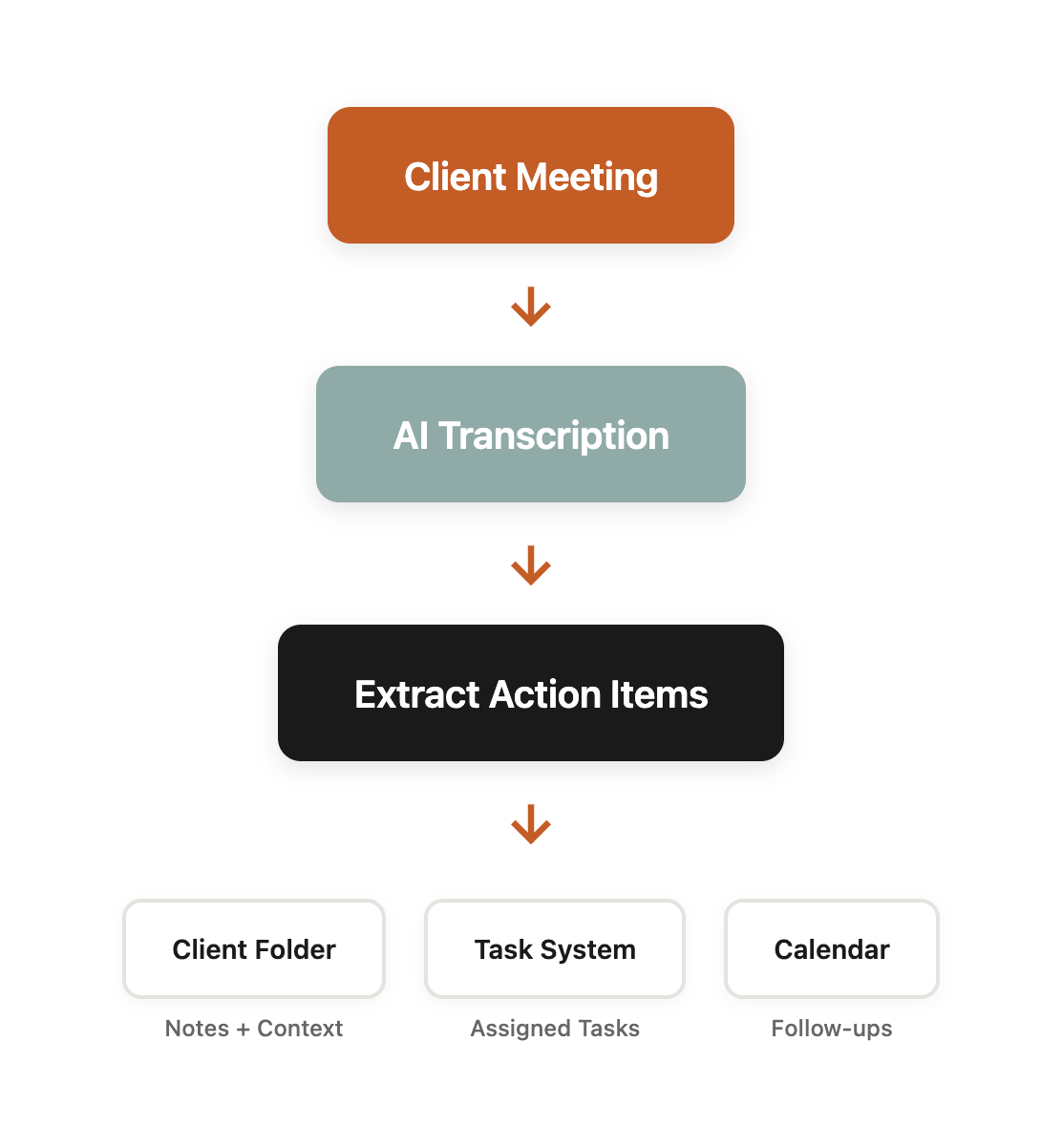
Step 1: Automatic Recording and Transcription
Every client meeting records automatically. No opt-in required—recording is the default.
The recording feeds to a transcription service that produces:
- Full text transcript
- Speaker identification (who said what)
- Timestamp markers
- Summary of key discussion points
This happens without human intervention. The meeting ends; the transcript appears.
Transcription accuracy has improved dramatically. Modern services hit 95%+ accuracy even with industry jargon, multiple speakers, and imperfect audio quality. The transcript isn't perfect, but it's more than good enough for capturing commitments.
Step 2: AI Action Item Extraction
Here's where AI transforms the workflow.
The transcript feeds to an AI system trained to identify commitments:
Explicit commitments: "I'll send the updated creative by Friday" → Action: [Name] send updated creative. Due: Friday.
Implicit commitments: "Let's make sure we review the analytics before the next call" → Action: Review analytics. Due: Before next meeting.
Decision points: "We agreed to increase the budget by 20%" → Decision: Budget increase 20%. Action: [Account manager] implement budget change.
Questions requiring follow-up: "Can you check if that integration is possible?" → Action: [Name] investigate integration feasibility.
The AI doesn't just extract text—it classifies commitment type, identifies responsible parties, and infers due dates from context.
Example extraction from a 45-minute client call:
ACTION ITEMS EXTRACTED

1. [Mike] Send updated content calendar by EOD Wednesday
   Context: Client requested visibility into upcoming blog topics
   Timestamp: 12:34

2. [Sarah - Client] Provide brand guidelines PDF
   Context: Needed for landing page design
   Timestamp: 18:22

3. [Mike] Schedule follow-up call for campaign results review
   Context: Campaign launches Feb 1, review 2 weeks after
   Due: Week of Feb 14
   Timestamp: 31:45

4. [Team] Investigate Facebook API changes affecting reporting
   Context: Client concerned about tracking accuracy
   Priority: Before next monthly report
   Timestamp: 38:12

DECISIONS MADE

1. Approved: Increase monthly retainer by $2,000 for additional social management
   Effective: March 1
   Timestamp: 41:30

2. Approved: Proceed with website redesign proposal
   Next step: Mike to send SOW
   Timestamp: 44:15
From a 45-minute call: 4 action items and 2 decisions, with context and timestamps for reference.
Step 3: Automatic Client Routing
Extracted action items need to go somewhere useful. Our system routes automatically:
Client folder matching: The system identifies which client the meeting concerns (by participant emails, meeting title, or calendar context) and routes the transcript and action items to the appropriate client folder.
No "where did I put those notes?" moments. Every meeting associated with a client lives in that client's folder.
Standardized naming:
Meeting notes follow a consistent naming pattern: YYYY-MM-DD-[topic].md. Searchable, sortable, consistent.
Action item integration: Action items populate in the task management system with:
- Client linked
- Owner assigned
- Due date set
- Context/timestamp linked back to recording
Tasks don't require manual creation. They appear automatically, ready for human review and prioritization.
Step 4: Human Review and Prioritization
Automation handles extraction and routing. Humans handle judgment:
Review extracted items: AI catches most action items but occasionally misses nuance or over-extracts. A 2-minute review confirms accuracy.
Add strategic context: "Investigate Facebook API changes" might be routine maintenance or a critical blocker depending on campaign timing. Humans add priority and context that AI can't infer.
Assign ownership: AI guesses ownership from speaker identification, but team dynamics require human knowledge. "Mike said it, but Sarah actually handles that type of work."
The human review takes 5-10 minutes per meeting. But those 5-10 minutes are focused on judgment calls, not transcription or data entry.
Step 5: Accountability and Visibility
With action items in the task system:
Team visibility: Anyone on the account can see outstanding commitments. No private notebooks, no hidden obligations.
Client visibility: Clients can see what we committed to and current status. Transparency builds trust.
Accountability: Tasks have owners and due dates. Dashboard shows overdue items. Nothing hides in the shadows.
Historical reference: When the client asks "what did we decide about X?" the answer is searchable. Meeting timestamp, exact quotes, decision made. No more "I think we said..." conversations.
03 / the-time-math
The Time Math
Let me quantify the impact.
Traditional approach:
| Activity | Time per Meeting |
|---|---|
| Note-taking during meeting | 30 min (distracted attention) |
| Note cleanup after meeting | 15-20 min |
| Action item extraction | 10-15 min |
| Task creation | 10-15 min |
| Total | 65-80 min |
Plus: attention split during meeting means missing context and contributing less.
AI-amplified approach:
| Activity | Time per Meeting |
|---|---|
| Recording + transcription | 0 min (automatic) |
| AI extraction + routing | 0 min (automatic) |
| Human review + prioritization | 5-10 min |
| Total | 5-10 min |
Plus: full attention during meeting, zero items missed due to distraction.
Time savings: 55-70 minutes per meeting.
For an account manager with 20 client meetings per month, that's 18-23 hours saved monthly—more than two full workdays.
But the bigger value isn't time. It's trust.
04 / the-trust-dividend
The Trust Dividend
Here's what clients actually notice:
Follow-through improves: "You always remember everything we discuss. Other agencies constantly drop the ball."
Responsiveness improves: When clients ask about past discussions, you have instant answers. No "let me dig through my notes" delays.
Preparation improves: Before the next call, review the last meeting's notes and outstanding items. Enter every conversation knowing exactly where things stand.
Accountability improves: Clients can see their own action items too. The "waiting on client" delay shortens when they have visibility into their commitments.
One client told us: "I've never worked with an agency that actually does what they say they'll do. It's weirdly refreshing."
That's not because we're more disciplined than other agencies. It's because our system makes discipline automatic. The meeting intelligence feeds directly into our client reporting workflows, ensuring nothing falls through the cracks.
05 / building-your-own-meeting-intelligence-system
Building Your Own Meeting Intelligence System
You can implement similar systems without custom development. Here's the stack:
Recording Layer
Options:
- Fathom (AI-native meeting recording, excellent summaries)
- Fireflies.ai (transcription-focused, integrations)
- Otter.ai (good transcription, affordable)
- Zoom/Google Meet native recording (basic but functional)
Requirements:
- Automatic recording without manual start
- Participant consent handling (legal requirement)
- Transcript export capability
Extraction Layer
Options:
- Fathom's built-in AI summaries (if using Fathom)
- Claude/GPT-4 with custom prompts (if using other recording)
- Dedicated meeting AI tools (Grain, Avoma)
Prompt structure for extraction:
Analyze this meeting transcript and extract:

1. Action items: Things someone committed to do
   Format: [Person] - [Action] - [Due date if mentioned]

2. Decisions made: Things the group agreed to
   Format: [Decision] - [Any conditions or next steps]

3. Questions requiring follow-up: Unresolved questions that need answers
   Format: [Question] - [Who should answer]

4. Key discussion points: Important topics covered (not action items)
   Format: Brief summary of each major topic

For each extracted item, include the approximate timestamp.

Transcript:
[paste transcript]
Routing Layer
Options:
- Zapier/Make automations (connect recording tool to file storage)
- Custom scripts (if you have technical resources)
- Native integrations (many tools connect directly)
Requirements:
- Client identification from meeting metadata
- Consistent folder structure
- Standardized naming convention
Task Integration Layer
Options:
- Zapier to push to Asana/Monday/ClickUp/Notion
- Native integrations from meeting tools
- Manual creation from extracted list (fallback)
Requirements:
- Task creation with owner, due date, context
- Link back to source recording
- Client/project association
Implementation Order
Week 1: Implement recording for all meetings Week 2: Set up extraction (built-in AI or custom prompts) Week 3: Configure routing to client folders Week 4: Integrate with task management
Start simple. Add sophistication over time.
06 / common-pitfalls-to-avoid
Common Pitfalls to Avoid
Pitfall 1: Recording Without Consent
Legal requirements vary by jurisdiction. Generally:
- One-party consent: You can record if you're a participant
- Two-party consent: All participants must consent
Best practice: Announce recording at meeting start. Most tools display a recording indicator. Make consent explicit.
Pitfall 2: Over-Extraction
AI might flag every statement as an action item: "We should probably think about that at some point" ≠ action item "I'll send that by Friday" = action item
Review extracted items. Train your eye for real commitments versus exploratory statements.
Pitfall 3: Skipping Human Review
AI extraction is good, not perfect. Common misses:
- Implied commitments without explicit statements
- Complex multi-step actions that need breakdown
- Strategic importance that requires context
5 minutes of human review catches what AI misses.
Pitfall 4: Creating Tasks Nobody Checks
Tasks in a system nobody uses are worse than no system. Before implementing:
- Confirm team actually uses the task system
- Establish review cadence (daily standup, weekly review)
- Create accountability for overdue items
The system only works if tasks get worked.
Pitfall 5: Ignoring Client Action Items
Client commitments matter too. "Can you send the brand guidelines?" is an action item—theirs.
Track client items separately:
- Creates gentle accountability
- Prevents "waiting on client" items from disappearing
- Enables proactive follow-up
07 / the-compounding-effect
The Compounding Effect
Meeting intelligence doesn't just improve individual meetings. It improves over time.
Institutional memory builds: After 50 meetings with a client, you have a searchable archive of every decision, commitment, and discussion. New team members can get up to speed by reading history.
Patterns emerge: "This client always asks about reporting timing. Let's proactively address it." Historical data reveals client priorities and concerns.
Relationship deepens: "Remember when we discussed X six months ago? Here's how that turned out." References to past conversations signal attention and care.
Problems prevent: "Last time we did X, client raised Y concern. Let's address that proactively." Historical context prevents repeated mistakes.
Meeting intelligence isn't just about the immediate meeting. It's about building organizational memory that compounds. This is part of our broader AI-amplified marketing approach and ties directly into our continuous improvement system. It's also a prime example of AI tools for business automation that eliminate manual work while improving outcomes. For organizations building this kind of operational infrastructure, a structured AI enablement approach ensures the pieces connect into a cohesive system.
08 / start-today
Start Today
If you're managing client relationships and dropping action items, here's your path forward:
Today:
- Sign up for a meeting recording service (Fathom, Fireflies, Otter—most have free tiers)
- Record your next client meeting
This Week:
- Review the transcript and AI-generated summary
- Compare extracted action items to what you would have captured manually
- Identify gaps in your current process
This Month:
- Make recording default for all client meetings
- Establish a review workflow for extracted action items
- Connect extracted items to your task management system
This Quarter:
- Build client folder routing
- Implement accountability dashboards
- Extend to internal meetings
You'll never wonder "what did we agree to?" again.
09 / let-us-set-this-up
Let Us Set This Up
Don't want to build the system yourself? We offer meeting intelligence implementation as a service.
What we do:
- Evaluate your current meeting and task management stack
- Design integration architecture
- Implement recording, extraction, routing, and task creation
- Train your team on the workflow
Meeting intelligence is just one component of a complete AI-powered marketing system. See our AI Operations services for the full picture.
Investment: One-time setup starting at $2,500 (varies by complexity).
Contact us:
- Email: hello@wedoworldwide.com
- Website: wedoworldwide.com
Or just tell us about your current meeting workflow. We'll identify where items are falling through and how to fix it.
About the Author: Mike McKearin is the founder of WE•DO Growth Agency. His team manages 100+ client relationships without dropping action items—a claim he's unreasonably proud of given his personal tendency to forget everything not written down.