A lot of owner work happens away from a desk: in the truck, on a job site, walking between appointments. That's where talking to Claude beats typing.
There are two ways to use your voice: Dictate, where you talk and Claude types your words, and voice mode, where you and Claude have a spoken conversation.
Step 1: Find the two voice buttons
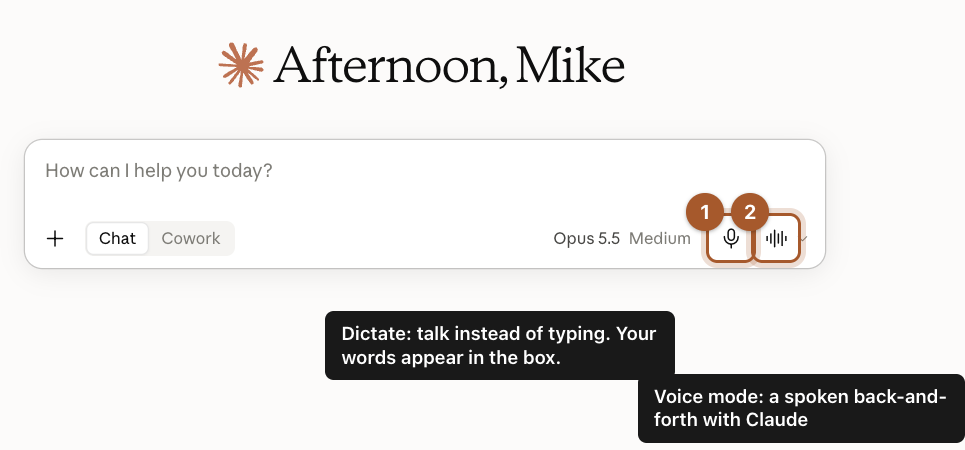
In the message box, on the right, there are two buttons:
- The microphone: Dictate. Click it and talk. Your words appear in the box as text. Read them over, fix anything it misheard, then send.
- The sound waves: voice mode. Click it and have a back-and-forth conversation out loud, like a phone call.
The first time you use either, your browser or phone asks for permission to use the microphone. Click Allow.
Step 2: Get the Claude app on your phone
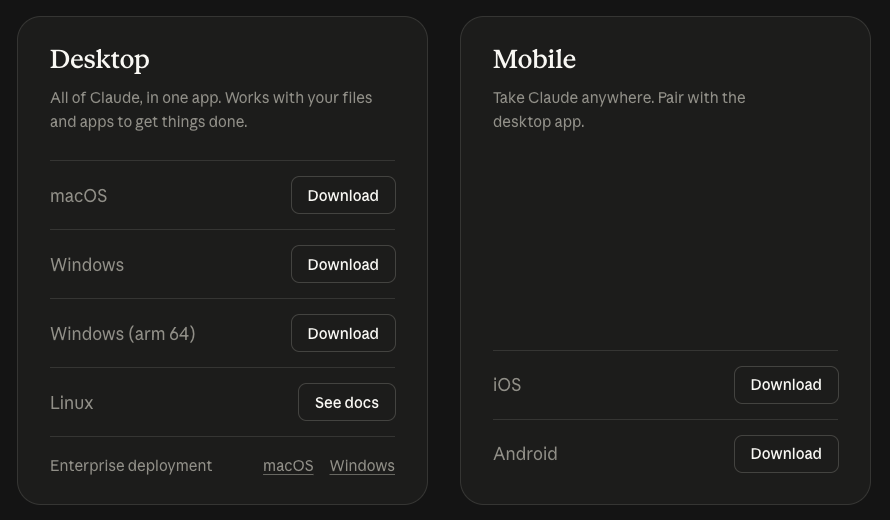
On your phone, open the App Store (iPhone) or Google Play (Android) and search for Claude. Check that the maker is Anthropic before you install it. You can also go to claude.com/download and tap the iOS or Android link.
Step 3: Sign in with the same email
Open the app and sign in with the same email you use on your computer. Your chats and Projects show up on both, so you can start something in the truck and finish it at your desk.
Step 4: Talk through a job on the go
In the phone app, the message box has the same microphone and voice buttons as on your computer. Tap the microphone and try something like this:
I just finished a site visit. Here's what the customer wants, in no order. Turn it into a short list of tasks and a rough materials list, and tell me what I forgot to ask.
Then talk through what you saw, the way you'd tell your crew lead.
Screenshots taken September 24, 2026. Claude changes its look now and then. If a button has moved, look for the same words nearby.