Some questions need more than one quick answer. What licenses do I need? What are competitors charging? What changed in the rules this year? You'd normally spend an afternoon clicking through search results.
Research does that searching for you. Claude reads hundreds of pages, then writes a report with links to where each fact came from. Your job is to check the important ones.
Our example: a made-up owner starting a 3-person landscaping company in North Carolina.
Step 1: Turn on Research from the + menu
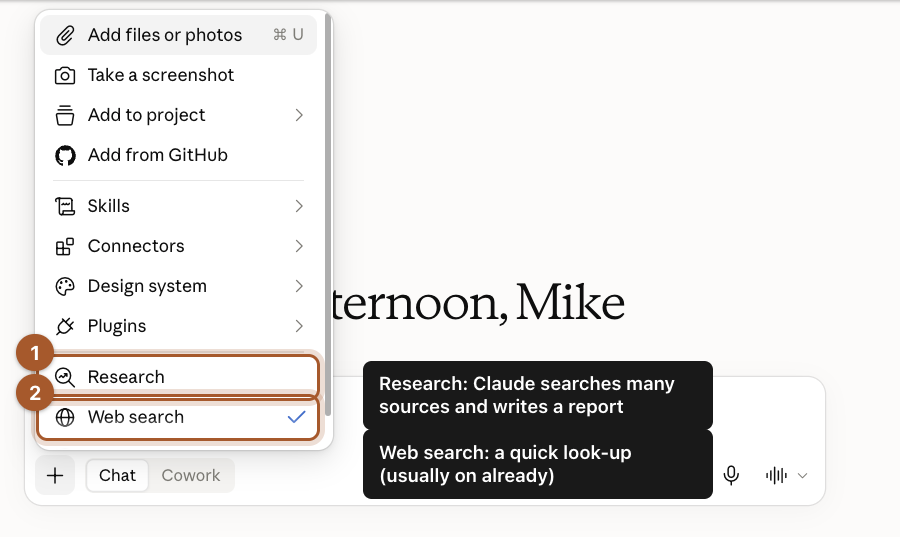
Start a New chat, click the + button, and click Research.
Step 2: Ask your question, and ask for sources
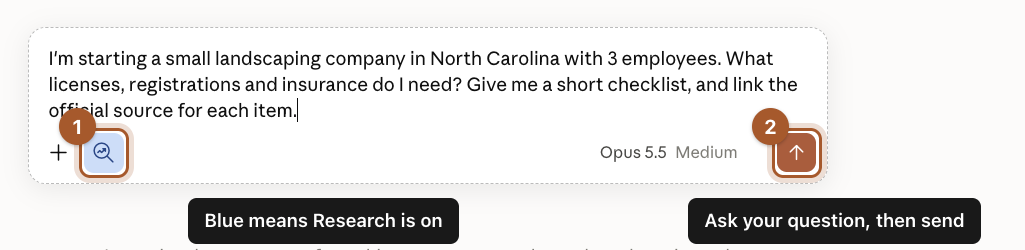
The small magnifying-glass button next to the + turns blue, which means Research is on. Type your question and send it. Ask for official sources by name:
I'm starting a small landscaping company in North Carolina with 3 employees. What licenses, registrations and insurance do I need? Give me a short checklist, and link the official source for each item.
Step 3: Decide whether it can search your connected apps
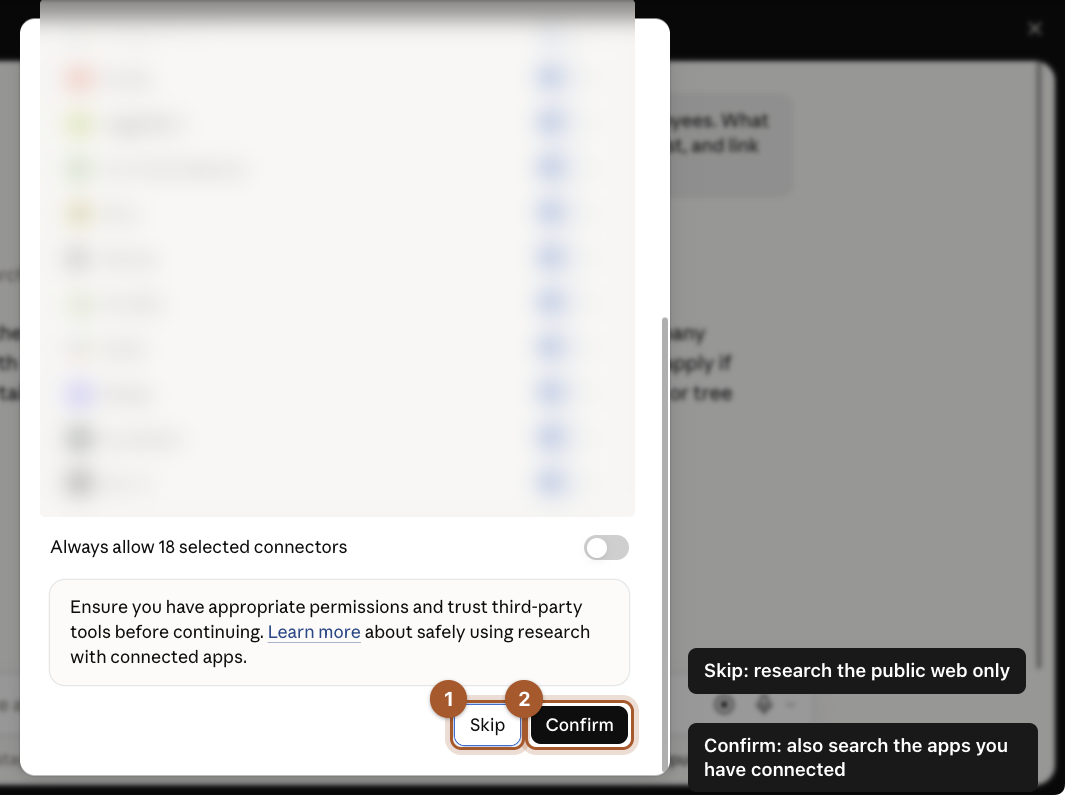
If you've connected apps like email or Google Drive, Claude may ask whether Research can search them too.
- Skip: research the public web only. Pick this for questions about laws, prices, competitors and anything else public.
- Confirm: also search your connected apps. Only pick this when the answer is in your own email or files.
Step 4: Let it work
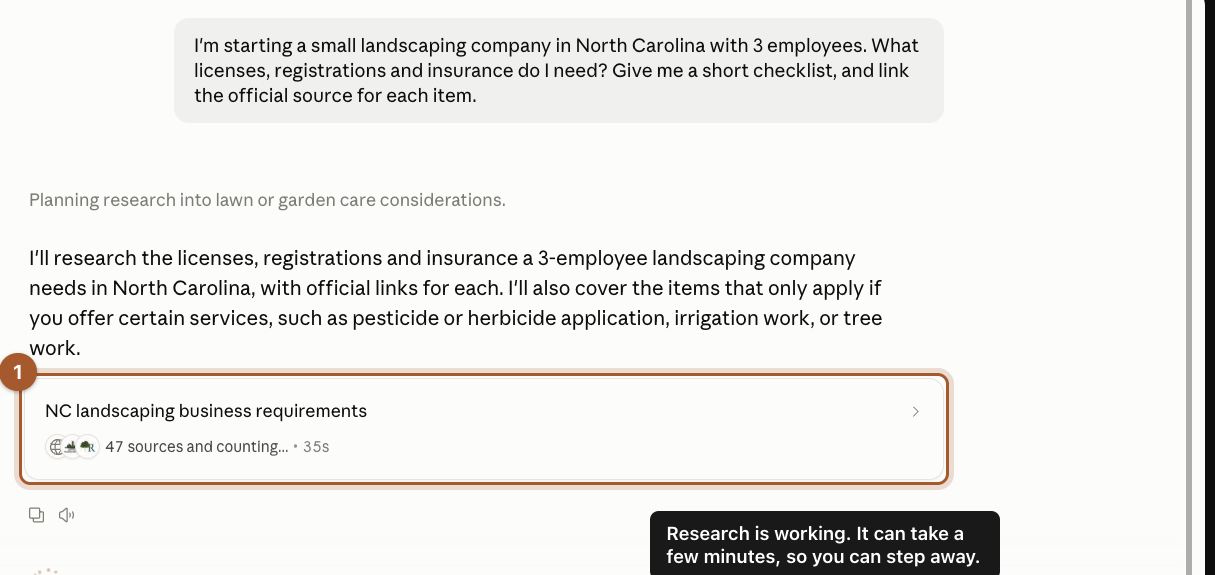
A progress card shows what Claude is researching and how many sources it has read so far. Ours read about 300 sources and took just under 5 minutes. You can do something else while it works.
Step 5: Read the report
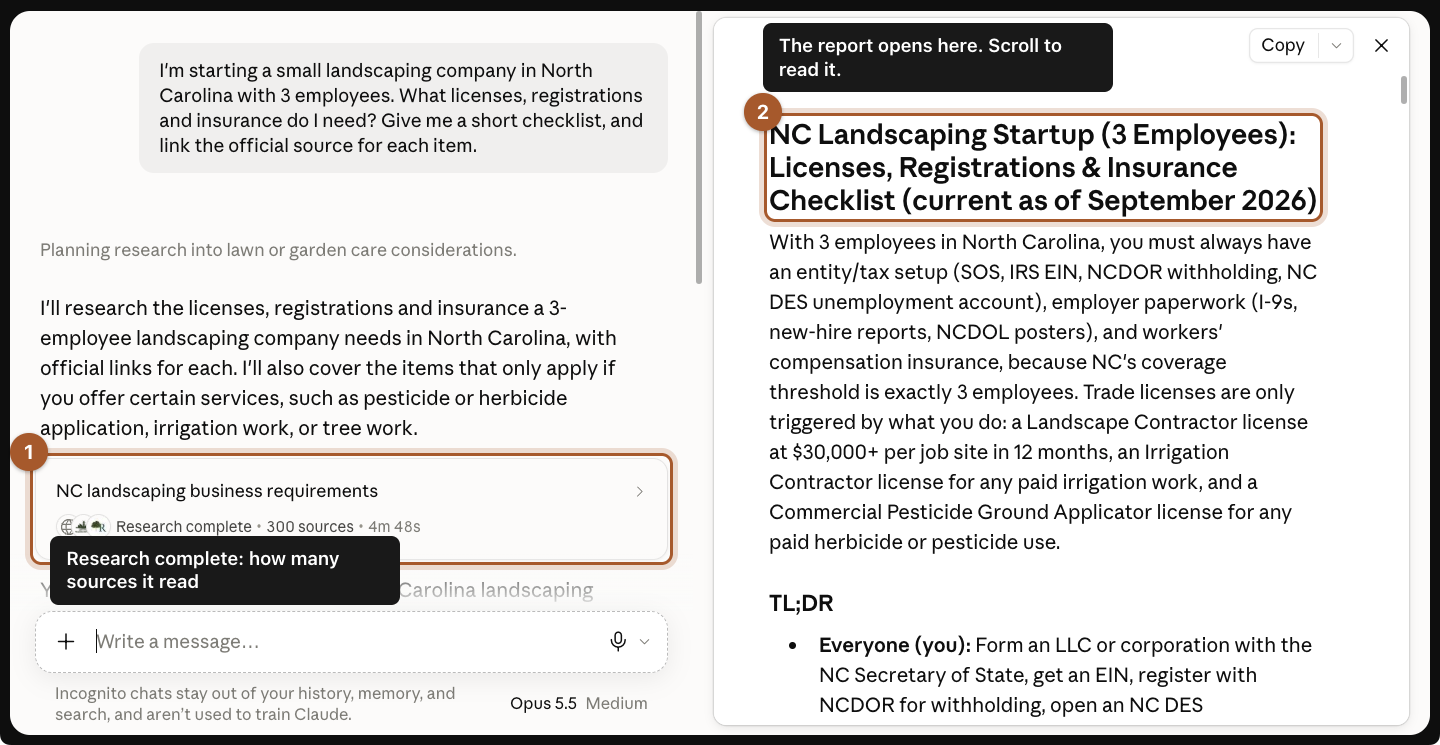
When it finishes, you get a short summary in the chat and a full report in a panel on the right. Ours included a checklist, what was required for everyone, and what only applied to certain services, like irrigation or spraying.
Step 6: Click the sources on anything important
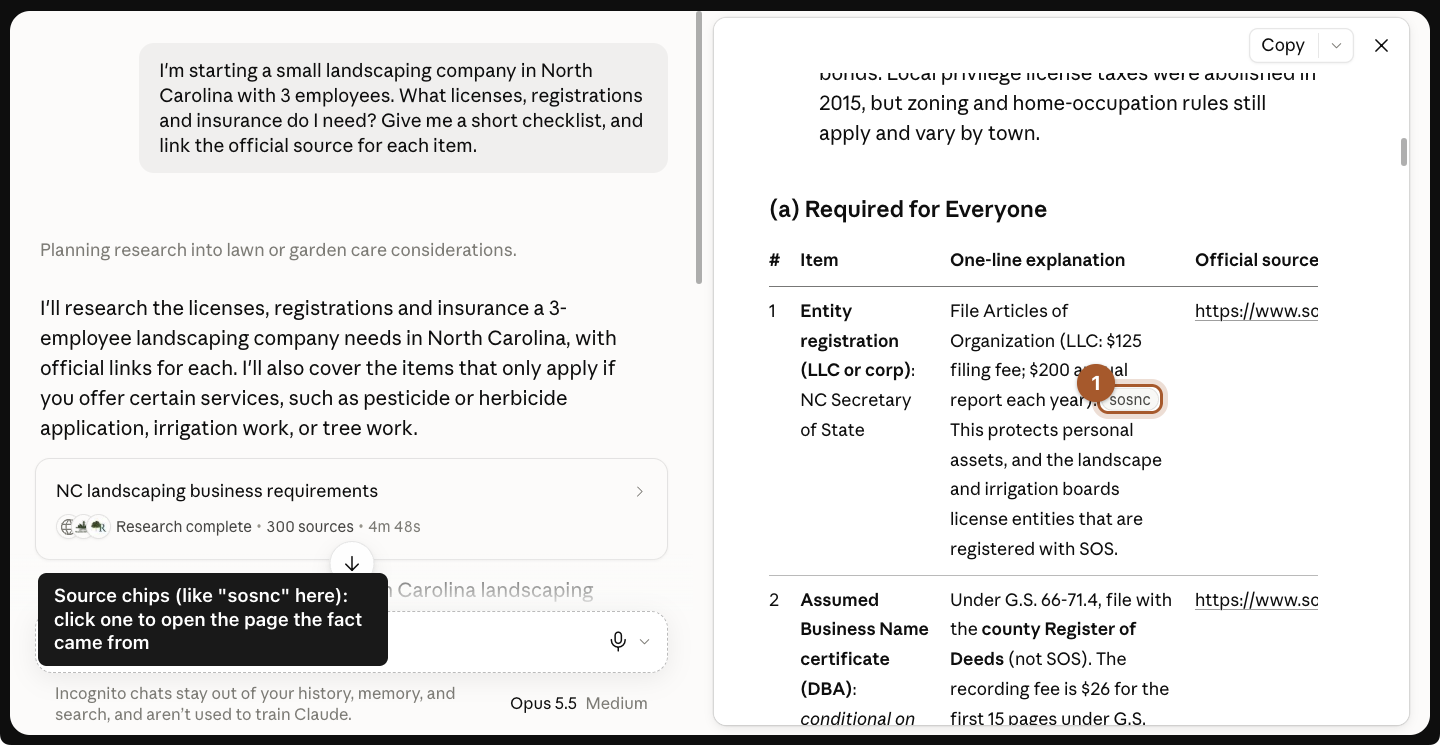
Next to facts, you'll see small grey source chips with a short name, like "sosnc" for the NC Secretary of State. Click one to open the page the fact came from.
A harder question: what are competitors charging?
License rules are published on official sites. Prices are harder: most local companies don't post them, and national averages can be far off for your area. This is where a research brief helps. Instead of one line, you tell Claude what you're deciding, what you already know, where to look and what to hand back.
Step 7: Write a research brief instead of a question
Turn on Research as before, then paste a brief like this, with your own town and prices:
RESEARCH BRIEF
Question: What do landscaping companies around Brevard and Hendersonville, NC charge for weekly mowing, spring cleanup, and mulch installed?
Why I'm asking: I run a 3-person landscaping company in Brevard and I'm setting next spring's prices.
What I already know: I charge $55 per mowing visit (up to half an acre), $250 to $450 for a spring cleanup, and $95 per cubic yard of mulch installed.
Where to look: local company websites that publish prices, local price guides, and regional cost guides for western North Carolina. Only use national averages if there's nothing local, and label them.
What I want back: 1) a table with company, town, service, price, and a link to where the price was published. 2) For each service, tell me if my price is low, in line, or high, and by how much. 3) The 3 things you're least sure about.
Rules: don't estimate a company's price if they don't publish one. Leave it out and say so.
Step 8: Read the verdict, and where it's weakest
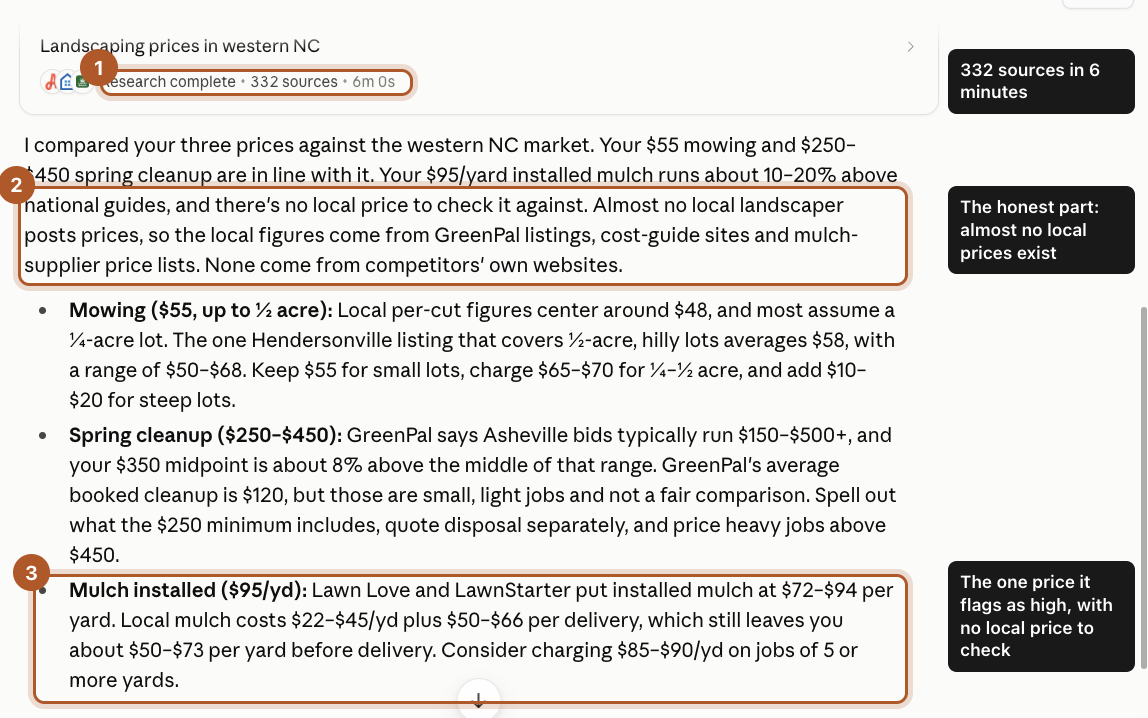
Ours read 332 sources in 6 minutes. The verdict, service by service:
- Mowing, $55: in line. Local per-cut prices center around $48, but most assume a quarter-acre lot. It suggested charging more for bigger and steep lots.
- Spring cleanup, $250 to $450: in line, a little above the middle of the local range.
- Mulch, $95 a yard installed: about 10 to 20% above national guides, with no local price to check it against.
The most useful line was the honest one: almost no local landscaper posts prices. The local figures came from booking sites, cost guides and mulch-supplier price lists, not from competitors' own websites. That's exactly what the "don't estimate" rule was for.
Step 9: Turn the report into a plan
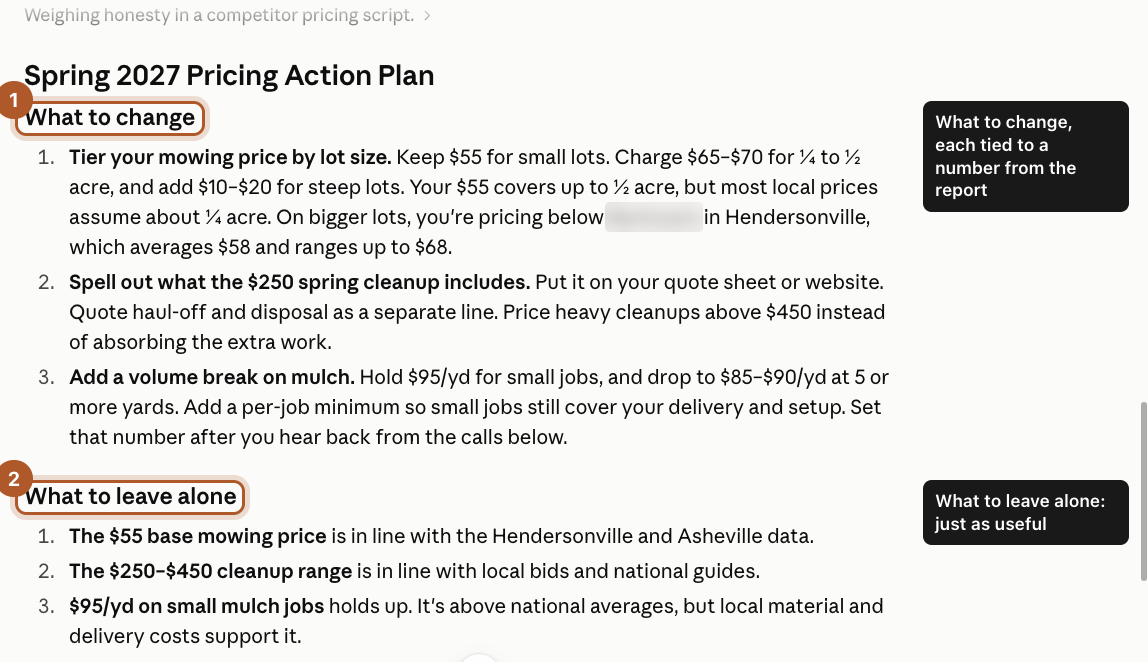
A report is only useful if it changes what you do. In the same chat, ask:
Turn this into a short action plan for next spring: what I should change, what I should leave alone, and what I need to find out first. Include a short script I can use to ask two local companies for a quote on 5 yards of installed mulch.
Turn Research off first (click the blue magnifying glass so it goes grey). The answer comes from the report you already have, so it takes seconds instead of minutes.
What came back:
- What to change, each tied to a number from the report: charge more for bigger and steep lots, spell out what the cleanup minimum covers, and add a volume price on mulch at 5 yards or more.
- What to leave alone: the base mowing price, the cleanup range and small-job mulch. Knowing what not to touch is just as useful.
It also listed what to find out first, like your own cost per yard and how many customers are on bigger lots, and wrote the phone script. Then it added a note we didn't ask for: the script doesn't say who you are, and you shouldn't claim to be a homeowner if you're not. Ask the questions honestly, or skip the call.
Screenshots taken September 24, 2026. Claude changes its look now and then. If a button has moved, look for the same words nearby.