Every small business owner has been told that AI agents change everything. Almost nobody has been told what one costs, which one to build first, or what happens the week it gets something wrong.
Search the term and you get lists of platforms. Nine of the ten results on page one are ranked tool roundups: pick a vendor, sign up, good luck. That is useful if you already know which job you are handing off. It is useless if you do not, which is where most owners actually are.
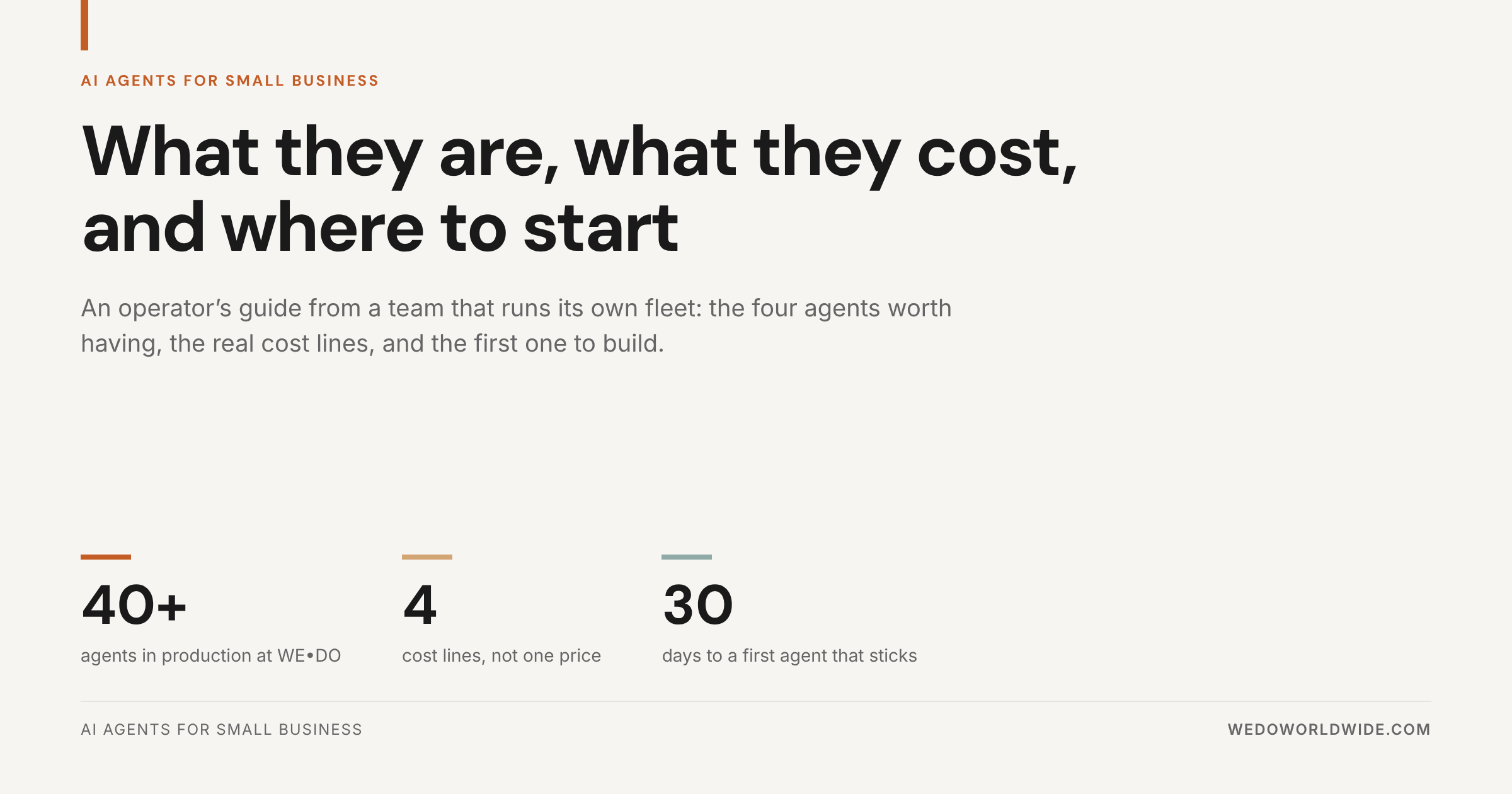
We run 40+ agents in production at WE•DO across content, reporting, SEO diagnostics, meeting prep, and internal operations. We have also killed a fair number of them. So this is the operator version of the guide: what an agent is, how much freedom to give it, the four agents almost every small business needs, what the cost really looks like, and a 30-day path to your first one.
What an AI Agent Actually Is
An AI agent is software that finishes a job. Not a conversation, not a suggestion: a defined piece of work that starts on its own, reads real business context, uses your tools, and produces an output someone was going to have to make anyway.
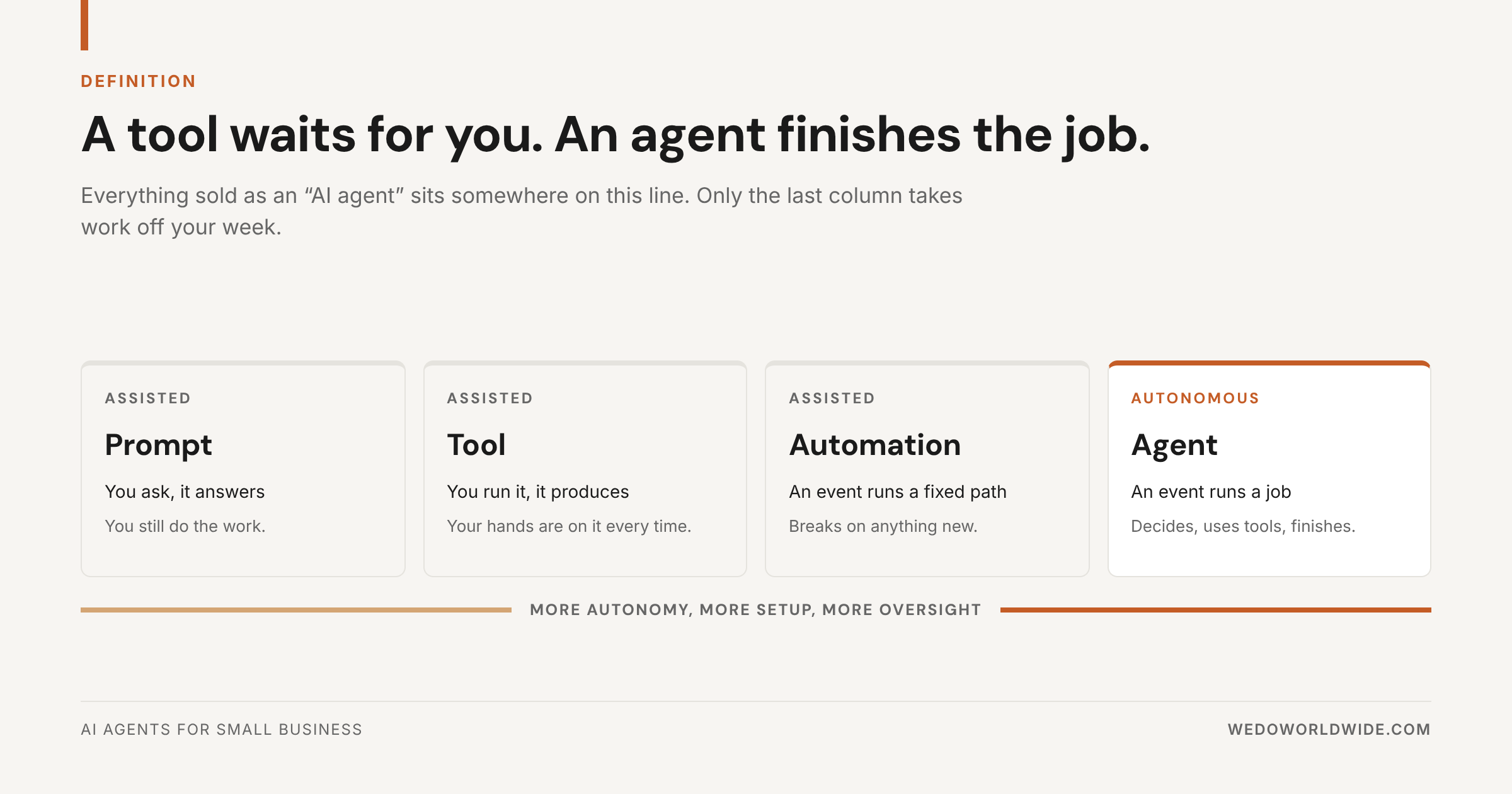
That puts it at one end of a line most AI marketing blurs on purpose:
- A prompt answers a question. You still do the work.
- A tool produces something when you run it. Your hands are on it every time.
- An automation fires a fixed path when an event happens. It breaks the moment reality changes.
- An agent takes a job when an event happens, decides how to complete it, and hands back a finished output.
The fastest test we know: name what starts the work without a human in the sentence. If you cannot, you do not have an agent yet. You have a tool with extra steps. That line between assisted and autonomous is the one we draw in AI Tools for Business Automation.
AI agent vs chatbot
A chatbot answers. An agent acts.
Ask a chatbot about your Saturday availability and it repeats what is in your knowledge base. Ask an agent and it checks the live calendar, books the slot, updates the CRM record, sends the confirmation text, and flags the one request it could not interpret for a human. Same conversation, different amount of work removed from your week.
The practical difference is access, not intelligence. Chatbots read content. Agents read and write to the systems your business runs on, which is also why they cost more and need governance.
AI agent vs automation
Automations are rules you wrote. Agents are judgments you delegated.
A Zapier flow that moves a form submission into a spreadsheet is dependable and cheap, and you should keep it. But it cannot read the submission, notice the prospect has no budget, score them, and skip the discovery call. That gap is the entire case for agents, and it is also the reason a broken process does not get better when you automate it. It just gets faster.
Decide How Much Autonomy to Hand Over
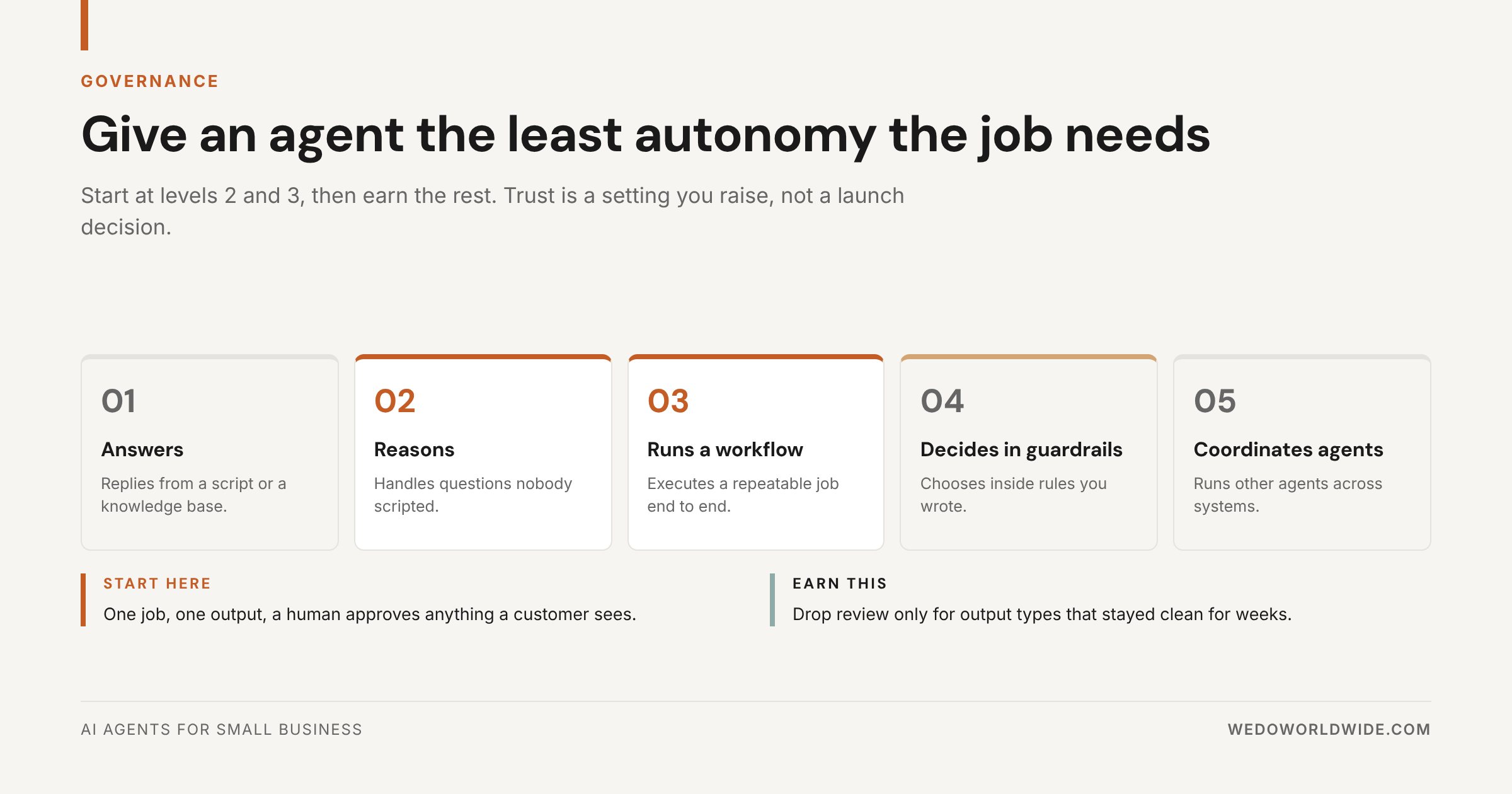
The question that matters before tooling is not "which platform," it is how much rope does this job get. Five levels, in plain terms:
- Answers. Replies from a script or a knowledge base.
- Reasons. Handles questions nobody scripted.
- Runs a workflow. Executes a repeatable job end to end.
- Decides inside guardrails. Chooses between options using rules you wrote.
- Coordinates other agents. Runs a multi-agent process across systems.
Start at 2 and 3. Almost every small business win lives there, and both are cheap to judge inside two weeks. Levels 4 and 5 are earned by agents that have already been boring and reliable for a month.
Autonomy is a setting, not a launch decision. The rules we write into every agent before it runs:
- If the answer lives in the data, look it up. Do not guess.
- Before anything reaches a customer, show the exact message and wait for approval.
- If the job has phases, stop between them.
- When the data does not support the conclusion, say so.
That last one saves more trust than any model upgrade. The longer version of how we frame delegation, agents as employees and skills as SOPs, is in our small business delegation framework.
The Four Agents Almost Every Small Business Needs
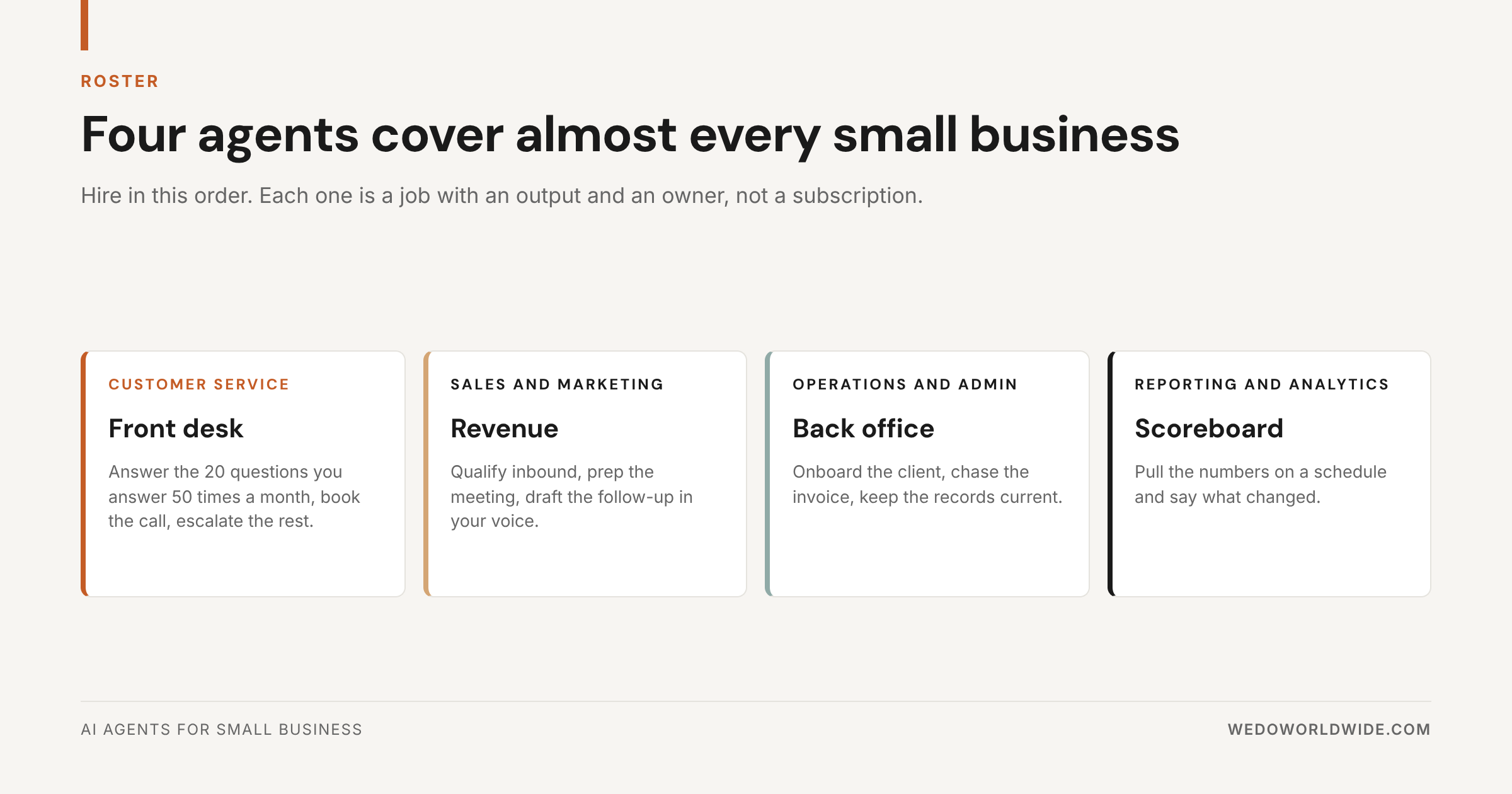
Forget the 40-item vendor list for a minute. Across the businesses we work with, four jobs come up every single time. Hire them in this order.
1. Front desk (customer service)
The job: answer the 20 questions you answer 50 times a month, book the call, escalate anything unusual with context attached.
The trigger: an inbound message, form, chat, or call.
Why it is first: it is the clearest revenue leak in a small business. Speed decides who wins the job, and after-hours inquiries are lost quietly. This is also the job with the most mature off-the-shelf options, so build almost never beats buy here.
2. Revenue (sales and marketing)
The job: qualify inbound leads against your criteria, prep every meeting, draft the follow-up in your voice.
The trigger: a new lead, or a calendar event 24 hours out.
What good looks like: you walk into the call already knowing the company, the history, and the three things you should ask. Our own meeting-prep agent starts a day before any client call and posts the brief straight onto the task. Nobody types a prompt.
3. Back office (operations and admin)
The job: onboard the new client, chase the unpaid invoice, keep records current, catch the step somebody forgot.
The trigger: a signed contract, an overdue date, a status change.
Why it pays: these tasks are individually small and collectively brutal. A missed onboarding step costs you a reference. A polite invoice sequence that runs on its own fixes cash flow without an awkward phone call.
4. Scoreboard (reporting and analytics)
The job: pull the numbers on a schedule and say what changed.
The trigger: the first of the month, or every Friday at 7am.
The proof: reporting was five hours per report by hand for us. With aggregation and first-draft analysis handled, it is 30 minutes, which is how a three-person team ships 100+ client reports a month without a reporting department.
If you want the full inventory by function, the roster lives in 40 AI Marketing Agents for Growth Teams. Four is where you start. Forty is where you end up.
What We Run, Including the Part That Did Not Work
We are not describing a demo. We run 40+ agents in production at WE•DO, and the fleet covers content research, briefs, drafting and QA, client reporting, SEO diagnostics, meeting prep, transcript-to-task-list, and internal routing. Three patterns hold across all of it.
The boring agents win. The best performers are bolted to work that happens weekly, pulls from several sources, is easy to start and easy to never finish, and creates a downstream problem for someone else when it is skipped.
The trigger matters more than the model. Our meeting-prep agent got used twice in its first two weeks because a person had to remember to run it. Same instructions, same model, attached to the calendar instead: used before every call.
Output is not outcome. Agent-assisted production scales how much you publish. It does not fix the commercial strategy underneath it, and no amount of automation does. More content faster is not more business value.
Here is the part that did not work. Over one 180-day window, our own 40-agents pillar page earned 29,668 impressions and 8 clicks in Search Console, a 0.03% CTR. Agent-assisted production scaled how much we published. It did not fix what we were publishing for. That honesty is the point. Agents remove repeated work. They do not decide what work was worth doing.
What AI Agents Actually Cost
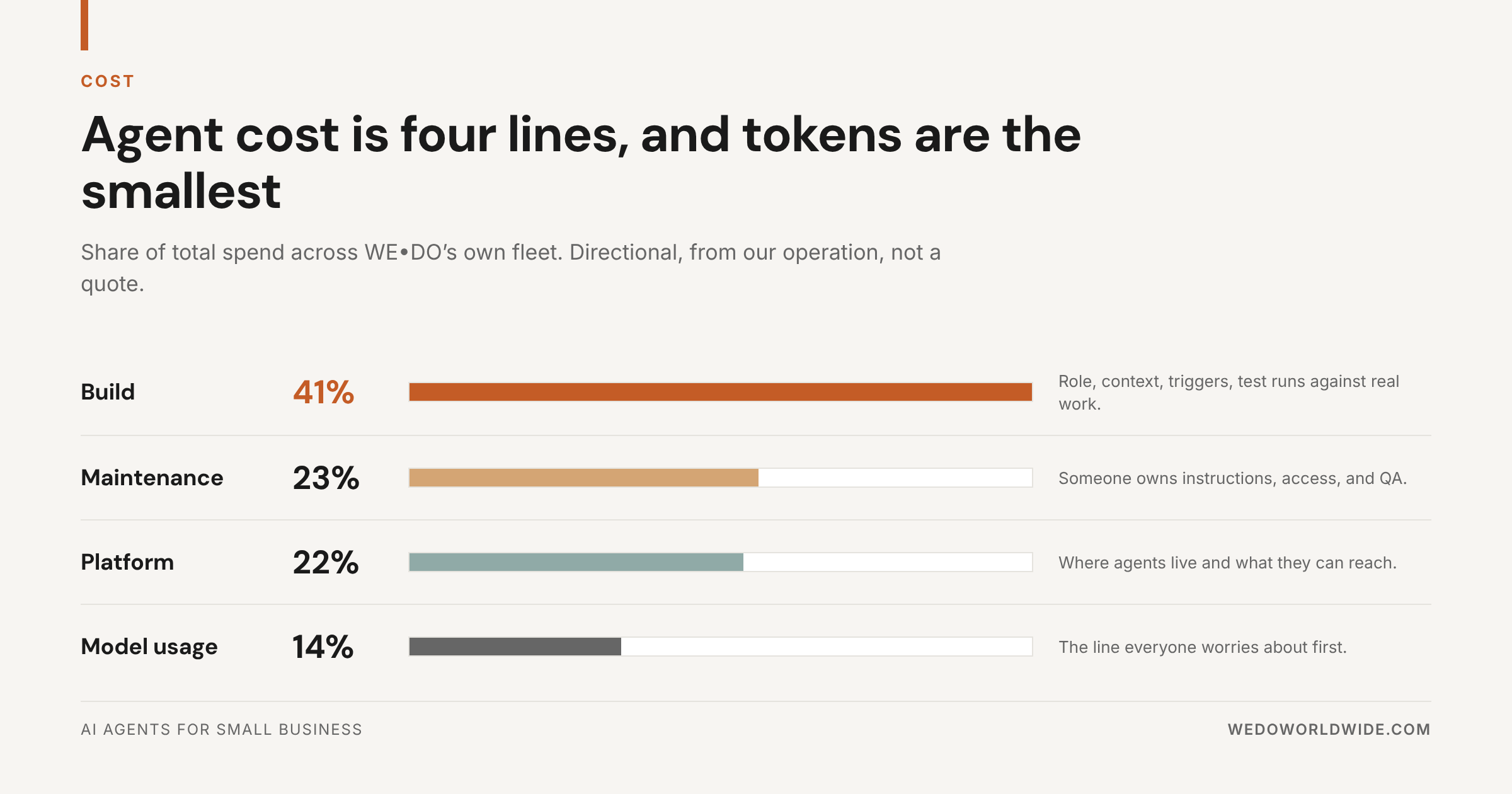
"AI agent pricing" sounds like one number. It is four, and they carry very different weight. Across our own fleet the split runs roughly 41% build, 23% maintenance, 22% platform, and 14% model usage. Directional, from our operation, not a quote.
- Build is where the budget actually goes: role definition, trusted context, tool access, trigger logic, output rules, and test runs against real work.
- Maintenance is the line nobody quotes. Systems move, offers change, docs go stale, and somebody owns instructions and QA.
- Platform is where agents live and what they can reach. Platform choice moves ROI more than model choice does.
- Model usage is the line everyone worries about first and the smallest of the four in practice.
Here is what the market charges, so you know what you are being quoted against:
Compiled from published 2026 vendor and agency pricing. Treat it as a budgeting frame, not a quote.
Notice what drives price: access, not intelligence. An agent that answers from a help center is cheap. An agent that reads your analytics, writes to your project system, and routes work to people is real engineering.
Two numbers worth holding onto. Outcome-priced customer service agents run roughly $0.40 to $2.00 per resolved task. The human benchmark vendors quietly compare against is a mid-level analyst at $50 to $80 an hour fully loaded. And the honest alternative to an agent fleet is rarely "nothing": building the same capability in house runs $105,500 to $167,500 a year once you count salary, tools, training, and management.
The full breakdown, including our break-even math and the four cases where our own ROI went negative, is in AI Agent ROI: What Running 40+ Agents Actually Costs and Saves.
How to Pick the First One
Run any agent idea through five questions. Three or more yes answers means it is worth a narrow first build.
- Does this job happen at least weekly? Frequency is what amortizes the build.
- Is it context-heavy? Docs, tasks, transcripts, analytics, history. Context is where agents beat tools.
- Is "good" easy to define? Structured output can be QA'd. Vague output cannot.
- Does a missed step cost something? That is where reliability turns into money.
- Would solving it let the team grow without the next hire? The clearest path to ROI there is.
Then decide build or buy, and be honest about it. If a $200 a month tool already does the job, a custom agent is an expensive hobby. If the job is specific to how you operate, no platform will ever fit. We use an eight-question test for that call, because reversing it six months in is the most expensive mistake in this category.
Why Small Business Agent Projects Stall
Most agent projects do not fail loudly. They get built, demoed, admired, and quietly abandoned. Five reasons, and none of them are the model:
- The scope was a wish, not a job. "Help with marketing" has no edges. Write the job in one sentence with no "and" in it.
- Nobody built the trigger. A manual-run agent competes with muscle memory, and muscle memory wins by week three.
- It could not reach the real data. An agent with no live context produces confident, generic output, and one round of plausible-but-wrong burns the trust you needed.
- There was no success metric. Without a baseline, a 40% improvement and a rounding error look identical.
- The wrong person owned it. Builders optimize for capability, users optimize for relief. Give it to whoever feels the pain.
The full diagnosis, including a 30-minute triage for a project already slipping, is in Why Most AI Agent Pilots Fail.
Your First 30 Days
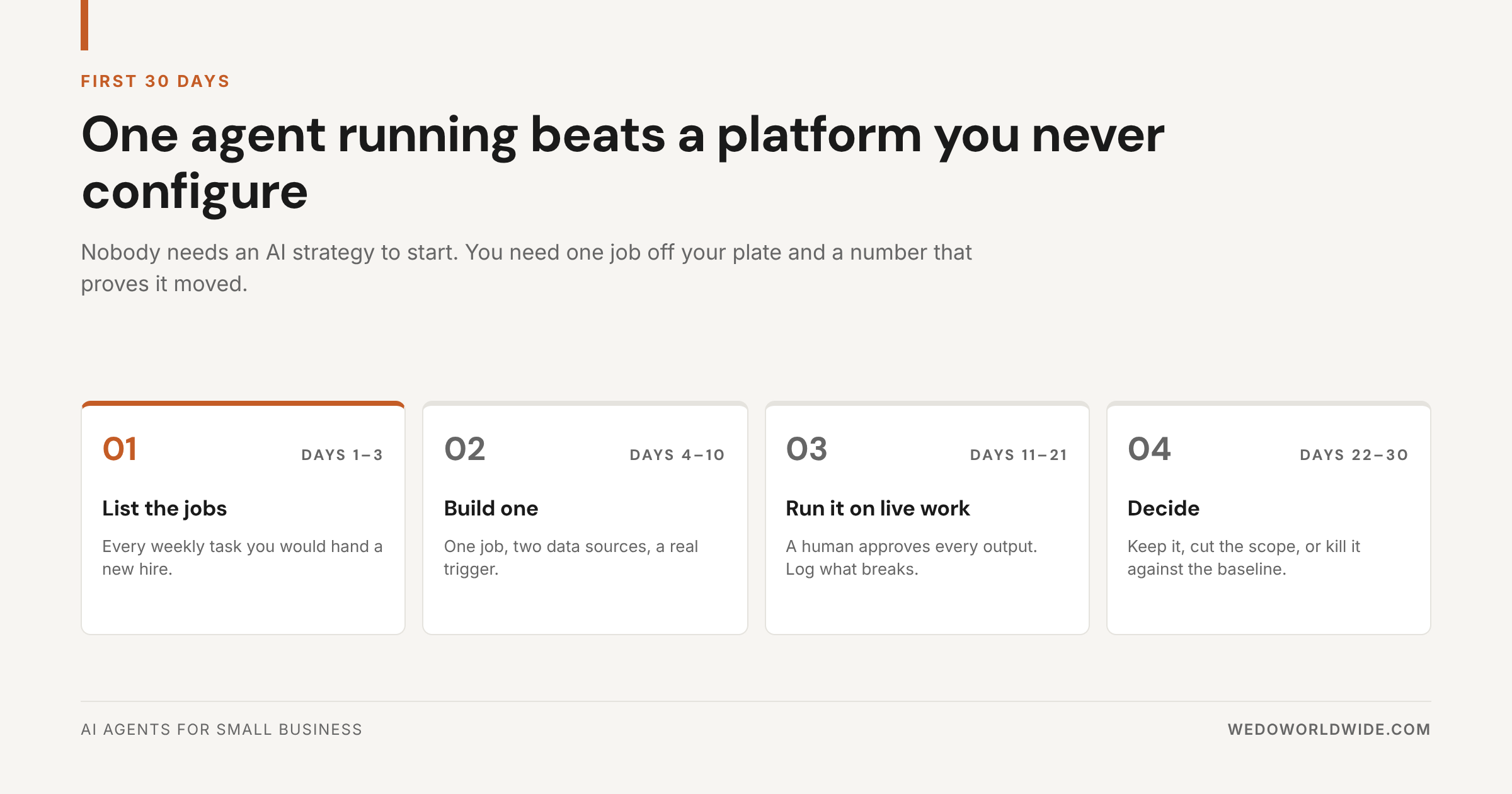
You do not need an AI strategy to start. You need one job off your plate and a number that proves it moved.
Days 1 to 3: list the jobs. Write down every task you would hand a new hire in their first week. Mark the ones that happen weekly. Time two of them honestly. That baseline is the only thing that makes day 30 a decision instead of an opinion.
Days 4 to 10: build one. One job, two data sources, one real trigger. Nothing else. If your sentence needs an "and," you have two agents, so build the first one.
Days 11 to 21: run it on live work. A human approves every output. Log what breaks. Resist adding features: the friction you find here is the product.
Days 22 to 30: decide. Compare against the baseline. Keep it, cut the scope, or kill it. A working agent at day 30 has four properties: it runs without a manual start, someone who did not build it uses it, the output lands where work already happens, and it has a number attached.
Then, and only then, build the second one next to it. Not more jobs on top of the first.
Where to Go Next
- 40 AI Marketing Agents for Growth Teams for the full roster by function
- AI Agent ROI: What 40+ Agents Cost and Save for the cost and break-even math
- Why Most AI Agent Pilots Fail for the five failure modes and the fix
- AI Automation for Small Business for the simpler automations to do first
- AI Enablement for Small Business for the readiness work underneath all of it
- Small Business AI Consulting if you would rather not do this alone
Next step
Find the first job worth handing off
We will map your recurring workflows, price the two or three worth automating first, and tell you which ones to leave alone.
Start with an AI workflow audit
FAQ
What is an AI agent for a small business?
An AI agent is software that completes a defined job on its own: it starts from a trigger like an inbound lead or a calendar event, reads your real business context, uses your tools, and produces a finished output. Unlike a chatbot, it takes action. Unlike an automation, it can handle situations nobody scripted.
How much do AI agents cost for a small business?
Off-the-shelf platforms run $20 to $150 per user per month with no build cost. No-code builds run $1,500 to $5,000 to set up and $300 to $2,000 a month to run. Custom agents with real system access start around $15,000 to build. In our own fleet the spend splits roughly 41% build, 23% maintenance, 22% platform, and 14% model usage, so the monthly software price is the smallest part of the decision.
What is the difference between an AI agent and a chatbot?
A chatbot answers questions from content it can read. An agent acts on systems it can write to: checking a calendar, booking the slot, updating the CRM, sending the confirmation, and escalating what it cannot handle. The difference is access and autonomy, not model quality.
Which AI agent should a small business build first?
The one attached to a job that happens weekly, pulls from context you already store, has a definable "good," and costs you something when a step gets missed. For most small businesses that is customer inquiry handling, meeting prep, or recurring reporting.
Do you need technical skills to run AI agents?
Not for levels 2 and 3. Most current platforms are configured in plain language, and the hard part is not technical: it is defining the job, connecting the right two data sources, and deciding what needs human approval. Custom builds with deep system access are where outside help pays for itself.
Can AI agents replace employees?
In practice they replace repeated work, not people. The realistic outcome for a small business is absorbing more volume without the next hire, and freeing your team for the work that needs judgment. Agents that run without human review on customer-facing output are how small businesses get burned.
Go deeper
- Best AI Agents for Small Business in 2026
- AI Agents vs AI Tools: when you need autonomous, not just assisted
- What Is an Agentic Workflow?
- AI Agents Examples: real businesses, real results
- AI Agents for Reporting: the agent, not the dashboard
- AI Agents for Customer Service: what actually works below 500 tickets a month
- How We Built 40+ AI Agents to Run Our Agency
- AI Operations: the 90-day buildout
- AI Enablement: train your team first