If you've worked through this level, you've already built the pieces of an AI agent. An agent is just this: a job (a skill or clear instructions), a schedule or trigger (a scheduled task), and permission to act (like Cowork doing the steps) without you asking each time.
That last part is what makes it powerful, and also what makes it risky. This guide is the part most AI tutorials skip.
What we run at WE•DO
At our agency, AI agents handle a lot of the small, repeat work. An Intake AI Agent sorts new requests. A Quality Check AI Agent reviews drafts before a person sees them. A Website Maintenance AI Agent looks after routine site upkeep, and a Meeting Notes AI Agent writes up our calls. Our blog work runs through a pipeline where AI does the research, the first draft, the checks and the linking, and a person reviews it before anything publishes.
It saves us real hours every week. It also went wrong in ways worth learning from.
What went wrong, and what we changed
An agent emailed a client several times in a few seconds, with different content each time. Nothing it said was harmful, but it was embarrassing. I picked up the phone and called the client myself. The fix: agents now draft emails to clients, and a person sends them.
A website update reported success when it hadn't worked. While we were building our Website Maintenance AI Agent, Claude caught a site reporting that a plugin update had gone through when it hadn't. The best thing it did was stop and tell us no, and suggest a safer way, instead of pushing ahead. The lesson: check the result, not the "done" message.
A meeting summary with no recording to work from. Our Meeting Notes AI Agent found that several meetings had no recording or transcript. Instead of writing plausible-sounding notes, it refused to make up decisions and flagged the gap. That's exactly the behavior you want, and it happened because the instructions said "don't invent".
Seven rules for your first agent
Step 1: Pick a boring, frequent, low-risk job
The best first agent does something you do every week, that follows the same steps, and where a mistake is cheap. A weekly weather check, a Monday to-do list or a sales summary: yes. Anything that talks to customers or moves money: not yet.
Step 2: Start read-only
Your first agent should read and report, not change or send anything. It tells you what it found, and you decide what to do. You can give it more permission later.
Step 3: Keep a person in front of anything that leaves the building
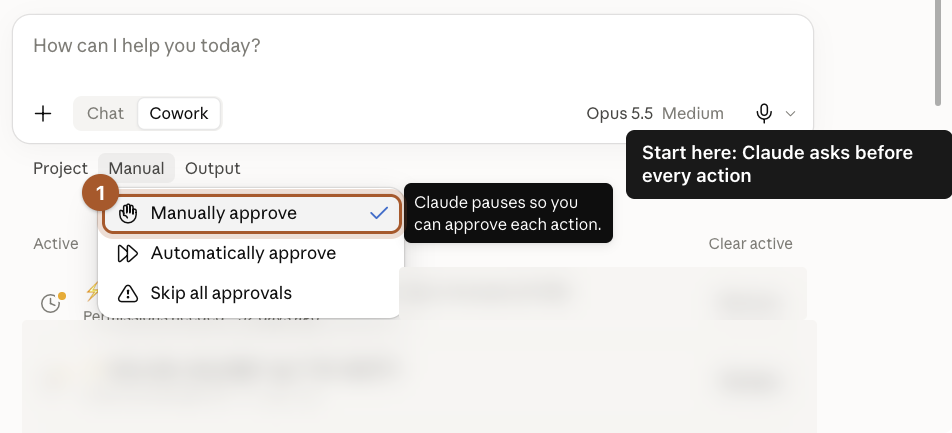
Emails to customers, posts, invoices and payments: the agent drafts, a person sends. Use Manually approve while you're learning what it does. This is the rule that would have saved our many-emails moment.
Step 4: One agent, one job
Don't build one agent that does everything. Small agents with one clear job are easier to check and easier to fix, and when one goes wrong, the damage stays small.
Step 5: Tell it not to guess
Put this in every agent's instructions:
If you're missing information or something doesn't look right, stop and tell me instead of guessing or pushing ahead.
Both of our good saves above came from agents that stopped instead of guessing.
Step 6: Check its work every week
For the first month, look at what the agent did every week. Did it run? Was the result right? Would you have done anything differently? When it's been right for a month, check less often, but never stop checking entirely.
Step 7: Know how to switch it off
Before you turn an agent on, know how to turn it off. For a scheduled task, that's the switch on its page on the Scheduled page. If something looks wrong, pause first and figure it out second.
Put it together: a Quote Follow-up AI Agent
If you followed the last two guides, you've already built one. Here's how the pieces line up, using the made-up landscaping company from those guides.
| Piece | What it is here | Where you set it up |
|---|---|---|
| The job | The quote follow-ups skill: find quiet quotes, draft emails, flag big ones for a call | Skills |
| What it knows | The open quotes list, plus the company's voice and details | Projects |
| When it runs | Every Friday at 9 AM | Scheduled tasks |
| What it may do | Read the list, write drafts, save a file. Never send. | The instructions and Manually approve |
| Who checks it | The owner reads the drafts on Friday and sends the good ones | You |
| The off switch | The switch on the task's page | The Scheduled page |
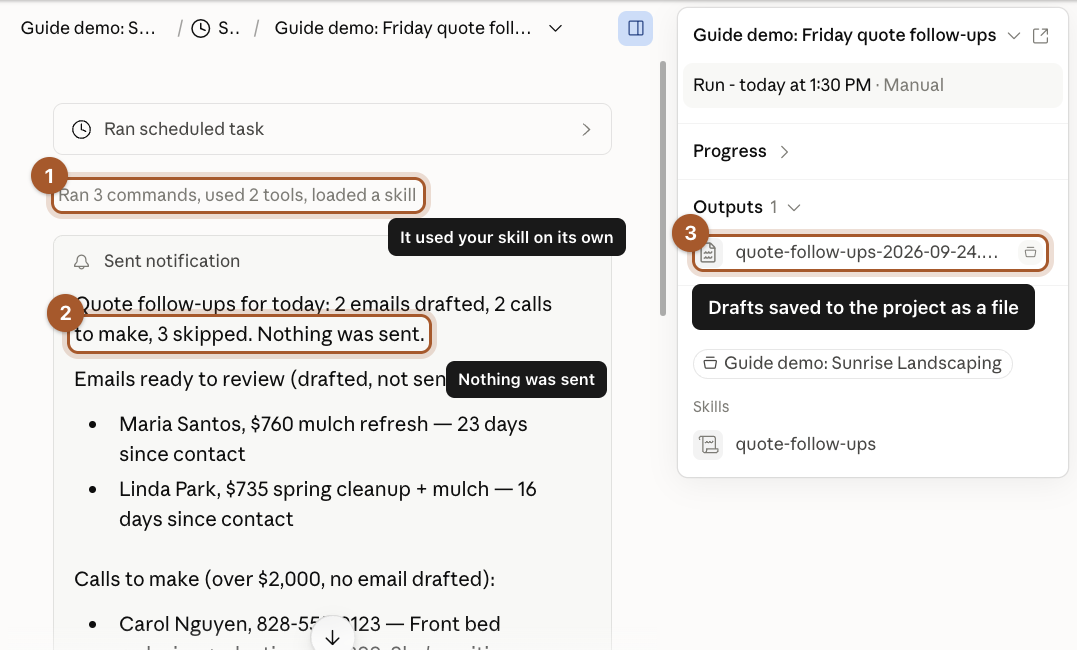
Look at what's missing: it can't send an email, change a price or touch the customer list. It does the tedious part (finding who's gone quiet and writing a first draft) and a person does the part that leaves the building. That's rules 2 and 3 in practice.
Design your own with Claude
Paste this into a new chat and Claude will walk you through designing your first agent, one question at a time:
Help me design my first AI agent for my business. Interview me one question at a time. Cover: the repeat job it should do, how often, what information it needs and where that lives, what it's allowed to do on its own, what it must never do, what a person checks before anything leaves the business, what it should do when something's missing or looks wrong, and how I'll switch it off. Then give me a one-page plan, a draft skill and the instructions for a scheduled task. Push back if my first idea is too risky for a first agent.
Ideas by how much can go wrong
Start at the top of this list and work down as you get comfortable.
Low risk: it only reads and reports
- Monday: this week's weather and which jobs it could push.
- Friday: a summary of this week's sales, from a report you export.
- First of the month: which subscriptions and bills renew this month.
Medium risk: it drafts, a person sends
- Quote follow-ups, like the one above.
- Replies to new online reviews, waiting for you to approve.
- A weekly update to a regular customer, in the same format every time.
Higher risk: wait until you trust it
- Anything that sends messages to customers on its own.
- Anything that changes prices, invoices, bookings or your website.
- Anything that moves money. Keep a person in charge of this one.
Screenshots taken September 24, 2026. Claude changes its look now and then. If a button has moved, look for the same words nearby.