Choose one workflow before deciding whether you need an AI tool, an integration or an agent. Write down what starts it, what information it needs and who checks the result.
Part of our guide to AI agents for small business.
An AI tool makes you faster at work you were already going to do. An AI agent takes the work off your desk. Both are useful. They are not interchangeable, and buying one when you needed the other is the most common reason AI spend produces nothing.
We run 40+ agents in production at WE•DO, and we still use plain AI tools every day. Here is how we decide which one a job gets.
01 / the-real-spectrum-prompt-tool-automation-agent
The Real Spectrum: Prompt, Tool, Automation, Agent
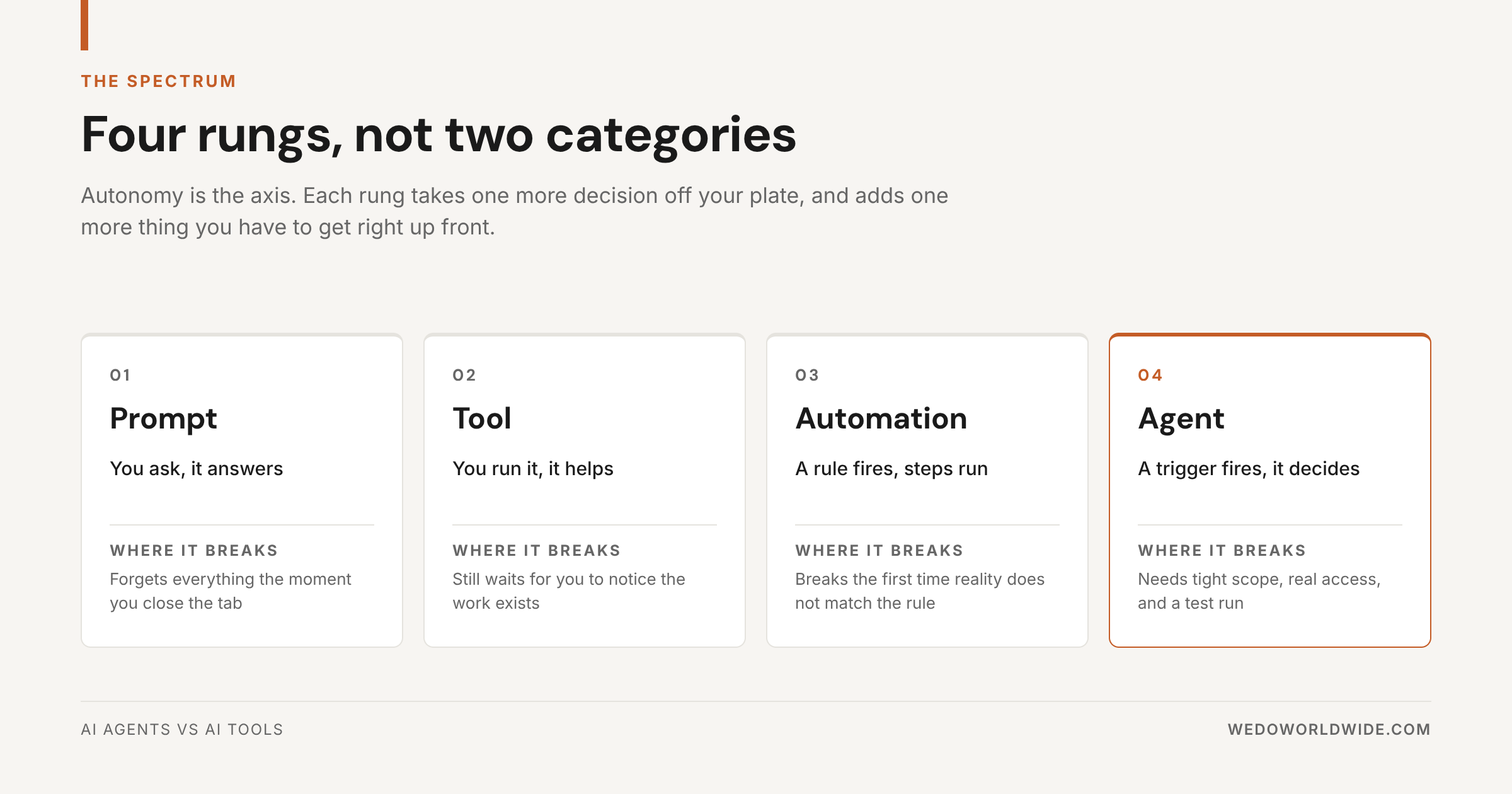
Agents and tools are not two categories. They are two rungs on a four-rung ladder, and the axis is autonomy.
Prompt. You ask, it answers. Fast, flexible, and gone the moment you close the tab.
Tool. You run it, it helps. A tool is a prompt with a purpose built around it: an interface, a template, somewhere to paste your inputs. It still waits for you to notice that work needs doing.
Automation. A rule fires, steps run. No reasoning, just reliability. Automation is excellent right up until reality stops matching the rule.
Agent. A trigger fires and it decides. An agent has a defined job, standing instructions, access to real context, tools it can call, and something other than you that starts it.
Each rung takes one more decision off your plate. Each rung also adds something you have to get right before it works at all. That trade is the whole decision.
02 / what-ai-tools-are-actually-good-at
What AI Tools Are Actually Good At
Tools get unfairly dismissed in a market obsessed with autonomy. They shouldn't be.
A tool is the right answer when the work is contained, occasional, and fast to check. That covers a lot of real marketing work:
- five headline options for a landing page
- alt text for a batch of product images
- a call transcript turned into bullets
- an FAQ rewritten in a different tone
- lead classification or ticket tagging
- a first-pass outline from a keyword
What these share is that you are already looking at the work when it needs doing. There is no trigger to detect and no context to go fetch. Check whether a tool you already use can handle it before adding another subscription. Our guide to AI tools for business automation covers the categories worth standing up first, and AI automation for small business covers what to hand to a rule instead.
The limit is structural, not a quality problem. A tool does not decide when to run, does not fetch its own inputs, and does not know what happens next. You are still the operator. For most tasks, that is exactly right.
03 / what-changes-the-moment-it-becomes-an-agent
What Changes the Moment It Becomes an Agent
An agent is not a smarter tool. It is a different operating model.
Instead of responding to one request, an agent gets a role, a goal, standing instructions, access to trusted context, tools it can use, and a trigger that tells it when to run.
Every agent we run has the same five-part anatomy: a trigger that starts it, the context it pulls before deciding anything, the action it takes, the gate where a human signs off, and the output that lands somewhere a person actually looks. If you can name all five for a job, you have an agent. Miss one and you have a tool with extra steps.
Take a meeting transcript. A tool summarizes it after you paste it in. An agent notices the meeting note was created, loads the transcript alongside the client's open tasks and last few deliverables, pulls out decisions, risks, and follow-ups, creates the tasks in the right list, and posts a structured handoff to the account team. Nobody typed anything.
That is not better output. It is a different amount of work leaving your team.
An agent is still bounded. It is not making strategy calls, and the good ones are narrow on purpose. But inside its lane, it starts itself and it finishes.
04 / same-job-two-operating-models
Same Job, Two Operating Models
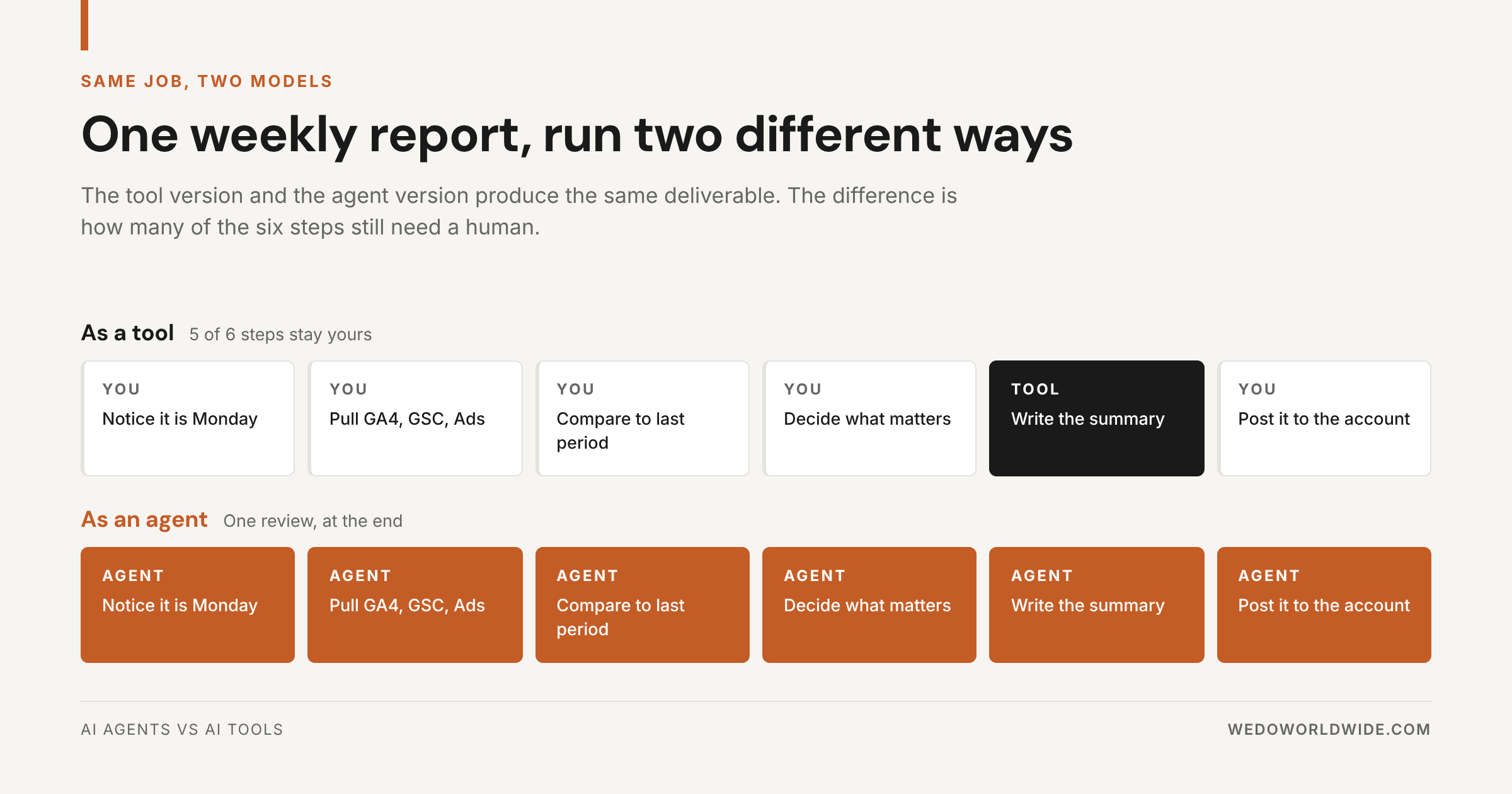
Weekly client reporting shows the difference cleanly, because both versions ship the same deliverable.
Run as a tool, the job has six steps and five of them are yours: remember it's Monday, pull GA4, Search Console, and Ads, compare against the prior period, decide what actually matters, let the tool draft the commentary, then post it. The tool saved you the writing. It did not save you the morning.
Run as an agent, all six steps belong to the agent and one review belongs to you, at the end. Same report, same standards, a fraction of the human time.
Notice what did not change: the quality bar, the format, or the need for a human to sign off. What changed is who does the fetching, the comparing, and the remembering.
05 / ai-agent-vs-chatbot-vs-assistant
AI Agent vs Chatbot vs Assistant
This is where most of the confusion lives, and the distinction is simpler than the market makes it.
A chatbot answers. It waits for your message and responds in the thread.
An assistant performs tasks you ask for. It is reactive by design: it recommends, then waits for permission to act.
An agent works toward a goal. It plans its own steps, decides which tools to call, and acts inside a scope you defined.
The interface is not the tell. Plenty of agents live in a chat window, and plenty of chat windows contain no agent at all. The tell is whether anything happens when you are not looking. If the answer is no, you have an assistant, whatever the vendor calls it.
06 / the-four-question-test
The Four-Question Test
Use these questions to describe the job. They help you compare options; they do not produce a score that proves you need an agent.
- How often does it run? Record the frequency and effort today. Repetition alone does not justify a build.
- Who starts it? Name the person, schedule or event. A predictable trigger and fixed steps may fit an ordinary automation.
- Where do the inputs live? Check whether an existing tool or connector can gather them with appropriate access.
- What happens if a step gets skipped? Name the consequence, how someone will notice and who will recover the work.
Use an existing tool when someone is already doing the task and can check its output. Try its built-in features against a representative example.
Consider a simple integration when the work follows stable rules, such as moving an approved record between systems. Check the existing connector before commissioning custom work.
Consider implementation help when the workflow needs interpretation across systems, careful permissions or exception handling your team cannot maintain. Ask the provider to compare a bounded agent with a simpler approach using the same acceptance test.
07 / before-you-buy-implementation-help
Before You Buy Implementation Help
Write a short brief for one workflow. Ask a provider to show how each item will work:
- Trigger: What starts the job, and how are repeat events handled?
- Data: Which inputs are required, where do they come from and what access is appropriate? Use approved, representative test data.
- Allowed actions: What can the system read, draft or change? Which actions remain outside its scope?
- Human approval: Who reviews which outputs before an action happens? How can they stop or correct it?
- Exceptions: What happens when data is missing, a request fails or the output is uncertain? Who receives the alert?
- Owner: Which person is responsible for checking the workflow after launch?
- Handoff: Where does the result land, and what tells the receiving person it is ready? A generated draft and an accepted business result are different states.
- Maintenance: Who updates instructions and connections, tests changes and handles recovery? What ongoing costs and responsibilities remain?
Agree on examples of an acceptable result and a result that should be held for review. Test the normal path, missing inputs, failures and duplicate triggers before relying on the workflow.
For help scoping that decision, see AI Operations. Bring one workflow and its current obstacles to the conversation.
08 / compare-the-full-cost-of-running-the-workflow
Compare the Full Cost of Running the Workflow
Ask for setup and ongoing costs separately. Include subscriptions, usage, integration work, human review, monitoring and maintenance. A tool can require configuration; an agent still needs oversight after launch.
Use the same representative job to compare options. Record today's effort and errors, then assess what changes in a test. Frequency matters, but so do failure consequences and the work needed to keep the system reliable. There is no universal payback period.
Our build vs buy framework for AI tooling covers that comparison in more detail.
09 / how-we-split-tools-and-agents-at-wedo
How We Split Tools and Agents at WE•DO
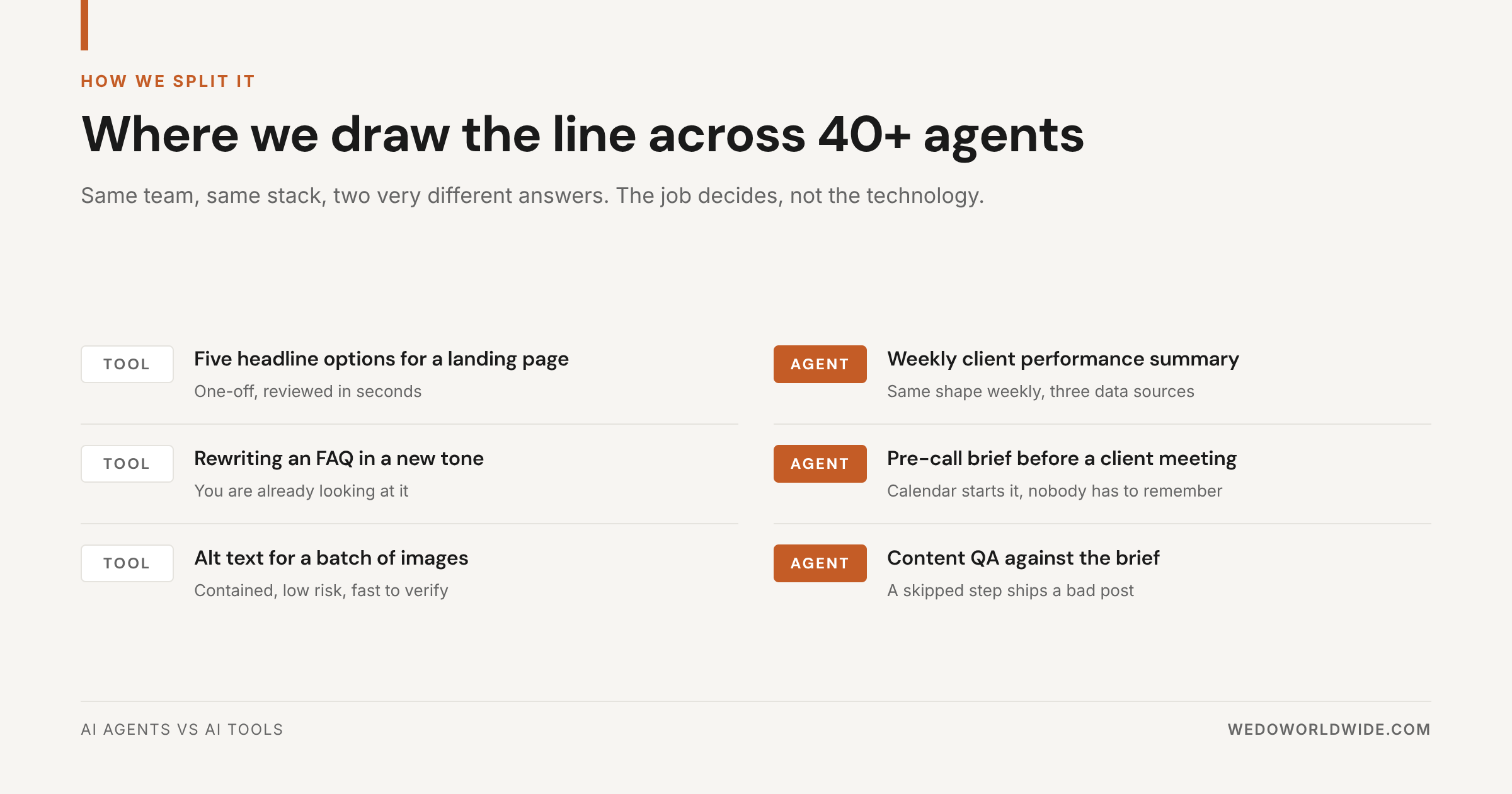
We're not neutral here, and we're not maximalists either. Across the 40+ agents we run, the split lands like this.
Agents own anything recurring, multi-source, and structured: weekly performance summaries, pre-call briefs, content QA against the brief, keyword opportunities routed into tasks, publish checks.
Tools own anything one-off, contained, and reviewed in seconds: headline variations, tone rewrites, batch alt text, quick comparison tables.
The job decides. Not the technology, and definitely not the vendor. That is the whole test for AI agents for business: match the level of autonomy to the shape of the work, and ignore what the category is called this quarter.
Two of those agents matter more than the rest. The reporting workflow gathers inputs for a human review. The content QA agent catches brief misses before they ship, which is a job humans do badly because it's boring. Both are narrow. Neither would work as "an agent that handles marketing."
If you want the full inventory, 40 AI Agents Every Growth Team Should Have lists what we actually run, and Best AI Agents for SEO and Content Teams breaks the content side into the seven roles worth building first.
10 / three-mistakes-we-made-getting-here
Three Mistakes We Made Getting Here
We built agents for work that happened twice. Impressive demos, zero return. Now we count runs per month before anyone writes instructions.
We gave one agent too many jobs. An agent with an "and" in its job description hedges on both halves. Split it.
We shipped without a replay. The fastest way to find out whether an agent works is to run it against last month's real work and diff the output against what a human actually produced. Skip that and you find out in front of a client.
11 / the-takeaway
The Takeaway
Don't turn every workflow into an agent. Don't expect a pile of tools to fix an operations problem either.
Ask how much of the job you want to keep. If the honest answer is "all of it, I just want to move faster," buy a tool. If the answer is "none of it, this should happen without me," build an agent and give it one job.
Everything else is vocabulary.
Want to see where agents actually make sense in your workflow? Start with 40 AI Agents Every Growth Team Should Have to see the ones we run, then AI Operations if you want help designing the right mix of tools, automations, and agents.