Most teams don't need more AI. They need one system that does useful work without a babysitter.
That's the gap between playing with prompts and building an AI marketing agent.
A prompt writes a headline. An agent takes a whole job. Think "prep me for this client meeting" or "pull performance data and flag what changed." It follows instructions, uses tools, pulls context, and hands back something usable.
Your first agent doesn't need to be a moonshot. Starting too broad is the fastest way to fail.
By the end, you'll know:
- When a job needs an agent and when a prompt is enough
- The 5 steps to build your first agent
- What a real meeting prep agent looks like inside
- The 6 mistakes that kill agent performance
It's about a 9-minute read. If you only want the build steps, jump to the 5-step process and stop there.
At WE•DO, we run 40+ agents daily. They cover reporting, SEO, content, WordPress ops, and meeting follow-up. The best ones aren't the flashiest. Each has one job, the right context, and hard testing before it touches real work.
Here's how to build your first one.
AI Marketing Agents
Build One Useful Agent First
Start with one useful job, connect the right context, and improve it through repetition.
01 / what-is-an-ai-marketing-agent-and-what-isnt-it
What is an AI marketing agent (and what isn't it)?
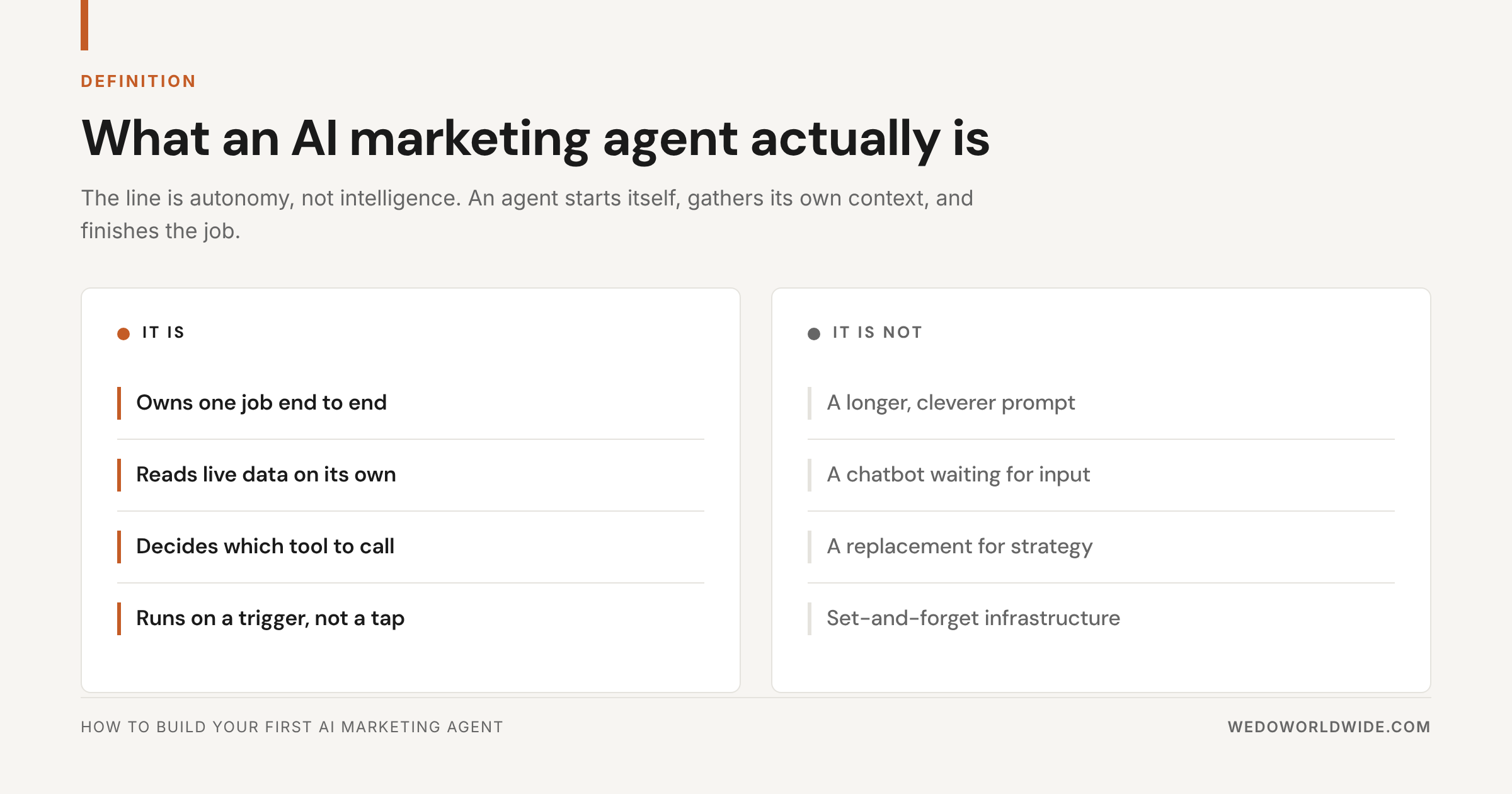
An AI marketing agent is a role-based system with one defined job. ChatGPT with a longer prompt doesn't count.
A real agent has:
- a clearly defined job
- instructions for how to do that job
- access to the context it needs
- tools to take actions or fetch information
- triggers or workflows that tell it when to run
Think of it as a teammate with a process, not a one-off assistant.
It isn't magic, though. A good agent doesn't think like a human. It follows a structure and checks the right sources. It produces consistent output inside one bounded job.
A bad agent is usually one of two things:
- a chatbot wrapped in hype
- an overbuilt automation with no judgment
The sweet spot sits in the middle: an agent that reasons inside a defined lane.
For a marketing team, that lane could be:
- briefing blog posts
- pulling GA4 (Google Analytics 4) and GSC (Google Search Console) trends into a report
- prepping account managers for a client call
- reviewing landing pages for CRO (conversion rate optimization) issues
- turning transcripts into tasks and summaries
That's why agents beat generic prompting for repeat work. They don't stop at writing text. They run inside a repeatable workflow.
02 / when-do-you-need-an-agent-instead-of-a-prompt
When do you need an agent instead of a prompt?
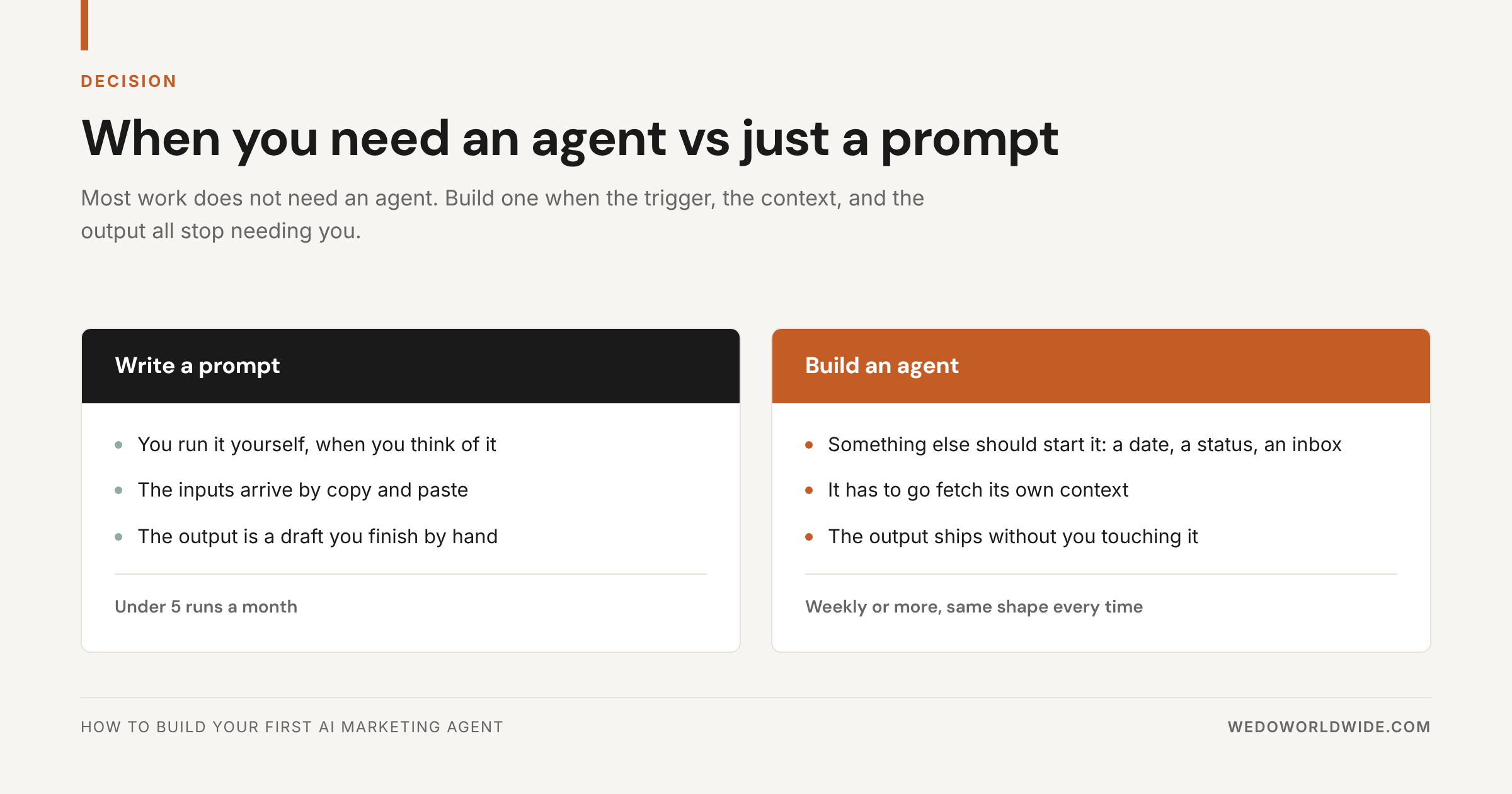
You need an agent when the job repeats or pulls from several sources. Same if it breaks when someone forgets a step. For quick, one-off, low-stakes work, a prompt is enough.
Use a prompt when:
- you need ideas, rewrites, or rough drafts
- the work only happens once in a while
- the output doesn't depend on structured context
- the AI has nothing to do after it writes
Use an agent when:
- the same job happens every week or every day
- the work needs docs, analytics, transcripts, or CRM (customer relationship management) data
- the output must follow a consistent structure
- you want it to run on events or schedules
- a missed step causes problems downstream
Here's a simple test. Are you pasting the same background into AI over and over? You don't need a better prompt. You need an agent.
03 / which-platform-should-you-use-claude-gpt-clickup
Which platform should you use: Claude, GPT, ClickUp, or custom?
Pick based on how much context, control, and tool access you need. No platform is best for everyone.
Claude
Claude is strong at long-context reasoning, careful writing, and following structured instructions. Use it for content workflows, QA, research synthesis, and ops-heavy tasks. It shines when the agent has to read a lot before acting.
GPT
GPT fits teams already deep in OpenAI tooling. It covers a broad ecosystem and makes fast experiments easy. Use it for lightweight assistants, prototypes, and integrations already in that stack.
ClickUp
ClickUp works well when your tasks, docs, and team chat already live there. An agent inside ClickUp uses real workspace context. It can act on tasks and comment right where the work happens.
Custom stacks
Go custom when you need deeper app integrations, database logic, or productized workflows. That could mean API layers, internal tools, or orchestration across several systems. It could also mean webhooks (automatic messages one app sends another when something happens). Or MCP servers (Model Context Protocol, a standard way to plug tools into AI models).
For most marketing teams, the answer isn't "pick one forever." Do this instead:
- choose the model that reasons well
- connect it to your real work system
- add tools only where they remove friction
That's how practical agent stacks get built.
04 / how-do-you-build-your-first-agent-follow-5-steps
How do you build your first agent? Follow 5 steps
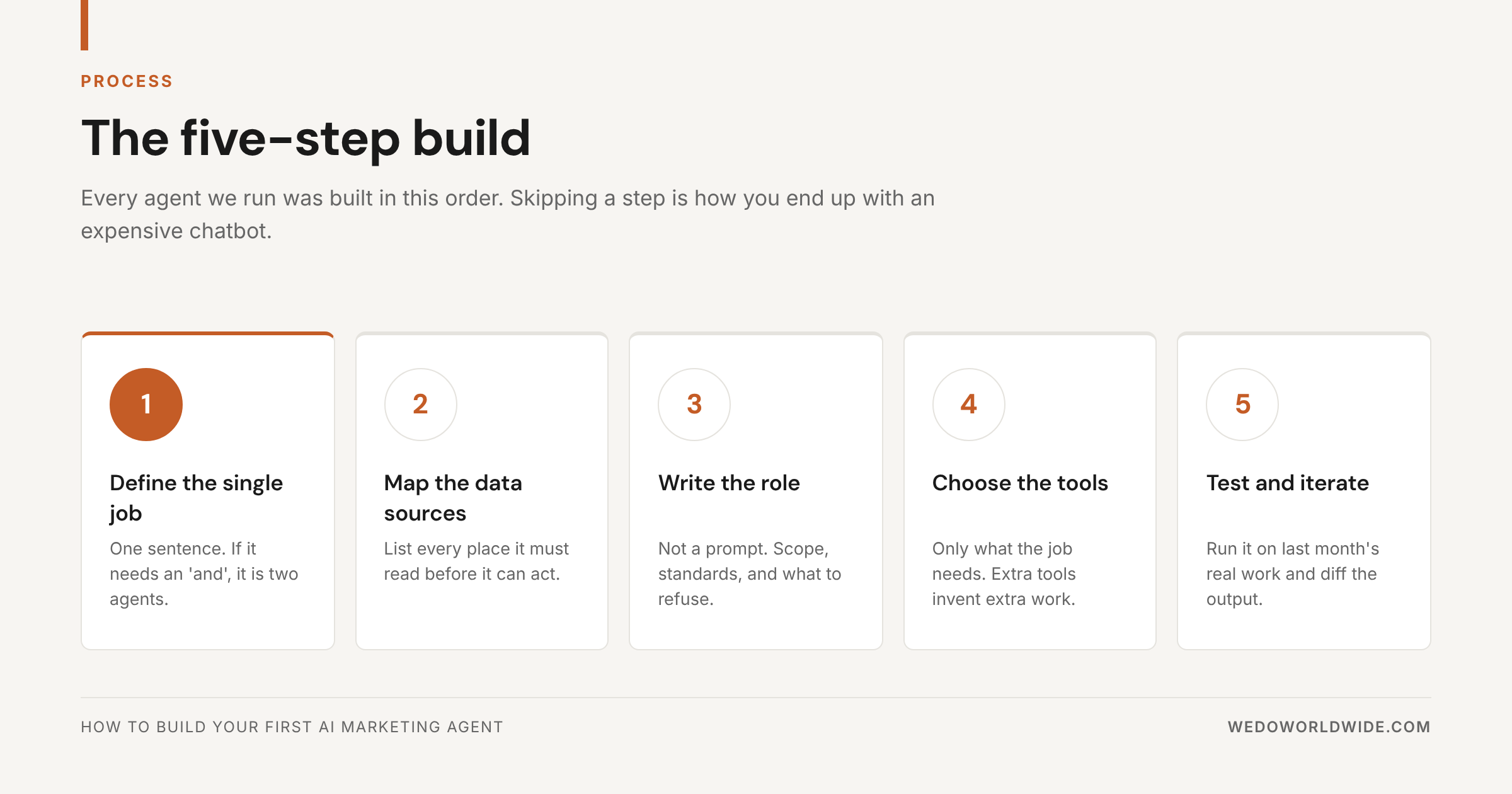
Define the job, map the data, write the instructions, pick the tools, then test. Here's the process we use for a first agent.
Step 1: Define the single job
Start smaller than you want to.
Don't build a marketing agent. Build an agent that does one marketing job well.
Bad first-agent ideas:
- run our content program
- manage SEO
- be our strategist
Good first-agent ideas:
- create a pre-meeting brief from the transcript, CRM notes, and last deliverables
- review a blog draft against the brief and flag missing sections
- pull weekly organic traffic changes and write a client-facing summary
A tight job definition improves everything downstream: instructions, tools, testing, and trust.
A good job definition answers four questions:
- What exact input starts the work?
- What output comes back?
- What decisions can the agent make?
- What's out of bounds?
Can't explain the job in two sentences? It's still too broad.
Step 1
One Job Beats Ten Vague Ones
Narrow scope improves instructions, tools, testing, and trust.
Step 2: Map the data sources
Most agent problems are context problems, not model problems.
To do useful work, the agent needs the right source material. That might include:
- task descriptions
- meeting transcripts
- docs and briefs
- GA4 or GSC data
- CRM notes
- SOPs (standard operating procedures)
- website URLs
- prior deliverables
For your first agent, list the exact sources it should trust.
Then answer three questions:
- Where does that context live?
- How will the agent retrieve it?
- What should it ignore?
The third question matters more than most teams think. Give an agent too much messy context and it gets inconsistent fast.
Don't give it everything. Give it the right inputs at the right moment.
Step 2
Useful Agents Need the Right Inputs
Tasks, docs, analytics, transcripts, and comments matter only when the agent knows which ones to trust.
Step 3: Write instructions, not a prompt
This is where most teams underspec the work.
A prompt tells AI what you want once. Agent instructions define how it works every time.
Strong agent instructions include:
- role and objective
- what success looks like
- trigger conditions
- required context-gathering steps
- tool usage rules
- output format
- escalation or approval rules
- known limitations
For example, don't write this:
Summarize this meeting and tell me what matters.
Write something like this (paste it and swap in your own role):
You are a meeting prep agent for account managers. Before every client call, review the transcript, prior meeting notes, open tasks, and recent deliverables. Produce a concise pre-meeting brief with what changed since last time, open decisions, at-risk items, opportunities to raise, and recommended next questions. If information is missing, state what is missing instead of guessing.
The second version is an operating role. The agent knows what to read and what to produce. It also knows what to do when data is missing.
Step 4: Choose the tools
Tools turn an agent from a writer into an operator.
Depending on your setup, tools let an agent:
- search workspace docs
- read tasks and comments
- query analytics data
- pull meeting transcripts
- post updates into project management tools
- create tasks or docs
- hit APIs (the connectors apps use to talk to each other) or sheets
For a first agent, fewer tools is better.
Give it the minimum toolset that finishes the job end to end.
Say your agent reads a transcript, searches tasks, and writes a summary doc. Don't hand it ten extra systems. Every added tool means more noise, more failure points, and sloppier routing.
A good first build often looks like this:
- one trigger
- two to four context sources
- two to five tools
- one structured output
Step 5: Test and iterate
Your first version isn't done when it runs once. It's done when it runs reliably.
Test with real examples, not idealized ones.
Give the agent:
- a clean case
- a messy case
- a case with missing context
- a case where it should decline or escalate
Then review:
- Did it pull the right sources?
- Did it skip anything important?
- Did it invent details?
- Was the output useful?
- Did it follow the format every time?
Most fixes come from three moves: tighten scope, clarify instructions, and cut context clutter.
Iteration isn't failure. Iteration is the build.
05 / worked-example-how-did-we-build-our-meeting-prep
Worked example: how did we build our meeting prep agent?
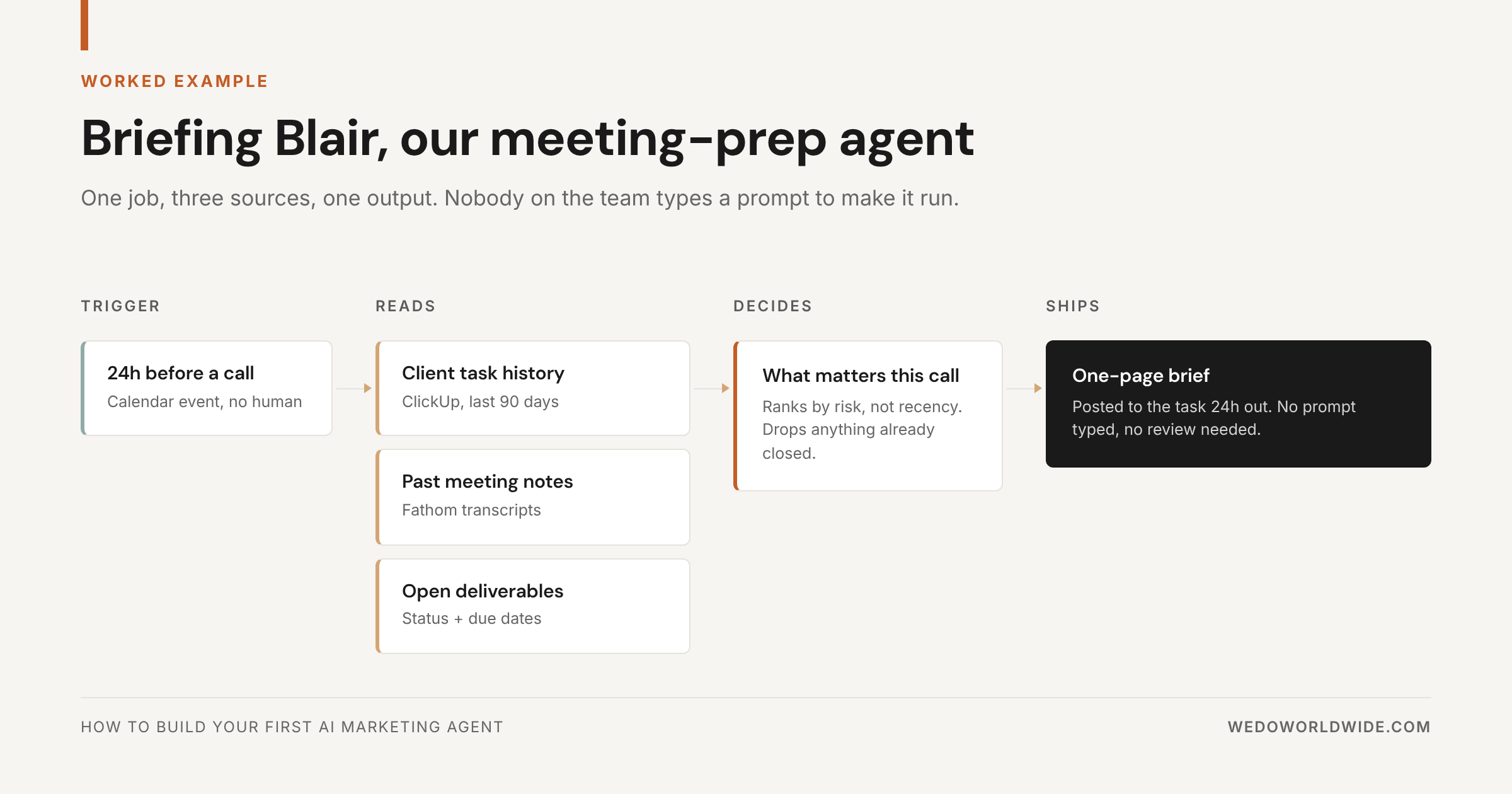
We built it around one narrow job. Meeting prep is one of the clearest first-agent jobs there is.
At WE•DO, the workflow runs through an internal agent called Briefing Blair.
The job wasn't "manage meetings." It was specific: pull the meeting context, turn it into usable notes, and surface the follow-up. The point was to keep the team from losing momentum after the call.
Worked Example
Meeting Prep Agent Workflow
Pull transcript and task context, identify decisions and blockers, then draft a client-ready prep brief.
Here's the basic shape of that build:
Job definition
The agent worked from meeting data. It produced a structured output the team could use right away.
Core context sources
- Fathom (an AI meeting recorder) meeting info and transcripts
- workspace docs and notes
- related client and task context
- the team's meeting expectations and follow-up structure
Tool behavior
Our internal notes show Briefing Blair was set up to pull Fathom meeting info into the workspace. The next layer was automating that retrieval and the follow-up flow.
So the agent doesn't summarize a transcript someone pasted into a chat. It works from the real source material and the work around it.
Output structure
A good meeting agent doesn't hand back a blob of notes. Its output answers:
- what happened?
- what matters now?
- what needs a task?
- what risks or opportunities should the account lead notice before the next call?
One recent output included the meeting title, time, attendees, and client or space. It added an executive summary and clear bullets on what landed in the call. That's the right direction. It turns raw conversation into clear next moves.
Why this works
It's a strong first agent for three reasons. The job repeats constantly. The inputs are easy to find. The output is useful right away.
It also removes a familiar bottleneck. Someone means to clean up notes later and never gets to it.
The same logic applies across marketing. Is the job repetitive, context-heavy, and easy to define? Then it's a great first-agent candidate.
06 / what-mistakes-kill-agent-performance
What mistakes kill agent performance?
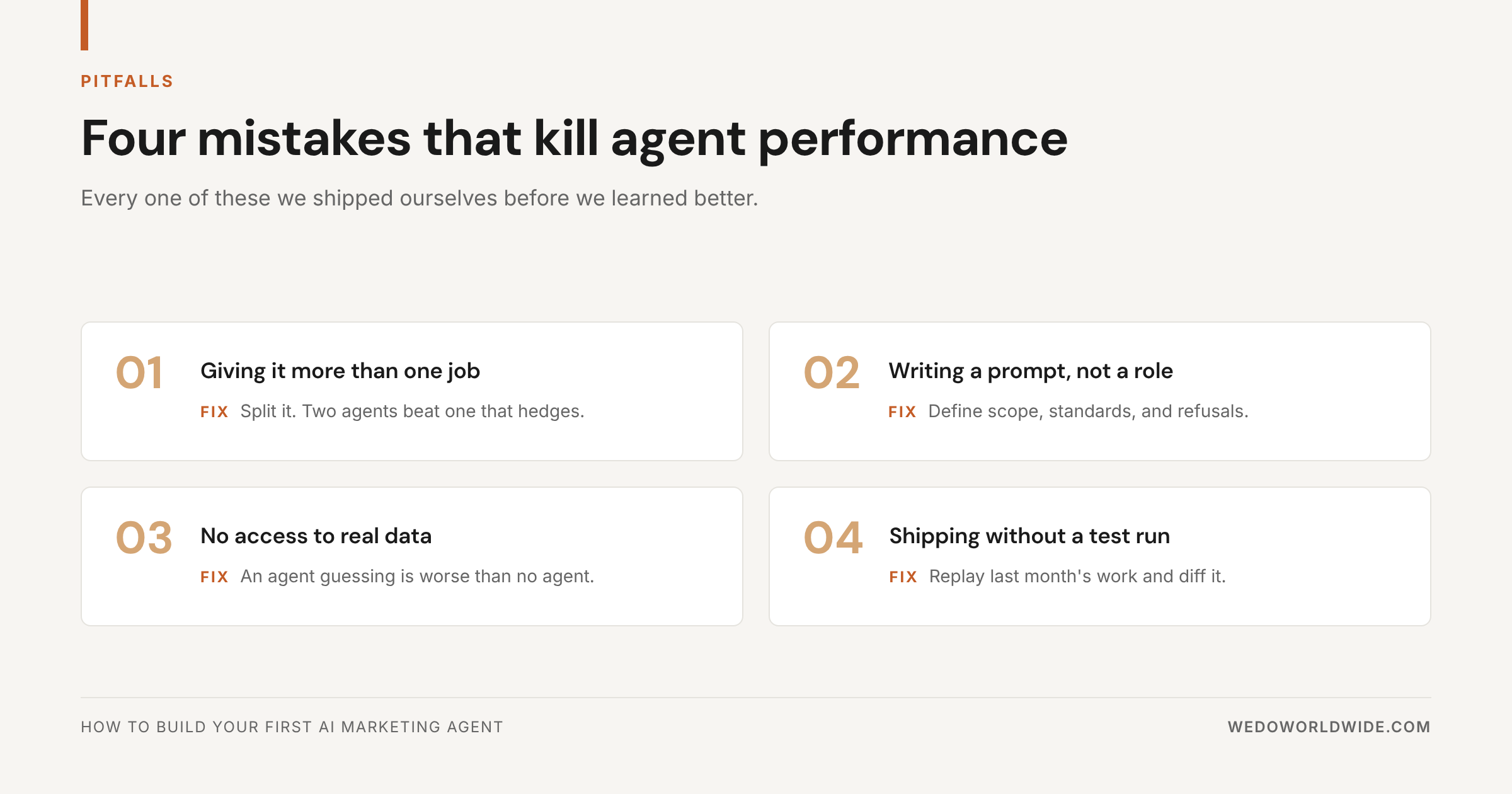
Loose system design kills most first agents, not a weak model. Here's what doesn't work.
1. Trying to make one agent do everything
Part strategist, part writer, part analyst, part PM (project manager), part automator? It'll be mediocre at all of it.
2. Giving it vague instructions
"Help with content" is vague. "Review this draft against the brief and flag missing search-intent coverage" is usable.
3. Connecting too many tools too early
Tool sprawl creates confusion. Start with the fewest tools that finish the job.
4. Feeding it bad or noisy context
An agent is only as useful as the inputs it can trust. Messy docs and duplicate notes produce messy outputs. So does not knowing which system is the source of truth.
5. Expecting zero iteration
Your first version is a prototype, even if it already saves time. Review the outputs. Tighten the role. Improve the workflow.
6. Measuring cleverness instead of usefulness
Skip the futuristic demo. Judge the agent on one thing: does it reliably save time, improve quality, or stop dropped balls?
07 / what-should-you-build-after-your-first-agent
What should you build after your first agent?
Build the next adjacent job. Don't make the first agent more complicated right away.
A smart progression often looks like this:
- meeting prep and follow-up agent
- reporting summary agent
- content brief or QA agent
- SEO diagnostics agent
- publishing or routing agent
That's how real agent systems get built. Skip the giant all-knowing AI. Build a fleet of narrow operators, each handling one job well.
It also keeps trust high. Your team sees the system working where it matters. They don't have to take big promises on faith.
Want to move faster? Start with jobs that already have:
- clear recurring triggers
- repeatable inputs
- structured outputs
- visible time cost when done manually
That's where agent ROI (return on investment) shows up first.
For a broader view of the operator model, see 40 AI Agents Every Growth Team Should Have, How We Use Claude Code, AI Tools for Business Automation, and AI Blog Content Pipeline.
08 / whats-the-checklist-for-your-first-agent
What's the checklist for your first agent?
Start with precision, not ambition. Copy this checklist before you build:
- One job you can explain in two sentences
- One trigger that starts the work
- Two to four context sources, plus a list of what to ignore
- Written instructions: role, success, output format, and escalation rules
- Two to five tools, no more
- One structured output
- Tests on a clean case, a messy case, a missing-context case, and a should-escalate case
That's how you go from "we tried some AI" to "this saves us time and improves the work."
Once you have one good agent, the second one gets much easier.
If you'd rather build your agent fleet with us, schedule a strategy call.