Search ai agents for customer service and count the sellers.
Nine of the ten page-one results sell a support platform, or list companies that do. The tenth is a Reddit thread asking which one to pick.
Part of our guide to AI agents for small business.
None of them tell you what decides whether this works. Below a certain ticket volume, an autonomous support agent isn't a risky investment. It's a bad one.
We run more than forty AI agents at our own agency. Not one answers a customer on its own, because our volume doesn't justify it. You won't hear that from anyone billing per resolution.
By the end, you'll know:
- Which of the five support jobs to automate first
- The ticket volume where a resolving agent starts to pay
- What it costs, including the line item vendors leave off
- A 14-day plan for building a triage agent
It's about a 9-minute read. Under 100 tickets a month? You can stop after the volume section.
01 / what-does-an-ai-customer-service-agent-do
What Does an AI Customer Service Agent Do?
It picks up a ticket, pulls context, and takes an action. Then it either stops for a human or finishes the job itself.
It doesn't wait for you to prompt it. A new ticket is the trigger. The context is the order record, past conversations, and your help docs.
That fork (stop for a human, or finish the job) is the only distinction that matters commercially. Does the agent resolve, or does it prepare?
- A resolving agent closes the conversation without a person. Priced per resolution.
- A preparing agent classifies, routes, looks things up, and drafts. A person hits send. Priced per seat or per workflow run.
Vendors lead with the resolving agent. That's the one with usage-based pricing attached (you pay per result, not a flat monthly fee). Most small businesses need the preparing agent. The category language hides the difference. Unpack it and customer service is five separate jobs.
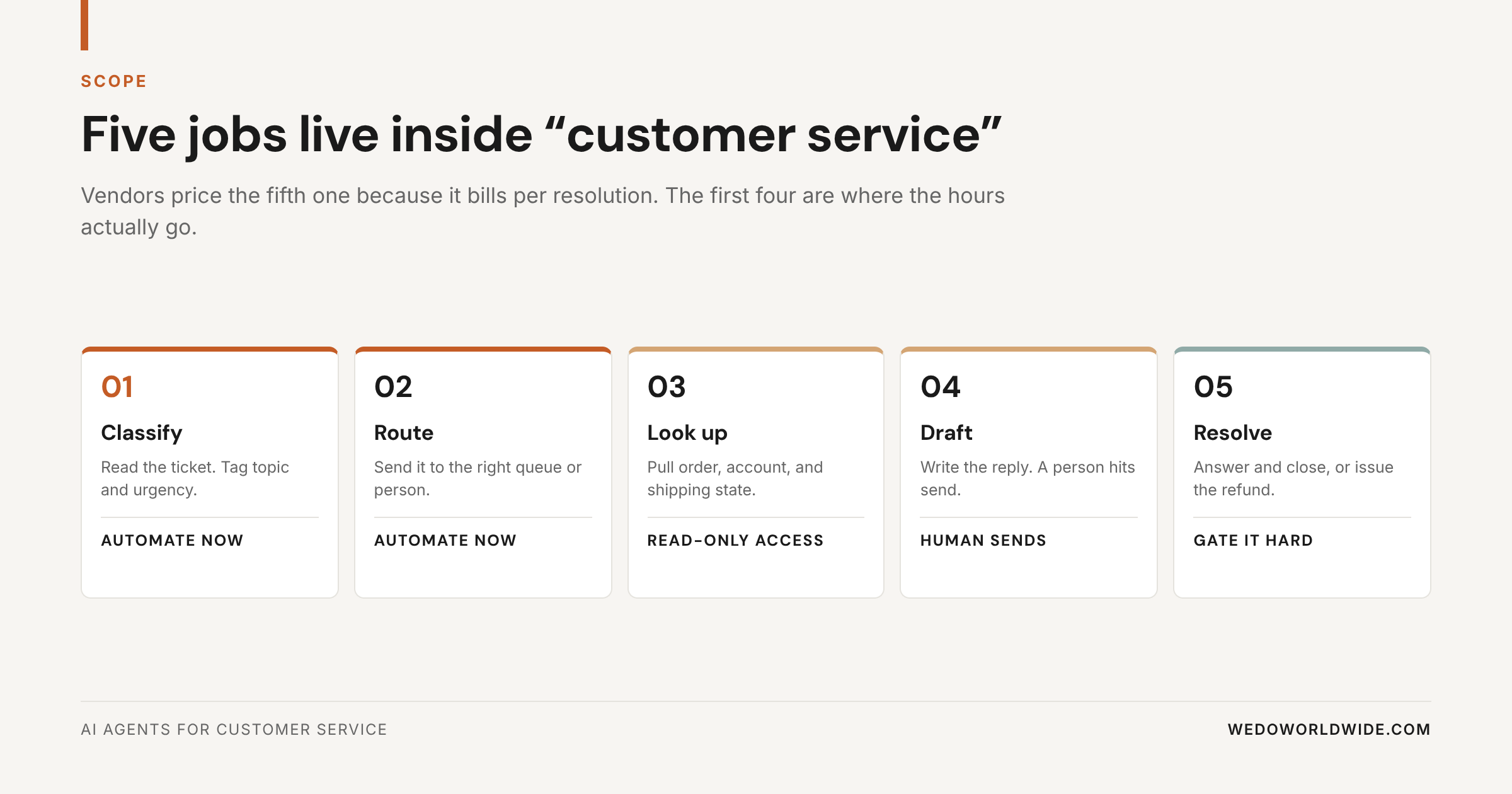
Jobs one through four are boring. They're also where nearly all the time goes. A support person spends more of the day sorting than writing: deciding who owns a ticket, hunting for an order number.
One more line to draw: a chatbot isn't an agent. A chatbot answers from a script or a search index, then stops. An agent holds context between steps, uses tools, and can change something in another system. Can your tool look up an order or update a ticket field? If not, you're buying a search box with a friendly voice. We drew that line more carefully in AI tools for business automation.
| Job | What it needs to work | Risk if it is wrong |
|---|---|---|
| Classify | Your own topic list, from real tickets | A ticket gets the wrong tag |
| Route | Clear queue ownership | A ticket waits in the wrong queue |
| Look up | Read access to orders and accounts | Stale information in a draft |
| Draft | Voice guidance and past replies | A person edits the draft |
| Resolve | Current documentation and a hard escalation path | A customer gets a wrong answer in writing |
Look at the bottom row. Four of the five jobs fail privately. Only the fifth fails in front of a customer.
02 / when-does-a-resolving-agent-earn-its-cost
When Does a Resolving Agent Earn Its Cost?
At about 500 support tickets a month, if those tickets repeat. Our second line sits at 100.
Those numbers are ours, drawn from client work. They're not an industry standard. So here's the arithmetic behind them. Move the line for your own business instead of taking our word for it.
Pull your last 90 days of tickets. Not your busiest week. Not the month you had a shipping problem. Ninety days, divided by three.
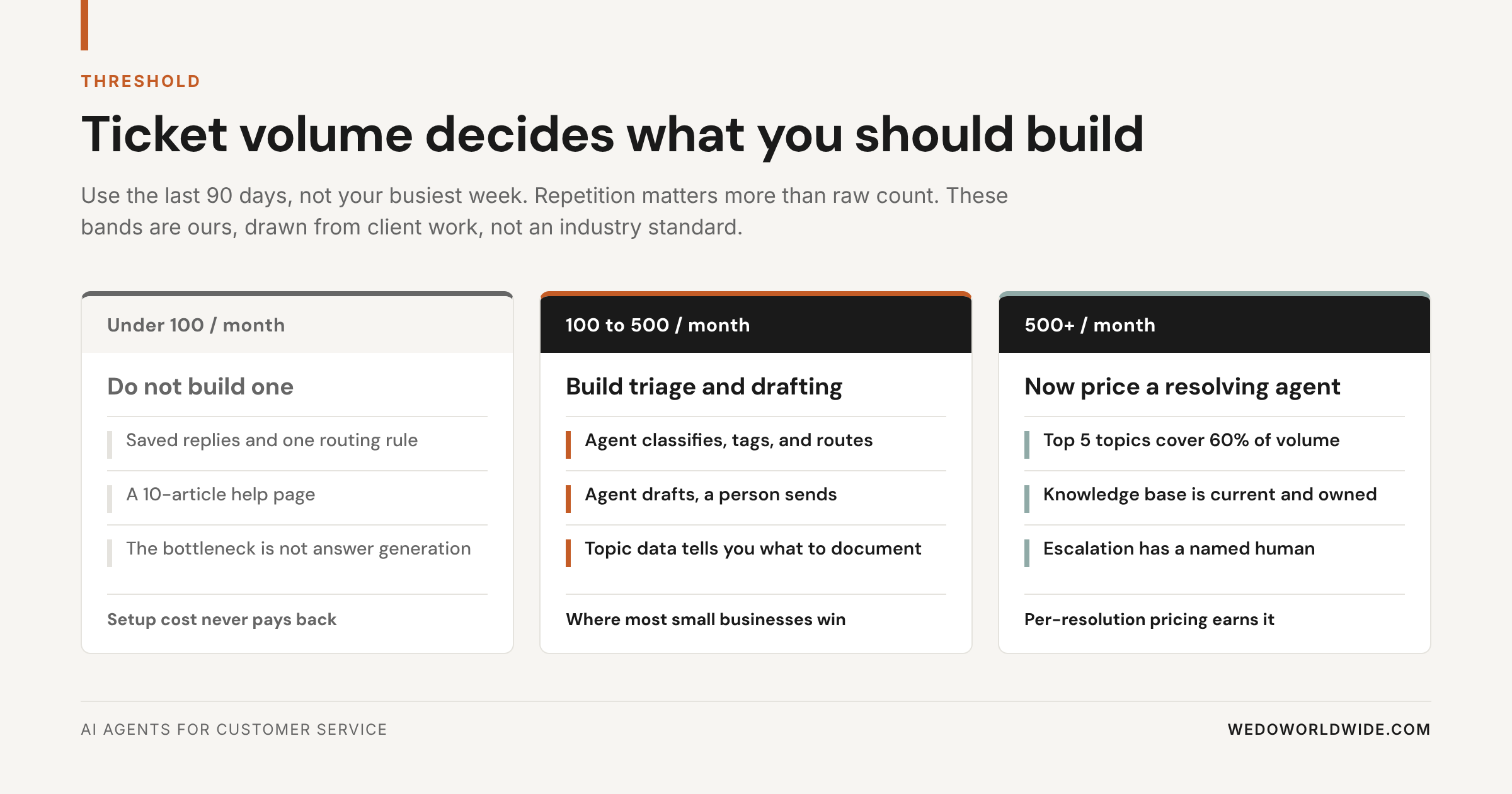
Under 100 tickets a month
Don't build a resolving agent. Saved replies, ten good help articles, and one routing rule will beat it. Every measure, response time included. At this volume, writing answers isn't your bottleneck. The bottleneck is that nobody owns the inbox before noon.
100 to 500 tickets a month
Build triage (sorting and routing tickets) and drafting. The agent classifies, tags, routes, and writes a first draft. A person reads it and sends. Most small businesses live here. The returns are real, and you can undo them.
500 or more tickets a month
Now a resolving agent can earn its keep. Two conditions: your top five ticket topics cover most of your volume, and someone owns the knowledge base by name.
The threshold is about repetition, not raw count. Take 400 tickets a month where 300 are the same six questions. That's an excellent candidate. Now take 400 tickets that are all custom quotes. You'd automate the easy five percent and pay per resolution for the privilege.
Your threshold moves with two things: what an hour of support time costs you, and how repetitive your tickets are. Field the same six questions all day and you cross the line early. When every ticket is different, you cross it much later.
Run the test before you run a demo
Tag your last 200 tickets by topic
If your top five topics cover 60% or more of them, you have a resolution candidate. Under 40%, build triage and stop there.
03 / run-the-repetition-test-before-you-take-a-demo
Run the Repetition Test Before You Take a Demo
It takes about 20 minutes. It'll tell you more than any vendor calculator.
- Export your last 200 tickets to a spreadsheet. Subject line and first message is enough.
- Add one column called topic and one called urgency. Use no more than eight topics. If you need a ninth, your categories are too narrow.
- Tag every row. Do it yourself, or have the person who answers the most tickets do it.
- Count the share of volume in your top five topics.
Have 60% or more of your volume in five topics? That's a documentation problem hiding as a staffing problem. A resolving agent will help once the documentation exists. At 30%, your work is varied. The win is speed and routing, not deflection (tickets closed without a person).
This exercise gives you one more thing free. The tagged spreadsheet is the spec for the agent. Any implementation partner who doesn't ask for it will build you a generic bot.
04 / what-does-it-cost
What Does It Cost?
A triage agent you build runs roughly $40 to $100 a month. Resolving agents bill $0.75 to $0.99 per resolution, often on top of seats.
Here's list pricing from Intercom's pricing page and Help Scout's pricing page as of September 2026.
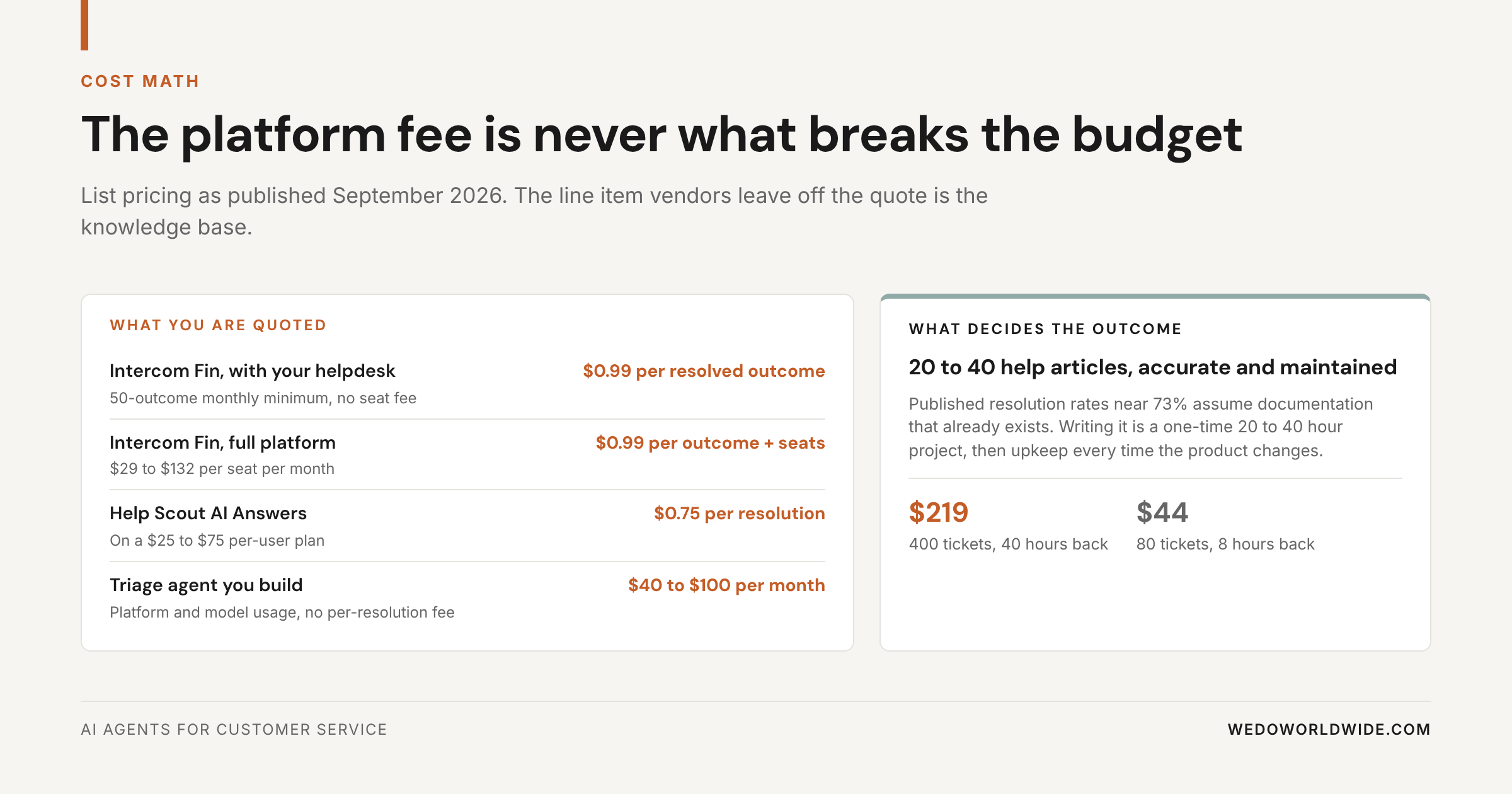
| Option | Price | What the price hides |
|---|---|---|
| Intercom Fin, on your existing helpdesk | $0.99 per resolved outcome | 50-outcome monthly minimum. No seat fee. |
| Intercom Fin, full platform | $0.99 per outcome plus seats | Seats run $29 to $132 per month. Agent-side Copilot is another $29 per agent. |
| Help Scout AI Answers | $0.75 per resolution | Requires a paid plan at $25 to $75 per user per month. |
| A triage agent you build | Roughly $40 to $100 per month | Platform and model usage. The build time is yours. |
Now the arithmetic nobody runs on the sales call. Help Scout publishes an average resolution rate of 73%. At 400 tickets a month, that's 292 resolutions, or about $219. Set that against roughly 40 hours of human handling at six minutes a ticket. The trade is obvious.
At 80 tickets a month, the same math gives you 58 resolutions for about $44. It returns about eight hours. Still positive on paper.
Then the invisible line item shows up. Nobody hits a 73% resolution rate without 20 to 40 help articles that are accurate today. Writing those takes 20 to 40 hours up front. Then you update them every time your product, pricing, or policy changes. At eight hours saved a month, that never pays back.
The real line item
The platform fee is never what makes or breaks a support agent
The knowledge base is.
There's a third bucket nobody quotes: integration time. Connecting a support agent to a helpdesk is usually simple. Connecting it to the system that holds your order and account state is where the days go. Especially if that system is a spreadsheet, a legacy database, or one person's memory.
Ask any vendor these four questions before you sign:
- What counts as a resolution? Am I billed when the customer escalates to a person?
- What's the minimum monthly commitment, and can I cap spend?
- What resolution rate do your customers hit at my volume and documentation level? Not your best case.
- What happens to the agent when I change a policy? Who updates what, and how fast?
The second question matters more than it sounds. Usage-based billing with no cap turns a bad week into a surprise invoice. Both vendors above let you set limits. Ask anyway.
It's the same pattern we walk through in AI automation for small business: the cost that decides the outcome is almost never the subscription.
05 / build-the-triage-agent-first
Build the Triage Agent First
A triage agent is unglamorous. It's what we'd build for nearly every business searching this term.
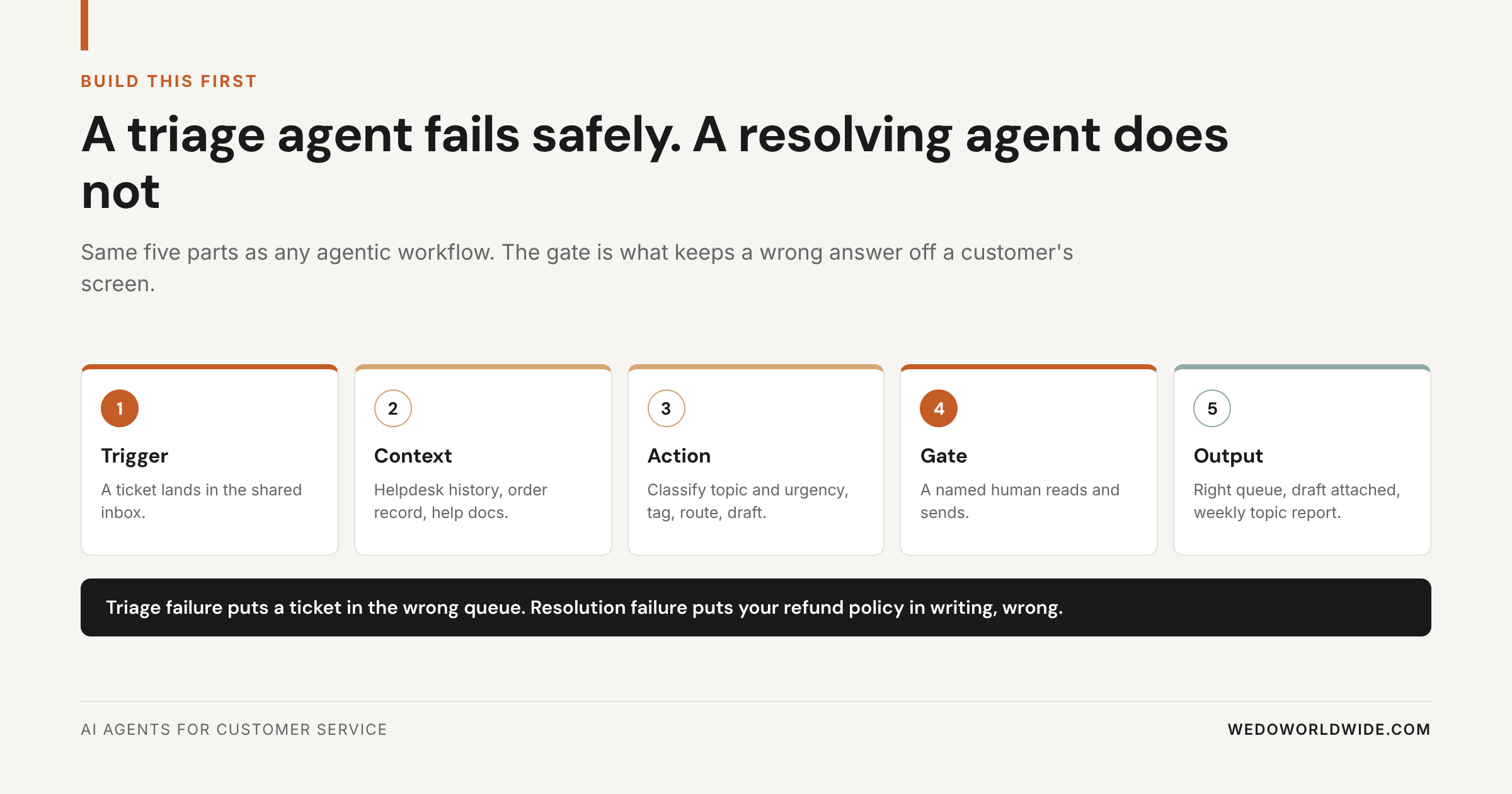
Three things it gives you that a resolving bot does not:
- First-response time drops without risk. The customer gets a routed, drafted, human-approved reply faster. No one gets a confidently wrong answer.
- The topic tagging becomes your documentation roadmap. After 60 days you know exactly which ten articles to write. The agent counted them for you.
- It's reversible. Turn it off and you're back to a normal inbox. Nothing customer-facing was ever automated.
That third point is the one to weigh. A triage agent that fails puts a ticket in the wrong queue for an hour. A resolving agent that fails puts your refund policy in writing, wrong, in front of a customer. Then it bills you $0.99 for it.
Decide what it may never touch before you turn it on. Our list is short, and it hasn't changed in a year:
- Anything involving money leaving the business
- Anything a customer has already escalated once
- Anything with legal, medical, or safety language in it
- Anything from an account above a revenue line you set
Those four rules cost you almost no automation coverage. They remove nearly every scenario that ends in an apology.
06 / how-do-you-build-it-in-14-days
How Do You Build It in 14 Days?
In four phases: tag, connect, shadow, switch on.
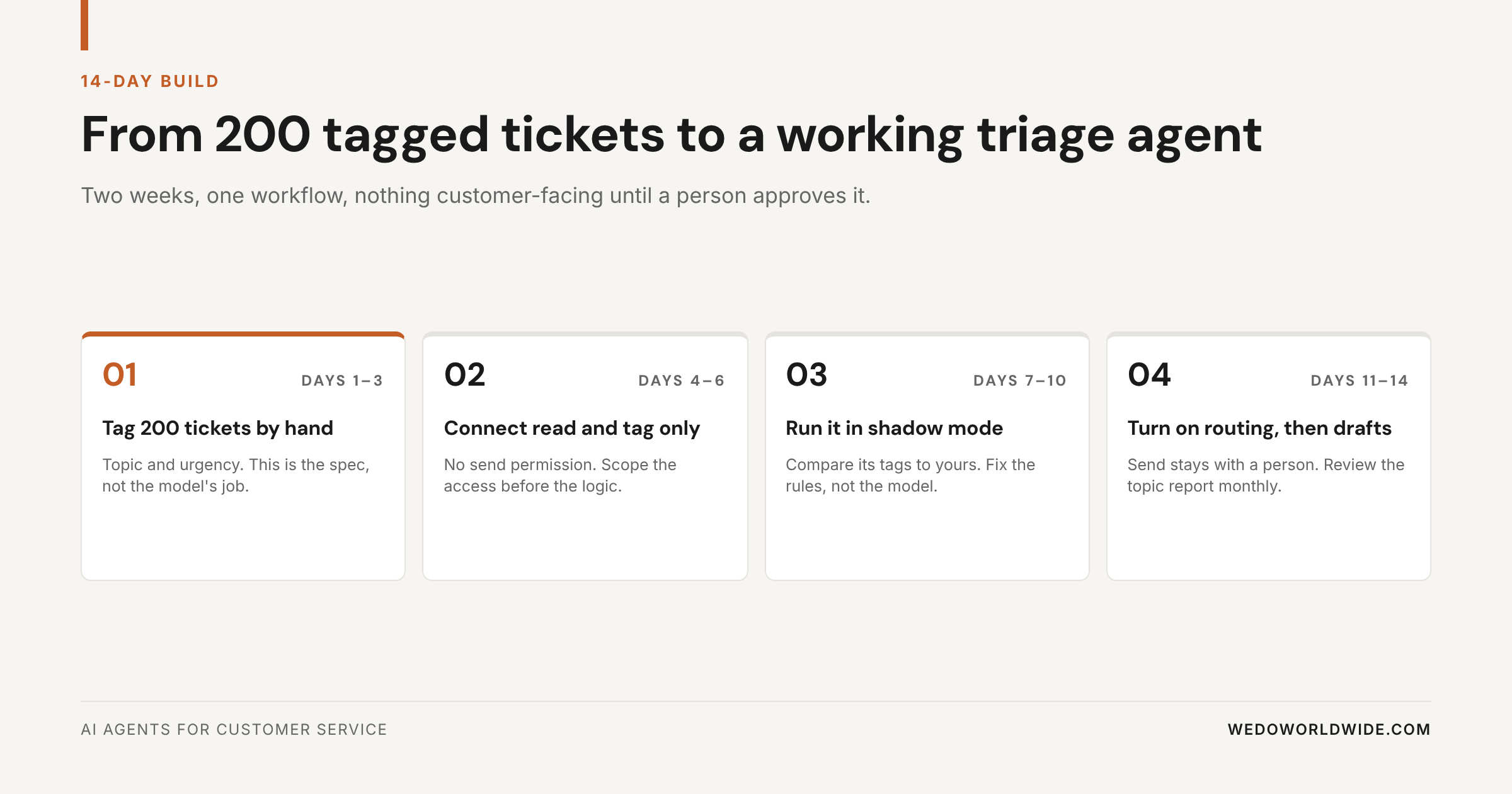
- Days 1 to 3. Export 200 tickets and tag them by topic and urgency by hand. It's tedious, and it's the spec. An agent can't classify against categories you haven't defined.
- Days 4 to 6. Connect the agent to your helpdesk with read, tag, and assign permission only. No send. Scope the access before you write any logic.
- Days 7 to 10. Run it in shadow mode (it works on live tickets, but nothing it does goes live). Compare its tags against yours. When it gets one wrong, fix the rules and examples, not the model.
- Days 11 to 14. Turn on tagging and routing. Add drafting last, and leave send with a person.
Then review the topic report monthly. Watch for a topic that clears 15% of your volume and has one stable, correct answer. That's your first candidate for autonomous resolution. One topic. Not the whole inbox.
We use the same build sequence for our own internal agents. It's described in how we run agency operations on AI.
07 / what-should-you-measure-after-30-days
What Should You Measure After 30 Days?
Four numbers, and you need all four. Any one alone can be gamed.
| Metric | What good looks like | Why it is here |
|---|---|---|
| First response time | Down, week over week | The reason you built triage in the first place |
| Routing accuracy | Above 90% agreement with your tags | If the agent cannot classify, nothing downstream is safe |
| Draft acceptance rate | Above 60% sent with light edits | Below that, the drafts are costing time, not saving it |
| CSAT (customer satisfaction score) on agent-touched tickets | Flat or up against your baseline | Deflection with falling satisfaction is churn on a delay |
Set the baseline before you launch. Thirty days of before-numbers is the cheapest part of this project. It's also the part teams skip most.
08 / where-does-this-go-wrong
Where Does This Go Wrong?
In four predictable places.
- No escalation owner. "The team will catch it" isn't ownership. Name the person, and the condition that sends a ticket to them.
- Automating the exception. Teams automate the weird 10% because it's annoying. Then they wonder why nothing got cheaper. Automate the boring 60%.
- A stale knowledge base. A resolving agent pointed at eight-month-old docs is a liability with usage-based billing attached.
- Measuring deflection only. Deflection up and CSAT down isn't a win. That's a customer leaving quietly.
IBM makes the same point about escalation paths in its overview of AI agents in customer service. It's the step most implementations skip.
09 / what-should-you-do-monday
What Should You Do Monday?
Start with the spreadsheet.
- Export your last 200 tickets and tag them by topic.
- Calculate what share of volume your top five topics cover.
- Under 40%, build triage and drafting. Over 60% and above 500 tickets a month, price a resolving agent.
- Either way, name the human who owns escalation before you turn anything on.
Want a broader map of where agents fit outside support? Start with 40 AI agents every growth team should have, then the AI enablement guide for the rollout side.
Next step
We will run the ticket audit for you
Tagging 200 tickets and pricing the build is week one of an AI workflow audit. You get the topic concentration, the volume band you are actually in, and a build recommendation with numbers attached.