When I talk with owners about AI, the first question is almost always the same: "Where do I even start?" It's a fair question. There's a new tool every week, everybody online has an opinion, and most of the advice is written for tech companies with a whole team to throw at it. If you run a shop, a crew or a small firm, you don't have time to test fifty apps. You need to know where AI will actually pay off in your business.
The easiest way in is to start with your business, and pick the tool later.
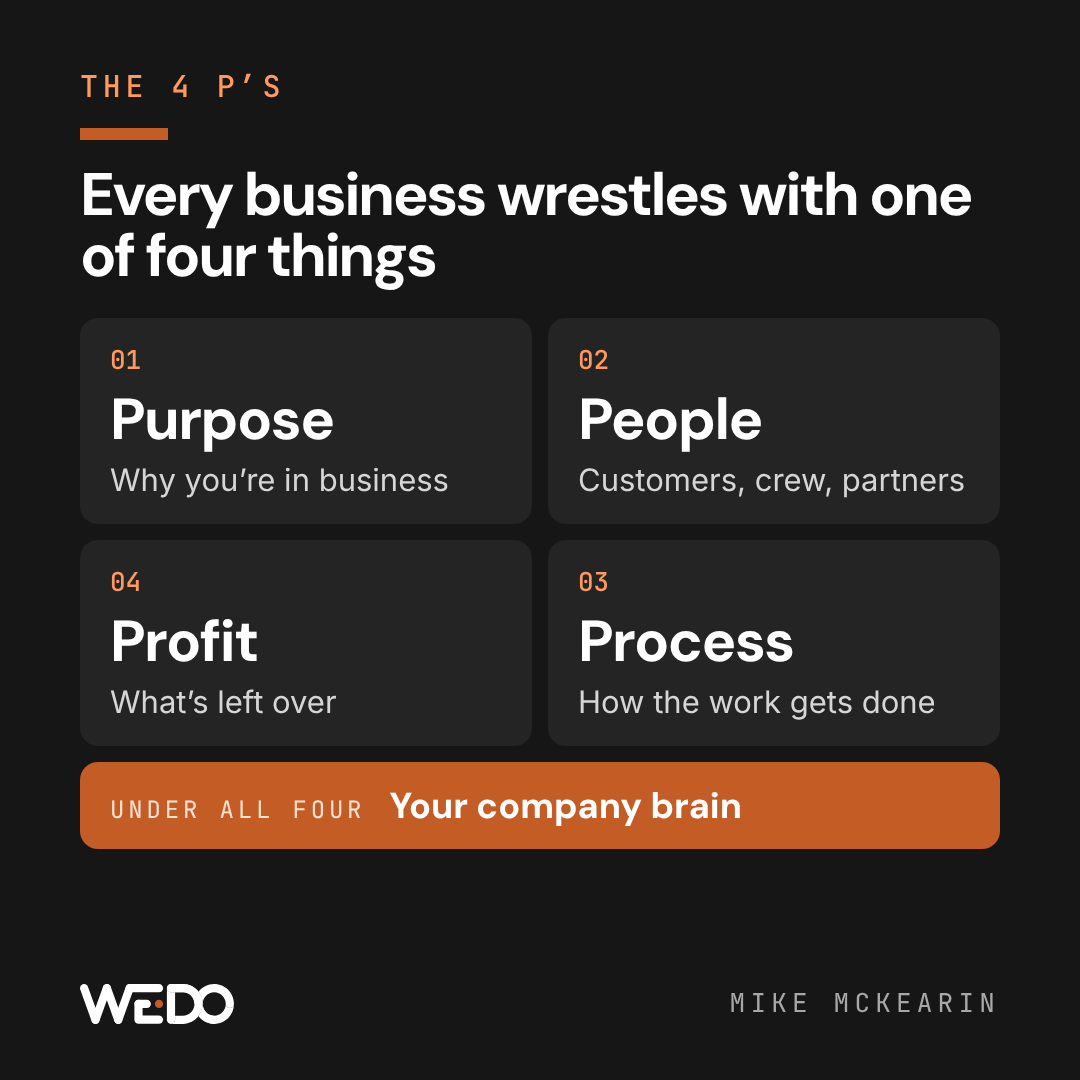
Here's what I've noticed after years of working with small businesses. Every one of them is wrestling with at least one of these four things:
- Purpose. Why you're in business, who you're for, and where you're headed.
- People. Your customers, your crew, and your partners.
- Process. How the work actually gets done, day to day.
- Profit. What's left at the end of the month, and where it's leaking out.
I call them the 4 P's. Picture a simple four-square grid, one P in each box. The good news is that AI can help in every square. The trick is knowing which square you're stuck in.
01 / the-four-squares-feed-each-other
The four squares feed each other
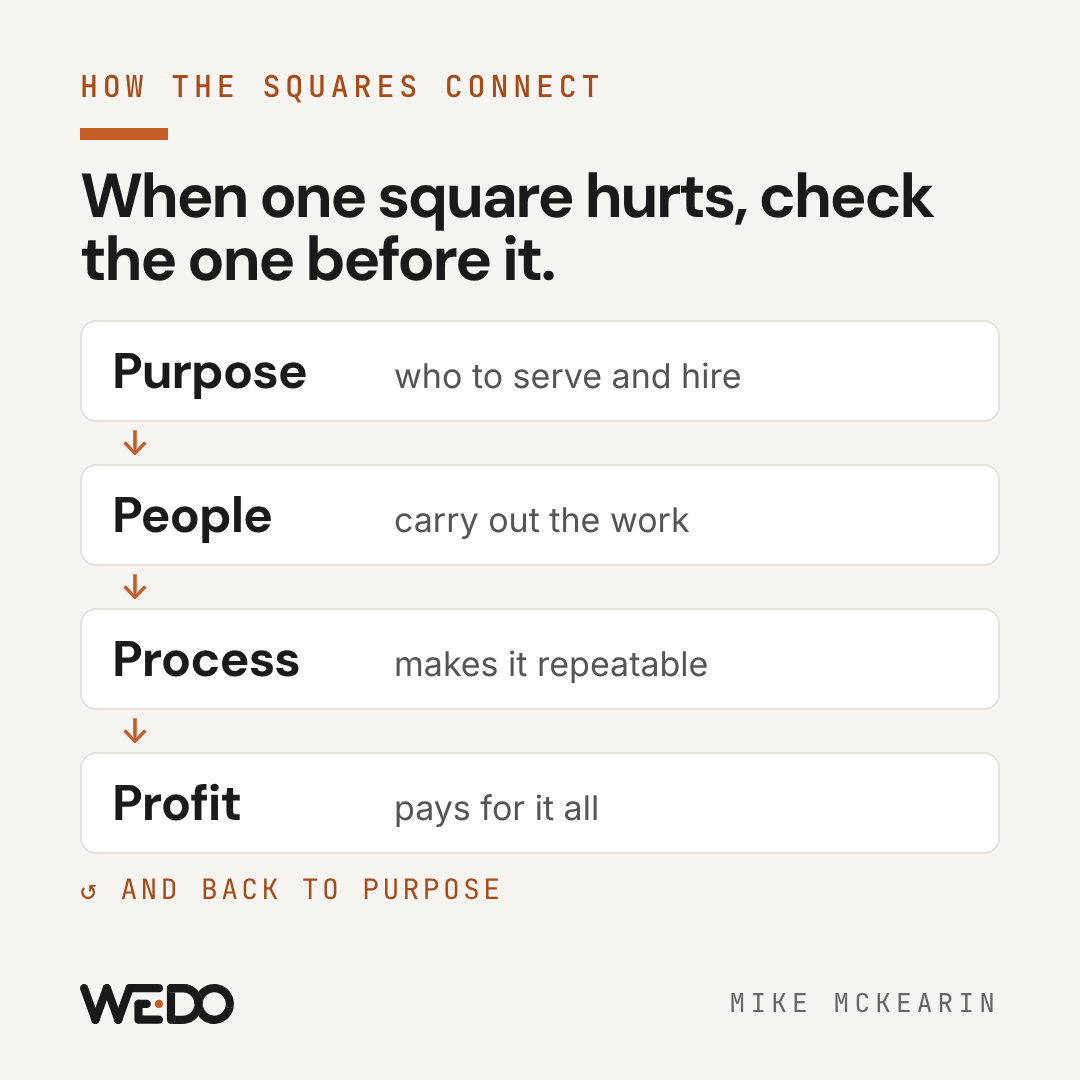
The 4 P's aren't four separate problems. They run in a loop:
- Purpose tells you who to serve and who to hire.
- People carry out the work.
- Process turns that work into something repeatable.
- Profit pays for all of it, and funds what you want to do next.
That loop is the most useful part of the whole idea, because it tells you where to look when something hurts. Thin margins? That's a profit problem on the surface, but a lot of the time it's really a process problem: jobs that run over, quotes that go out late, work that gets done twice. A messy process is often a people problem: nobody owns it, or nobody was ever shown how. And a people problem (the wrong customers, or hires who don't stick) often goes back to purpose: you never decided who you're for.
When one square hurts, check the square before it. That's usually where the problem started.
02 / first-a-quick-word-on-the-company-brain
First, a quick word on the "company brain"
AI can only help as much as it knows about you. Ask a chatbot to write a customer email and it'll sound like a stranger, because it is a stranger. It doesn't know your prices, your policies or how you talk.
A company brain fixes that. It's one shared folder where the way your business runs is written down: what you sell and what it costs, how you sound, how the main jobs get done, and the decisions you've made. Your crew reads it, and your AI tool reads it too. At WE•DO, every person and every AI tool on the team reads the same "Start Here" page before they do any work. It's the floor under all four squares, so start there if you haven't.
Now, the squares.
03 / 1-purpose-ai-as-your-thinking-partner
1. Purpose: AI as your thinking partner
You might be stuck here if:
- You'd struggle to explain in two sentences why your business exists and who it's for
- You say yes to almost everything, then wonder why you're stretched thin
- Your plan for next year lives only in your head
This is the square most people never think to use AI for, and it's one of my favorites. Think of AI as a brainstorming buddy who never gets tired of your questions and has no ego in the answer. It's a great sounding board at 10pm when there's nobody else to talk to about the business.
Here's what it's good at:
- Getting the "why" out of your head. Have it interview you, one question at a time, about why you started, what you're proud of and what you'd never do. Then have it write up what you said in plain words.
- Arguing with you. Ask it to poke holes in a plan. A good trick is a "pre-mortem": tell it to imagine it's a year from now and the plan failed, then ask it to explain why. You'll hear the risks you've been avoiding.
- Helping you say no. Give it your purpose and a list of opportunities on your plate, and ask which ones fit and which ones pull you off course.
- Turning it into one page. Once it's clear, have AI write it up as a one-page summary your team can read. Put that page in your company brain.
Try this:
Interview me one question at a time about why I started this business,
who we do our best work for, and what we'd never do. After 10 questions,
write a one-page summary in plain words. Then tell me the two places
where my answers don't line up.
Watch out: AI tends to agree with you. If it's just cheering you on, tell it to push back harder. The decisions are still yours.
04 / 2-people-customers-crew-and-partners
2. People: customers, crew and partners
You might be stuck here if:
- You can't describe your best kind of customer, so your marketing talks to everybody
- Hiring feels like a coin flip
- One-on-ones with your team keep getting skipped, or they're just status updates
"People" covers three groups, and AI helps with all three.
Customers. Start with your ICP, or ideal customer profile. That's a description of the customer you'd clone if you could. Give AI a list of your customers (names removed) with what each one spent and what kind of work it was, and ask what your best ones have in common. We did exactly this at WE•DO recently: we pulled a couple of years of invoices and had AI sort our customers into groups. Four clear groups came out of it, and it changed who we go after. From there, AI can help you:
- Write LinkedIn posts and outreach messages that talk to that one kind of customer
- Find the right groups, associations and events where those people already gather
- Read your reviews and survey answers and tell you what people love and what they complain about
- Draft a friendly note to past customers you haven't heard from in a while
Crew. AI is a big help with the paperwork side of managing people:
- Job posts that describe the real job (not a list of buzzwords)
- Interview questions tied to what the job actually needs
- Prep for one-on-ones: paste in your notes from last time and ask what to follow up on
- Training: once your jobs are written down in the company brain, a new hire can ask AI "how do we handle a return?" instead of interrupting you
Partners. Vendors, referral partners and the folks you team up with. AI can prep you for a tough vendor call, draft a referral partner pitch, or summarize a contract into plain English before you read it closely.
Try this:
Here's a list of our customers from the last two years with names removed:
what they bought, what they spent, and how long they've been with us.
Group them into 3 to 5 kinds of customers. For each group, tell me what
they have in common, how much they're worth to us, and where else I might
find more people just like them.
Watch out: let AI help you write and prepare, but keep people decisions with people. Don't let it screen job candidates on its own (it can carry bias, and hiring has legal rules), and keep personal details about customers and employees out of free AI accounts.
05 / 3-process-workflows-sops-and-the-daily-grind
3. Process: workflows, SOPs and the daily grind
You might be stuck here if:
- Everything runs through you, and the phone rings when you're on vacation
- The same mistakes keep happening
- Nobody could do your job for a week if you got sick
This is where most people expect AI to help, and it can. An SOP, or standard operating procedure, is just the written steps for a job, like you'd teach a new hire. Most small businesses don't have them because writing them down takes forever. AI makes that the easy part.
Here's how to start:
- Write one job down. Pick the question you get asked the most. Have AI interview you about it and write the steps up for you.
- Find where your time goes. Paste in a week of your calendar or to-do list and ask AI what's eating your hours and what could be handed off.
- Hand off one chore. Pick something that's frequent, boring and safe to get wrong. Every handoff has four parts: what kicks it off, what AI does, what you check, and how it finishes. Customer email replies, weekly inventory checks and turning one blog post into a week of social posts are all good first picks.
- Run it by hand first. Do the chore with AI's help, yourself, for a couple of weeks before you set it to run on its own.
Try this:
Interview me one question at a time about how we [name the job]. Ask what
starts it, what "done" looks like, the steps in between, and when someone
should stop and ask me. Then write it up as simple steps a new hire could
follow.
Watch out: don't automate a mess. If a process is broken when people do it, AI will just do the broken version faster.
06 / 4-profit-reporting-unit-economics-and-leaks
4. Profit: reporting, unit economics and leaks
You might be stuck here if:
- You find out how last month went when your bookkeeper tells you, weeks later
- You're busy all the time, but the bank account doesn't show it
- You haven't raised prices in a couple of years
Most owners I know don't love the numbers part, so this is where AI can feel like a relief. You don't need fancy software to start. An export from QuickBooks (or whatever you use) is plenty.
- Reports in plain English. Export your profit and loss for the last few months, then ask AI what changed and why it matters. It'll turn a page of numbers into three sentences you can actually use.
- Unit economics. That's a fancy term for a simple question: what do you really make on one sale, one job or one customer, after the costs tied to it? AI can help you work it out by product or by type of customer. A lot of owners find out one of their busiest lines barely makes money.
- The leak hunt. Give AI a few months of expenses and ask it to flag software you're paying for and not using, costs that crept up, and discounts that got out of hand. Then look at your unpaid invoices and have it draft polite reminders.
- Pricing. Ask AI to model what happens if you raise prices 5 or 10 percent and lose a few customers. The math usually surprises people.
- Cash. Have it help you build a simple 13-week cash forecast, which just means a list of what's coming in and going out each week for the next three months, so you see a tight spot before you're in it.
The profit square isn't only about cutting. Going back to past customers is often the cheapest revenue you'll ever find. We built a win-back list for WE•DO from our own invoice history this week: every past client we haven't worked with in a while, with an idea for each one.
Try this:
Here are our expenses for the last 3 months (exported from our books).
Flag anything that looks like a subscription we may not use, anything that
went up more than 10%, and anything that looks like a duplicate charge.
Put it in a table with the amount, how often it bills, and a question I
should ask about each one.
Watch out: AI is fast, and sometimes wrong with numbers. Check its math against your books, never give it your bank login (use exports instead), and keep your accountant in the loop for anything tax related.
07 / find-your-square-in-five-minutes
Find your square in five minutes
Score each line from 1 (not true at all) to 5 (very true). Add up each P.
| Square | Statements |
|---|---|
| Purpose | I can say why we exist and who we're for in two sentences. / Our plan for next year is written down. / I find it easy to say no to work that doesn't fit. |
| People | I can describe our best kind of customer. / Our last hire is working out. / I have a real one-on-one with each person on my team at least monthly. |
| Process | Our most common jobs are written down step by step. / The business runs fine if I'm out for a week. / The same mistakes don't keep happening. |
| Profit | I know how last month went within a week of it ending. / I know which products or services make the most money. / I've raised prices or checked our costs in the last year. |
Your lowest score is the square to start with. Then do one more thing: look at the square right before it in the loop (Purpose, People, Process, Profit, and back to Purpose). If that one's low too, the problem may have started there.
08 / pick-one-move-and-give-it-30-days
Pick one move, and give it 30 days
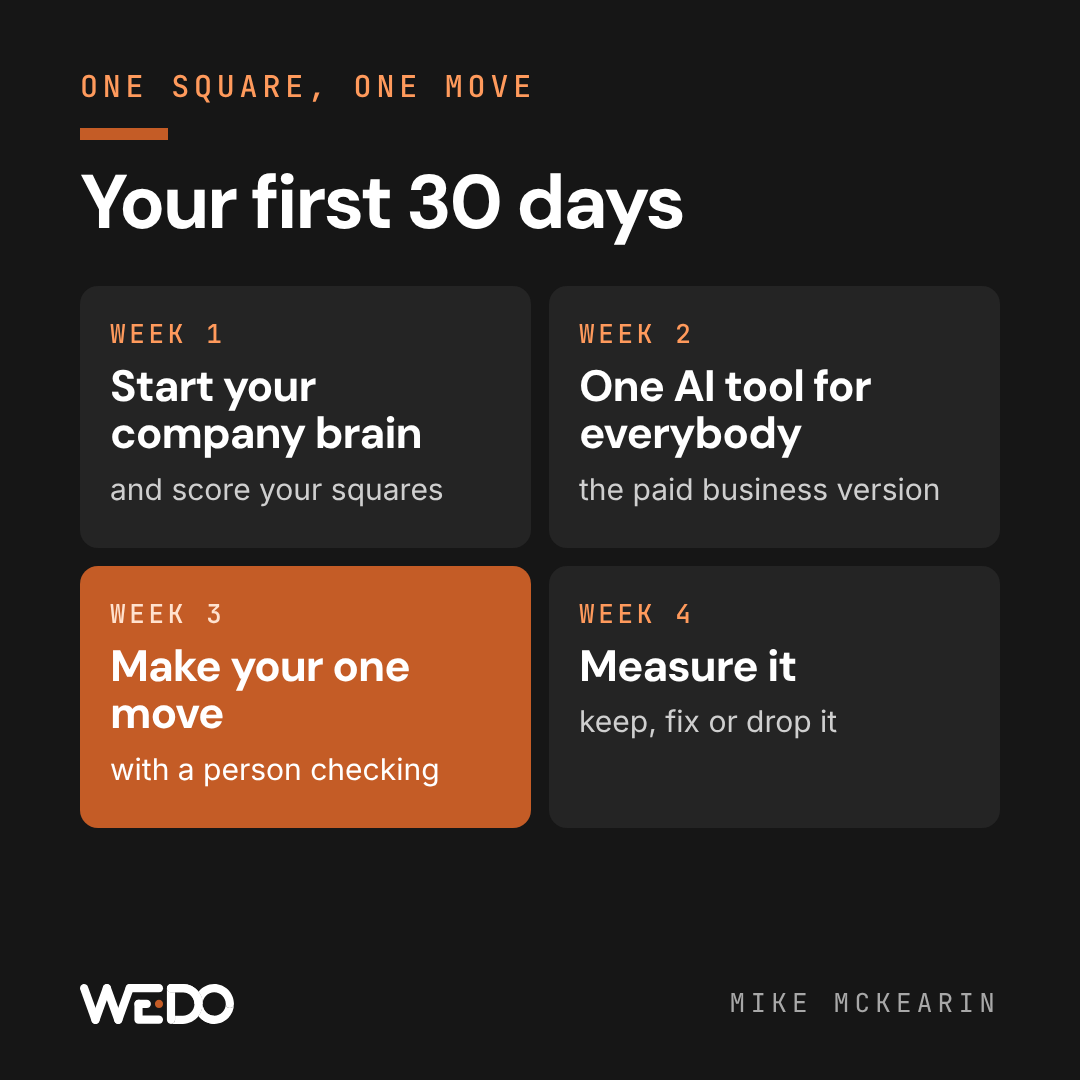
Here's my honest take: most owners don't need more AI tools. They need to pick one square, make one move, and see it through. So:
- Week 1: start your company brain, and take the five-minute score above.
- Week 2: get your team on one AI tool, the paid business version, so your information isn't used to train it.
- Week 3: make your one move in your lowest square, by hand, with a person checking the result.
- Week 4: measure it. Did it save time, find money or clear something up? Keep it, fix it or drop it, then pick the next move.
One square, one move, one month. That beats a dozen half-started experiments every time.
09 / if-you-want-a-hand
If you want a hand
Everything in this post works on your own. If you'd rather not go it alone, this is what we do at WE•DO. Our AI Enablement program trains your leaders and your team on their real work across all four squares, and every session ends with the team listing what they'd hand to AI tomorrow. From that, you get a ranked map of where AI will pay off most in your business. It starts with a free 30-minute call.
Either way, pick your square this week. I'd love to hear which one it is, so drop me a line and tell me.