SEO ROI is the value your organic work creates compared with what you spend on it. For a service business, that value cannot be read from traffic or rankings alone. Use Google Search Console to measure demand and visibility, GA4 to measure behavior and key events, and your CRM or finance system to validate qualified pipeline and closed revenue.
A practical formula is:
SEO ROI = (attributed gross profit − SEO cost) ÷ SEO cost × 100
The word attributed matters. GA4 can show how people arrived, what they did, and which key events they triggered. It does not magically prove that a blog post caused a complex sale months later. Your measurement system needs to show what is directly observed, what is assisted, and what is modeled.
01 / start-with-the-business-question-not-the-dashboa
Start with the business question, not the dashboard
Most SEO reporting starts in the wrong place. Someone opens GA4, exports organic sessions, and asks whether the number is “good.” That is not a business question. It is a number looking for a job.
Start with the decision you need the data to support:
- Should we keep investing in SEO content?
- Which pages should we improve first?
- Which topics attract qualified buyers rather than casual readers?
- Are organic leads becoming opportunities?
- Is a content refresh more valuable than a new article?
- Can we connect organic demand to closed revenue?
Each question needs a different layer of evidence.
| Measurement layer | What to use | What it can tell you |
|---|---|---|
| Visibility | Google Search Console | Whether pages and queries are earning impressions, clicks, and rankings |
| Engagement | GA4 | Whether visitors engage with landing pages and move through the site |
| Lead intent | GA4 key events | Whether visitors submit forms, book calls, or take another defined action |
| Lead quality | CRM | Whether leads become qualified opportunities |
| Revenue | CRM and finance data | Whether opportunities close and what gross profit they create |
| Investment | Internal cost records | What the SEO program actually costs, including labor, tools, and production |
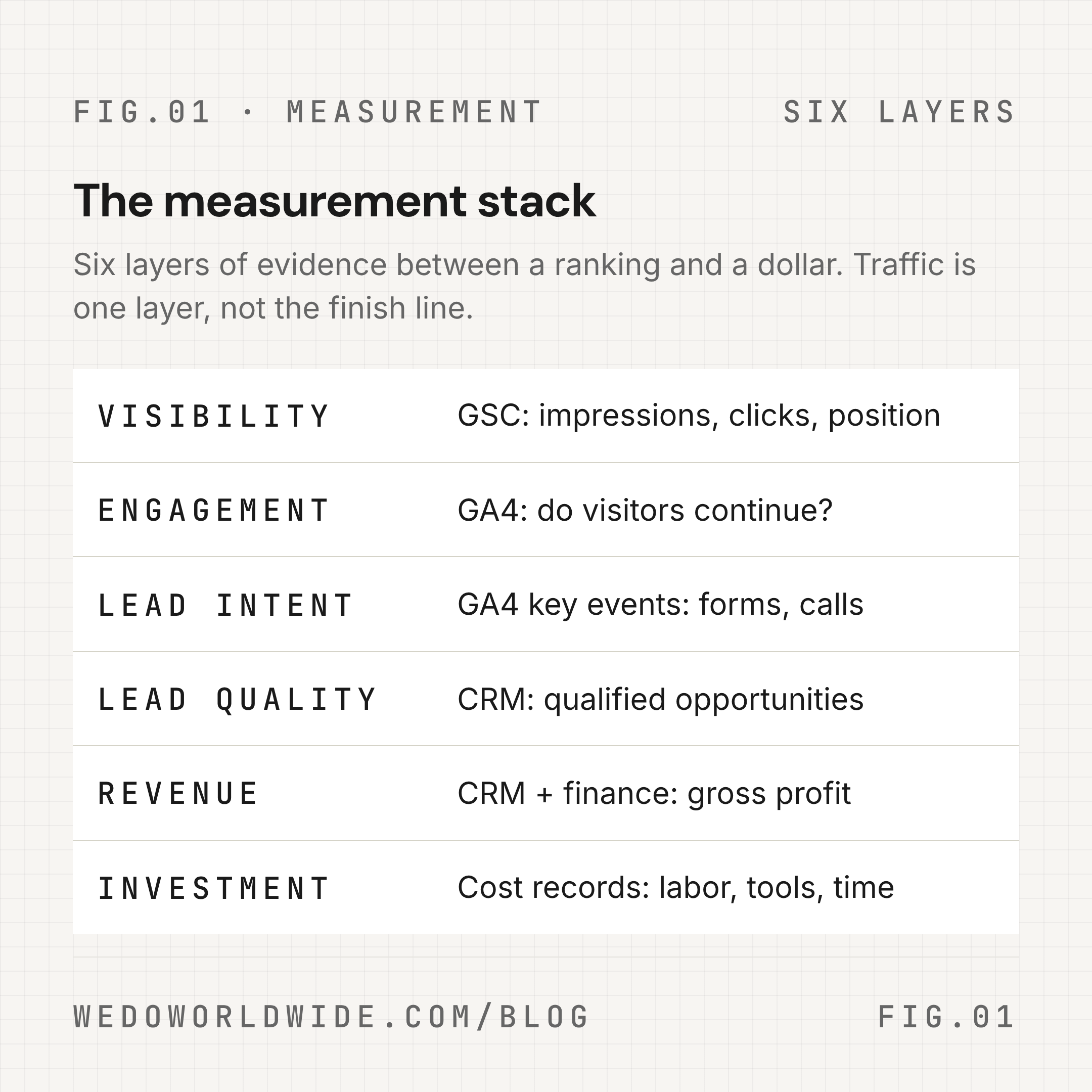
Traffic is useful. It is just not the finish line.
02 / define-seo-roi-for-the-way-your-business-sells
Define SEO ROI for the way your business sells
An ecommerce company can often connect an organic session to a transaction in the same analytics property. A service business usually cannot. The buyer may read three articles, return through a branded search, book a call, speak with sales, and sign a contract weeks later.
That means a service business needs two views:
- Observed channel performance: What GA4 and Search Console directly record.
- Business contribution: What the CRM and finance system confirm or model.
If you only know that organic search generated 20 form submissions, call the result organic lead volume. If you know that six of those leads became qualified opportunities, report organic-sourced qualified pipeline. If three closed and produced $24,000 in gross profit, you can use that number in an ROI model, provided you explain the attribution rule.
Do not call a form submission revenue. Do not call a ranking return. Do not call a modeled estimate a proven causal result.
For a lead-generation business, a simple modeled value can be:
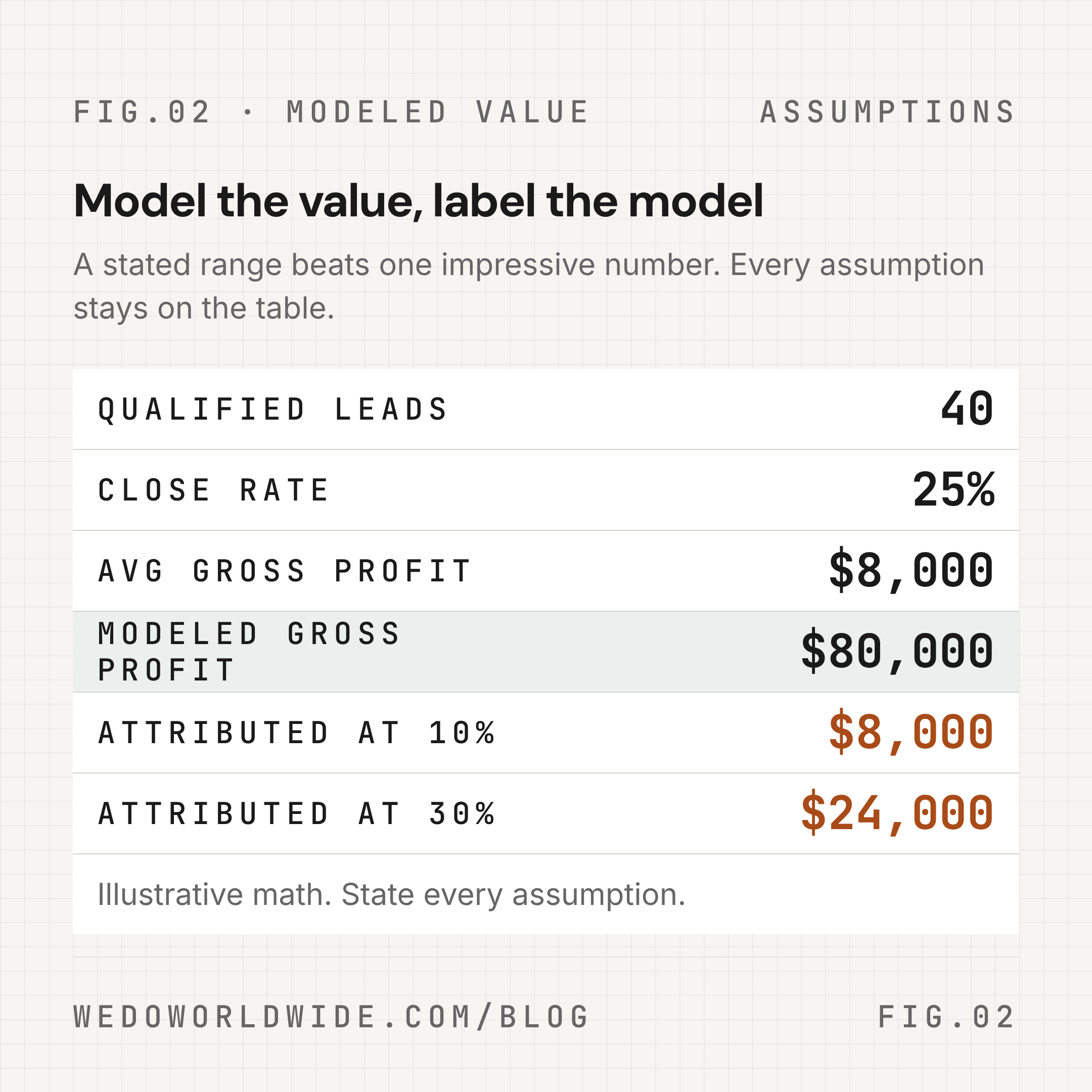
Modeled organic value = qualified organic leads × close rate × average gross profit per customer
If the model uses assumptions, show them. For example, 40 organic leads × a 25% close rate × $8,000 average gross profit produces $80,000 of modeled gross profit. That does not mean SEO caused all $80,000. If your team assigns only 10% to 30% of that value to the content or organic touchpoints being evaluated, the modeled contribution is $8,000 to $24,000. The range is more honest than a single impressive number.
03 / instrument-ga4-for-content-and-lead-quality
Instrument GA4 for content and lead quality
GA4 is event-based. A page view tells you that a page loaded. A key event tells you that a defined business action happened. The measurement work is deciding which actions deserve to be tracked and what context each event needs.
Google recommends events such as generate_lead, qualify_lead, and close_convert_lead for lead-generation journeys. These are event names, not a guarantee that your property is already tracking them. Check your implementation before using them in a report.
A practical service-business event map looks like this:
| Business step | Example event | Useful context |
|---|---|---|
| Form begins | form_start | Form name, page path, content group |
| Form is submitted | generate_lead | Form type, service interest, landing page |
| Lead is reviewed | qualify_lead | Lead status, service line, CRM ID if your setup supports it |
| Opportunity closes | close_convert_lead | Deal value, service line, customer type |
| Content is engaged with | scroll, select_content, or custom event | Article, section, author, topic cluster |
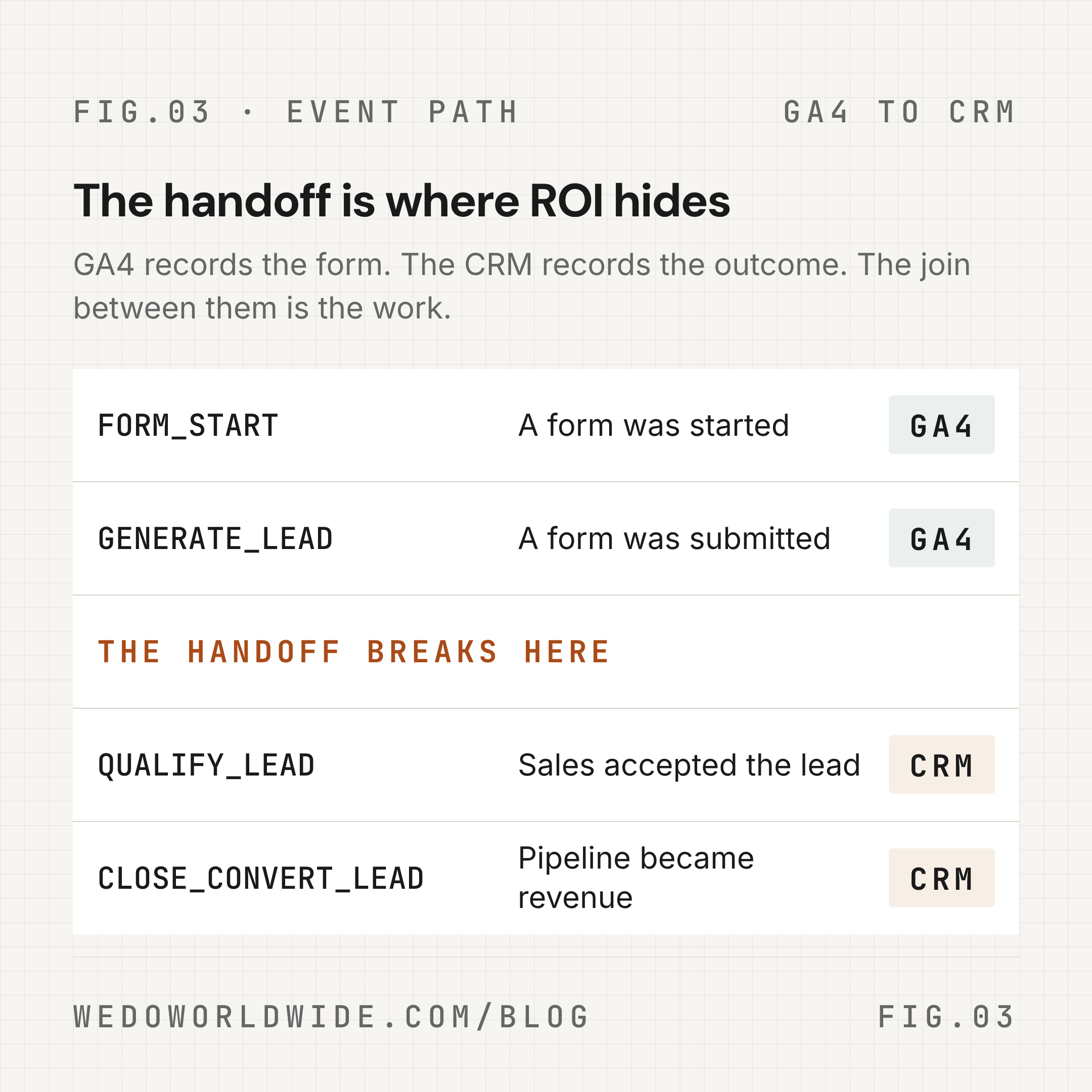
The names are less important than the handoff. A generate_lead event that never connects to a CRM stage tells you that a form was submitted. It does not tell you whether sales accepted the lead.
You can add context with event parameters. For example:
gtag('event', 'generate_lead', {
  method: 'contact_form',
  lead_type: 'strategy_call',
  content_group: 'seo'
});
lead_type and content_group are example custom parameters. Sending a parameter is only the first step. Register custom parameters as dimensions or metrics in GA4 before expecting them to appear in standard reports and explorations. Verify the event in Realtime and DebugView before using it for decisions.
For service businesses, start with a small event set:
- one event for a submitted lead;
- one event for the most valuable conversion type, such as a strategy call;
- one or two parameters that explain the request;
- one CRM field that carries the lead into qualification and close stages.
More events do not automatically create better measurement. Unused events create more noise.
04 / use-search-console-to-measure-demand-capture
Use Search Console to measure demand capture
Google Search Console answers a different question from GA4: How is Google showing the page before the visitor arrives?
Track these fields by query and page:
- impressions;
- clicks;
- click-through rate;
- average position;
- query intent;
- landing page;
- date range.
The most useful pattern is not always a high-volume keyword. A page with strong impressions, a position near the top of page two, and almost no clicks may be a better next action than a page with low impressions and no clear demand.
Use the patterns to choose the work:
- High impressions + low CTR: rewrite the title and description, then monitor the result.
- Position 8–20 + relevant query: improve the answer, add internal links, and strengthen the page’s commercial path.
- Many impressions + weak engagement in GA4: check intent match, opening clarity, and page experience.
- Good organic engagement + no key events: inspect the CTA, form, tracking, and offer alignment.
- Strong page + many related queries: consider expanding the cluster or linking the page into a service hub.
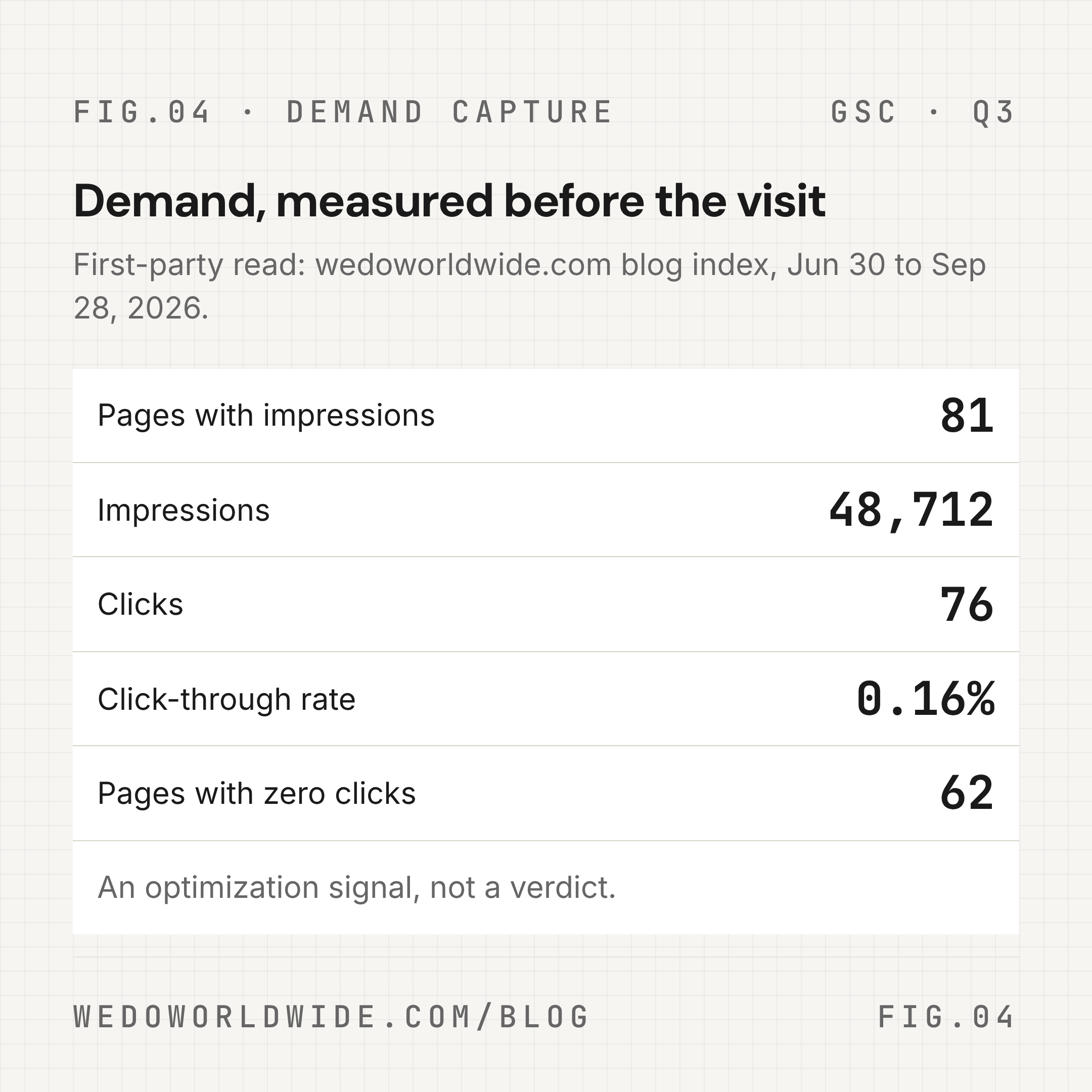
Search Console clicks are not revenue. They are evidence that the page earned a visit opportunity.
For context, WE•DO’s current GSC index summary shows that most blog pages with impressions have no clicks. That is an optimization signal, not a reason to publish more content automatically. The right response may be a better title, a tighter angle, stronger internal linking, or a measurement fix.
05 / connect-ga4-gsc-crm-and-cost-data
Connect GA4, GSC, CRM, and cost data
A credible SEO ROI report needs a join between systems. The join does not have to be perfect on day one, but the gaps must be visible.
A useful monthly table includes:
| Field | Source | Decision it supports |
|---|---|---|
| Organic impressions | GSC | Is demand growing? |
| Organic clicks | GSC | Is visibility turning into visits? |
| Landing-page sessions | GA4 | Which pages receive the traffic? |
| Engagement rate | GA4 | Is the visit relevant enough to continue? |
| Key events | GA4 | Did a defined action occur? |
| Qualified leads | CRM | Did sales accept the opportunity? |
| Closed-won deals | CRM | Did the pipeline become revenue? |
| Gross profit | Finance or CRM | What value should ROI use? |
| SEO cost | Internal records | What did the work require? |
| Next action | Team decision | What changes this month? |
Add a content identifier where you can. A stable URL, content group, topic cluster, or campaign label is more useful than asking an analyst to infer the page from a screenshot.
WE•DO’s live Growth Dashboard offer is built around this kind of operating view: organic traffic, landing pages, conversion events, Search Console signals, top queries, and a monthly summary. Whether you use that product, a spreadsheet, or a warehouse, the principle is the same: report the metrics together so someone can make a decision.
06 / choose-an-attribution-view-without-overclaiming
Choose an attribution view without overclaiming
GA4 includes session-scoped traffic dimensions and event-scoped attribution views. They answer different questions.
- Session source/medium: How did this session begin?
- First-user source/medium: How was this user first acquired?
- Event-scoped source/medium or channel: Which touchpoints received credit for a key event under the selected attribution model?
- Key event paths: What sequence of touchpoints appeared before the key event?
Google’s documentation notes that event-scoped reports change with the selected attribution model, while user- and session-scoped dimensions are not rewritten by that setting. That is why two reports can show different channel numbers and both be correct within their scope.
Use three views in your review:
- Last non-direct or session view for a straightforward acquisition read.
- Key event paths for assisted interactions and time to conversion.
- Data-driven or contribution modeling when the property has enough data and the team can explain the assumptions.
For long service sales, supplement GA4 with CRM stages. If a prospect first reads an SEO article, later returns directly, and then closes after a sales call, the direct session is not the whole story. It is also not proof that the article deserves 100% of the credit.
Use language such as:
- “Organic search was the first recorded source.”
- “The content appeared in the path before the key event.”
- “The model assigns a contribution estimate to this cluster.”
- “Closed revenue was confirmed in the CRM.”
Avoid “this article generated $X” unless the attribution method can support that level of certainty.
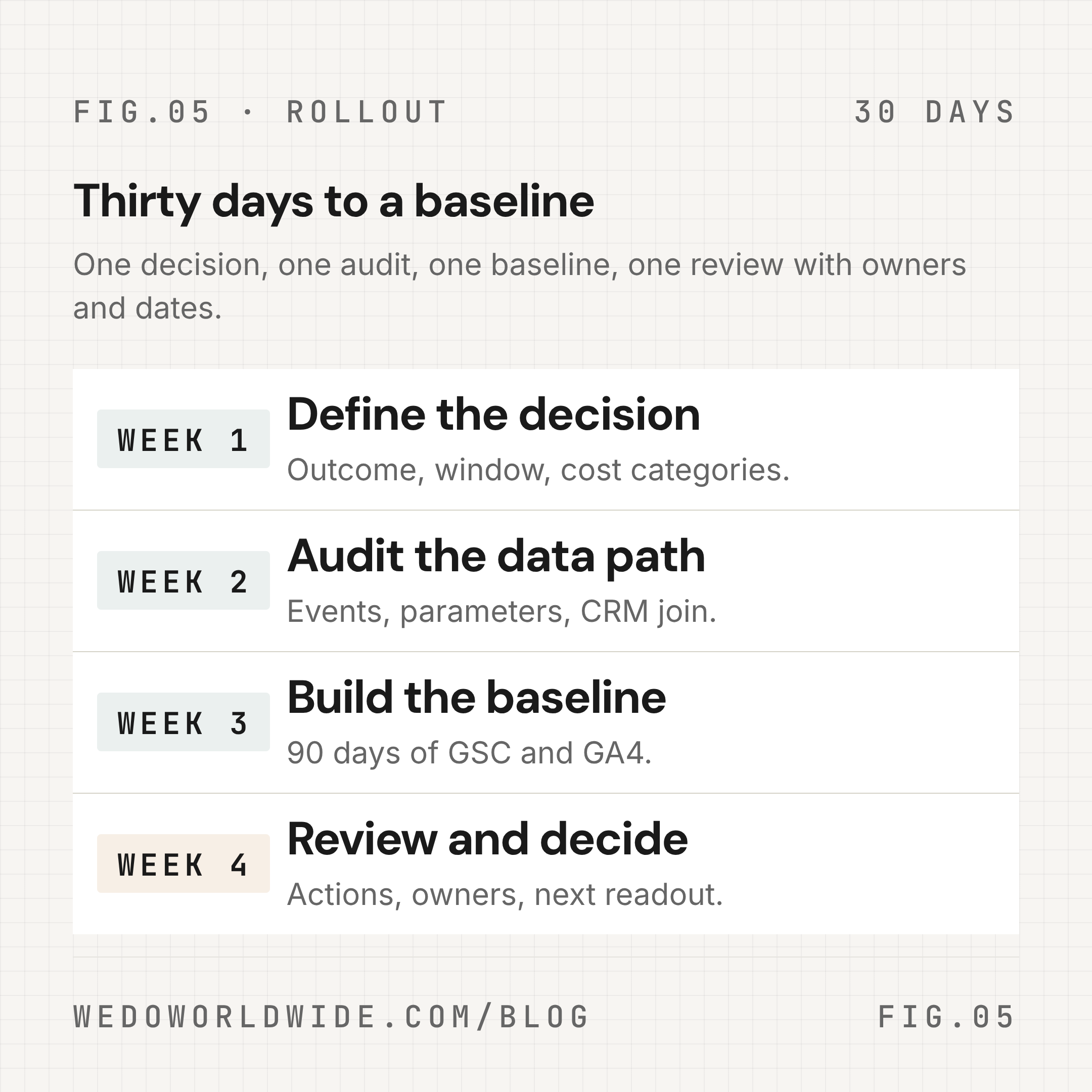
07 / a-30-day-seo-roi-measurement-plan
A 30-day SEO ROI measurement plan
Week 1: Define the decision
Choose one business outcome: qualified leads, sales opportunities, or gross profit. Define the time window, the SEO cost categories, and the pages or cluster you are evaluating.
Write down the assumptions before looking at the result. This keeps the team from changing the definition after seeing the number.
Week 2: Audit the data path
Confirm that:
- organic sessions are classified correctly;
- lead forms fire a key event;
- important event parameters are registered;
- thank-you or confirmation states are not double-counted;
- Search Console pages match the canonical URLs;
- CRM stages can be joined to a source, landing page, or campaign identifier.
Test the events in Realtime and DebugView. Compare a small sample with actual form submissions and CRM records.
Week 3: Build the baseline
Create a report with 90 days of GSC and GA4 data. Separate brand and non-brand queries where possible. Group pages by topic cluster or service line. Add qualified leads and closed revenue if the CRM data is ready.
Do not change five things at once. Pick one page group, one conversion path, or one measurement gap to improve.
Week 4: Review and decide
Bring the team together for one short review. Decide which pages to refresh, which topics to expand, which links to add, and which tracking gaps to fix next.
The deliverable is not a prettier dashboard. It is a prioritized list of actions with owners and a date for the next readout.
08 / five-mistakes-that-make-seo-roi-misleading
Five mistakes that make SEO ROI misleading
1. Counting rankings as returns
Rankings are a visibility signal. They become more useful when connected to clicks, relevant landing pages, key events, and pipeline.
2. Treating all organic sessions as equal
A branded visit, a research visit, and a service-specific visit may have different commercial value. Segment before comparing.
3. Calling modeled revenue “closed revenue”
A lead value estimate can help with planning. It is not the same as a closed-won amount in the CRM.
4. Ignoring the cost of the program
Include strategy, writing, editing, development, tools, content refreshes, and internal review time. If the cost is incomplete, the ROI is incomplete.
5. Publishing more when the real problem is measurement
WE•DO’s current first-party data includes measurable lead events, but the blog-path page report does not return a conversion value for the current period. Before publishing more, verify the event path, CRM handoff, and reporting scope. A missing join is a measurement problem, not a content verdict.
09 / the-next-step
The next step
If your reporting shows traffic but cannot answer which content creates qualified demand, start with the measurement path before adding more content. WE•DO’s CRO & Analytics Services can help clean up GA4, dashboards, and attribution. The SEO & Content Marketing Services team can connect that measurement to search intent, topic clusters, internal links, and content decisions.
The goal is not to make SEO look better. It is to make the next decision easier.