Once Claude saves you real time, the next question is whether your office manager, crew lead or partner should have it too. You can give everyone their own personal account, or you can get a Team plan. Here's how to decide.
Step 1: Know what the Team plan costs
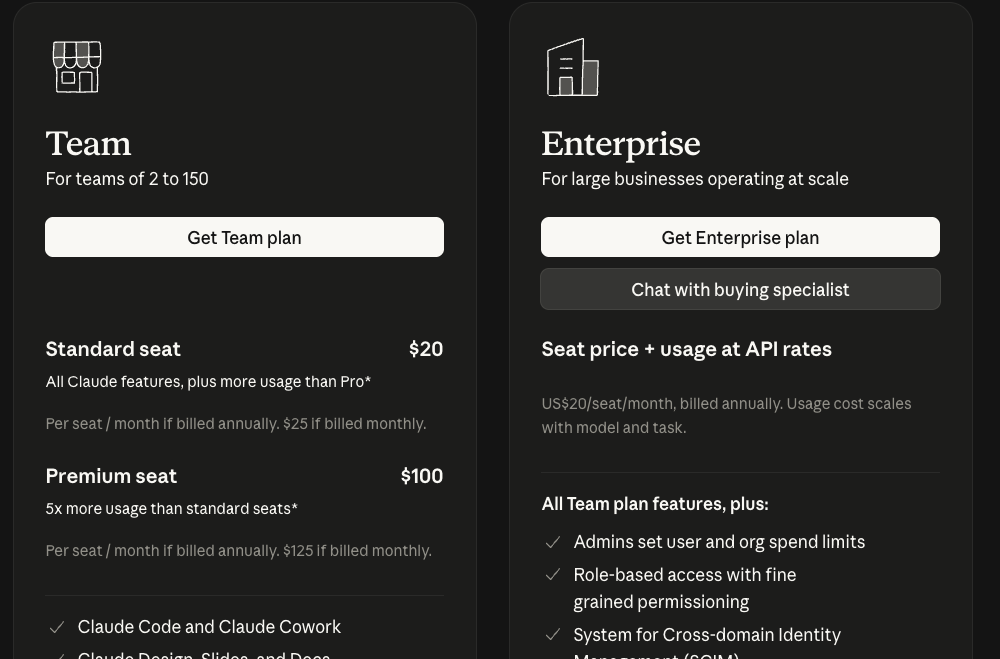
The Team plan is for 2 to 150 people. You pay per person (a "seat"):
- Standard seat: $20 a month per person if you pay for the year, or $25 month to month. More usage than Pro.
- Premium seat: $100 a month per person if you pay for the year, or $125 month to month. Five times the usage of a standard seat.
You can mix them, for example premium for the one person who uses it all day and standard for everyone else. Enterprise is for large businesses and is priced with a sales team.
Step 2: Know what you get over personal accounts
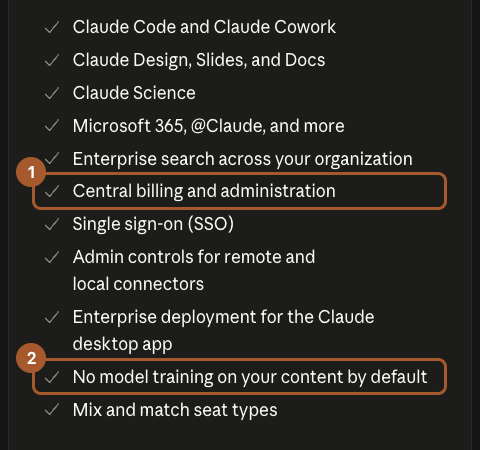
The two lines that matter most for a small business:
- Central billing and administration. One bill, and you add or remove people yourself when someone joins or leaves.
- No model training on your content by default. Your team's chats aren't used to train Claude. On personal accounts, that depends on each person's own setting (see the privacy guide).
You also get single sign-on (SSO) and admin controls over which apps people can connect.
Do you need it?
Stick with personal accounts if:
- It's just you, or you and one partner who each pay for your own.
- Nobody puts customer or company details into Claude.
Get the Team plan if:
- Two or more employees use Claude for company work.
- Anyone pastes in customer information, pricing or financials.
- You want one bill and the ability to shut off access when someone leaves.
A simple rollout that works
- Start with two or three people, not everyone. Pick the ones who'll actually use it.
- Write one page of rules first. What never goes in (the list from the privacy guide), and what should always be double-checked before it goes to a customer.
- Give each person one job to hand off in the first week, from the 12 jobs guide. A clear first win beats a long training session.
- Share what works. Once a week, have everyone share one prompt that saved them time.
- Check in after 30 days. Keep the seats that are used, and drop the ones that aren't.
Screenshots taken September 24, 2026. Claude changes its look now and then. If a button has moved, look for the same words nearby.