Every Claude plan has a limit on how much you can use it in a stretch of time. Hit it and Claude asks you to wait. It's annoying the first time, but it's easy to avoid once you know what uses it up.
How the limit works, in plain terms
- There's a session limit that resets every five hours, and a separate weekly limit.
- It isn't a fixed number of messages. Long chats, big files, and heavy features use more.
- Everything counts toward the same limit: the website, the desktop app, the phone app.
- Paid plans get more. Pro gets more than Free, and Max gets more than Pro.
Step 1: Check how much you've used
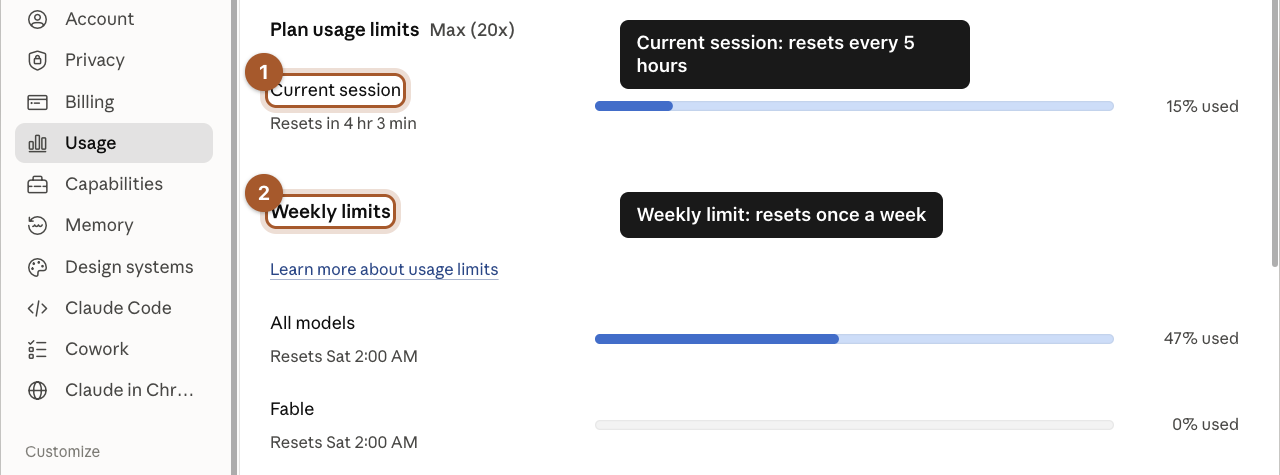
Click your name in the bottom left, then Settings, then Usage. You'll see how much of the current five-hour session and the week you've used, and when each one resets.
Step 2: Pick a lighter model for everyday jobs
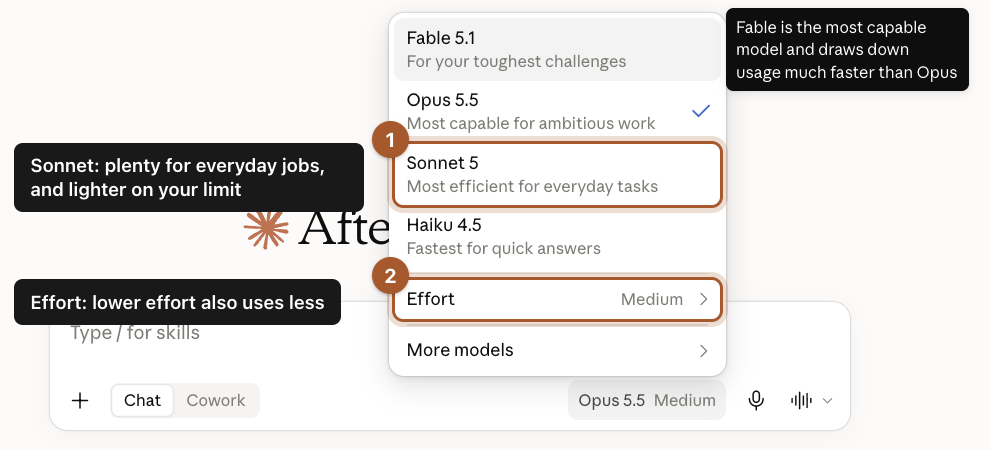
Click the model name in the message box (it says something like "Opus 5.5"). A menu shows the models from most powerful to fastest, plus an Effort setting.
- The most capable models and higher effort use more of your limit.
- Sonnet is described as "most efficient for everyday tasks". It's plenty for emails, summaries and most owner jobs.
- Haiku is the fastest, for quick questions.
Six habits that make your plan last
- Start a new chat when the topic changes. A long conversation gets heavier with every message, because Claude rereads the whole thing each time.
- Ask for everything at once. "Write the email, a shorter version, and a subject line" is one message instead of three.
- Be specific the first time. A clear request (the how to ask guide) means fewer rounds of fixing.
- Put files you reuse in a Project. Anthropic says files kept in a Project count less against your limit when they're used again.
- Only turn on Research when you need it. Research and web search do a lot of work behind the scenes.
- Upload only the part you need. If the question is about one page of a 60-page contract, copy that page instead of attaching the whole file.
Screenshots taken September 24, 2026. Claude changes its look now and then. If a button has moved, look for the same words nearby.