A week-by-week AI implementation plan for a 5 to 50 person business. Thirteen weeks, one job per week, and a running workflow at the end instead of a roadmap deck.
Part of our guide to AI enablement for small business.
Every AI plan online has the same shape. Eight steps. Five phases.
Define your goals. Assess your data. Choose your tech. Build a cross-functional team.
IBM and Microsoft both rank on page one for that. Neither is wrong. Both are useless on a Monday morning.
None of those frameworks tell you what to do in week three. They don't say who owns it or what each week produces. They don't tell you by Friday if you're ahead or behind.
Owners don't stall for lack of a five-phase diagram. They stall because week one arrives and nobody has an hour blocked. The plan quietly becomes a document.
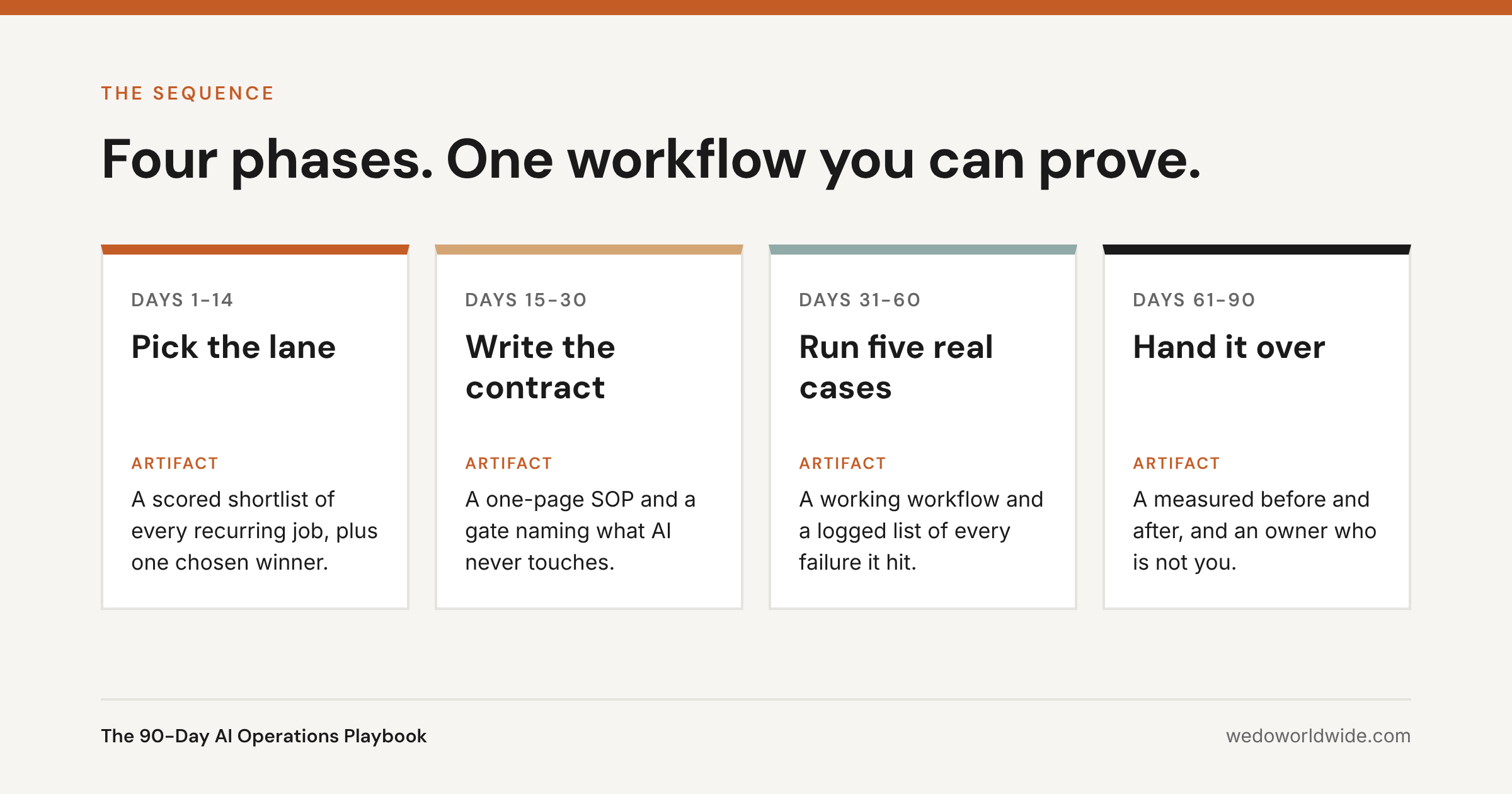
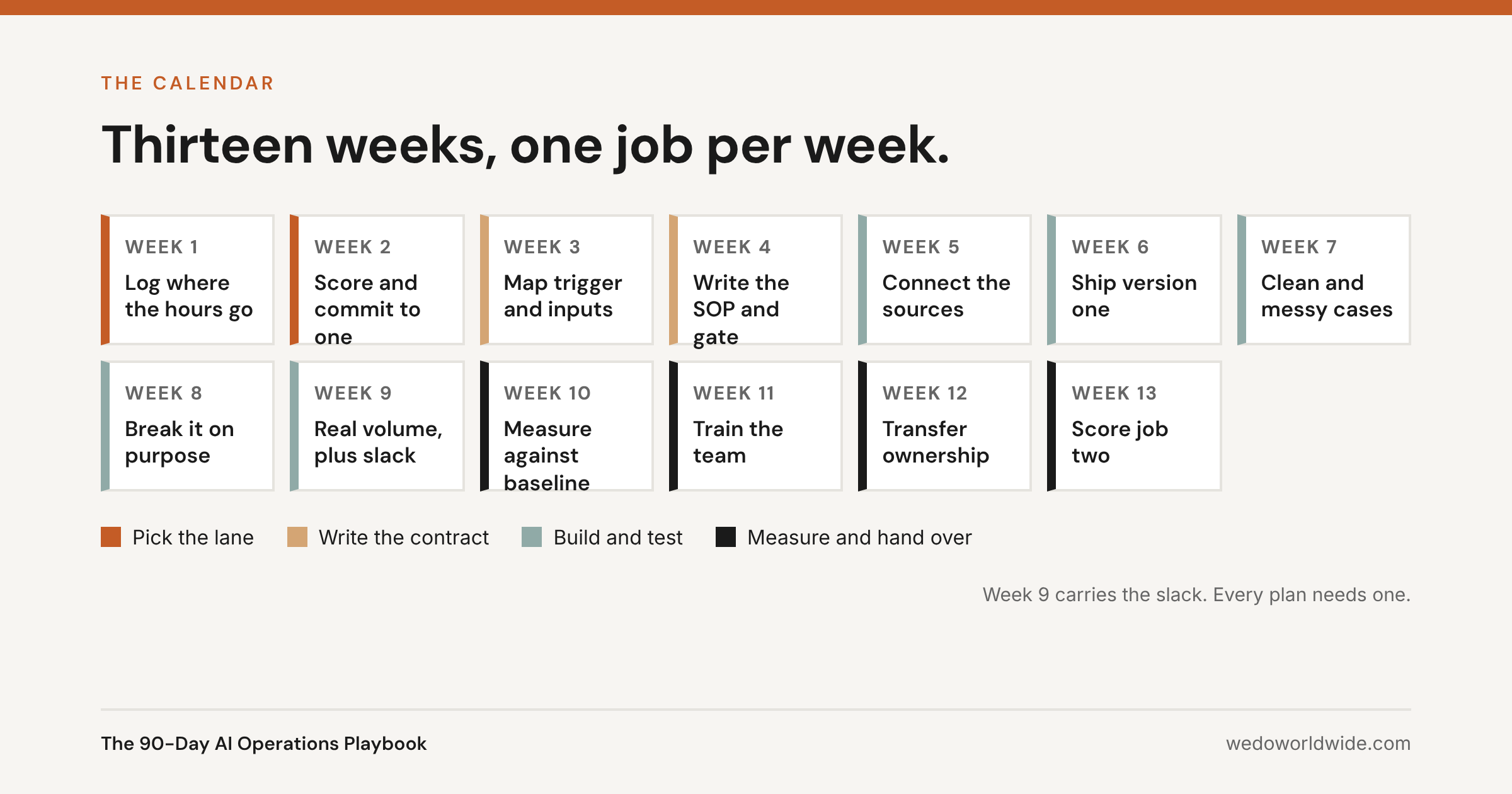
So this is the calendar version. Thirteen weeks, one job per week. Each week names the owner, the artifact, and the pass condition.
We run this on ourselves. More than 40 agents work inside WE•DO's own operation right now. They run across GA4, Search Console, Google Ads, Shopify, WordPress, and ClickUp. Every one arrived through this sequence. The costs and returns are published in what running 40+ agents costs and saves.
By the end, you'll know:
- The five things you should hold on day 90.
- What to do each week, and who owns it.
- How to test a workflow on messy, real cases.
- What the 90 days cost in dollars and hours.
- The five ways this plan goes wrong.
It's an 11-minute read. Read it once end to end, then work it a week at a time. Only want the budget? Skip to "What do the 90 days cost?"
01 / what-do-the-90-days-produce
What do the 90 days produce?
Five things you keep. Judge the plan on those, not on what you learn.
- A scored shortlist of every recurring job, ranked by hours times frequency. Jobs AI shouldn't touch are marked, with a reason.
- One live workflow inside tools you already pay for. Output lands in your system of record (the tool where the work officially lives), not a chat window.
- A one-page SOP (standard operating procedure) for that workflow: trigger, inputs, output, owner, review rule, and what to do when it fails.
- A measured before and after on one number you chose in week two. Measured the same way both times.
- A named owner who isn't you, plus the next two jobs scored and queued.
Notice what's missing. No AI strategy deck. No tool evaluation matrix. No maturity score.
Those come from consulting engagements. They're why enterprise AI programs run 12 to 18 months and six figures. You're not running that program. You're handing off one job and proving it stuck.
02 / what-has-to-be-true-before-day-one
What has to be true before day one?
Three things. Each one quietly kills the plan if it's missing.
- Someone owns it by name. Not a committee. Not "the team." One person with 3 to 4 hours a week blocked for 13 weeks. Can't free that up? You have a capacity problem, and this plan won't fix it.
- The work already lives in shared systems. Records on paper or in personal drives? Spend two to four weeks organizing first. It's the highest return work you have, so don't call it a delay.
- You'll measure one number. Pick it in week two. Take the baseline before you build anything. Take it again the same way in week 10. Skip this and all you get is opinions.
If the plan doesn't survive one person taking a vacation, it isn't a system yet. It's a hobby.
03 / days-1-to-14-pick-the-lane
Days 1 to 14: Pick the lane
Two weeks on choosing sounds slow. It's the most valuable time in the plan.
Almost every failed rollout we've looked at failed here, on scope. Then it spent the next 11 weeks paying for it. The full set of failure patterns is in why most AI agent pilots fail.
Week 1: log where the hours go
Don't brainstorm the list. Log it.
For five working days, everyone writes down the recurring jobs they touch. Note how long each took and what triggered it. A shared sheet with four columns is enough: job, trigger, minutes, output.
The list won't match your guess. It never does.
The jobs that hurt are rarely glamorous. They're assembly work: pulling numbers into a report, retyping a call into tasks, chasing the same three approvals, formatting the same deliverable. Our guide to what to automate first covers where those hours usually hide.
Week 2: score the candidates and commit to one
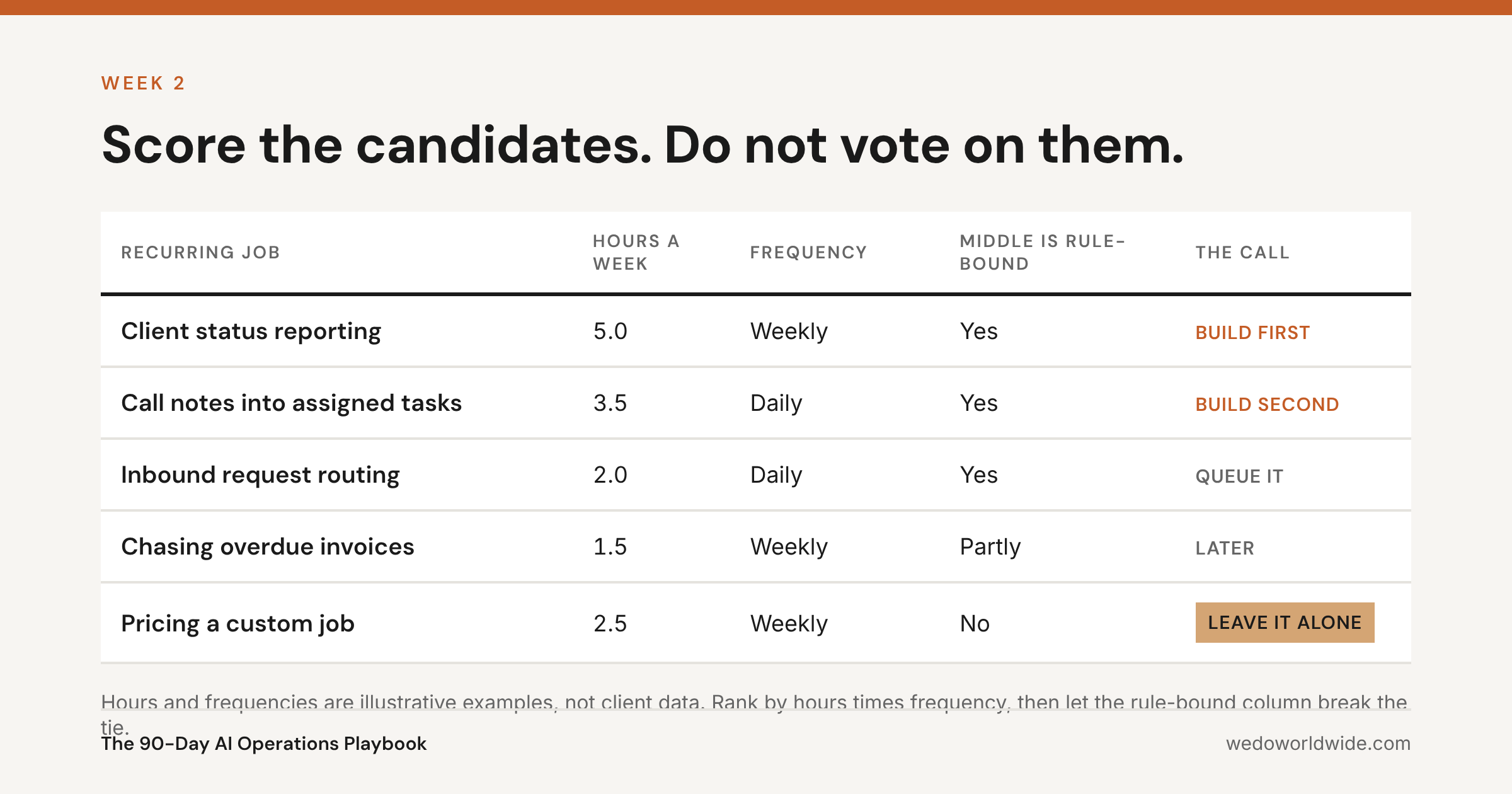
Rank by hours times frequency. Then apply the filter that matters more than the math: does the middle of the job follow rules?
Judgment at the edges is fine. That's what the human keeps. Judgment all the way through means leave it alone.
Good candidates share three traits:
- They fire on a predictable trigger.
- The middle is mechanical.
- The output has an obvious home.
Commit to exactly one. Write the number you'll move next to it.
04 / days-15-to-30-write-the-contract
Days 15 to 30: Write the contract
Weeks three and four produce paper, not software. That feels like stalling.
It's the difference between a workflow your team trusts and one they quietly drop in month two.
Week 3: map the trigger, the inputs, and the landing spot
Write down three things. What starts the work. What it needs before it can run. Where the finished output has to land.
Be specific enough that a new hire could follow it. "Pull the analytics" is not an input. "Sessions, conversions, and top landing pages from GA4 for the trailing 30 days, compared to the prior 30" is an input.
Then write down what the workflow should ignore. Most performance problems are context problems. The fastest way to get inconsistent output is to hand it every document you own.
Week 4: write the SOP and the one-page gate
The SOP is one page. It covers purpose, owner, trigger, input checklist, output example, review rule, and the escalation path when it goes wrong. Can't fit it on a page? The scope is still too big.
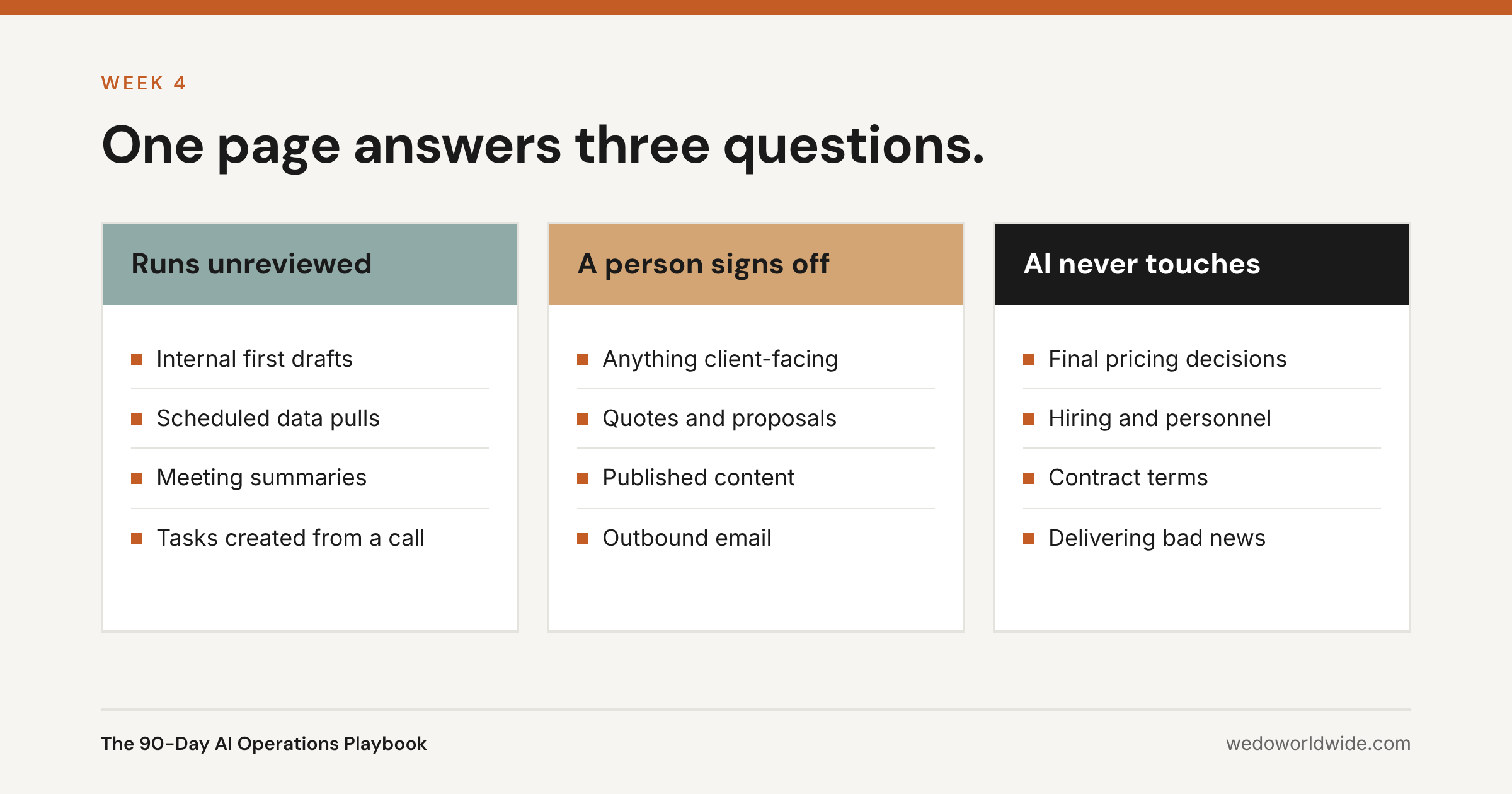
The gate is the other half. It's the part teams skip.
It answers three questions and nothing else:
- What can run without review?
- What needs a person to sign off before it leaves the building?
- What does AI never touch?
Write it before the build. Writing it after the first bad output reaches a client is a much more expensive way to learn the same lesson.
05 / days-31-to-60-build-it-and-run-five-real-cases
Days 31 to 60: Build it and run five real cases
Thirty days on one workflow is generous on purpose. You're not building until it runs. You're building until it runs reliably. That's a different finish line.
Weeks 5 and 6: connect the sources, ship version one
Build inside the systems the work already lives in. If a person still moves the output by hand, you automated the easy half. You kept the annoying half.
Then run case one against real work, with the owner watching.
This is also the week you pick the platform. Our tool guide by category is built to be read at this point, not before.
Weeks 7 through 9: five real cases, including the ugly ones
Idealized test cases teach you nothing. Run five that look like your real week:
- One clean case, where everything is where it should be.
- One messy case, with a bad transcript or an incomplete brief.
- One case with a source missing entirely.
- One case where the right answer is to stop and escalate.
- One case at real volume, on the day the work normally lands.
Log every failure in one place, with the input that caused it. Fix the instructions and the source connections before you touch the model.
In our experience, the model is almost never the problem.
Week 8 is for deliberately breaking it. That week is why the workflow survives month four.
06 / days-61-to-90-measure-train-and-hand-it-over
Days 61 to 90: Measure, train, and hand it over
The last month makes the workflow independent of the person who built it. Skip this and you haven't removed a bottleneck. You've moved it.
Week 10: measure against the old way
Take the number you baselined in week two, measured the same way. Hours returned per week. Missed steps eliminated. Time from trigger to finished output.
Volume of AI output isn't a result. Don't report it.
Weeks 11 and 12: train on the workflow, then transfer ownership
A tool demo doesn't create adoption. Budget 2 to 4 hours per person up front. Then 30 minutes a week of guided practice for the first month.
Your team needs to know four things:
- When to reach for it.
- What to feed it.
- How to spot a confident wrong answer.
- Where to report a failure.
Then hand it over in writing. Name the owner. Set the review cadence. Put the SOP where the work happens, not in someone's inbox.
Week 13: score job two
Go back to the week one log. Re-score it with what you now know. Pick the next job.
This is where compounding starts. Job two takes a fraction of the time. The hard parts (the gate, the source access, the review habit) are already built.
07 / what-do-the-90-days-cost
What do the 90 days cost?
A lot less than enterprise. Enterprise AI enablement runs $200,000 or more across 12 to 18 months. A 20 person company doesn't need that, and the real budget looks nothing like it.
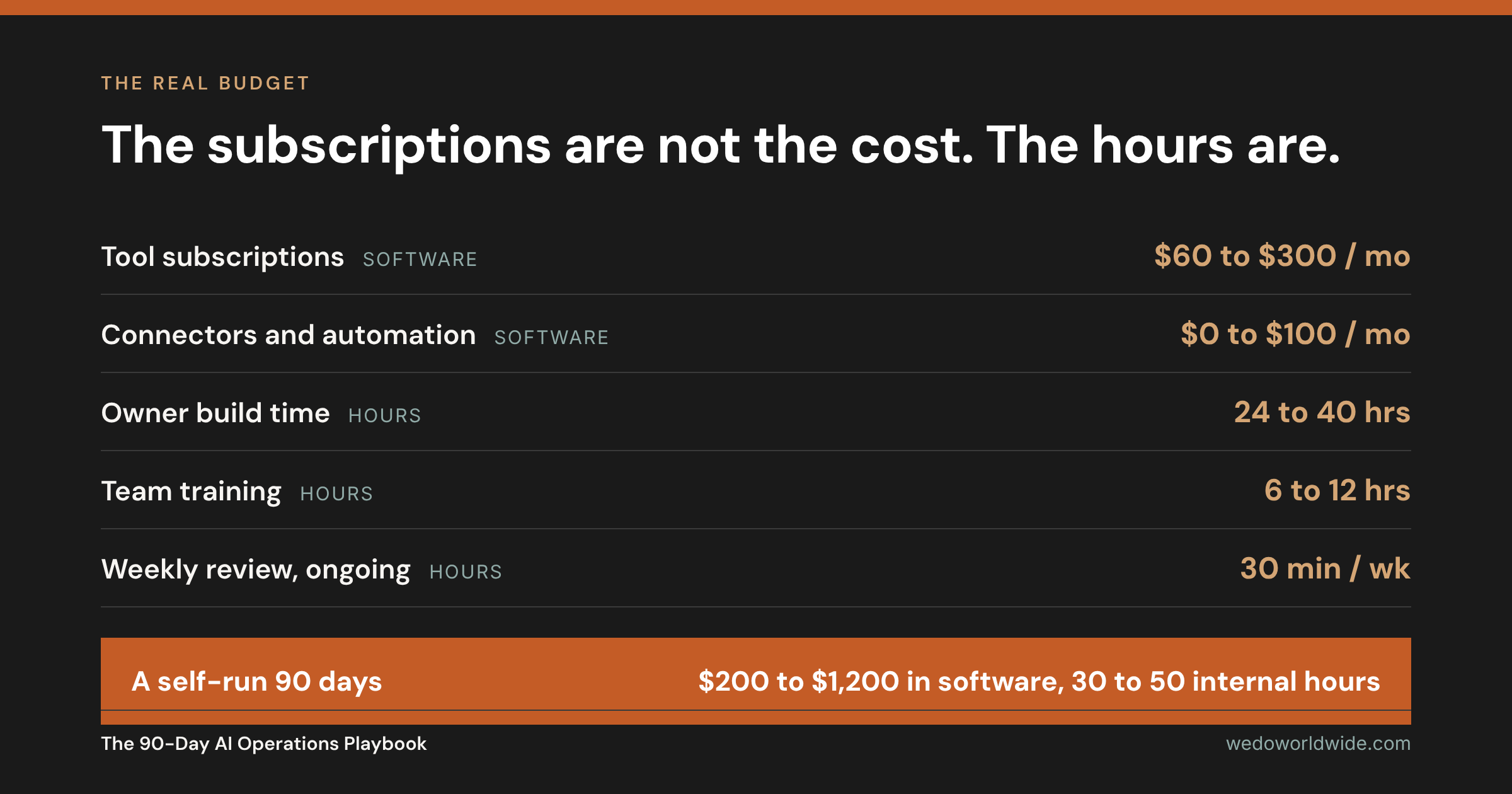
Add it up. A self-run 90 days lands between $200 and $1,200 in software. Add roughly 30 to 50 hours of internal time.
The hours are the expensive half. They're also the half most plans never book.
Rather not spend those hours? We install this same sequence for clients as the 90-Day AI Operations Buildout. It starts at $5,000 a month for a three month engagement. Want only the scored shortlist first? That's a $997 workflow audit.
08 / how-do-the-90-days-go-wrong
How do the 90 days go wrong?
Five ways. Each one is avoidable.
- Starting with a tool. The tool is a setting. Start with the job that eats your week, and pick the tool in week five.
- Scoping a department instead of a job. "Run our marketing" is a wish. "Turn every client call into assigned tasks within an hour" is a workflow.
- Skipping the gate because you're small. You're not too small for one page of rules. You're exactly the size where one bad client-facing output costs real money.
- Testing on clean inputs. A workflow that only works on a perfect transcript doesn't work.
- Never transferring ownership. If the builder is still the only operator on day 91, you built a dependency.
09 / find-your-week-one-job-in-30-minutes
Find your week one job in 30 minutes
Bring your week one log. We'll score it with you on a fit call. Want the whole sequence installed instead? That's the 90-Day AI Operations Buildout.
Book a 30-minute fit call or see how we build AI into an operation.